Core: Alias use on Outbound NAT - not possible, nat not working
Alias use on Outbound NAT seems currently broken:
Forum Report of osn1803 https://forum.opnsense.org/index.php?topic=12006.0
mine:
https://forum.opnsense.org/index.php?topic=12002.0
When we used NAT with an "Alias - predifined network" it would not be translated as expected. But if we changed the NAT to an explicit NET/CIDR it worked instantly.
Should i add / duplicate the whole forum entry? (pictures etc.. )
 katamadone
All 24 comments
please use the issue template, which should walk you through the things needed to evaluate if it's a bug and how to reproduce it on our end.
 AdSchellevis
on 12 Mar 2019
AdSchellevis
on 12 Mar 2019
Describe the bug
We'd like to NAT an address. NAT should be applied from a subnet attached to opnsense to second subnet attached to opensense and should use the interface address of the second for nat.
IF machine X from subnet/interface c100 would like to access Machine X in subnet/interface c101 it should be translated with the address of the opnsense interface address of c100.
Hopefully I didn't mix up anything - otherwise I have to document it further tomorrow with more precise IPs.
Were having it on 19.1.1 (looks like someone - described above - has the same problem)
To Reproduce
Steps to reproduce the behavior:
- Go to 'Firewall/NAT/Outbound'
- Click on 'add
- Enter the Outbound NAT Rule
- Interface source interface c100
- TCP/IP IPv4
- TCP/UDP
- Source any
- Source port any
- Destination address "predefined entry of c101"
- Destination port any
- Translation Target "opnsense address in c101"
- See the error (screenshot not working)
if you do the same on point 3 with
. Destination address "c101" cidr notation
--> its working
Expected behavior
A clear and concise description of what you expected to happen.
Screenshots
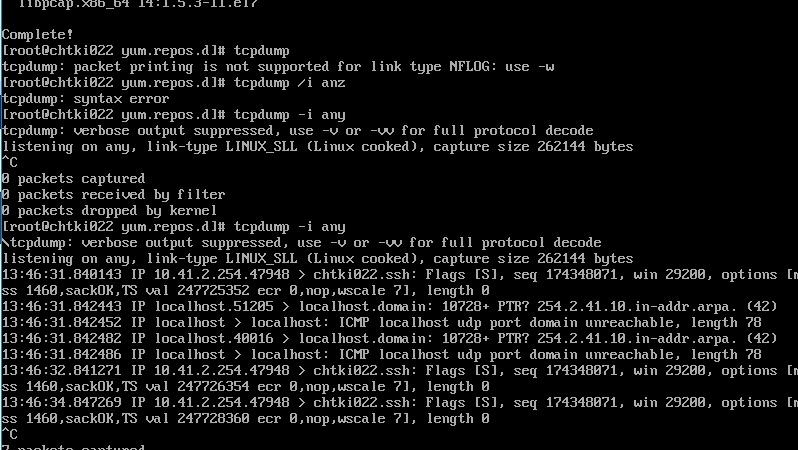
not working nat entry (tcpdump on destination system)

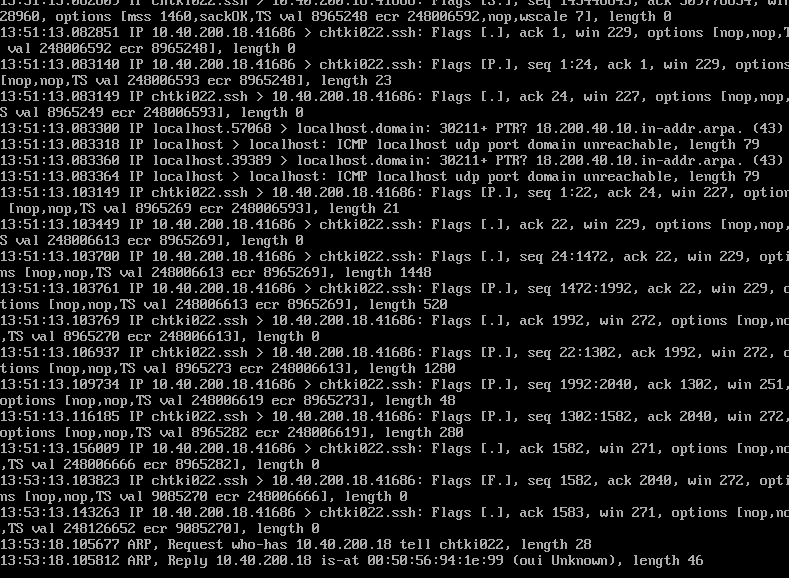
working nat entry

Relevant log files
not working - relevant timestamp timestamp 13:46:31.840143:
working - relevant timestamp 13:51:13:082851:
Environment
(2x) VMWARE Virtual Guest in HA
OPNsense 19.1.1-amd64
FreeBSD 11.2-Release-p8-HBSD
OpenSSL 1.0.2q
katamadone
on 12 Mar 2019
we're at 19.1.4 at the moment, can you try an upgrade first?
AdSchellevis
on 13 Mar 2019
tested with 19.1.4 - same problem
BUT be more precise
- Interface Settings (IP) of
t_tools_sgmgmt_int 10.40.200.18/28 - so if i choose Destination
t_tools_sgmgmt_int netit should be the same
--> doesn't work - for a test I just created an alias which has the exact
network 10.40.200.16/28
--> that works
-- same for entering directly the subnet... works
conclusion:
predefined alias / object of the interface doesn't work
katamadone
on 14 Mar 2019
what kind of interface config does t_tools_sgmgmt_int have? are you revering to "interface setting" as the current one or as in Static IPv4 configuration? Because if it was DHCP it would likely not work.
 fichtner
on 14 Mar 2019
fichtner
on 14 Mar 2019
t_tools_sgmgmt_int is a vlan interface with a static address
katamadone
on 14 Mar 2019
can you make sure the rule has a descriptive name and dump the rule generated for it?
grep '<<descriptive name>>' /tmp/rules.debug
working with alias
nat on vmx2_vlan704 inet proto {tcp udp} from any to $aliastest_net_sgmgmt_int -> 10.40.200.18 port 1024:65535 # INT: sgmgmt NOT routed
not working
#debug:Unable to convert address, see to for details
# nat on vmx2_vlan704 inet proto {tcp udp} from any to {"address":"opt28"} -> 10.40.200.18 port 1024:65535 # INT: sgmgmt NOT routed
nat on vmx2_vlan703 inet proto {tcp udp} from any to 10.40.200.0/28 -> 10.40.200.2 port 1024:65535 # PROD: sgmgmt NOT routed
didn't deliver you the grep itself, it's an excerpt of the rules.debug so you see the debug line above
katamadone
on 14 Mar 2019
ok, this is your defective rule then, right?
# nat on vmx2_vlan704 inet proto {tcp udp} from any to {"address":"opt28"} -> 10.40.200.18 port 1024:65535 # INT: sgmgmt NOT routed
it has address of opt28 selected as to address (not it's network), just to be sure. I'll try this at my end as well.
AdSchellevis
on 14 Mar 2019
yes.. I verified it right now again. Selected the t_tools_sgmgmt_int net not the t_tools_sgmgmt_int address
and rule entry is {"address":"opt28"}
katamadone
on 14 Mar 2019
ok, let me prepare a fix for this.
AdSchellevis
on 14 Mar 2019
thx in advance
katamadone
on 14 Mar 2019
@katamadone found it, you do have to save your settings again, the issue seems to be in the page https://github.com/opnsense/core/commit/64c4d89b9dd99b9041f0984bec39ed76ed9dc978
opnsense-patch 64c4d89
should to the trick
AdSchellevis
on 14 Mar 2019
doing that on the slave
opnsense-patch 64c4d89
Fetched 64c4d89 via https://github.com/opnsense/core
Hmm...  Looks like a unified diff to me...
The text leading up to this was:
--------------------------
|From 64c4d89b9dd99b9041f0984bec39ed76ed9dc978 Mon Sep 17 00:00:00 2001
|From: Ad Schellevis <[email protected]>
|Date: Thu, 14 Mar 2019 09:29:14 +0100
|Subject: [PATCH] firewall, source nat, typo in destination address, closes
| https://github.com/opnsense/core/issues/3321
|
|---
| src/www/firewall_nat_out_edit.php | 2 +-
| 1 file changed, 1 insertion(+), 1 deletion(-)
|
|diff --git a/src/www/firewall_nat_out_edit.php b/src/www/firewall_nat_out_edit.                                                          php
|index 754bc8961d..19a066337c 100644
|--- a/src/www/firewall_nat_out_edit.php
|+++ b/src/www/firewall_nat_out_edit.php
--------------------------
Patching file www/firewall_nat_out_edit.php using Plan A...
Hunk #1 succeeded at 286.
done
All patches have been applied successfully.  Have a nice day.
grep out
nat on vmx2_vlan704 inet proto {tcp udp} from any to (vmx2_vlan704:network) -> 10.40.200.18 port 1024:65535 # INT: sgmgmt NOT routed
looks correct & works
Thanks again.
katamadone
on 14 Mar 2019
thanks for confirming
AdSchellevis
on 14 Mar 2019
hm.. wait short.. have to confirm something had a glitch in the outbound nat overview that "Destination" was empty.
- Re-edited the rule, Destination address is there in rule edit mode, saved it
- same behaviour (empty field)

- applied patch again to remove, edit, save, Overview is correct
katamadone
on 14 Mar 2019
ok, so the overview has a similar issue too.
AdSchellevis
on 14 Mar 2019
yes.. see the more precise above "same" rules but the above one is working related to nat, but not displayed correctly
the one below is not working and not re-edited.
katamadone
on 14 Mar 2019
as described - in the rule edit all seems to be correct
katamadone
on 14 Mar 2019
same procedure, add https://github.com/opnsense/core/commit/ff4de67bb2d0206ab173af38875f7d0030ae4c94 to fix the presentation.
AdSchellevis
on 14 Mar 2019
opnsense-patch ff4de67
Rule correct, nat working but view displays interface not the combination of "name and net":

is there any chance to list which patches are installed?
katamadone
on 14 Mar 2019
This is not how opnsense-patch works. Please don't panic and read:
# man opnsense-revert
# man opnsense-patch
no panic here was only a bit confused by Patches can also be reversed by reapplying them and but multiple patches must be given in reverse order to succeed.
and because opnsense-patch -l delivers the patch stored in the cache regardless of the install state im not sure if the patches/patches are now applied and in the correct order...
katamadone
on 14 Mar 2019
finally confirm.. don't know what it was 7 hours ago.
verified it at home on pcengines (nat & display)
and retried the third time at the company on vmware - now good, too. (restarted the browser maybe did the trick).
Thx again for your effort.
katamadone
on 14 Mar 2019
Related issues
 Kimotu
·
4Comments
Kimotu
·
4Comments
 defiantmonkey
·
8Comments
defiantmonkey
·
8Comments
 nikaro
·
3Comments
nikaro
·
3Comments
 namezero111111
·
5Comments
namezero111111
·
5Comments
 Stephanowicz
·
6Comments
Stephanowicz
·
6Comments