Cordova-plugin-iosrtc: Build fail with cordova-plugin-fingerprint-aio plugin. The target "appName" contains source code developed with Swift 3.x. This version of Xcode does not support building or migrating Swift 3.x targets.
Description
The target "appName" contains source code developed with Swift 3.x. This version of Xcode does not support building or migrating Swift 3.x targets.
Use Xcode 10.1 to migrate the code to Swift 4.
Steps to reproduce
- ionic cordova platform add ios
- Open the project in Xcode
Expected results
Build should run fine
Actual results
build fails
 MishraAarambh
All 25 comments
LOL @MishraAarambh I can guaranty you that we are not using Swift 3 since 2 years now.
Also https://github.com/cordova-rtc/cordova-plugin-iosrtc/blob/master/.github/ISSUE_TEMPLATE.md
Note: If the checkboxes above are not checked (which you do after the issue is posted), the issue will be closed, removing this checkbox will result in automatic closed issue.
You did not keep checkbox and provide versions, therefor we dont have the required information, you most likely use a deprecated version of Xcode or an old iosrtc version, use 6.0.20 and update you mac to latest xcode 12.4 (12D4e).
ONLY if you provide proper versions and test 6.0.20 and use Xcode 12.4 (12D4e) and confirm the issue, I will reopen.
We have continuous integration, meaning each commit is tested, i can can tell you this issue is not occuring with proper updated xcode and iosrtc versions.
 hthetiot
on 22 Mar 2021
hthetiot
on 22 Mar 2021
This may come from another plugins if you actually use iosrtc 6.0.20 and Xcode 12.4 (12D4e).
But since you deciced to skip checkbox and versions used, i cannot help you more than that.
hthetiot
on 22 Mar 2021
Build fails with recent changes in plugin.
NO we did not change swift related stuff in anyway especially swift version since 2 years.
Also you can only say that if you can reproduce with one version but not a previous one, but again you decided to skip providing versions. EDIT the issue and we can help otherwise, you will not get help.
The issue is may be that you are not using cordova but meteor or something else and hook is not executed.
Related:
hthetiot
on 22 Mar 2021
It was working till yesterday
Suddenly it stopped working as soon as i added
https://www.npmjs.com/package/cordova-plugin-fingerprint-aio
Any relation we can establish between the two.
I know this is a senseless question that I'm asking but I don't know if this is possible or not.
Ideally it shouldn't be
MishraAarambh
on 22 Mar 2021
https://www.npmjs.com/package/cordova-plugin-fingerprint-aio
@MishraAarambh this is not the right plugin.
This is our plugin: https://npmjs.org/package/cordova-plugin-iosrtc
People often copy our plugin and dont update the links.
hthetiot
on 22 Mar 2021
LOL you created an issue in the wrong repository my friends, this is the repository for the plugin:
hthetiot
on 22 Mar 2021
Suddenly it stopped working as soon as i added
https://www.npmjs.com/package/cordova-plugin-fingerprint-aio
Then the problem is with this plugin, not ours.... that LOGIC no ? Also you should have said that in the original issue, im not supposed to ask you this or guess it. Anyway this is not an iosrtc issue, unless you can reproduce steps and prove me otherwise.
hthetiot
on 22 Mar 2021
No buddy
I'm saying iosrtc plugin was working till yesterday for me
As soon as I added fingerprint plugin
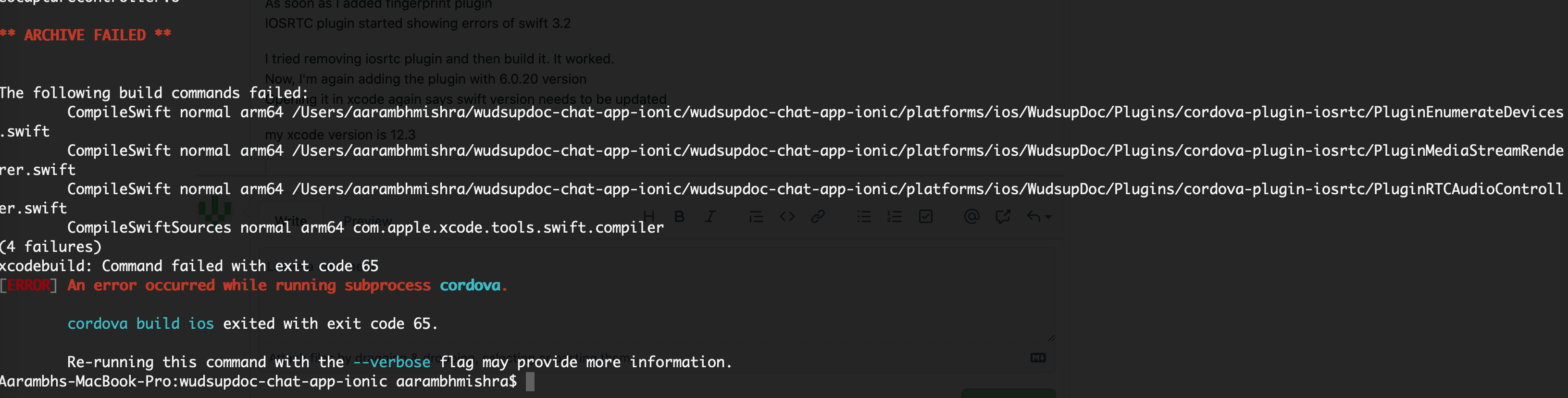
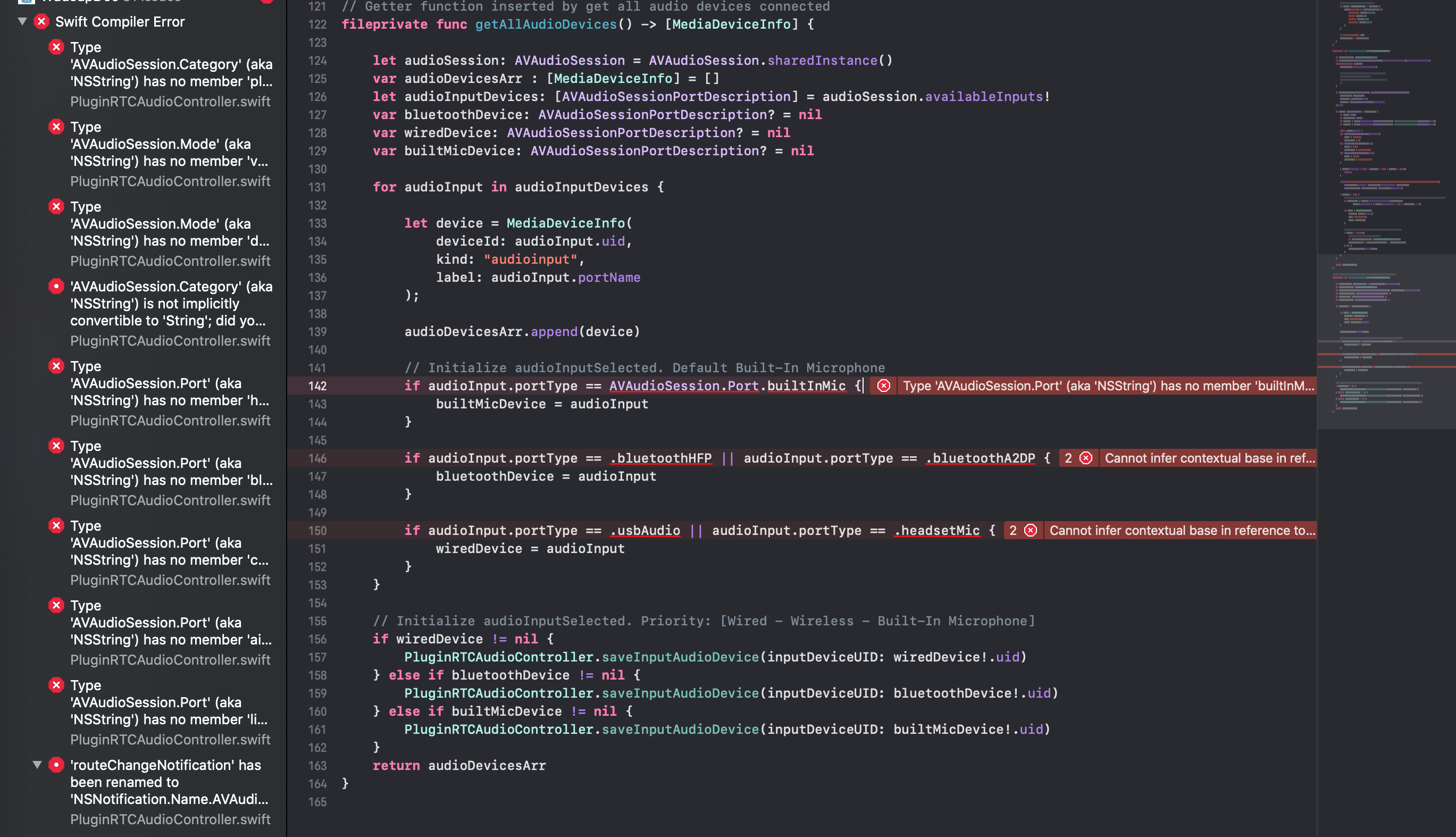
IOSRTC plugin started showing errors of swift 3.2
I tried removing iosrtc plugin and then build it. It worked.
Now, I'm again adding the plugin with 6.0.20 version
Opening it in xcode again says swift version needs to be updated
my xcode version is 12.3
MishraAarambh
on 22 Mar 2021
MishraAarambh
on 22 Mar 2021
As soon as I added fingerprint plugin
I tried removing iosrtc plugin and then build it. It worked.
Yes, Im telling you that have nothing to do with us.
BTW, fingerprint plugin use swift 4 we use 4.2 so, in any case....
hthetiot
on 22 Mar 2021
could be related to your ios target version also we require 10.2 or the version used by the other plugin.
IN ANY CASE that a PLUGIN conflict not an osrtc ISSUE.
It was working till yesterday
We did not change anything since yesterday.
hthetiot
on 22 Mar 2021
Any fix that you can recommend me to make it work on the device
MishraAarambh
on 22 Mar 2021
Any fix that you can recommend me to make it work on the device
no sorry, beside providing step by step to reproduce, but im pretty sure the issue is on the other plugin since iosrtc is compatible with many many other plugins.
hthetiot
on 22 Mar 2021
MishraAarambh
on 22 Mar 2021
I'm removing the other plugin and adding this only and trying to reproduce again
MishraAarambh
on 22 Mar 2021
I'm removing the other plugin and adding this only and trying to reproduce again
Works for me 🙂
hthetiot
on 22 Mar 2021
I think the problem is with this part of the finger print plugin that conflict with iosrtc
<header-file src="src/ios/Bridging-Header.h" type="BridgingHeader"/>
    <source-file src="src/ios/Fingerprint.swift"/>
    <config-file target="config.xml" parent="/*">
      <preference name="SwiftVersion" value="4"/>
      <feature name="Fingerprint">
        <param name="ios-package" value="Fingerprint"/>
      </feature>
    </config-file>
You're correct
Fingerprint aio is creating a problem in this case
I removed that stupid plugin
iosrtc works fine now.
How do we make both of them work 🤔
MishraAarambh
on 22 Mar 2021
How do we make both of them work 🤔
You need to create an issue on their repository saying that their plugin override other plugin swift headers and use swift 4 instead of 4.2. You may also reference this issue in the new issue.
If you remove this 2 lines it works:
```diff
@@ -43,7 +41,7 @@
````
iosrtc respect other plugins swift headers they dont.
Cordova reference: https://issues.apache.org/jira/browse/CB-10071
hthetiot
on 22 Mar 2021
Mention this issue in the new issue on their side and i may intervene to help on their side (because im nice in fact :)
hthetiot
on 22 Mar 2021
@hthetiot
created an issue on their side
https://github.com/NiklasMerz/cordova-plugin-fingerprint-aio/issues/335
Thanks for your help
MishraAarambh
on 22 Mar 2021
Mention this issue in the new issue on their side and i may intervene to help on their side (because im nice in fact :)
I'm gonna have to vouch for this 👍
You're really nice 😄
MishraAarambh
on 22 Mar 2021
I have commented here https://github.com/NiklasMerz/cordova-plugin-fingerprint-aio/issues/335#issuecomment-804403047
hthetiot
on 22 Mar 2021
Alternativly you dont really need their plugin in fact webauthn is part of webview and most of browser does support it and it's better because it support more authentication scheme and built-in and updated by the browser vendor.
hthetiot
on 22 Mar 2021
@MishraAarambh in any case use 6.0.20 otherwise chrome 89 calls may fail see https://github.com/cordova-rtc/cordova-plugin-iosrtc/discussions/666
hthetiot
on 22 Mar 2021
Related issues
 sboudouk
·
12Comments
sboudouk
·
12Comments
 smuddy
·
15Comments
hthetiot
·
4Comments
smuddy
·
15Comments
hthetiot
·
4Comments
 nickygiorgi
·
15Comments
nickygiorgi
·
15Comments
 derMani
·
9Comments
derMani
·
9Comments