Cordova-plugin-iosrtc: Webrtc-adapter mediaConstraints.video.facingMode does not select correct camera
Expected behavior
Hi, I'm using the plugin to get AR.js to work in cordova-ios.
With some adjustment on the AR.js code the video is loaded and should show the environment camera.
Observerd behavior
But I only get the selfie camera selected.
Steps to reproduce the problem
I used the bootstrap code to patch the global API, then started AR.js. The code in AR.js is:
navigator.mediaDevices.enumerateDevices().then(function (devices) {
    var userMediaConstraints = {
      audio: false,
      video: {
        facingMode: {
          ideal: 'environment'
        },
        width: {
          ideal: _this.parameters.sourceWidth,
          // min: 1024,
          // max: 1920
        },
        height: {
          ideal: _this.parameters.sourceHeight,
          // min: 776,
          // max: 1080
        }
      }
    };

    // get a device which satisfy the constraints
    navigator.mediaDevices.getUserMedia(userMediaConstraints).then(function success(stream) {
      // set the .src of the domElement
      domElement.srcObject = stream;

      var event = new CustomEvent('camera-init', {stream: stream});
      window.dispatchEvent(event);
      // to start the video, when it is possible to start it only on userevent. like in android
      document.body.addEventListener('click', function () {
        domElement.play();
      });
      // domElement.play();

    })
    });
  })
  });
[...]
Are there any other things I have to define, set or pay attention to?
Platform information
- Cordova version: 9.0.0
- Plugin version: 5.0.1
- iOS version: 13.2.3 (iPhone 7 & XR)
- Xcode version: 12.2.1
 smuddy
All 15 comments
Here the constraints translated by the webrtc adapter:
{
  "audio":false,
  "video": {
    "optional": [
      {"minWidth":640},
      {"maxWidth":640},
      {"minHeight":480},
      {"maxHeight":480}],
    "mandatory": {
      "sourceId":"com.apple.avfoundation.avcapturedevice.built-in_video:0"}
    }
  }
video:0 seems to be the correct camera, it is labeled with: "Rückkamera (Back Camera)"
smuddy
on 26 Nov 2019
@smuddy yes WebRTC adapter ignore the facingMode and I can do nothing about that.
The solution could be to call iosrtc registerGlobals after adapter load or to not use adapter or call Cordova.plugins.iosrtc.getUserMedia directly.
Can you test to later to confirm the issue is from webRTC-adapter that ignore facingMode.
 hthetiot
on 26 Nov 2019
hthetiot
on 26 Nov 2019
Note: @smuddy if you need to render video to canvas for AR.js you going to need to use videoEl.render.save function.
See example:
hthetiot
on 26 Nov 2019
Possible solution is for iosRTC to implement getSupportedConstraints but I'm not sure it will be enough.
hthetiot
on 26 Nov 2019
with webrtc adapter
I think, I found the problem in the getUserMedia.js.
        // Also check video sourceId (mangled by adapter.js).
        } else if (typeof constraints.video.sourceId === 'string') {
            newConstraints.video.deviceId = {
                exact: constraints.video.sourceId
            };
But the adapter writes the sourceId to constraints.video.mandatory.sourceId.
without webrtc adapter
The constraints inside getUserMedia.js are the original constrains from the AR.js call. But:
if (constraints.video.facingMode.ideal === 'string') {
  newConstraints.video.facingMode = {
    ideal: constraints.video.facingMode.ideal
  };
}
The Browser evaluates (constraints.video.facingMode.ideal === 'string') as false, so the facing mode is not passed into the native plugin code.
PS: there is typeofmissing: (**typeof** constraints.video.facingMode.ideal === 'string')
smuddy
on 26 Nov 2019
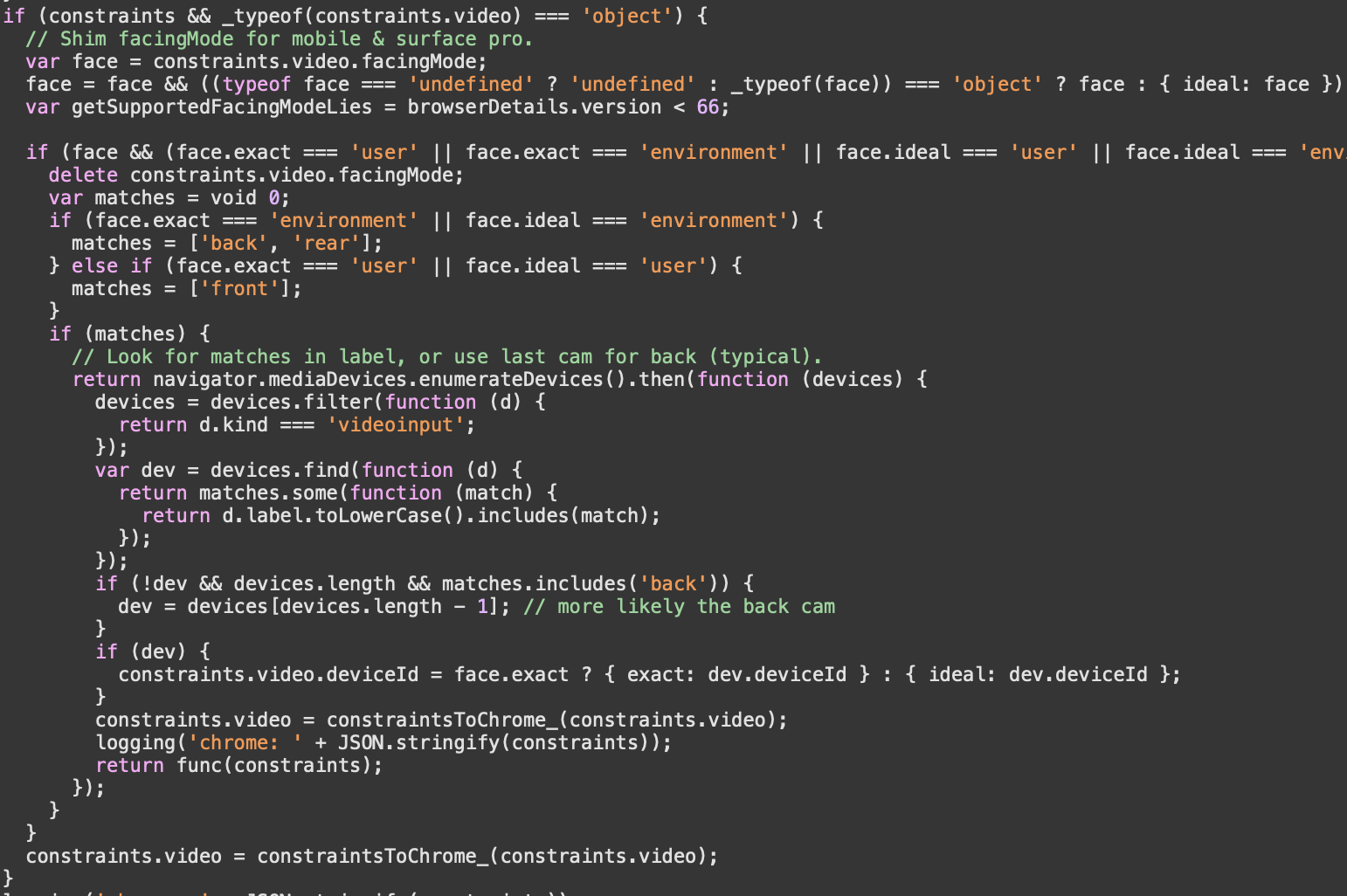
WebRTC adapter delete facingMode and use enumarateDevice in the end to find the match.

hthetiot
on 26 Nov 2019
PS: there is typeofmissing: (typeof constraints.video.facingMode.ideal === 'string')
I will fix that ASAP. Thx
hthetiot
on 26 Nov 2019
But the adapter writes the sourceId to constraints.video.mandatory.sourceId.
See https://github.com/cordova-rtc/cordova-plugin-iosrtc/blob/master/js/getUserMedia.js#L169
hthetiot
on 26 Nov 2019
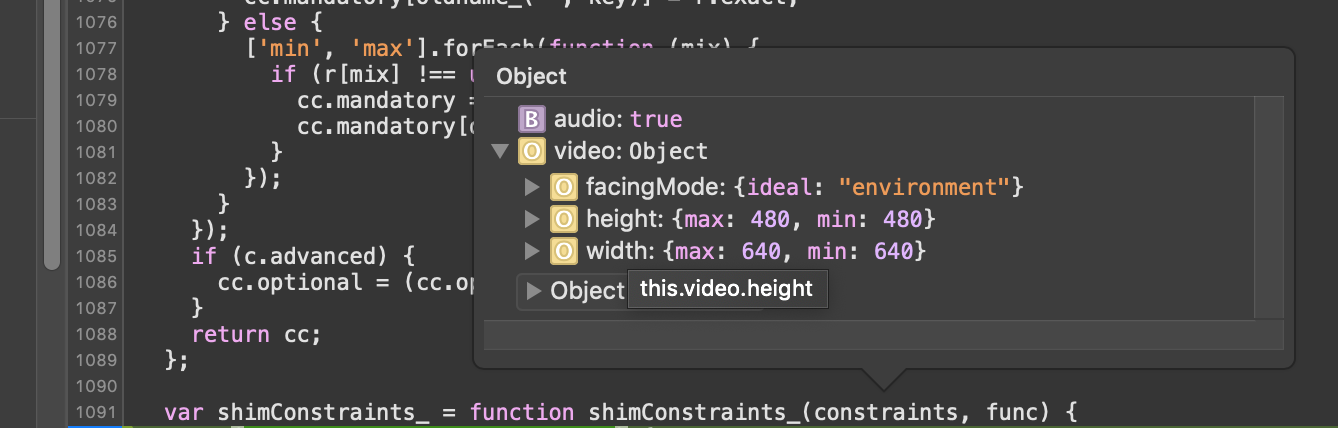
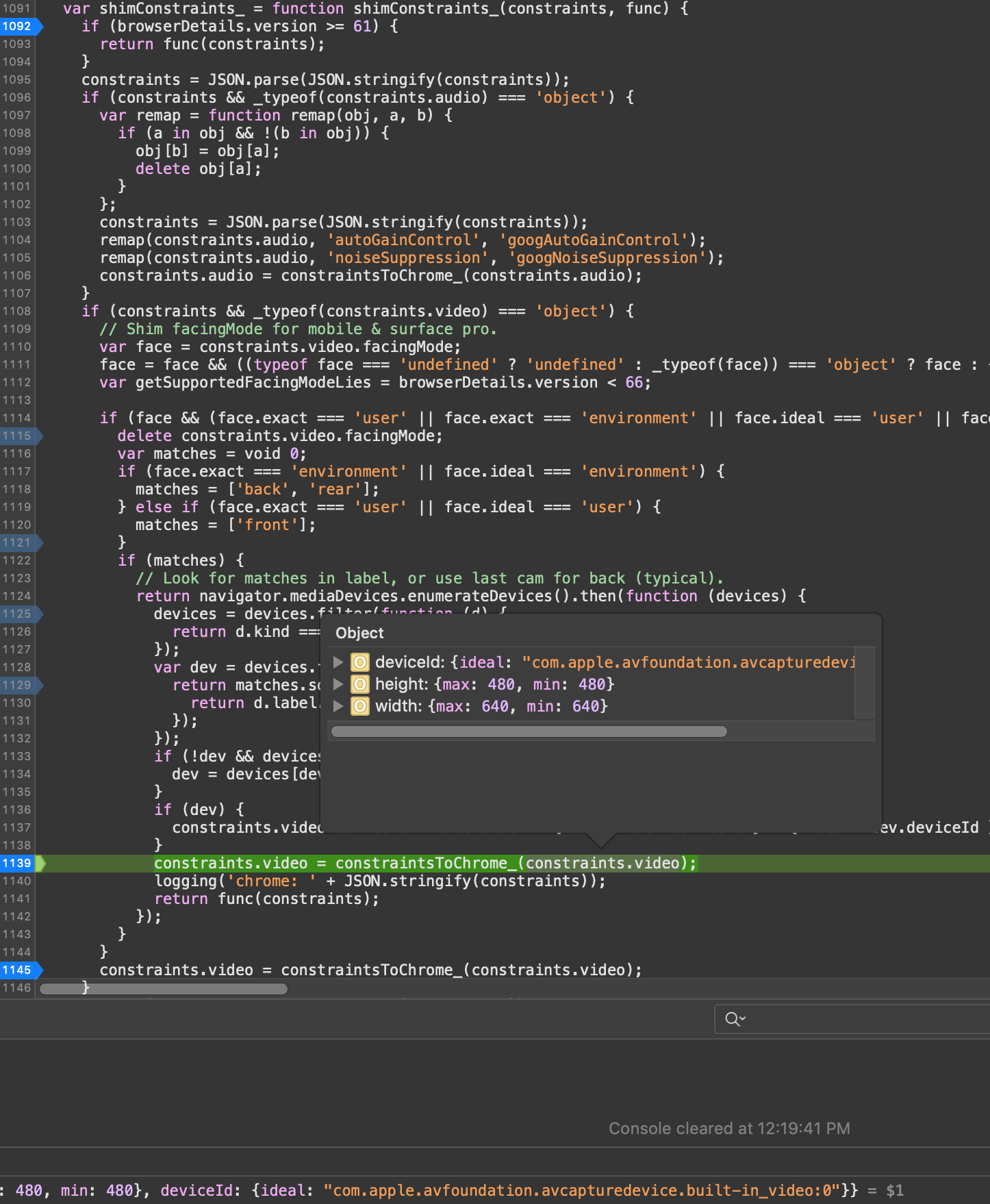
@smuddy I have re-tested and I think it actually works with webrtc-adapter, it does look via enumerateDevice for device with label "back" when facingMode = enviroment and remove original facingMode.
hthetiot
on 26 Nov 2019
Missing typeof released on 6.0.5
hthetiot
on 26 Nov 2019
But the adapter writes the sourceId to constraints.video.mandatory.sourceId.
See https://github.com/cordova-rtc/cordova-plugin-iosrtc/blob/master/js/getUserMedia.js#L169
Hm, after reinserting the adapter, the sourceID was placed in constraints.video.optional[4], but the code only reads constraints.video.optional[0].
But if it works without the adapter, I won't use it.
...
Without the adapter and the original AR.js Code (facingMode: 'environment') it works perfectly.
Very much thanks for your help!!!
One last question:
if you need to render video to canvas for AR.js you going to need to use videoEl.render.save function.
AR.js places the video and the canvas side by side in the DOM. Does this affect this?
smuddy
on 26 Nov 2019
@smuddy Thank you.
Can you provide a dump of "constraints.video.optional[4]" from adapter may be I can handle the case.
hthetiot
on 26 Nov 2019
AR.js places the video and the canvas side by side in the DOM. Does this affect this?
Side by side is ok, but you cannot render native video and have canvas above unless you use z-index: -1on video element and body and html transparent.
https://github.com/cordova-rtc/cordova-plugin-iosrtc/blob/master/docs/videoCSS.md#video-css
hthetiot
on 26 Nov 2019
Side by side is ok, but you cannot render native video and have canvas above unless you use z-index: -1on video element and body and html transparent.
Ah ok, the z-indices are set correctly by AR.js.
Can you provide a dump of "constraints.video.optional[4]" from adapter may be I can handle the case.
Sure:
{
  "audio": false,
  "video": {
    "optional": [
      {
        "minWidth": 640
      },
      {
        "maxWidth": 640
      },
      {
        "minHeight": 480
      },
      {
        "maxHeight": 480
      },
      {
        "sourceId": "com.apple.avfoundation.avcapturedevice.built-in_video:0"
      }
    ]
  }
}
@smuddy I have implemented a fix to handle webrtc-adapter multiple video.optional constraints values and added support for maxHeight and maxWidth. This should work with adapter also now.
- d83f12b56d6557b7da61d11703179d19ef74ecc8
For testing master you can do the following:
cordova plugin remove cordova-plugin-iosrtc --verbose
cordova plugin add https://github.com/cordova-rtc/cordova-plugin-iosrtc#master --verbose
cordova platform remove ios --no-save
cordova platform add ios@latest --no-save
Related issues
 ducile
·
4Comments
ducile
·
4Comments
 sboudouk
·
12Comments
sboudouk
·
12Comments
 numerized
·
4Comments
numerized
·
4Comments
 nickygiorgi
·
15Comments
nickygiorgi
·
15Comments
 magestican
·
11Comments
magestican
·
11Comments