Cordova-plugin-iosrtc: Capacitor compatibility
currently when i build a capacitor app with this plugin xcode gives me this error
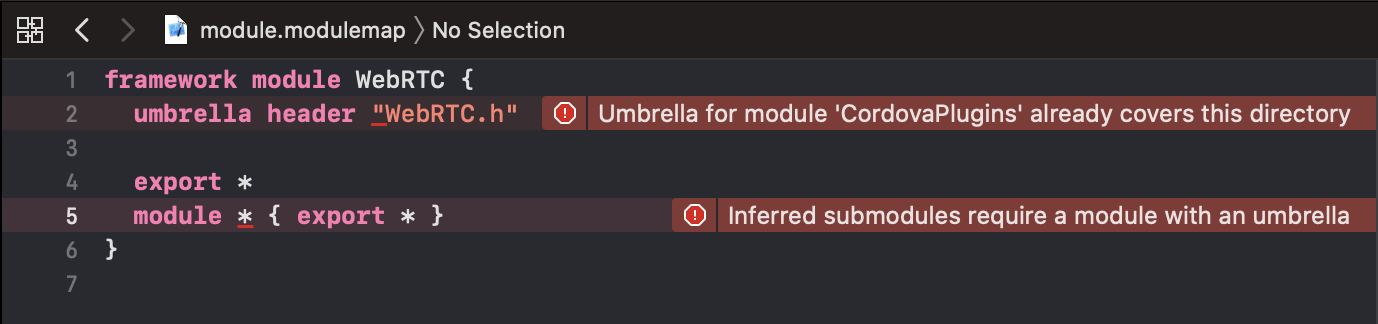
how can i fix that? if someone can give me some tips i can make a PR
 kalimantos
All 30 comments
Same issue here
 ghost
on 24 Apr 2020
ghost
on 24 Apr 2020
Same here too
 savgiannis
on 26 Apr 2020
savgiannis
on 26 Apr 2020
 hthetiot
on 26 Apr 2020
hthetiot
on 26 Apr 2020
Read the comment here:
I have no interest in capacitor poor way of doing things and will no allocate even one second to it, PR are welcome but I will not do it for you or assist you with it.
hthetiot
on 26 Apr 2020
This is a cordova plugin not a capacitor plugin.
If capacitor is not capable of supporting properly cordova plugin then dont use cordova plugin and dont create issue on cordova plugin repository, instead go create issue on capacitor.
hthetiot
on 26 Apr 2020
I have no personal interest into Capacitor, if iosrtc support Capacitor it will have to be contributed by users that need it, that why i have re-opneded the issue so users can collaborate to a solution.
- https://groups.google.com/forum/#!topic/cordova-plugin-iosrtc/2Ioysem4Bjg
hthetiot
on 28 Apr 2020
Is there someone working on a solution for this or possibly even a working fork for Capacitor?
 mvaljento
on 15 May 2020
mvaljento
on 15 May 2020
If someone fork instead of making a PR then that stupid, as I said I would accept contribution but will not contribute myself since Capacitor is like a rotting dead body in the water for me.
I think Capacitor users are not low level developer so i dont expect anyone providing a fix anytime soon, future will tell if I'm wrong.
hthetiot
on 19 May 2020
hi guys i have some good news.
i got iosrtc working whit capacitor.
Its seems to have some problem with dependencies.
so i have created a CocoaPod framework from the webRTC.framework in this project.pod
and changed:
<framework src="lib/WebRTC.framework" custom="true" embed="true" />
to <framework src="pjor94.webRTC.framework" type="podspec" />
i have forked this repo and make those change fork
i dont think to make a pr.. because i think this is a workaround.
 pjor94
on 6 Jun 2020
pjor94
on 6 Jun 2020
@pjor94 any docs on how to use your plugin can be usefull !
 riderx
on 20 Jun 2020
riderx
on 20 Jun 2020
@pjor94 Thank you for looking into this.
Based on your fork changes, I made this PR https://github.com/cordova-rtc/cordova-plugin-iosrtc/pull/528
Question: What version of WebRTC do you use into https://github.com/pjor94/pjor94.webRTC.framework ?
May be we can do the same for iosrtc and split webRTC.framework into his own repository.
hthetiot
on 22 Jun 2020
<framework src="pjor94.webRTC.framework" type="podspec" /> will cause this warning and error on cordova 8.1.0+.
"framework" tag with type "podspec" is deprecated and will be removed. Please use the "podspec" tag.
Adding pods since the plugin contained <framework>(s) with type="podspec"
Set pods.json for `libraries` - `frameworks/WebRTC.framework`
Added pod line for `frameworks/WebRTC.framework`
Wrote to pods.json.
Failed to install 'cordova-plugin-iosrtc': TypeError: Cannot use 'in' operator to search for 'spec' in undefined
Instead podspec need to be used.
hthetiot
on 22 Jun 2020
Will a fix be included in future versions?
savgiannis
on 3 Jul 2020
@savgiannis it depend how the capacitor users here help to get the #528 a successfull fix for capacitor.
@pjor94 Seams to have found a possible solution but "framework" tag with type "podspec" is deprecated is depcreated and therefor I d'like to use the "podspec" tag. instead like the PR #528.
hthetiot
on 6 Jul 2020
It is working in the emulator but I cannot build for amd64 so far.
 phairow
on 7 Jul 2020
phairow
on 7 Jul 2020
@phairow it's most likely due this architecture step that you may have not performed.
See https://github.com/cordova-rtc/cordova-plugin-iosrtc/blob/master/docs/Building.md#strip-simulator-archs-usage
I can see you are using [email protected] it mean capacitor finally fixed support from framework podspec.
hthetiot
on 7 Jul 2020
I sure appreciate the help in troubleshooting. I tried most of the steps on that page already aside from cordova build, trying to do it manually. Maybe it is "Objective-C Bridging Header" but I don't understand why it works with the simulator. Maybe it is just some difference in build process caused by signing or something? I tried using ios_arch.js and it makes no difference, if I build for device only then simulator fails on x86_64 but device still also fails on amd64, build for simulator still works on simulator same as before running ios_arch.js and obviously fails on device. Nothing I have tried so far will make it build for amd64.
On Tuesday, July 7, 2020, 10:30:42 AM PDT, Harold Thétiot notifications@github.com wrote:
@phairow it's most likely due this architecture step that you may have not performed.
See https://github.com/cordova-rtc/cordova-plugin-iosrtc/blob/master/docs/Building.md
I can see you are using [email protected] it mean capacitor finally fixed support from framework podspec.
—
You are receiving this because you were mentioned.
Reply to this email directly, view it on GitHub, or unsubscribe.
phairow
on 7 Jul 2020
I finally got it working. The key was to disable bitcode, I had skipped that step for the app, thought I only had to do it for the library. Now it works on the device. Time to go back to debugging my app :) Have audio working but not video. Thanks again for the advice.
phairow
on 8 Jul 2020
We would need some guide for your fellow capacitor developers @phairow if you can propose something here https://github.com/cordova-rtc/cordova-plugin-iosrtc/tree/master/docs
hthetiot
on 10 Jul 2020
Sure, bitcode setting was the main thing. This is my first use of capacitor, I had used ionic in the past for angular and wanted to port this react SPA to a mobile app. I was stuck with capacitor since it is the only option for ionic/react. I was already used to using cordova so I thought this would be easy since capacitor will support cordova plugins to an extent. Truth is that I didn't fully understand your document in the beginning under configuring-xcode-manually https://github.com/cordova-rtc/cordova-plugin-iosrtc/blob/master/docs/Building.md#configuring-xcode-manually which has all the needed info for this (aside from some CocoaPods setting for me). I didn't do anything specific to make it work with capacitor, I just needed to understand the manual steps. There are a couple minor things I did to make it easier and I will make an md file for that.
- understand that app has to have the "Build Settings" set "Enable Bitcode" to "No" as you have mentioned in your doc.
- minor change to Podfile to set bitcode no in the pods so you don't have to do it after every capacitor sync (found example in a very old stack overflow bout CocoaPods so not really capacitor specific: https://stackoverflow.com/questions/32640149/disable-bitcode-for-project-and-cocoapods-dependencies-with-xcode-7)
# Custom changes
post_install do |installer|
  installer.pods_project.targets.each do |target|
    target.build_configurations.each do |config|
      # Disable bitcode in order to support cordova-plugin-iosrtc
      config.build_settings['ENABLE_BITCODE'] = 'NO'
    end
  end
end
also note, I am using 7.0.0-RC3 which may or may not be relevant but I have not gone back to try with the current release version
phairow
on 10 Jul 2020
I added some info to docs/Building.md -> https://github.com/cordova-rtc/cordova-plugin-iosrtc/pull/538
phairow
on 10 Jul 2020
I reached out to ionic support for Capacitor on adding WebRTC support and they said they have no plans for that. This cordova plugin will be needed for some time. I am sure apple will support WebRTC in the web view at some point since it was recently added to Safari but currently it is not supported in web view.
phairow
on 10 Jul 2020
I reached out to ionic support for Capacitor on adding WebRTC support and they said they have no plans for that. This cordova plugin will be needed for some time. I am sure apple will support WebRTC in the web view at some point since it was recently added to Safari but currently it is not supported in web view.
Thank you for all your work. Also @hthetiot!!
Do you plan to finish your Port?
Could I help somewhere? I am also interested to use it.
 danielehrhardt
on 11 Jul 2020
danielehrhardt
on 11 Jul 2020
@danielehrhardt thanks,I am sure @hthetiot can use help :) I am not making a port, only sharing how I used the cordova-plugin-iosrtc in my capacitor based project.
phairow
on 11 Jul 2020
@danielehrhardt their is no need to port anything. Or finish anything iosRTC works since 2015 already....
@danielehrhardt thank you for you PR, it's now merged on master and I'll be added to the change logs with your GitHub name as contributor.
https://github.com/cordova-rtc/cordova-plugin-iosrtc/pull/538
hthetiot
on 13 Jul 2020
I tried your solution with the podfile. But now I get the following error:
▸ Linking Capacitor

▸ Generating 'Capacitor.framework.dSYM'

▸ Touching Capacitor.framework (in target 'Capacitor' from project 'Pods')

▸ Processing Pods-App-Info.plist

▸ Copying Pods-App-umbrella.h

▸ Compiling Pods-App-dummy.m

▸ Compiling Pods_App_vers.c

▸ Touching Pods_App.framework (in target 'Pods-App' from project 'Pods')

Provisioning profile "" for "App" contains entitlements that aren't in the entitlements file: com.apple.developer.coremedia.hls.low-latency. To use these entitlements, add them to your entitlements file. Otherwise, remove unused entitlements from your provisioning profile. (in target 'App' from project 'App')

▸ Running script '[CP] Check Pods Manifest.lock'

▸ Compiling AppDelegate.swift

▸ Linking App

❌ ld: '/Users/vagrant/Library/Developer/Xcode/DerivedData/App-dxfkyhrskqdpdnadxkqnzzkcyqsm/Build/Intermediates.noindex/ArchiveIntermediates/App/BuildProductsPath/Release-iphoneos/Capacitor/Capacitor.framework/Capacitor' does not contain bitcode. You must rebuild it with bitcode enabled (Xcode setting ENABLE_BITCODE), obtain an updated library from the vendor, or disable bitcode for this target. file '/Users/vagrant/Library/Developer/Xcode/DerivedData/App-dxfkyhrskqdpdnadxkqnzzkcyqsm/Build/Intermediates.noindex/ArchiveIntermediates/App/BuildProductsPath/Release-iphoneos/Capacitor/Capacitor.framework/Capacitor' for architecture arm64

❌ clang: error: linker command failed with exit code 1 (use -v to see invocation)

Last lines of the Xcode's build log:

/usr/bin/ditto -rsrc /Users/vagrant/Library/Developer/Xcode/DerivedData/App-dxfkyhrskqdpdnadxkqnzzkcyqsm/Build/Intermediates.noindex/ArchiveIntermediates/App/IntermediateBuildFilesPath/App.build/Release-iphoneos/App.build/Objects-normal/arm64/App.swiftmodule /Users/vagrant/Library/Developer/Xcode/DerivedData/App-dxfkyhrskqdpdnadxkqnzzkcyqsm/Build/Intermediates.noindex/ArchiveIntermediates/App/BuildProductsPath/Release-iphoneos/App.swiftmodule/arm64.swiftmodule

Ditto /
Do you have a idea?
danielehrhardt
on 15 Jul 2020
@danielehrhardt
All you have to do is read the error message....
disable bitcode for this target
AS @phairow EXPLAINED but you probably did not follow the instruction
I finally got it working. The key was to disable bitcode
hthetiot
on 15 Jul 2020
Okay it worked. :) Thank you for your Help
danielehrhardt
on 15 Jul 2020
@danielehrhardt See reading error message is the key ;)
I'm closing coment on this issue since capacitor support is now documented.
If you have capacitor related issues please open new issue from now.
hthetiot
on 15 Jul 2020
Related issues
 outEduardoSilva
·
11Comments
outEduardoSilva
·
11Comments
 sboudouk
·
12Comments
sboudouk
·
12Comments
 aspdev91
·
10Comments
aspdev91
·
10Comments
 alaanasreng
·
7Comments
alaanasreng
·
7Comments
 magestican
·
11Comments
magestican
·
11Comments
Most helpful comment
hi guys i have some good news.
i got iosrtc working whit capacitor.
Its seems to have some problem with dependencies.
so i have created a CocoaPod framework from the webRTC.framework in this project.pod
and changed:
<framework src="lib/WebRTC.framework" custom="true" embed="true" />to
<framework src="pjor94.webRTC.framework" type="podspec" />i have forked this repo and make those change fork
i dont think to make a pr.. because i think this is a workaround.