Cordova-plugin-googlemaps: Stuck on Blank Page
I'm submitting a ... (check one with "x")
- [ ] question
- [x] any problem or bug report
- [ ] feature request
If you choose 'problem or bug report', please select OS: (check one with "x")
- [ ] Android
- [x] iOS
cordova information: (run $> cordova plugin list)
com.googlemaps.ios 2.7.0 "Google Maps SDK for iOS"
cordova-plugin-device 2.0.2 "Device"
cordova-plugin-googlemaps 2.3.11 "cordova-plugin-googlemaps"
cordova-plugin-ionic-keyboard 2.1.2 "cordova-plugin-ionic-keyboard"
cordova-plugin-ionic-webview 2.0.3 "cordova-plugin-ionic-webview"
cordova-plugin-splashscreen 5.0.2 "Splashscreen"
cordova-plugin-whitelist 1.3.3 "Whitelist"
{}
If you use @ionic-native/google-maps, please tell the package.json (only @ionic-native/core and @ionic-native/google-maps are fine mostly)
@ionic-native/core : ^4.11.0
@ionic-native/google-maps : ^4.9.1
Current behavior:
after running ionic cordova run ios
it launches and displays a black page for the map div
Expected behavior:
The map is supposed to load and display with a marker
Screen capture or video record:

Related code, data or error log (please format your code or data):
Here is the sample i created again [https://github.com/bunday/ionic-googlemap-test]
 bunday
All 14 comments
set #mapperFacade height and width higher than 100px.
 Gabplay
on 17 Aug 2018
Gabplay
on 17 Aug 2018
I can not say anything without code. Please share your project files on GitHub.
 wf9a5m75
on 17 Aug 2018
wf9a5m75
on 17 Aug 2018
this is the link to the project https://github.com/bunday/ionic-googlemap-test
bunday
on 17 Aug 2018
Thank you, you need to change <div style="height:90px" id="mapperFacade"></div> to <div style="height:100px" id="mapperFacade"></div>
wf9a5m75
on 17 Aug 2018
And I think you don't look this slide. I recommend check out this slides before starting.
https://docs.google.com/presentation/d/e/2PACX-1vScoho1ensbR4qCI9AIuQN55BZVvK73pAjI7sumDvW3CrxxHnrmpXWUjx2-8CpFibqU1EjLKCRhuthJ/pub?start=false&loop=false&delayms=3000&slide=id.p
wf9a5m75
on 17 Aug 2018
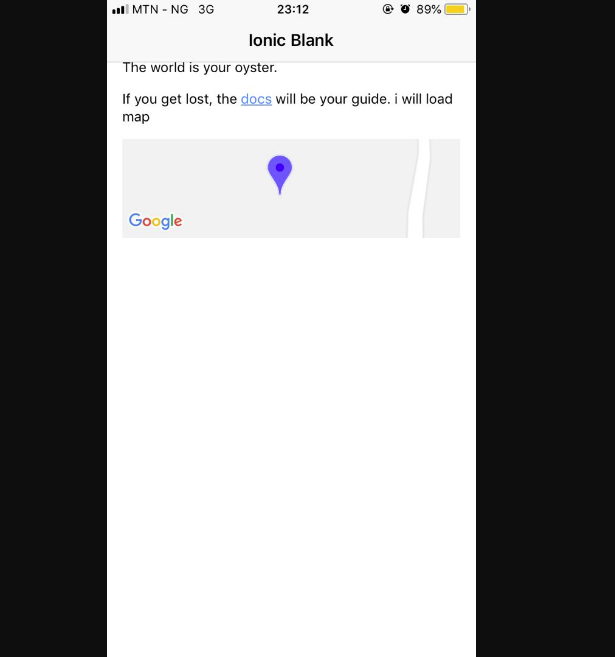
Thanks for the reply. I didn’t know the height as 100px mattered. It displays a map now, just that the map is now covering just 1/4 of the whole screen.
bunday
on 17 Aug 2018
Did you set <meta name="viewport" content="width=device-width, initial-scale=1">?
wf9a5m75
on 17 Aug 2018
I can't believe 100px height takes 1/4 of whole screen on any iOS devices.
wf9a5m75
on 17 Aug 2018
I’m surprised either. Would post a picture once I’m back at work. Thanks for the swift response.
bunday
on 18 Aug 2018
here is the image

bunday
on 18 Aug 2018
Well, do you need Google Maps API? End user can not do anything such a small map.
If you just display a map, I recommend you use Google Static Maps API.
Which is super faster.
https://developers.google.com/maps/documentation/maps-static/intro
wf9a5m75
on 18 Aug 2018
At least, 100px height = 1/4 of whole screen size. It seems 1/6.
wf9a5m75
on 18 Aug 2018
Anyway, congratus for solving the original problem.
wf9a5m75
on 18 Aug 2018
For anyone that will ever need this. the style should be 100% instead of 100px. It works fine now. Thanks @wf9a5m75
bunday
on 18 Aug 2018
Related issues
 javi124
·
5Comments
javi124
·
5Comments
 melkir
·
5Comments
melkir
·
5Comments
 ebellempire
·
3Comments
wf9a5m75
·
5Comments
ebellempire
·
3Comments
wf9a5m75
·
5Comments
 TimothyFehr
·
5Comments
TimothyFehr
·
5Comments
Most helpful comment
set #mapperFacade height and width higher than 100px.