Cordova-plugin-googlemaps: console.warn: Native: tried accessing the GoogleMaps plugin but Cordova is not available. Make sure to include cordova.js or run in a device/simulator
That is the error appearing in the console, i run the project in my mobile phone so i dont understand why cordova is unavailable.
This is my code:
import { Component } from '@angular/core';
import { NavController, NavParams, Platform } from 'ionic-angular';
import {
    GoogleMaps,
    GoogleMap,
    GoogleMapsEvent,
    LatLng,
    CameraPosition,
    MarkerOptions,
    Marker
} from '@ionic-native/google-maps';

@Component({
    selector: 'page-map',
    templateUrl: 'map.html',
})


export class MapPage {
    latitud: any;
    longitud: any;
    map: GoogleMap;

    constructor(public navCtrl: NavController, public navParams: NavParams, private googleMaps: GoogleMaps, public platform: Platform) {
        this.latitud = "-38.007681";
        this.longitud = "-57.543674";
    }
    ionViewDidLoad() {
        this.loadMap();
    }

    loadMap() {
        let mapOptions = {
            camera: {
                target: {
                    lat: Number(this.latitud),
                    lng: Number(this.longitud)
                },
                zoom: 18,
                tilt: 30
            }
        };

        this.map = GoogleMaps.create('map', mapOptions);


        // listen to MAP_READY event
        // You must wait for this event to fire before adding something to the map or modifying it in anyway
        this.map.one(GoogleMapsEvent.MAP_READY).then(() => {
            console.log('Map is ready!');


        });

    }

}
 francoro
All 32 comments
You don't have an issue on your mobile, but you get a console error in your browser?
If so, check this link out:
https://github.com/ionic-team/ionic-cli/issues/2490
 makers-mark
on 12 Mar 2018
makers-mark
on 12 Mar 2018
i use it in ionic runnig: ionic run android --device -lc
francoro
on 12 Mar 2018
Please share your project files on github. I will check it.
 wf9a5m75
on 12 Mar 2018
wf9a5m75
on 12 Mar 2018
I have a bitbucket repo, pass me your email so i can send you the invite
francoro
on 12 Mar 2018
Also i make a console.log of this.map and i get an empty object:
this.map = GoogleMaps.create('map', mapOptions);
And this is my html:
<div #map id="map" style="height:100%; width:100%;"></div>
francoro
on 12 Mar 2018
wf9a5m75
on 12 Mar 2018
I already send you the invite. The map is in the middle tab("Publicaciones") and there you will see the map icon. And the files are in /pages/map
francoro
on 12 Mar 2018
/pages/map ?

wf9a5m75
on 12 Mar 2018
Oh sorry it was not pushed, now it is
francoro
on 12 Mar 2018
Since you specifies <preference name="android-minSdkVersion" value="16" /> in the config.xml,
the ionic does not work properly (I guess).
Because the current ionic and this plugin do not support older android OS less than 19, so, you need to specify <preference name="android-minSdkVersion" value="19" /> at least.
If I change 16 to 19, then run the app on Android 4.4, the map is displayed as you expected.

wf9a5m75
on 12 Mar 2018
By the way, I appreciate if you support for this project.
This is not mandatory asking, but I appreciate if you donate some tip because I spend my private time for your project, and it was not plugin's bug.
wf9a5m75
on 12 Mar 2018
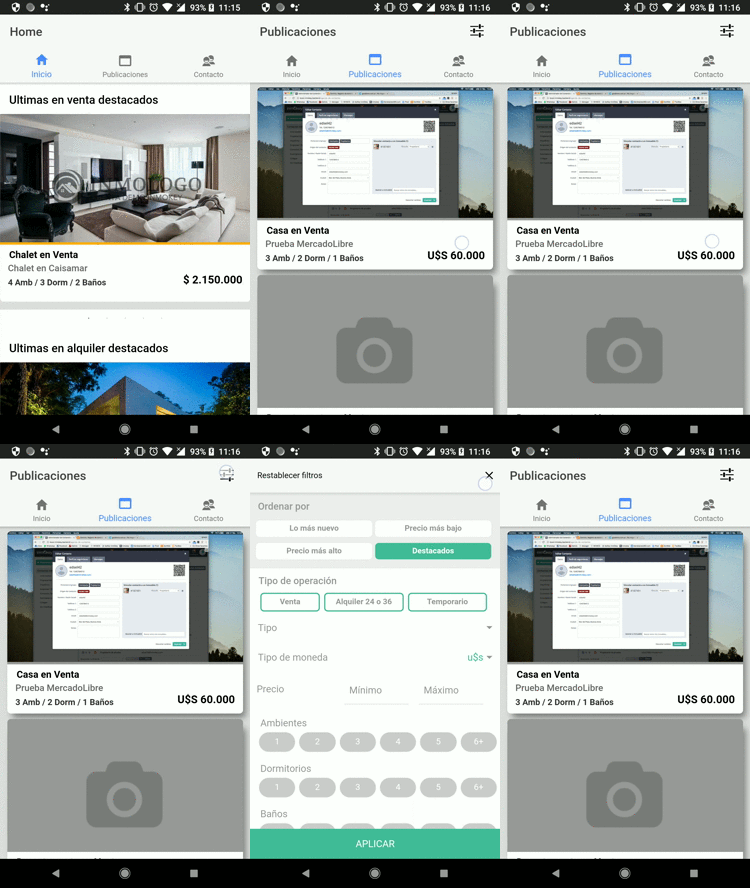
The map that i was saying is not that one, that is a static map it worked before. The map i say the one that is located in : the tab Publicaciones -> and there in the navbar the first icon counting from the right it has a map icon from ionic icons there touch in and it send you to other page all blank where it should be the native map
francoro
on 12 Mar 2018
Excuse me, I can't understand your navigation.
wf9a5m75
on 12 Mar 2018
I don't have enough time to work for your project. Please provide enough information much more.
wf9a5m75
on 12 Mar 2018
Are you in the last commit of the project? because i am seeing bitbucket and the code its right:
<ion-buttons right>
            <button style="color: black; background: transparent;
      font-size: 21px;" class="button-filters" (click)="openFilters()">
                <ion-icon name="md-options"></ion-icon>
            </button>
            <button style="color: black; background: transparent;
      font-size: 21px;" class="button-filters" (click)="openMap()">
               <i class="fa fa-map"></i>
            </button>
        </ion-buttons>
In what you show me its missing the second icon, the fontawesome. I am testing on android and it appears check if you are in the lastest version of the project, the last commit its called: map in progress
francoro
on 12 Mar 2018
I just cloned https://bitbucket.org/francocoro4/clientapp/commits/343389c7f8c4dbaa846df65196efd1eb9b87846d
wf9a5m75
on 12 Mar 2018
Here you are.

wf9a5m75
on 12 Mar 2018
I make a new commit. In the same page that you show me (Publicaciones). There is a red div on top of the posts that say go to map. It should appear now if you clone or pull
francoro
on 12 Mar 2018
Is that really reproduce your issue? Please don't waste my time.
wf9a5m75
on 12 Mar 2018
Yes now it should appear the red div if not i dont know why you cannot see it but i will try to use another version of the plugin if you cant
francoro
on 12 Mar 2018
Try ionic cordova run android --device without -lc
wf9a5m75
on 12 Mar 2018
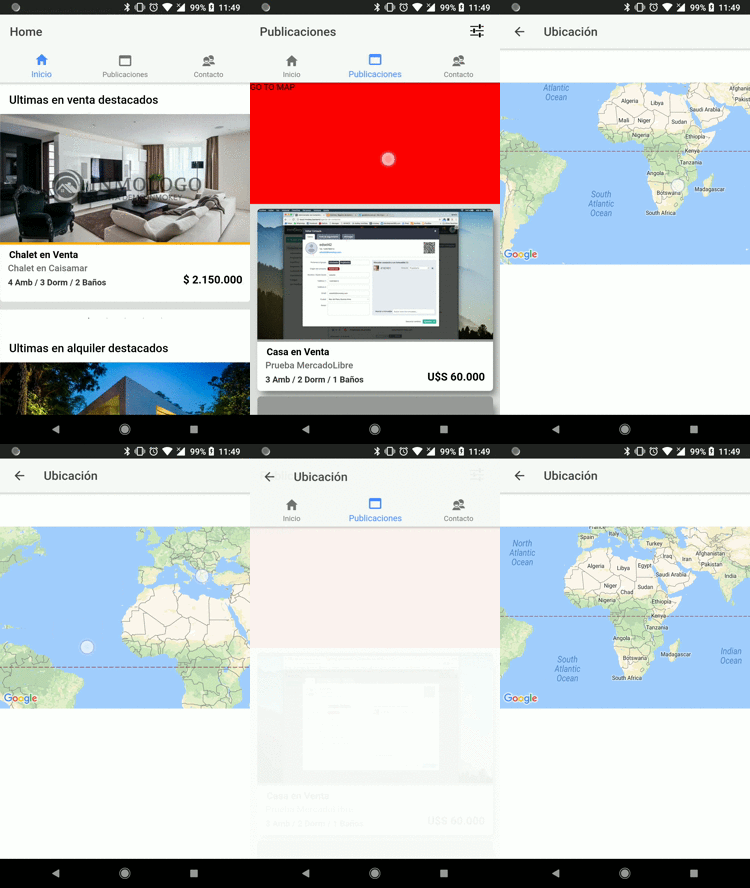
wf9a5m75
on 12 Mar 2018
It seems the problem is ionic itself, not this plugin.
wf9a5m75
on 12 Mar 2018
Yes it works without -lc. Weird but okay at least we know the code is fine.Thanks a lot i will donate you at night with the credit card of my mother lol thanks you can close it.
francoro
on 12 Mar 2018
Yeah, very weird. I haven't experienced this situation. But the problem is definitely ionic problem.
By the way, this presentation might help you use this plugin through @ionic-native/google-maps.
https://docs.google.com/presentation/d/1zlkmoSY4AzDJc_P4IqWLnzct41IqHyzGkLeyhlAxMDE/edit#slide=id.p
wf9a5m75
on 12 Mar 2018
@wf9a5m75
I am facing same problem but only on iOS simulator. It works fine on android device but not in iOS simulator. I don't have iOS device at the moment to test, i will appreciate if you can give a clue why it is behaving like this.
 monisamjad
on 26 Aug 2018
monisamjad
on 26 Aug 2018
It's easy. You don't wait platform.ready()
wf9a5m75
on 26 Aug 2018
I have already place platform.ready but still getting this issue
monisamjad
on 27 Aug 2018
If you can't solve the problem by yourself, please create a new issue, then share your project files on Github. This is closed thread.
wf9a5m75
on 27 Aug 2018
try : ionic cordova prepare android
 hhidalgo90
on 14 Mar 2019
hhidalgo90
on 14 Mar 2019
i have met the same issue. but how it works on https://mapsplugin.github.io/ionic-googlemaps-quickdemo-v4/home ?
 diamo1213
on 15 Dec 2020
diamo1213
on 15 Dec 2020
just solved. thanks guys,
wf9a5m75 Masashi Katsumata
ndrake Nate Drake
felipevencato Felipe Vencato
for the helpful example.
GOOD JOB!
diamo1213
on 15 Dec 2020
Related issues
 christoph-puppe
·
5Comments
christoph-puppe
·
5Comments
 ebellempire
·
3Comments
wf9a5m75
·
5Comments
ebellempire
·
3Comments
wf9a5m75
·
5Comments
 BTW18
·
3Comments
BTW18
·
3Comments
 Tong2203
·
5Comments
Tong2203
·
5Comments
Most helpful comment
Yeah, very weird. I haven't experienced this situation. But the problem is definitely ionic problem.
By the way, this presentation might help you use this plugin through
@ionic-native/google-maps.https://docs.google.com/presentation/d/1zlkmoSY4AzDJc_P4IqWLnzct41IqHyzGkLeyhlAxMDE/edit#slide=id.p