Cordova-plugin-googlemaps: Map not dragging/panning
I'm submitting a ... (check one with "x")
[ ] question
[x] any problem or bug report
[ ] feature request
The plugin version: (check one with "x")
[ ] 1.4.x
[x] 2.0.0-beta3
If you choose 'problem or bug report', please select OS: (check one with "x")
[x] Android
[ ] iOS
cordova information: (run $> cordova plugin list)
com.googlemaps.ios 2.3.0 "Google Maps SDK for iOS"
cordova-plugin-add-swift-support 1.6.0 "AddSwiftSupport"
cordova-plugin-compat 1.0.0 "Compat"
cordova-plugin-console 1.0.5 "Console"
cordova-plugin-datepicker 0.9.3 "DatePicker"
cordova-plugin-device 1.1.4 "Device"
cordova-plugin-facebook4 1.9.1 "Facebook Connect"
cordova-plugin-geolocation 2.4.3 "Geolocation"
cordova-plugin-globalization 1.0.7 "Globalization"
cordova-plugin-googlemaps 2.0.0-beta2-20170721-1617 "cordova-plugin-googlemaps"
cordova-plugin-nativegeocoder 1.0.2 "NativeGeocoder"
cordova-plugin-recentscontrol 1.1.0 "RecentsControl"
cordova-plugin-splashscreen 4.0.3 "Splashscreen"
cordova-plugin-statusbar 2.2.2 "StatusBar"
cordova-plugin-whitelist 1.3.1 "Whitelist"
ionic-plugin-deploy 0.6.7 "IonicDeploy"
ionic-plugin-keyboard 2.2.1 "Keyboard"
Current behavior:
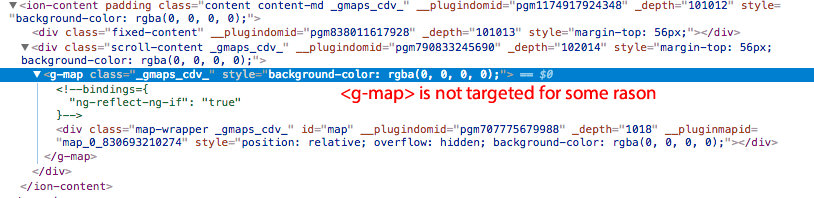
Map is successfully loading. However, it does not move on drag, and does not zoom/rotate on pan.
It just is not at all interactive.
Expected behavior:
Drag/Pan should work like normal map.
Steps to reproduce:
I am not sure. can I share my private repo with you instead of linking to it?
Screen capture or video record:
Not relevant as you don't see my swiping/panning
 AmitMY
All 27 comments
I have the same issue. I hope that it'll get fixed soon.
 Luttik
on 30 Aug 2017
Luttik
on 30 Aug 2017
cordova-plugin-googlemaps 2.0.0-beta2-20170721 is too old.
Please try the latest version before asking at least
 wf9a5m75
on 30 Aug 2017
wf9a5m75
on 30 Aug 2017
cordova-plugin-googlemaps 2.0.0-beta2-20170721 is too old.
Please try the latest version before asking at least
I have the same issue with the latest version.
The issue happens since yesterday. Last Friday I didn't have it yet. Downgrading doesn't seem to work either for some reason, this gives me the feeling that the issue resides in cordova-plugin-googlemaps-sdk.git. Where can we force cordova-plugin-googlemaps-sdk.git to use an older version? If I specify it in the package.json it just gets overwritten by cordova prepare.
Luttik
on 30 Aug 2017
com.googlemaps.ios 2.3.0 is not the latest version
wf9a5m75
on 30 Aug 2017
I know i'm at 2.4.0. I think you confuse me with the creator of this thread. I've got the same issue with everything on the latest version. I also tried to downgrade this plugin to 2.0.0-beta3-20170810-1904 but that did not work either.
Luttik
on 30 Aug 2017
Please share your project files on github
wf9a5m75
on 30 Aug 2017
Upgraded to:
com.googlemaps.ios 2.4.0 "Google Maps SDK for iOS"
cordova-plugin-googlemaps 2.0.0-beta3-20170829-1218 "cordova-plugin-googlemaps"
Same issue.
Sorry for not being on latest.
AmitMY
on 30 Aug 2017
Can I share a private repo with you on bitbucket?
AmitMY
on 30 Aug 2017
yes
wf9a5m75
on 30 Aug 2017
Thanks! I shared the repo with you. (locals-menu)
I didn't change much as I want it to feel as authentic as possible to the use case.
I am using Ionic. The map code is inside src/components/map. (it loads web map on non cordova, and native map on cordova)
To see the map on a device, just run ionic cordova run android, login (I made an account for you: [email protected] / 123456) and in the front page top right corner press on the compass icon.
I definitely feel a bit exploitative here, so please let me know how much time it took you to check it out, and I will pay accordingly.
AmitMY
on 30 Aug 2017
@AmitMY
$ ionic cordova prepare
[WARN] No local CLI detected.
       Starting with CLI 3.6, the CLI must be installed locally to use local CLI plugins.

? Install now? Yes
> npm install --save-dev --save-exact ionic@latest
✖ Running command - failed!
[ERROR] An error occurred while running npm install --save-dev --save-exact ionic@latest (exit code 1):

        npm ERR! code ENOSELF
        npm ERR! Refusing to install package with name "ionic" under a package
        npm ERR! also called "ionic". Did you name your project the same
        npm ERR! as the dependency you're installing?
        npm ERR!
        npm ERR! For more information, see:
        npm ERR!     <https://docs.npmjs.com/cli/install#limitations-of-npms-install-algorithm>

        npm ERR! A complete log of this run can be found in:
        npm ERR!     /Users/masashi/.npm/_logs/2017-08-30T18_19_22_545Z-debug.log
$ ionic cordova platform add android
? Looks like a fresh checkout! No ./node_modules directory found. Would you like to install project dependencies? Yes
[INFO] Installing dependencies may take several minutes!
> npm install
⠼ Running command    <-- I waited 30 minutes, but never end.
Wow that is weird. Mind trying again? I get a full dependencies install (npm + cordova) in 10 minutes tops.
npm install also has a postinstall script of cordova so that is fine.
Sorry for your trouble.
AmitMY
on 30 Aug 2017
Could you make a demo project that reproduce your issue, and share it?
wf9a5m75
on 30 Aug 2017
Same issue for me
com.googlemaps.ios 2.4.0 "Google Maps SDK for iOS"
cordova-plugin-android-permissions 1.0.0 "Permissions"
cordova-plugin-app-version 0.1.9 "AppVersion"
cordova-plugin-browsertab 0.2.0 "cordova-plugin-browsertab"
cordova-plugin-compat 1.1.0 "Compat"
cordova-plugin-console 1.0.7 "Console"
cordova-plugin-device 1.1.6 "Device"
cordova-plugin-geolocation 2.4.3 "Geolocation"
cordova-plugin-globalization 1.0.7 "Globalization"
cordova-plugin-googlemaps 2.0.0-beta3-20170830-1106 "cordova-plugin-googlemaps"
cordova-plugin-headercolor 1.0 "HeaderColor"
cordova-plugin-splashscreen 4.0.3 "Splashscreen"
cordova-plugin-statusbar 2.2.3 "StatusBar"
cordova-plugin-whitelist 1.3.2 "Whitelist"
cordova-sms-plugin 0.1.11 "Cordova SMS Plugin"
cordova-sqlite-storage 2.0.4 "Cordova sqlite storage plugin"
cordova.plugins.diagnostic 3.6.6 "Diagnostic"
ionic-plugin-deploy 0.6.7 "IonicDeploy"
ionic-plugin-keyboard 2.2.1 "Keyboard"
 fatalcaron
on 30 Aug 2017
fatalcaron
on 30 Aug 2017
I'm not happy with just Same issue for me.
Important thing is reproduce your issue at my side.
Please provide any example project files on github (or others).
wf9a5m75
on 30 Aug 2017
Done. https://github.com/AmitMY/ionic-map-issue
It has the keys and everything just npm install && cordova prepare && ionic cordova run android and you will see the issue right away.
AmitMY
on 30 Aug 2017
Thanks
wf9a5m75
on 30 Aug 2017
wf9a5m75
on 31 Aug 2017
Ok, I fixed this issue.

wf9a5m75
on 31 Aug 2017
Thanks so much. It works (installed the experimental branch)
AmitMY
on 31 Aug 2017
It works for me too. Thanks a lot.
Luttik
on 31 Aug 2017
@AmitMY how to install the experimental branch? Habitually I handle every package in my Package.json and for Google Maps SDK look like this...
"cordova-plugin-googlemaps": "git+https://github.com/mapsplugin/cordova-plugin-googlemaps.git#multiple_maps"
fatalcaron
on 31 Aug 2017
@fatalcaron the fix has already been moved to multiple_maps. Just remove you'r plugin and platform directory and run cordova prepare again.
Luttik
on 31 Aug 2017
The experimental branch is for my test purpose. Please use the multiple_maps branch
wf9a5m75
on 31 Aug 2017
Ok will do. Saw this fix only there and not on the main branch so just used that for now.
AmitMY
on 31 Aug 2017
How do use experimental ?
 isrmicha
on 11 Sep 2017
isrmicha
on 11 Sep 2017
Related issues
 rosnaib11
·
5Comments
rosnaib11
·
5Comments
 ebellempire
·
3Comments
ebellempire
·
3Comments
 sebagon
·
4Comments
wf9a5m75
·
3Comments
sebagon
·
4Comments
wf9a5m75
·
3Comments
 ahmadkam72
·
3Comments
ahmadkam72
·
3Comments
Most helpful comment
Ok, I fixed this issue.
