Cordova-plugin-googlemaps: Map only showing white screen
Hello,
I had added the google maps plugin(plugin.google.maps) but getting the white screen, not even google is written in the bottom, i had also checked the api key and it is correct but don't know why it is showing white screen and no maps. Can anyone please suggest this, i am trying it from long time.
plugin that i am using along with version:
cordova-plugin-googlemaps 1.4.0 "phonegap-googlemaps-plugin"
Thanks in advance.
 kanishkamehta801
All 79 comments
White screen means your js framework blocks the map mostly
 wf9a5m75
on 30 May 2017
wf9a5m75
on 30 May 2017
So how can i know about why the js framework blocks the map i mean which code is blocking the map or what is the reason.
 kanishka801mehta
on 31 May 2017
kanishka801mehta
on 31 May 2017
I don't know. But at least all HTML elements of the map div parents are transparent.
wf9a5m75
on 31 May 2017
https://github.com/mapsplugin/cordova-plugin-googlemaps-doc/blob/master/v1.4.0/class/Map/README.md#how-does-the-plugin-work
wf9a5m75
on 31 May 2017
actually i followed the same steps, my map is displaying correctly earlier but when i update the version of the plugin then after that this white screen issue comes.now the version is
cordova-plugin-googlemaps 1.4.0 "phonegap-googlemaps-plugin"
kanishka801mehta
on 31 May 2017
Did you try to use the plugin v2?
https://github.com/mapsplugin/cordova-plugin-googlemaps-doc/blob/master/v2.0.0/README.md
wf9a5m75
on 31 May 2017
No, i had not tried it yet. I will look into this.
kanishka801mehta
on 31 May 2017
@kanishka801mehta I have just tried this with V2 , using all the example code in the docs, and am still getting a blank screen every time. The console is reporting the plugin is working correctly, but nothing is displayed on that page apart from the tabs.
Ionic Framework Version: 3.3.0
Ionic CLI Version: 2.2.3
Ionic App Lib Version: 2.2.1
Ionic App Scripts Version: 1.3.7
ios-deploy version: Not installed
ios-sim version: Not installed
OS: Windows 7
Node Version: v6.10.3
Xcode version: Not installed

 SKempin
on 5 Jun 2017
wf9a5m75
on 5 Jun 2017
SKempin
on 5 Jun 2017
wf9a5m75
on 5 Jun 2017
@wf9a5m75 Yes I have followed those instructions exactly; the result is the blank screen at present. The console is logging the correct outputs as in the example given.
SKempin
on 5 Jun 2017
Do you set the background to your app? If so, you can not set it with CSS.
Must be transparent.
And even you can't figure out the solution, please share your whole project files on github or bitbacket.
wf9a5m75
on 5 Jun 2017
My only SCSS is:
ion-app._gmaps_cdv_ .nav-decor{
  background-color: transparent!important;
  display:none!important;
}
TS is (as per example):
import { Component, ViewChild, ElementRef } from '@angular/core';
import { LocationsData } from '../../providers/locations-data';
import { Platform, NavController, NavParams, LoadingController } from 'ionic-angular';
import { GoogleMap, GoogleMapsEvent, LatLng, MarkerOptions, GoogleMapsAnimation } from '@ionic-native/google-maps';
import { GoogleAnalytics } from '@ionic-native/google-analytics';
declare var plugin: any;
declare var cordova: any;

@Component({
  selector: 'page-map',
  templateUrl: 'map.html'
})

export class MapPage {

  locationCardClicked: any;

  @ViewChild('map') theMap: ElementRef;
  map: any;


  constructor(public loadingCtrl: LoadingController, public locData: LocationsData, public navCtrl: NavController, public platform: Platform, public navParams: NavParams, private GoogleAnalytics: GoogleAnalytics) {

    platform.ready().then(() => {
      this.loadMap();
      console.log("map v2 ready")
    });
    this.locationCardClicked = this.navParams.data;
  }


loadMap() {

    console.log('Start loading MAP');

    let mapEle = this.theMap.nativeElement;
    this.map = new plugin.google.maps.Map.getMap(mapEle, {});

    console.log('Map should be loaded.');

    this.map.one(plugin.google.maps.event.MAP_READY, () => {

      console.log("Map is ready.");

    });

}


  ionViewDidEnter() {
    this.GoogleAnalytics.trackView('page-map');
  }


}
I only check if you share your project files on github or bitbacket.
Pasting your code snippet, I can not build your code.
Please read here.
https://github.com/mapsplugin/cordova-plugin-googlemaps/issues/1479
wf9a5m75
on 5 Jun 2017
I will place in a repo. I just noticed that I do not have the plugin or API licenses listed in my app's main config.xml file? These were listed with version 1.4.0 of the plugin?
SKempin
on 5 Jun 2017
I have manually added this in my config.xml app file, however it is still blank.
  <plugin name="cordova-plugin-googlemaps" spec="https://github.com/mapsplugin/cordova-plugin-googlemaps.git#multiple_maps">
        <variable name="API_KEY_FOR_ANDROID" value="{KEY TAKEN OUT}" />
        <variable name="API_KEY_FOR_IOS" value="{KEY TAKEN OUT}" />
    </plugin>
Console:
Start loading MAP
main.js:45309 Map should be loaded.
main.js:45294 map v2 ready
main.js:45311 Map is ready.
@wf9a5m75 What are your details so I can share a private repo with you?
SKempin
on 5 Jun 2017
I have this exact issue...
 luisjjavier
on 5 Jun 2017
luisjjavier
on 5 Jun 2017
@luisjjavier what version of Ionic are you using? Do you have your API details in your config.xml file?
SKempin
on 5 Jun 2017
@SKempin well currently i'm working with ionic 3.2. I dint have the details in my config.xml, i had to pasted it... funny so i have started a new test project but when i install the plugin, map doesn't move at all. this issue was made in June 1st.
luisjjavier
on 5 Jun 2017
https://github.com/luisjjavier/mapstest
This repo could help to track the issue, sometimes i got this 
and sometimes just white.
luisjjavier
on 5 Jun 2017
Have you tried downgrading to Ionic 2?
SKempin
on 5 Jun 2017
@luisjjavier where is your code for maps? I can not see in your repo.
https://github.com/luisjjavier/mapstest/search?utf8=✓&q=maps&type=
@SKempin Without sharing your project files, I can not help you at this time.
Please read here.
1479
wf9a5m75
on 5 Jun 2017
@luisjjavier I can not see the Map2Page.
https://github.com/luisjjavier/mapstest/search?utf8=✓&q=Map2Page&type=
wf9a5m75
on 6 Jun 2017
I noticed the nav-decor blocks this plugin.
CSS solution is here. Please try it.
https://github.com/ionic-team/ionic/issues/7205#issuecomment-299481840
wf9a5m75
on 6 Jun 2017
@wf9a5m75 I have just created a bitbucket repo and shared this with you directly. Please note the config.xml file and the API licenses I have input. These are correct (they have worked previously). Thank you.
SKempin
on 6 Jun 2017
@wf9a5m75 sorry about that... push it already
luisjjavier
on 6 Jun 2017
Thanks, but I haven't been received the invitation yet.
wf9a5m75
on 6 Jun 2017
@wf9a5m75 I've just added you to the repo again.
https://[email protected]/sjk1986/demo-app-map.git
SKempin
on 6 Jun 2017
@wf9a5m75 i've just invited you to the repo.
luisjjavier
on 6 Jun 2017
Very similar case is https://github.com/mapsplugin/cordova-plugin-googlemaps/issues/1480
I checked @luisjjavier 's project last night, and the version cordova-plugin-googlemaps 2.0.0-beta2-20170531-1320 solves the white screen issue at least.
The ionic3 way covers on the maps.
Then he found additional solution. Providing Z-index.
wf9a5m75
on 7 Jun 2017
Ill try to use this... ill let you know as soon as possible.
luisjjavier
on 7 Jun 2017
@wf9a5m75 Are you able to get my repo? Thanks
SKempin
on 7 Jun 2017
@luisjjavier Ok, I figured out the problem. I fixed it. Please reinstall the plugin. The latest version is 2.0.0-beta2-20170607-1043.
@SKempin I haven't checked yours yet.
wf9a5m75
on 8 Jun 2017
@wf9a5m75 Ok thanks for the update, hopefully it is simple!
SKempin
on 8 Jun 2017
I guess the new version covers your case. Please reinstall the plugin.
wf9a5m75
on 8 Jun 2017
Ok, just to ensure can you tell me exactly where I specify this version? In config.xml?
SKempin
on 8 Jun 2017
You need to uninstall the plugin using command line, then install the latest version using command line.
wf9a5m75
on 8 Jun 2017
@SKempin
I noticed you installed the crosswalk plugin.
You need to specify additional settings into your config.xml.
wf9a5m75
on 8 Jun 2017
@wf9a5m75 I've already installed the plugin, now i can click the stuff inside of the map but when i push a view in from of the maps it seen like the map is overlapping all the controls and i cant touch the view
luisjjavier
on 8 Jun 2017
@wf9a5m75 I have added the crosswalk settings, however I'm still having the same issue.
SKempin
on 8 Jun 2017
but when i push a view in from of the maps it seen like the map is overlapping all the controls and i cant touch the view
Could you show me the screen record(video)?
wf9a5m75
on 8 Jun 2017
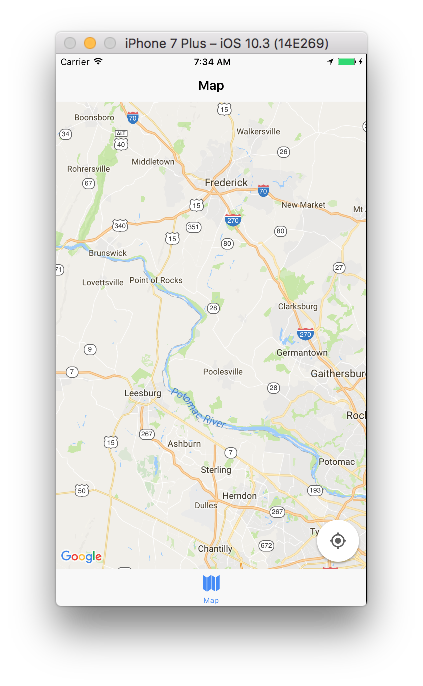
@SKempin I have no problem with your project files. I can see the map, control it.
wf9a5m75
on 9 Jun 2017
@wf9a5m75 Could you please push that change to the repo, so I can test on Android?
SKempin
on 9 Jun 2017
I only checked on the ios simulator.
I haven't changed hour code at all. Just installed the latest plugin.
wf9a5m75
on 9 Jun 2017
@wf9a5m75 oh figured out it was something with my css , i've already fixed it, but right now i'm still getting 10% of map and rest white more frequently on 2nd map. i made a commit so you could check
luisjjavier
on 9 Jun 2017
@wf9a5m75 Can you confirm how exactly you installed the latest plugin? I have just tested on an Android device but the page is still the same. Thanks.
SKempin
on 10 Jun 2017
I said I only checked on iOS.
wf9a5m75
on 10 Jun 2017
@wf9a5m75 Yes I understand, but can you please clarify how you installed the latest plugin?
SKempin
on 10 Jun 2017
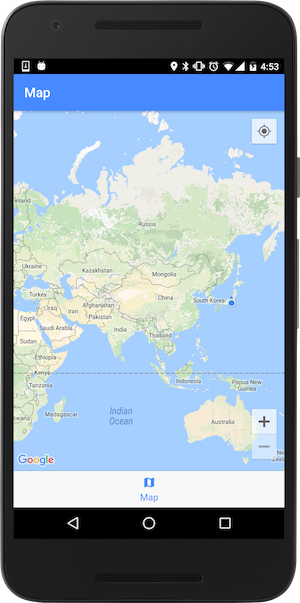
@SKempin Did you follow the crosswalk installation page ?
I followed this page, and worked your app.
Step1: Add <preference name="xwalkZOrderOnTop" value="true" /> and <preference name="BackgroundColor" value="0" /> to the config.xml
Step2: ionic cordova run android
(Since you need to rebuild your app with the config.xml file, you can not use Android Studio at this time)
wf9a5m75
on 11 Jun 2017
@wf9a5m75 Thanks very much, that has worked on the demo app on Android too. However I have now built up the rest of my app and ran into some consistent issues:
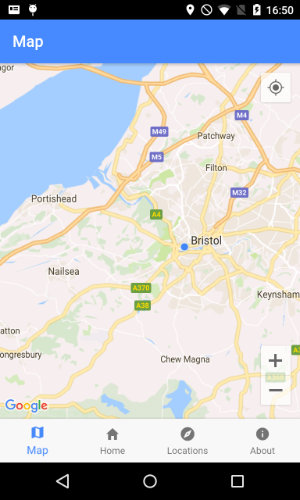
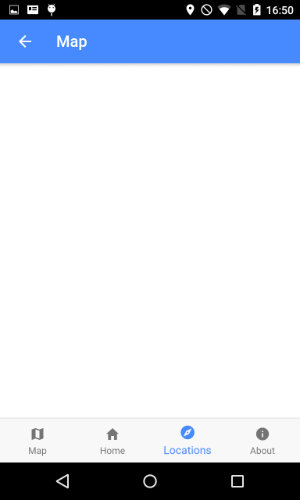
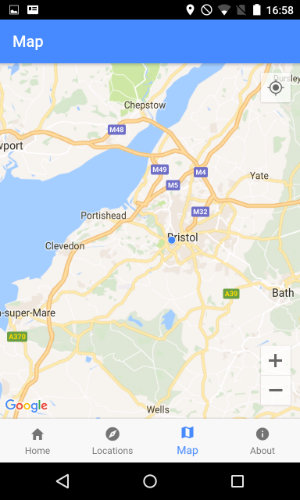
I now have multiple tabs (not just one with 'map). When the 'map' tab is first in the order, and this screen is the first to load, then the map works correctly. However I also link to the map page from another sub-page in my app. When opening the 'map' page from this sub-page, the map page is blank.
So... first tab is 'map' = correct behaviour:
But... opening the map from another page = a blank map page:
SKempin
on 11 Jun 2017
@wf9a5m75
Secondly, if the map page is not the first tab to load, then it remains blank, like in the original issue:
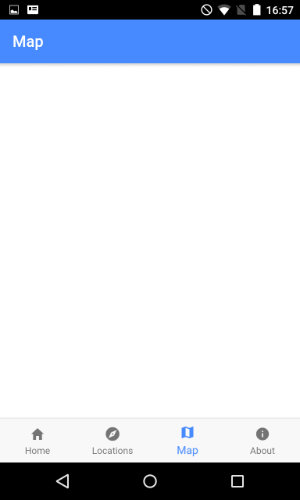
If however I then try and load the map page from a sub-page it is still blank, but then if i click the 'map' tab the map page functions correctly:
Would you like me to share my full repo code with you?
Many thanks for your time so far.
SKempin
on 11 Jun 2017
Please share your full code from the first time when you ask me something next time.
I have been so busy recently.
wf9a5m75
on 11 Jun 2017
@wf9a5m75 This was the full repo, I have now built up my project and encountered the listed issues. I will add you to the repo, your help is much appreciated. Thanks
SKempin
on 12 Jun 2017
@wf9a5m75 I have just added you to the Bitbucket repo. Thanks!
SKempin
on 12 Jun 2017
@wf9a5m75 Please let me know if you can't access that. Thank you.
SKempin
on 13 Jun 2017
Sorry for delay. I have been traveling currently. During the traveling, I have no internet access. I check each issues one by one when I have a time. Please wait
wf9a5m75
on 15 Jun 2017
@wf9a5m75 no problem, thank you.
SKempin
on 15 Jun 2017
@wf9a5m75 This has been solved by the fix suggested on https://github.com/mapsplugin/cordova-plugin-googlemaps/issues/256#issuecomment-309594480, however I can now only see a small portion of the map when I navigate to it from a sub page - https://github.com/mapsplugin/cordova-plugin-googlemaps/issues/256#issuecomment-309758583
SKempin
on 20 Jun 2017
I think I already fixed the bugs for this issue. Do you guys still face this issue?
wf9a5m75
on 27 Jun 2017
@wf9a5m75 What fix have you applied? I have circumnavigated the problem as described in #https://github.com/mapsplugin/cordova-plugin-googlemaps/issues/256#issuecomment-309594480
SKempin
on 27 Jun 2017
I already fixed couple of things.
https://github.com/mapsplugin/cordova-plugin-googlemaps-doc/blob/master/v2.0.0/ReleaseNotes/v2.0-beta2/README.md
And I think I already checked your repo. Did you try the latest version?
wf9a5m75
on 27 Jun 2017
@wf9a5m75 I will try updating again and check. Thanks
SKempin
on 28 Jun 2017
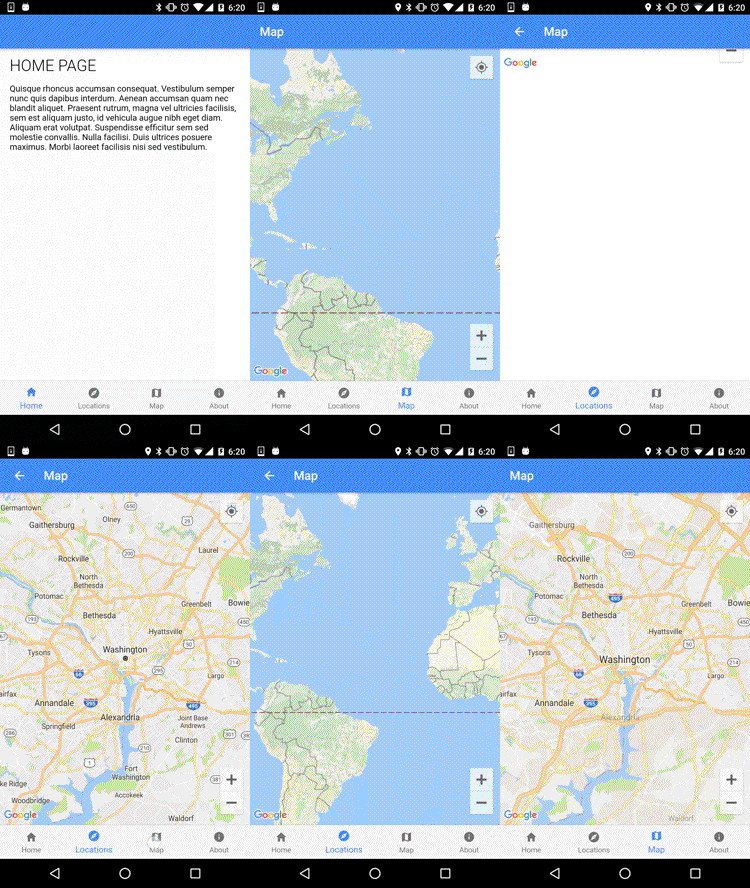
I committed some code to work your app.
I noticed that platform.ready() and ionViewDidLoad are fired only at once.
Because of this, after coming back to the map page from the about page, the map is not initialized.
(That's why the map view is not displayed).
I could not figure out how to catch the event changing the active tab page.
wf9a5m75
on 28 Jun 2017
@wf9a5m75 Thanks, much appreciated! Yes the active tab issue is something I've tried to fix previously, I will discuss with the Ionic community.
Since updating to version 2 of your plugin I have tried using your example code to create multiple markers as documented here, but cannot get this to work within Ionic. Would you like me to open a ticket for this with another example repo?
SKempin
on 28 Jun 2017
@SKempin ok
wf9a5m75
on 28 Jun 2017
i'll test this new release and i'll let you know
luisjjavier
on 28 Jun 2017
@wf9a5m75 I have created the new issue. The code is in the same Bitbucket repo that I shared, under a new branch multi-maps.
SKempin
on 29 Jun 2017
@luisjjavier ping
wf9a5m75
on 30 Jun 2017
@wf9a5m75 sorry for the delay,I've take some days off. After installing the new plugin its seems to work well, without troubles, i've using this answer as well #256
luisjjavier
on 4 Jul 2017
my map is showing gray background with google logo on the bottom right.
Please what am i doing wrong ?
 djokhar
on 20 Feb 2018
djokhar
on 20 Feb 2018
@djokhar do you have a valid and working API key? Have you zoomed out on the map?
SKempin
on 20 Feb 2018
wf9a5m75
on 20 Feb 2018
My map was not loading at tab pages although I could see source using chrome debugger. Its because I was using a percentage for map height. Converting percentage to pixel fixed it. Must re-run app again.
Hope it can help if someone facing an issue like this 👯♂️
 naumanahmed19
on 7 Mar 2018
naumanahmed19
on 7 Mar 2018
Is there a reason why the maps wont load with ionic cordova even with the lastest version. I have double checked my config and nothing seems wrong even made a new API key and enabled google maps API. Had this issue for a while.
 richie50
on 15 Mar 2018
richie50
on 15 Mar 2018
getting the same issue.
On android simulator, the map works fine.
When I build an apk with --aot --minifyjs --minifycss --release, the map disappears...
What should I do? and why does this happen? it's working well on simulator.
 jamesharvey2
on 23 May 2018
jamesharvey2
on 23 May 2018
@jamesharvey2 Have you checked you have a valid API key?
SKempin
on 23 May 2018
I fixed the issue by using z-index.
I set #map's z-index to 200 and others to lower z-index. Then map started to work fine on production build.
jamesharvey2
on 23 May 2018
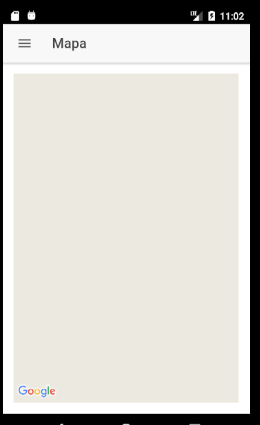
Error no me muestra el mapa no se si se requiera algún permiso
 walterGoSa
on 18 Aug 2018
walterGoSa
on 18 Aug 2018
Related issues
 vosecek
·
3Comments
vosecek
·
3Comments
 bigbossmaher
·
3Comments
bigbossmaher
·
3Comments
 BTW18
·
3Comments
BTW18
·
3Comments
 djett41
·
3Comments
djett41
·
3Comments
 lakano
·
4Comments
lakano
·
4Comments