Copyq: X selection and clipboard out of sync
After copying some text, Shift-Insert can paste it into terminals, browsers, but not telegram-desktop. I guess it might be that telegram-desktop uses X clipboard but it's not synced with current X selection?
 amosbird
All 25 comments
Can you check what following commands print and which one has correct text?
copyq selection
copyq clipboard
I believe that only some terminal application paste selection with Shift+Insert.
 hluk
on 12 Aug 2019
hluk
on 12 Aug 2019
copyq selection is correct. If I recall correctly, CopyQ keeps selection and clipboard in sync?
amosbird
on 12 Aug 2019
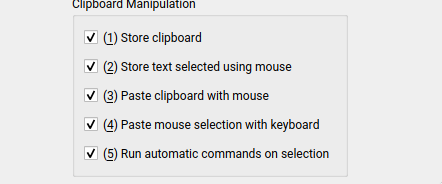
For the clipboard-to-selection sync you need to enable option "Paste clipboard with mouse" and the other direction option "Paste mouse selection with keyboard".
hluk
on 12 Aug 2019
I do, and it used to work.
amosbird
on 12 Aug 2019
I recently had issues with sync (both ways) - either with newer KDE or Qt. It was caused by seldom selection/clipboard timeouts. I have workaround in x11-fix-stuck-clipboard-access-2 branch but don't like to merge the patch because it's bit ugly (unblocks clipboard access by sending activate event to active window).
Could be the same issue. You could test it with following script which would occasionally stop for 5 seconds if you don't use keyboard and mouse and print empty clipboard content (press CTRL+C to stop the script).
```bash
copyq provideClipboard &>/dev/null &
trap exit INT
for x in $(seq 1000); do
time copyq clipboard application/x-copyq-owner || break
done
````
hluk
on 12 Aug 2019
Yes, I can reproduce the 5 seconds freeze
amosbird
on 12 Aug 2019
I'll try to improve the patch and push it to the next release.
hluk
on 13 Aug 2019
cool, can't wait to have it!
amosbird
on 13 Aug 2019
Hmm, actually I find out a consistent way of reproducing this issue. When copying some text with trailing new lines (or more than one lines), copyq selection and clipboard differs.
amosbird
on 15 Aug 2019
@hluk when populating clipboard with multiple line text, selection gets synced correctly. But when selection is filled with multiple line text, clipboard doesn't get any of those lines. Single line without any \n characters however works fine.
amosbird
on 16 Aug 2019
@amosbird Were your last two comments regarding a compiled version of CopyQ after the fixed commits? Or if you are not compiling, maybe you can try the new release from a few hours ago (https://github.com/hluk/CopyQ/releases/tag/v3.9.1) and see if the comments are still relevant to that version?
 scottkosty
on 18 Aug 2019
scottkosty
on 18 Aug 2019
Were your last two comments regarding a compiled version of CopyQ after the fixed commits
Yes. The issue still exists. Currently I use parcellite to sync clipboard and selection along with copyq.
amosbird
on 18 Aug 2019
Perhaps CopyQ is trying to hard NOT to synchronize selection.
You can try overriding the default behavior to avoid all the checks with following command.
[Command]
Command="
    global.synchronizeFromSelection = function() {
        serverLog('Synchronizing from selection')
        provideClipboard()
    }

    global.synchronizeToSelection = function() {
        serverLog('Synchronizing to selection')
        provideSelection()
    }"
Icon=\xf021
IsScript=true
Name=Simpler Selection Sync
With that command, copyq clipboard somehow hangs for 5 seconds.
amosbird
on 19 Aug 2019
With that command,
copyq clipboardsomehow hangs for 5 seconds.
Interesting. I cannot reproduce the delay. It could be related to other command. Do you use v3.9.1?
hluk
on 19 Aug 2019
@hluk 2d4d6c81 * origin/master X11: Use shorter interval to unstuck clipboard
amosbird
on 19 Aug 2019
Hmm, this issue happens again... Perhaps we need some other way of syncing selection/clipboard? parcellite works just fine
amosbird
on 28 Nov 2019
This is issue in some Qt version (Parcellite is using GTK+ I believe) -- in some cases it gets stuck because of incorrect mutex check (IIRC it's bug in this code).
But I haven't seen the issue in a while. It looks like it's fixed in Qt 5.12.5.
❯ copyq --version
CopyQ Clipboard Manager v3.9.3
Qt: 5.12.5
Compiler: GCC
Arch: x86_64-little_endian-lp64
OS: Fedora 31 (Workstation Edition)
Well I have just upgrade my Arch and perhaps it regressed
 ❯ copyq --version
CopyQ Clipboard Manager v3.9.2-80-gcee140dd
Qt: 5.13.1
Compiler: GCC
Arch: x86_64-little_endian-lp64
OS: Arch Linux
btw, do you think we should rely on system qt? perhaps we can have a shipped QT which is well-tested. I bet we don't rely on new QT features.
amosbird
on 28 Nov 2019
btw, do you think we should rely on system qt? perhaps we can have a shipped QT which is well-tested. I bet we don't rely on new QT features.
@amosbird It's not possible using the standard distro packages. But try installing the app using flatpak. I use few flatpak packages and it works quite well.
hluk
on 28 Nov 2019
It's not possible using the standard distro packages.
Hmm, at least telegram-desktop does that
amosbird
on 28 Nov 2019
It's not possible using the standard distro packages.
Hmm, at least telegram-desktop does that
I would leave it up to a package maintainer to ensure the app is updated on given distro. I don't think they normally want to build the dependencies for libraries in different versions than provided by the system (it would lead to some security issues).
hluk
on 28 Nov 2019
that flakpak package works fine. But it somehow doesn't use the local copyq's configuration. How can I migrate my config and scripts to that flatpak copyq?
amosbird
on 28 Nov 2019
You can export all configuration and items from one instance and import to the other.
Or copy the configuration directory (you can get the path by running copyq info config and flatpak run com.github.hluk.copyq info config) -- you should exit app instances first.
hluk
on 29 Nov 2019
Related issues
 nmat
·
6Comments
nmat
·
6Comments
 orschiro
·
7Comments
orschiro
·
7Comments
 gflex
·
5Comments
gflex
·
5Comments
 sebflipper
·
8Comments
sebflipper
·
8Comments
 gatopeich
·
3Comments
gatopeich
·
3Comments