Copilot-cli: Cert validation lambda times out resulting in validation error
Easy to deploy the application, copilot CLI worked weill but it doesn't work well after I developed new app with domain.
I could create app, env and svc but couldn't deploy svc. (although it worked well when I develop app without domain)
% copilot svc deploy --name [service-name] --env test
✘ execute "env upgrade --app [application-name]--name test": get template version of environment test in app [application-name]: get template summary for stack [cloudformation-name]: InvalidParameter: 1 validation error(s) found.
- minimum field size of 20, AssumeRoleInput.RoleArn.
And execute the following commands, but nothing changed
% copilot env upgrade --app [application-name] --name test
✘ get template version of environment test in app [application-name]: get template summary for stack [cloudformation-name]: InvalidParameter: 1 validation error(s) found.
- minimum field size of 20, AssumeRoleInput.RoleArn.
So I tried to delete svc or env in copilot, it always results the same like following.
% copilot svc delete [service-name]
Only found one service, defaulting to: [service-name]
Are you sure you want to delete api from application [application-name]? Yes
✘ Failed to delete service [service-name] from environment test: delete stack [application-name]-test-api: InvalidParameter: 1 validation error(s) found.
- minimum field size of 20, AssumeRoleInput.RoleArn.
.
✘ delete service: delete stack [application-name]-test-api: InvalidParameter: 1 validation error(s) found.
- minimum field size of 20, AssumeRoleInput.RoleArn.
I can't figure out what's going on.
Using version is here
% copilot -v
copilot version: v1.0.0
thanks in advance
 ainoue1995
All 26 comments
Hi @ainoue1995 !
Would you mind upgrading to the latest version of the CLI (v1.2) and trying again to see if it's the same error? https://aws.github.io/copilot-cli/docs/getting-started/install/
My hypothesis is that there is something weird happening with two of the roles that Copilot creates. If the new version doesn't work, can you take a look to see if the following IAM roles exist in the console:
[application-name]-test-EnvManagerRole[application-name]-test-CFNExecutionRole
both of these roles should be tagged with the keyscopilot-applicationandcopilot-environment
 efekarakus
on 14 Feb 2021
efekarakus
on 14 Feb 2021
Hi @efekarakus !
Thanks for replying.
I upgraded cli version but it's the same error.
And I checked I AM console, confirmed that there are these roles with the keys them.
ainoue1995
on 15 Feb 2021
This is so strange! Was the environment created with a version before v1.0?
Few more avenues that we can investigate:
- Copilot stores metadata about your application in SSM Parameter Store. Would you mind taking a look at the
copilot/applications/{appName}/environments/testparameter and see if there is a value for themanagerRoleARNand theexecutionRoleARN?
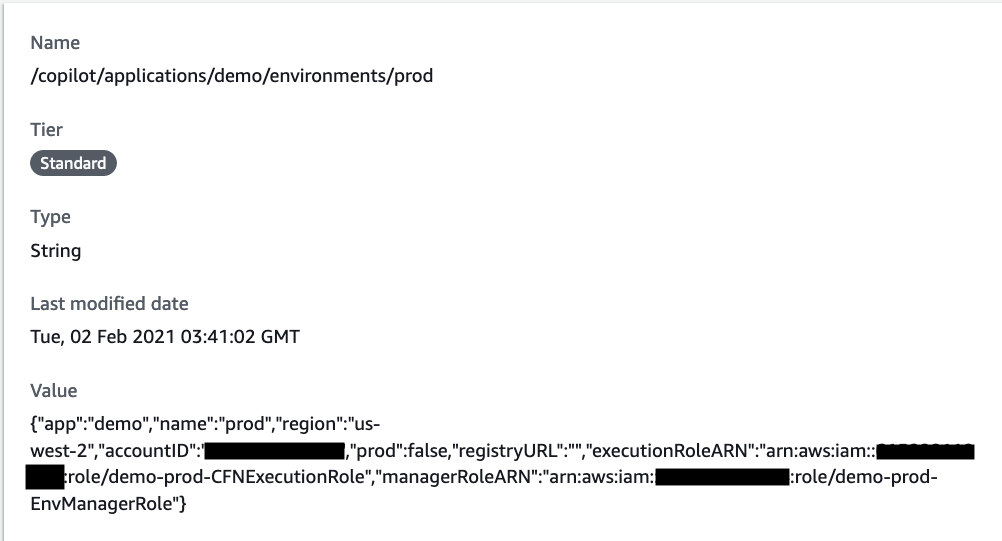
- How are the application credentials passed to Copilot?
Worst case to clean up everything manually 🙇♂️ apologies for the inconvenience:
- Delete the CloudFormation stack for the environment.
- Delete the stack instance for the application and then the stackset.
- Delete the
/copilot/parameters in SSM.
efekarakus
on 15 Feb 2021
I'm sure that current application was created with v1.0.0.
Here is the parameter
Both of them the managerRoleARN and the executionRoleARN have not been set.
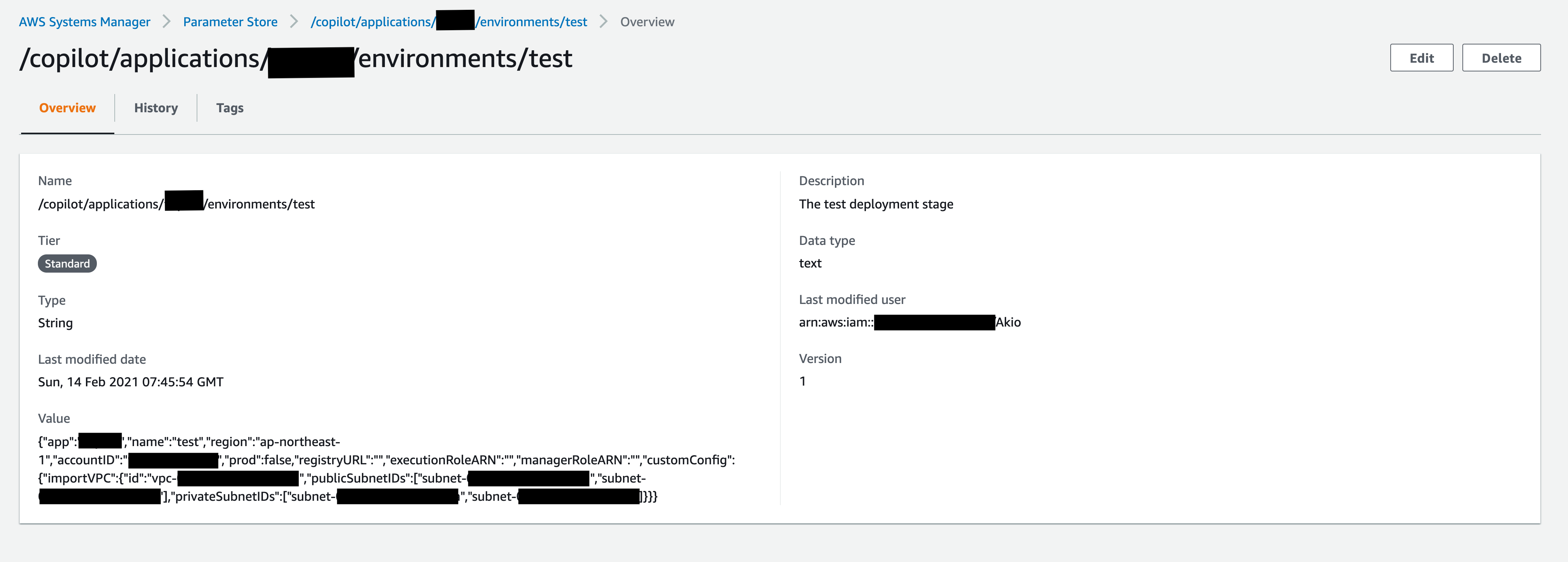
No worries at all.
I am looking forward to what this Copilot contributes!
ainoue1995
on 16 Feb 2021
Okay! I think that's the reason why the CLI is failing, both of these fields managerRoleARN and executionRoleARN should not be empty. I wonder how this happened 🤔
Would you mind editing the parameter and entering the ARN values in the JSON? I think that will unblock you.
{
"executionRoleARN": "arn:aws:iam::{accountID}:role/{appName}-test-CFNExecutionRole",
"managerRoleARN": "arn:aws:iam::{accountID}:role/{appName}-test-EnvManagerRole",
}
We will investigate in the mean time how this could have happened.
efekarakus
on 16 Feb 2021
To help us investigate 🙏 , would you mind taking a look at the CloudFormation stack {appName}-test and checking the following info:
- Do you see a
Metadatafield with a version in theTemplateof the stack? If so what is the version?
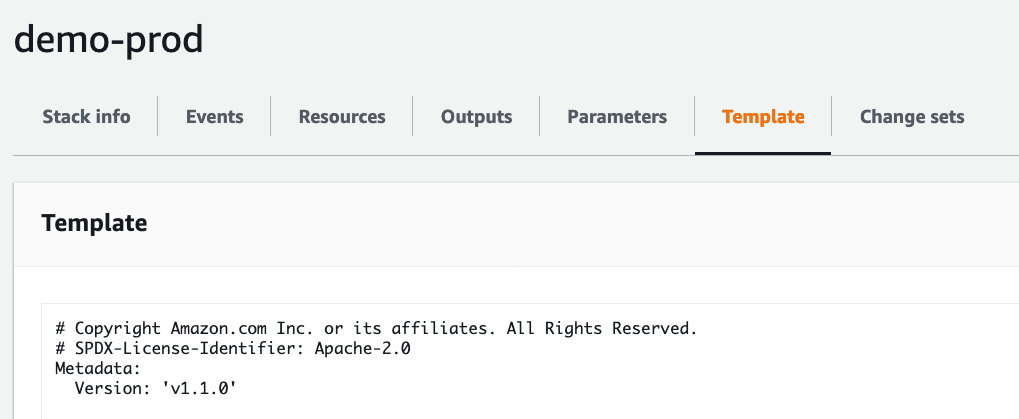
Under
Outputsdo you see outputs for the IAM roles?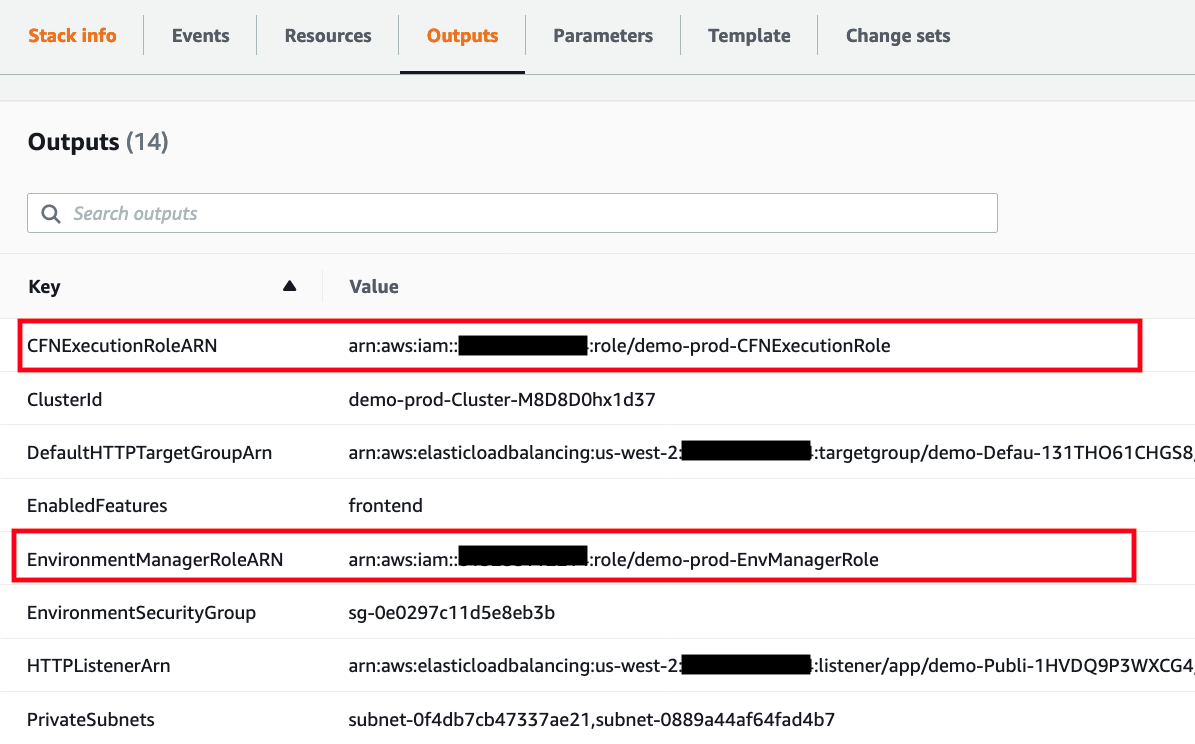
efekarakus
on 16 Feb 2021
Thanks! After setting roles right places, Copilot started to work well, but couldn't finish delete all.
Before I issued here, I tried to fix this problem myself and manually deleted some resources including CloudFormation stacks, so that's the reason why I guess.
Thus perhaps the data following are not expected value here.


ainoue1995
on 18 Feb 2021
Awesome, thanks for letting us know!
Yeah I think Copilot got into a weird state with the manual interventions, your outputs look good to me. Let me know if I can help deleting any of the remaining resources that Copilot failed to clean up.
Please feel free to re-open the issue if you see a similar behavior!
efekarakus
on 18 Feb 2021
Hi, I had a problem that env cannot be created.
The cli keep showing "create in progress" like following. And stack on CloudFormation still shows CREATE_IN_PROGRESS.
- Creating the infrastructure for the ${appName}-test environment.      [create in progress]  [1285.1s]
  - An IAM Role for AWS CloudFormation to manage resources           [create complete]    [21.5s]
  - An ECS cluster to group your services                            [create complete]    [12.3s]
  - An IAM Role to describe resources in your environment            [create complete]    [21.6s]
  - A security group to allow your containers to talk to each other  [create complete]    [3.1s]
I thought I could clean up the remaining resources related with the app I created before, but it seems not to be clean up because I couldn't clean up?
Things I did are:
- deleted roles with the name like "[app-name]-[env-name]-xxxx"
- deleted stack on CloudFormation
- deleted SSM parameters
- deleted S3 buckets
Are there anything else remaining resources I should delete?
ainoue1995
on 20 Feb 2021
hi! would you mind taking a look at the CloudFormation stack in the console for "tripass-test" to see if there is any resource in there that might explain why the stack is stuck in progress?
The resources you previously deleted look good to me
efekarakus
on 20 Feb 2021
I found that the status of HTTPSCert "Custom::CertificateValidationFunction" is CREATE_IN_PROGRESS.
I checked out why this stack is stuck in progress, but the records related with this certificate was added in Route53 in right place.
I can't find why the validation status of certificate still shows "Pending validation".
The stack to create env did not complete successfully and tried to do rollback but it failed in the end.
ainoue1995
on 21 Feb 2021
I experienced the same issue today. I initiated a new environment with a domain that was i Route53 but had expired (which i learned later on).
It actually completed all but the last step, where it waited forever.
When i tried to delete the environment it gave me the same error " get template version of environment test in app [application-name]: get template summary for stack [cloudformation-name]: InvalidParameter: 1 validation error(s) found.
- minimum field size of 20, AssumeRoleInput.RoleArn.", - Which eventually led me to this thread.
copilot cli 1.20
 z00dev
on 23 Feb 2021
z00dev
on 23 Feb 2021
Hi folks!
Thanks for adding the additional details. Okay, we'll start investigating this by trying to reproduce it with the following steps:
- Replace the code for our
CertificateValidationFunctionso that it times out - Try to delete the environment to see if we get the "minimum field size of 20, AssumeRoleInput.RoleArn.", "
I've reopened the issue for us to keep track of it.
efekarakus
on 23 Feb 2021
Hello @z00dev, @ainoue1995. I was trying to reproduce the error and here are the steps that I followed:
I manually changed the code in
CertificateValidationFunctionto make it time out in the very last step when validating the certificate:
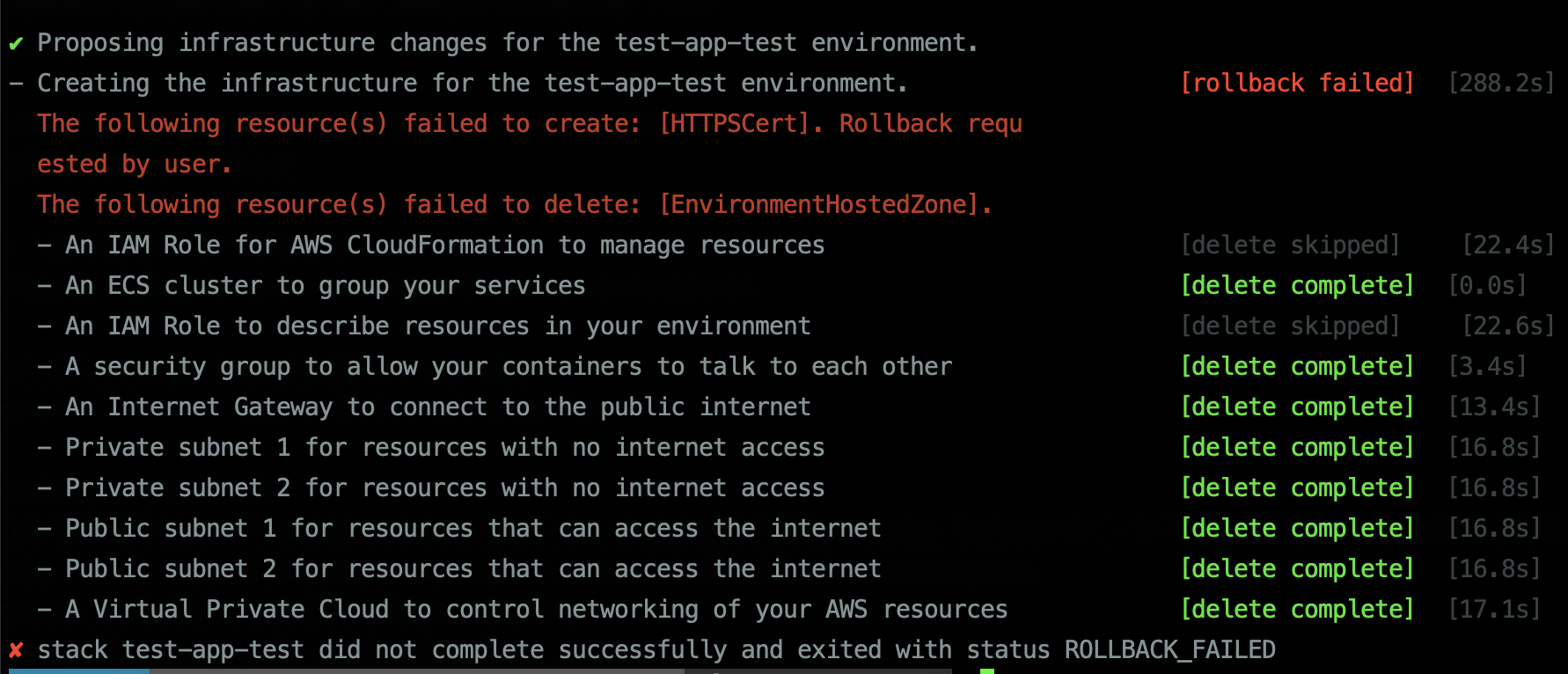
I couldn't runcopilot env deleteto delete the environment, since it hadn't created any SSM record yet.Went to the Route53 console to delete the remaining hosted zone.
- Deleted the rollbacked CFN stack.
- Deleted the remaining CFN execution role and environment manager role.
I think the error-prone step is you have to delete the CFN stack, before deleting those two IAM roles. Otherwise you'll fail to delete the CFN stack (also remember to delete any CFN dangling resources).
Additionally, if any failure happens when creating the environment, for now you are supposed to delete those resources manually instead of using env delete, since creating SSM parameter for this env would be the last step for env init and Copilot hasn't created any SSM parameter yet.
 iamhopaul123
on 23 Feb 2021
iamhopaul123
on 23 Feb 2021
@iamhopaul123
OK I understood how to delete remaining sources when failed.
But is there any reason why that CertificateValidationFunction is not working correctly when creating env?
ainoue1995
on 28 Feb 2021
Hello @ainoue1995. Im not sure why it is not working. Sometimes it takes really long time to wait for the cert changing to "verified" status. Maybe try it again to see if it works? Also please make sure the domain you are using is valid in your account (not expired although i think on our end we should also do the check). If it is not working still could you please send us the log of the lambda naming as ${appName}-${envName}-CertificateValidationFunction-${uuid}?
iamhopaul123
on 1 Mar 2021
It was my domain setting went wrong, and now it worked well with copilot app init xxx. Sorry 🙏
And I ran into the problem that I cannot deploy Load Balanced Web Service svc at the moment.
Here is logs
- Creating the infrastructure for stack ${appName}-dev-web                                [rollback complete]         [87.2s]
  The following resource(s) failed to create: [EnvControllerAction]. Rol
  lback requested by user.
  - Service discovery for your services to communicate within the VPC                  [delete complete]           [3.1s]
  - Update your environment's shared resources                                         [update rollback complete]  [28.1s]
    The following resource(s) failed to create: [PublicLoadBalancer].
    - A security group for your load balancer allowing HTTP and HTTPS traffic          [delete complete]           [0.0s]
    - An Application Load Balancer to distribute public traffic to your services       [delete complete]           [3.1s]
      A load balancer cannot be attached to multiple subnets in the same Ava
      ilability Zone (Service: AmazonElasticLoadBalancing; Status Code: 400;
       Error Code: InvalidConfigurationRequest; Request ID: 8c49de58-664f-44
      49-98a8-ab7321942694; Proxy: null)
  - An IAM Role for the Fargate agent to make AWS API calls on your behalf             [delete complete]           [3.1s]
  - A CloudWatch log group to hold your service logs                                   [delete complete]           [3.1s]
  - An ECS service to run and maintain your tasks in the environment cluster           [not started]
  - A target group to connect the load balancer to your service                        [delete complete]           [0.0s]
  - An ECS task definition to group your containers and run them on ECS                [not started]
  - An IAM role to control permissions for the containers in your tasks                [delete complete]           [3.1s]
✘ deploy service: stack ${appName}-dev-web did not complete successfully and exited with status ROLLBACK_COMPLETE
I set my env called dev with a vpc, 2 public-subnets and 2-private-subnets.
I'm sure that it used to work when I create app without domain and prepared vpc, but struggling with using existing resources now.
ainoue1995
on 14 Mar 2021
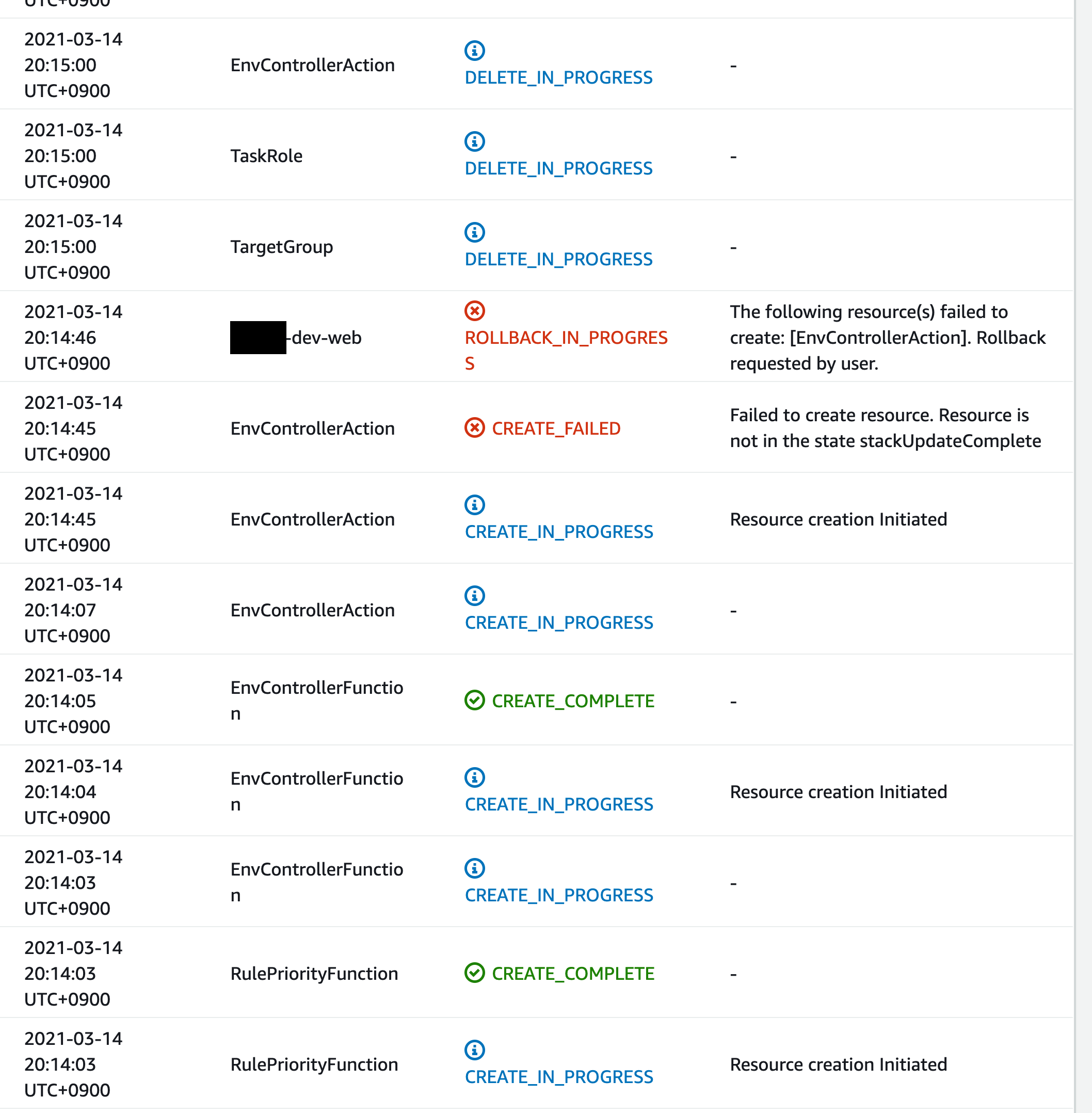
So sorry @ainoue1995. Totally forgot to reply this thread. Glad to see you solved the cert validator problem! As for this one, the log doesn't seem to be very helpful, but it seems like EnvControllerAction is not created successfully. Would you mind going to the CFN console to see the details on why this one failed to create?
iamhopaul123
on 14 Mar 2021
Here is a part of details on CFN console.
I don't actually figure out what 'resource is not in the statestackUpdateComplete' indicates.
ainoue1995
on 16 Mar 2021
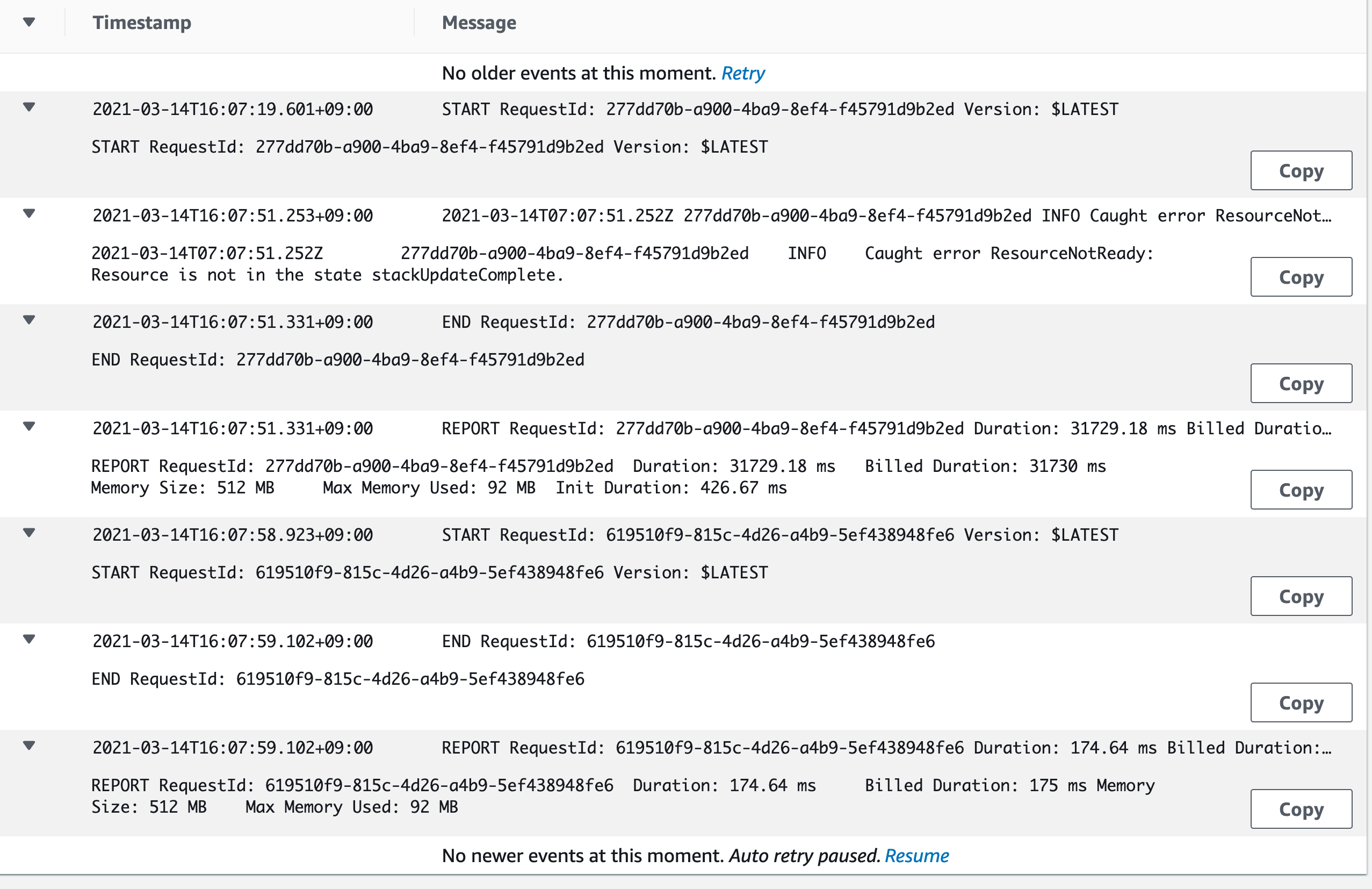
Oh it seems like the custom resource EnvController failed to be created. Unfortunately the error log is in its own log group named like /aws/lambda/{appName}-{envName}-{svcName}-EnvControllerFunction-13UZ3BSMGRWEY. Maybe you could find some interesting logs over there. Could you take a look at the log group?
iamhopaul123
on 17 Mar 2021
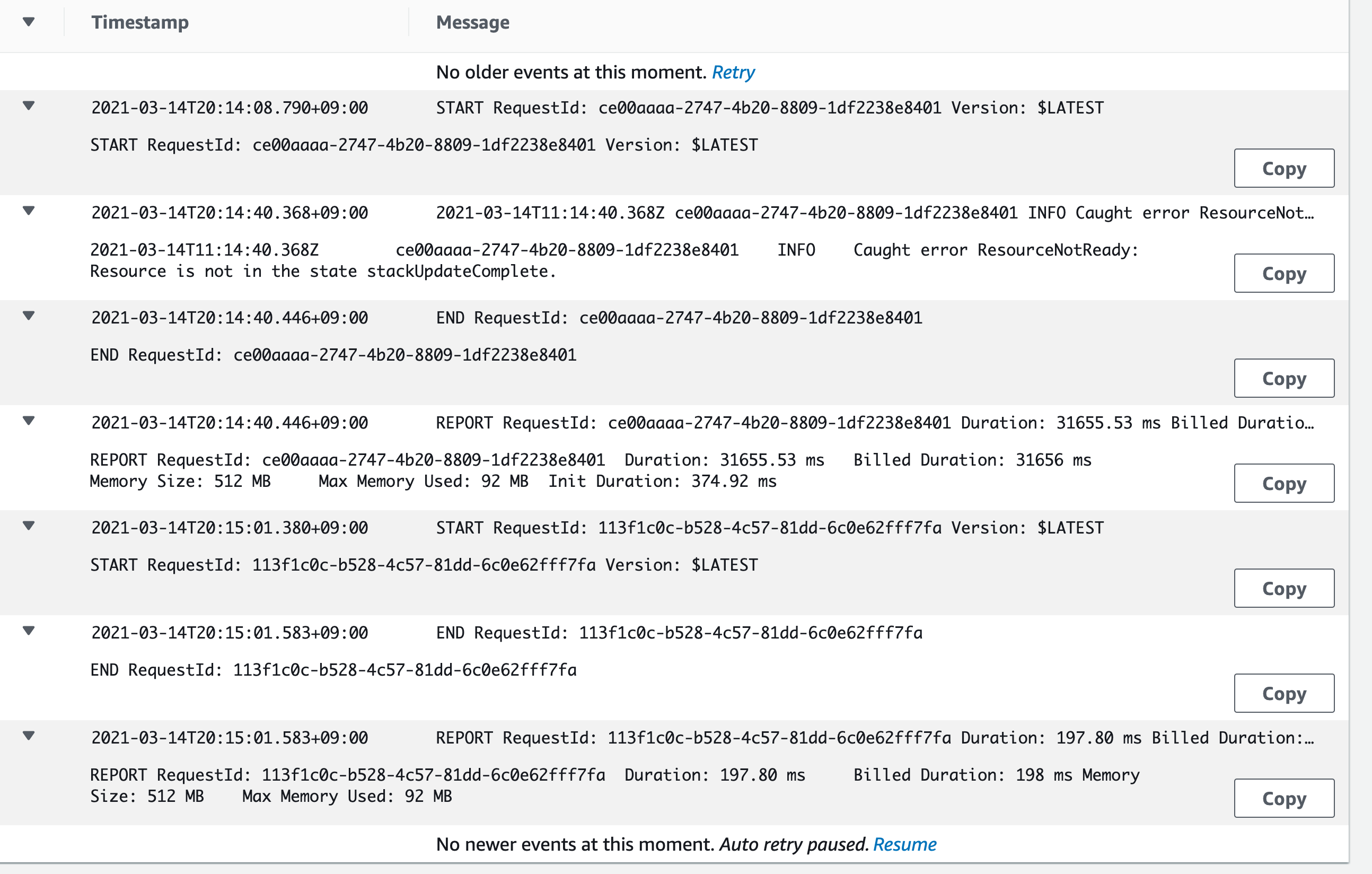
Do you find something strange in these three logs in log group?
It just shows Resource is not in the state stackUpdateComplete
ainoue1995
on 19 Mar 2021
I can't tell a lot from the log and I tried to search the request ID but it is outdated. What version of Copilot are you using? Could you update to the latest version and try to delete the env and then create the env and deploy again? Thank you!
iamhopaul123
on 19 Mar 2021
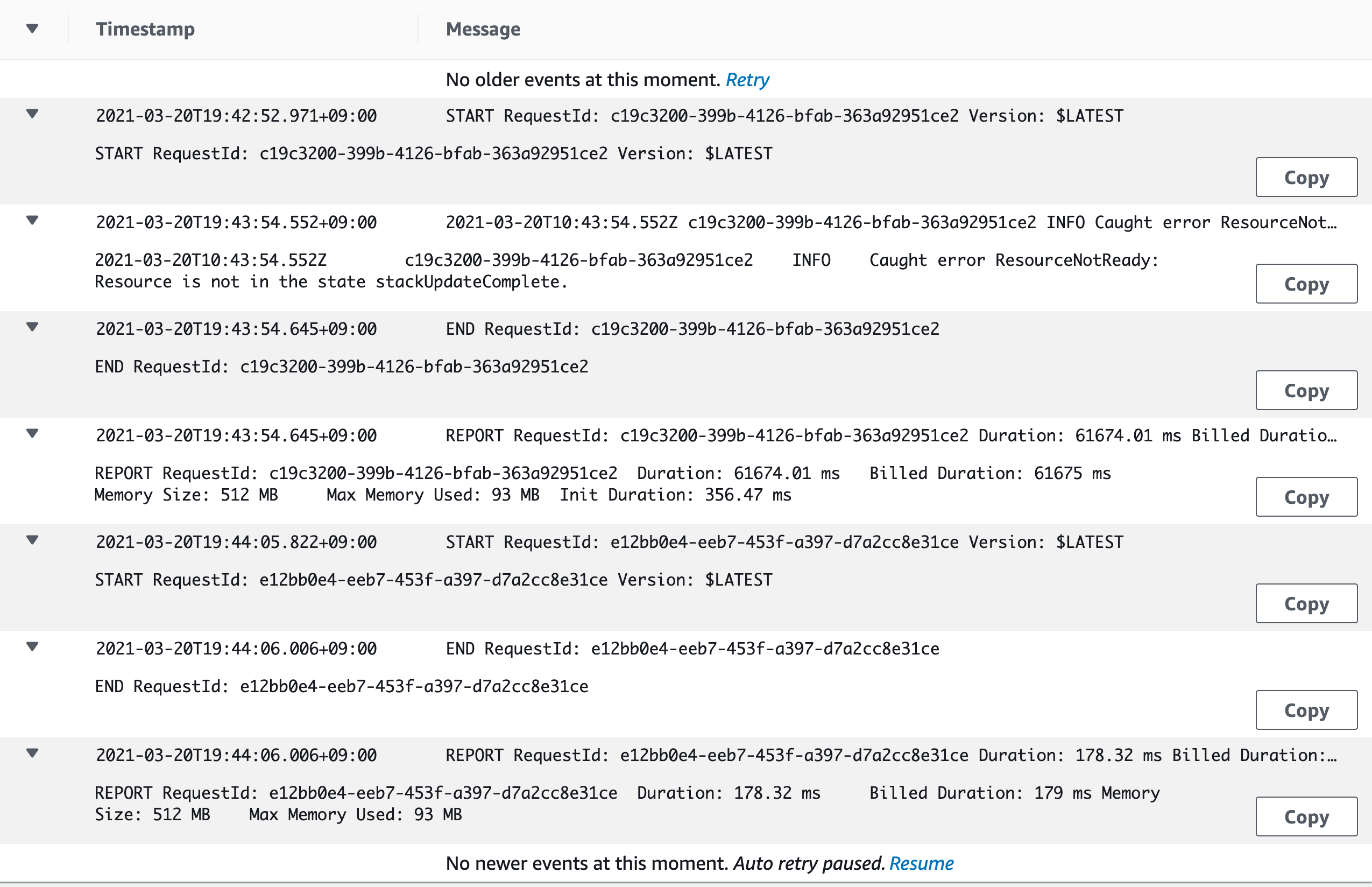
I updated copilot to the latest(v1.4.0) and tried to create app, env, svc the same as the above.
But it resulted almost the same.
ainoue1995
on 20 Mar 2021
Oooh ok I think I found the reason. Did you keep using the same app name, env name and svc name? I was wondering if it is because there was a failed deployment of your env stack which is named as {{app name}}-{{env name}} and it is not in an update-able state. Could you try to delete all the failed Cloudformation stack in your account to make sure a clean start? Thank you!
iamhopaul123
on 22 Mar 2021
Though I checked that there were no failed cfn stacks and did cli commands, I couldn't make it.
I tried to create app with different name in each app, env and svc, but it resulted in the same at the end.
ainoue1995
on 28 Mar 2021
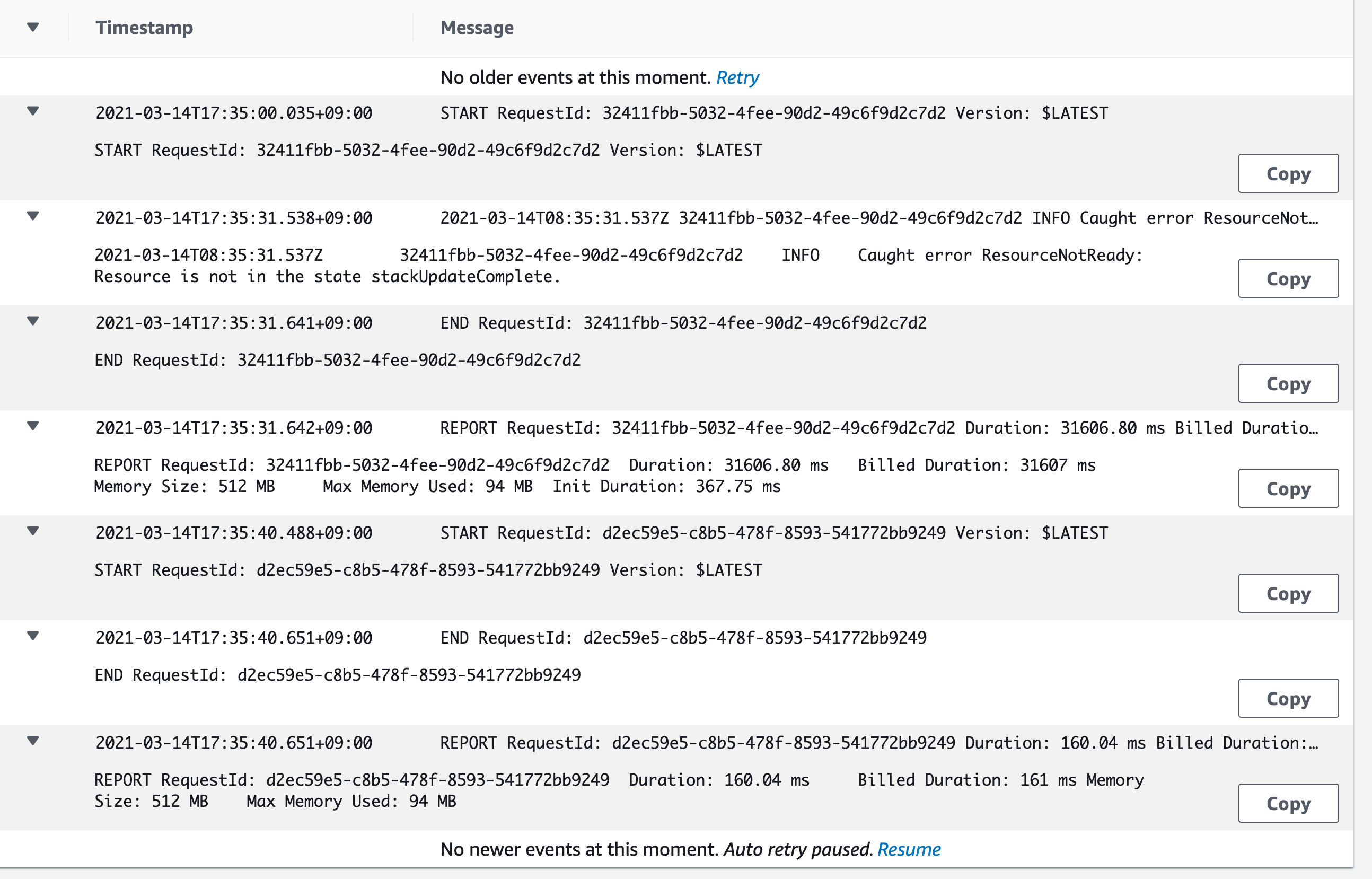
As for reference this is my env controller lambda log
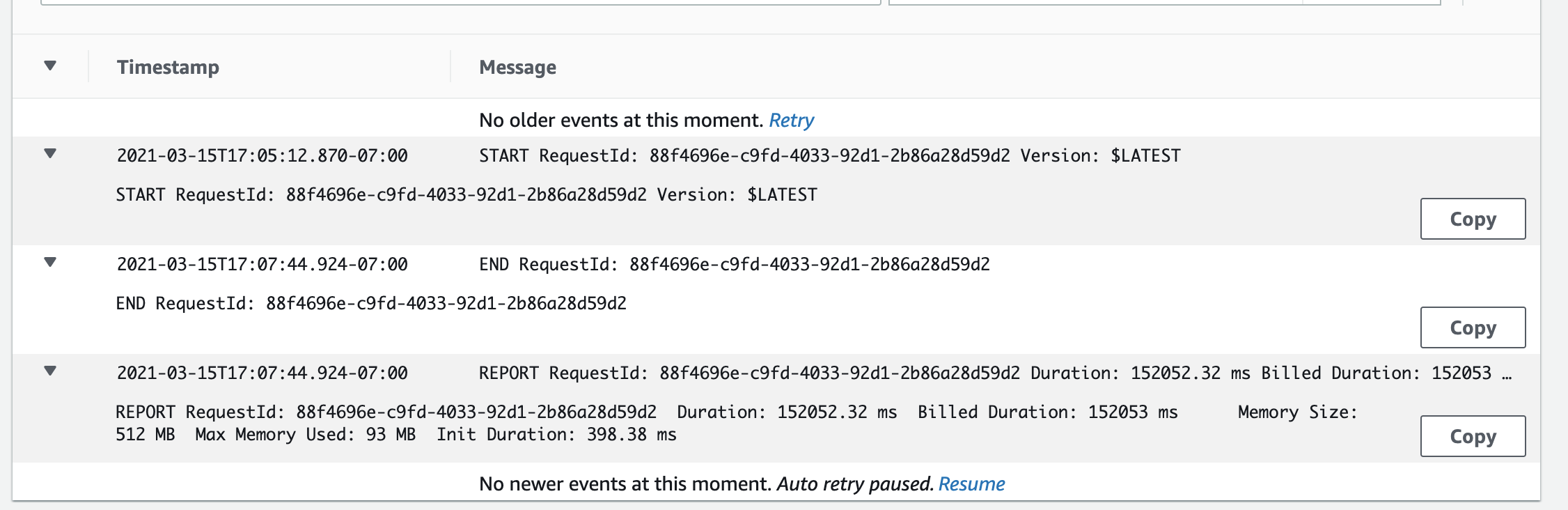
And it usually takes more than 2 minutes because we need to update the env stack to create the load balancer etc. It seems like it failed after 1 min-ish for your lambda waiting for the env stack to be the state stackUpdateComplete. I wonder if somehow you set the timeout configuration for this?
iamhopaul123
on 29 Mar 2021
Related issues
efekarakus
·
3Comments
 BenediktMiller
·
3Comments
BenediktMiller
·
3Comments
 kohidave
·
3Comments
kohidave
·
3Comments
 fullstackdev-online
·
3Comments
fullstackdev-online
·
3Comments
 efe-selcuk
·
3Comments
efe-selcuk
·
3Comments