Copilot-cli: List "prod" environments at the bottom
Ask
Sort environments when prompting such that environments with Prod=true appear last.
https://github.com/aws/amazon-ecs-cli-v2/blob/5f136e4e44383d8319af4b6b19d6eba966f8ab81/internal/pkg/archer/env.go#L14
Context
When running "app deploy" or any other commands that require an environment as input, by default we list the environments in the order that they were added to SSM.
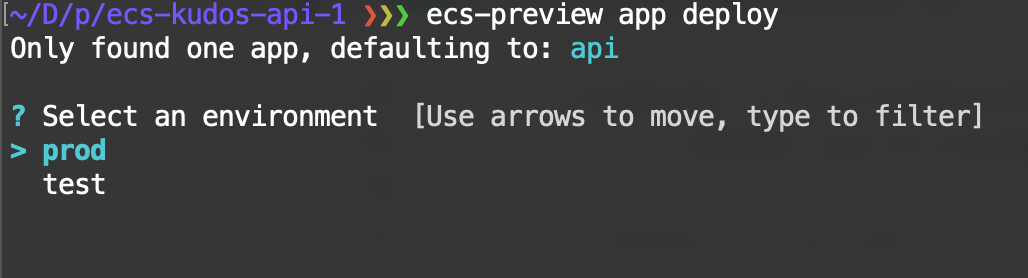
The problem is that usually production environments are created last, and if a user just blindly keeps pressing the enter-key then they can fat finger a deployment to a production environment.
Instead if the order in the list was:
> test
> prod
this would make it unlikely that a user accidentally deploys to a production environment.
 efekarakus
All 3 comments
happy to take a shot at it. first timer to this repo any extra pointer could i have?
 sandyleo26
on 6 Mar 2020
sandyleo26
on 6 Mar 2020
@sandyleo26 yay, thank you!
Check out the env.go file in the store pkg:
https://github.com/aws/amazon-ecs-cli-v2/blob/5f136e4e44383d8319af4b6b19d6eba966f8ab81/internal/pkg/store/env.go#L79-L96
Right now it just grabs the environments in whichever order they were stored in SSM.
We can sort the slice so that:
- non-prod environments appear first
- sorted alphabetically within that
See this for an example:
https://github.com/aws/amazon-ecs-cli-v2/blob/5f136e4e44383d8319af4b6b19d6eba966f8ab81/internal/pkg/cli/app_show.go#L169-L170
Once you have your changes ready, you can just run make test to ensure that the new test cases and old ones pass!
efekarakus
on 6 Mar 2020
thanks @efekarakus for the detailed info. very helpful. PR ready to have a look.
sandyleo26
on 7 Mar 2020
Related issues
 noahjahn
·
3Comments
noahjahn
·
3Comments
 kohidave
·
3Comments
kohidave
·
3Comments
 BenediktMiller
·
3Comments
BenediktMiller
·
3Comments
 camilosantana
·
3Comments
camilosantana
·
3Comments
 iamhopaul123
·
3Comments
iamhopaul123
·
3Comments