Copilot-cli: Feature request: a verbose option for most commands
When I run env init or svc init the tool prints out super informative, helpful, and useful status info; essentially a task list of the various things that need to be done, and their status. This helps provide transparency and also build confidence that the right stuff is happening, and that progress is being made.
$ copilot env init ...
⠸ Creating the infrastructure for the avi-test environment.
- Virtual private cloud on 2 availability zones to hold your services     [Complete]
  - Internet gateway to connect the network to the internet               [Complete]
  - Public subnets for internet facing services                           [Complete]
  - Private subnets for services that can't be reached from the internet  [Complete]
  - Routing tables for services to talk with each other                   [Complete]
- ECS Cluster to hold your services                                       [Complete]
- Application load balancer to distribute traffic                         [In Progress]
OTOH when I run most of the other commands, such as svc deploy, svc delete, task run and others, I get only a very high-level summary, with a spinner:
$ copilot app delete
Are you sure you want to delete application plotwatt? Yes
✔ Deleted service pienado from environment test.
✔ Deleted service pienado resources from application plotwatt.
✔ Deleted service pienado from application plotwatt.
⠦ Deleting service shared-dummy from environment test.
This is nice and elegant (really, kudos!) but personally I’d prefer more verbosity here; perhaps we could think of them as substeps... I’d love to have those substeps shown as part of the above processes, while they’re executing, if I specify --verbose or -v as a CLI option.
Thank you!!!
 aviflax
All 5 comments
I really want to improve our UX during service deployments/deletions! Thanks for the issue, a customer request will help us prioritize it :)
 efekarakus
on 24 Sep 2020
efekarakus
on 24 Sep 2020
Great! And thanks for the response — it’s always good to hear that the time taken to report/request these sorts of things was/is worth spending.
aviflax
on 24 Sep 2020
Copying additional UX feedback here from https://github.com/aws/copilot-cli/issues/1368#issuecomment-700686981
- When deploying a service, which generally entails starting the service and waiting for it to be up and running, show the logs of the service tasks as they start up — just stream them right to the terminal.
- When deploying a service, show all the various CF resources being created/updated and their status/progress.
- I had a service that was stuck in "deploying" at the CLI, and creating/updating (don’t recall) in CF. When I took a closer look at the tasks of the service — after ~10–15 mins — I found that there had already been a dozen tasks that had been created, and failed; I just hadn’t been aware that that was happening. I had to go look. Once I did, there was a useful error message under the “reason” field of the task in the Console, and the task logs were helpful too. But I wasted time just sitting around waiting for something to happen, and getting frustrated, before I went to look. So it would have been better for the tool to have surfaced what was going on, proactively, even though that was all happening at a deeper level.
efekarakus
on 29 Sep 2020
Hi @aviflax !
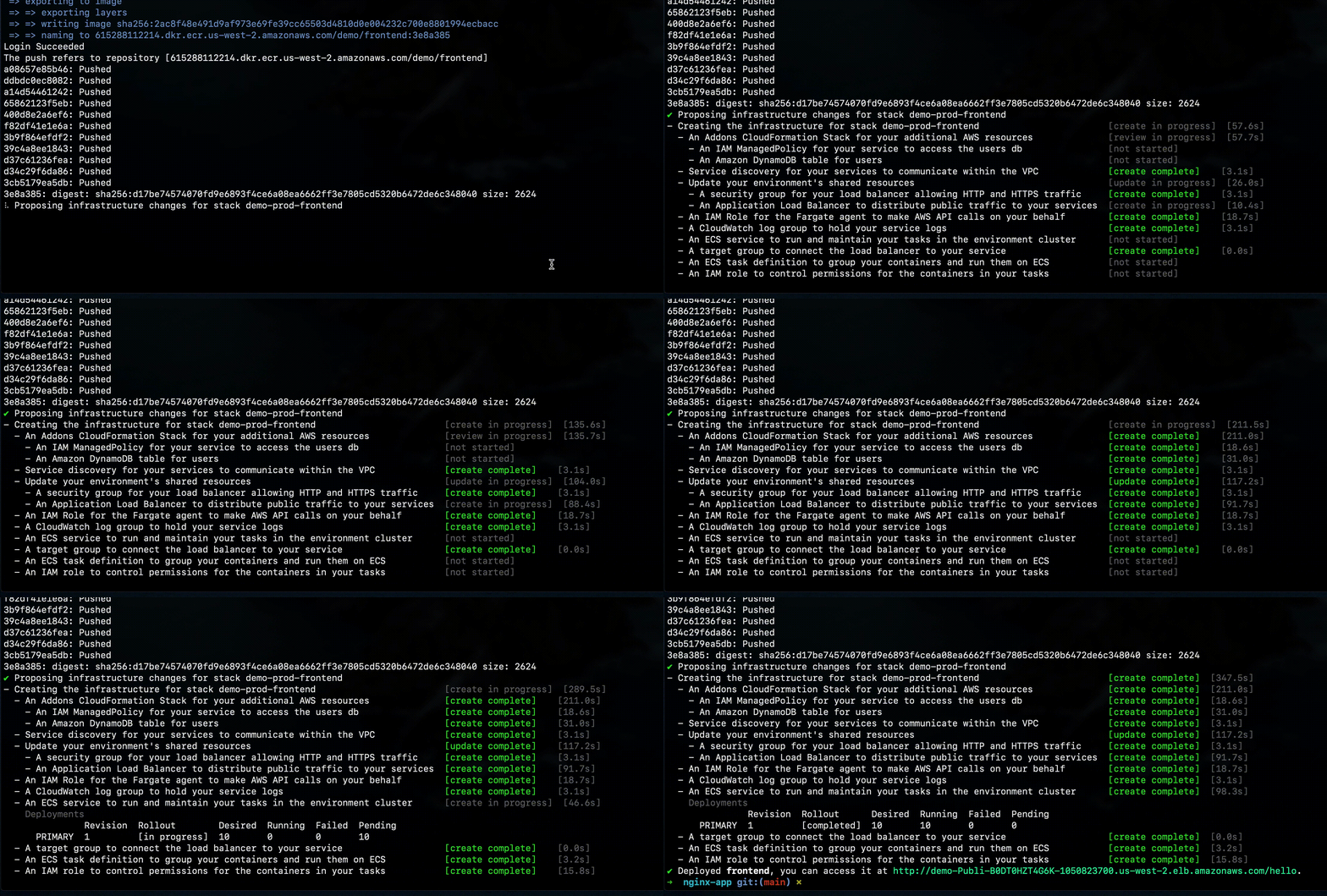
This is now released in https://github.com/aws/copilot-cli/releases/tag/v1.2.0! Here is a sample gif of what you'll see when you run copilot deploy:
efekarakus
on 4 Feb 2021
Very nice! Thank you, and thanks for the follow up!
aviflax
on 4 Feb 2021
Related issues
 noahjahn
·
3Comments
noahjahn
·
3Comments
 kohidave
·
3Comments
kohidave
·
3Comments
 bvtujo
·
3Comments
bvtujo
·
3Comments
 efe-selcuk
·
3Comments
efe-selcuk
·
3Comments
 mikelhamer
·
3Comments
mikelhamer
·
3Comments
Most helpful comment
Hi @aviflax !
This is now released in https://github.com/aws/copilot-cli/releases/tag/v1.2.0! Here is a sample gif of what you'll see when you run

copilot deploy: