Copilot-cli: Feature: settings custom resource tags
Description
As it looks there is no possibility to add custom resource or stack tags to CloudFormation stacks at the moment. However, this is important for us for billing purposes and automations (among others).
Workaround
My current solution would be to manipulate the generated {app}.params.json file and add entries to the Tags section. This way the user is responsible for customizing the output, on the other side we need to implement stuff around ecs-cli.
Proposal
Enhance the *.app.yml files to support a new property resourceTags which is empty by default. This way the generator for the stack and parameter files could use the property if set.
 thomasklinger1234
All 20 comments
@thomasklinger1234 thanks for the request!
To make sure that I understand the request correctly, do you want a mechanism to add tags to all the resources in the CFN stack?
Or do you want to apply tags specifically to individual resources?
 efekarakus
on 26 Feb 2020
efekarakus
on 26 Feb 2020
@thomasklinger1234 thanks for the request!
To make sure that I understand the request correctly, do you want a mechanism to add tags to all the resources in the CFN stack?
Or do you want to apply tags specifically to individual resources?
Yes, I would like to tag the application stacks ({project}-{env}-{app}) individually and use CFN tag propagation for the moment. For example, we require the use of environment, service and team tags for analyzing cost which is currently not possible with ecs-cli
thomasklinger1234
on 26 Feb 2020
I'd like to +1 this, but to add another point of view: I've worked at two companies who have automation that will delete resources that are not tagged correctly. Which makes the ECS CLI only usable for 5 mins at a time 😅
 aidansteele
on 10 Mar 2020
aidansteele
on 10 Mar 2020
Capturing additional feedback to be implemented with this task:
I see tags on the cluster, service, target group, task definition, repo, VPC, subnets, route table - but not the ECS task! Can we please have tags propagated to the tasks? That will help with cost allocation.
efekarakus
on 10 Mar 2020
We'll have to figure out a way to do this add tags for the environments, but this might be a nice project level config.
 kohidave
on 10 Mar 2020
kohidave
on 10 Mar 2020
We are thinking of doing the following changes to support this feature:
- You'll be able to specify tags while initializing a project so that all resources in your project will have these tags.
bash $ ecs-preview project init --help ... Flags --tags stringToString Labels with a key and optional value separated with commas. Allows you to categorize resources in your project. Examples `$ ecs-preview project tag --tags owner=MyOrg,retain,confidentiality=public` - The application manifest will have the following extra optional field:
yaml
tags:
<ul>
<li>key: user<br />
value: Developer</li>
<li>key: owner<br />
value: MyOrg</li>
<li>key: confidentiality<br />
value: public<br />
If your project has already the tag key defined, then the application tag will override the project tag's value. - When you run an
[entity] showcommand, likeapp showyou'll see a section with the tags applied to the CFN stack.
efekarakus
on 20 Mar 2020
We are thinking of doing the following changes to support this feature:
- You'll be able to specify tags while initializing a project so that all resources in your project will have these tags.
shell
$ ecs-preview project init --help
...
Flags
  --tags stringToString Labels with a key and optional value separated with commas.
                        Allows you to categorize resources in your project.
Examples
 `$ ecs-preview project tag --tags owner=MyOrg,retain,confidentiality=public`
The application manifest will have the following extra optional field:
tags:
- key: user
  value: Developer
- key: owner
  value: MyOrg
- key: confidentiality
  value: public
If your project has already the tag key defined, then the application tag will override the project tag's value.
- When you run an
[entity] showcommand, likeapp showyou'll see a section with the tags applied to the CFN stack.
+1 for that. two simple questions regarding the implementation:
- will it be possible to set dynamic tags on deployment? we are usually adding a
source/revisiontag with the id of the git commit that triggered the deployment dynamically when doingaws cloudformation deploy - are there any benefits when using a list for
tagsproperty instead of amap[string]string? the map could then internally be converted to a list ofkey,valuepairs
thomasklinger1234
on 23 Mar 2020
will it be possible to set dynamic tags on deployment? we are usually adding a source/revision tag with the id of the git commit that triggered the deployment dynamically when doing aws cloudformation deploy
Oh interesting, that sounds like you'd need the --tags flag for the ecs-preview app deploy command. We can add that!
are there any benefits when using a list for tags property instead of a map[string]string?
We can also change it to that 😄, the reason why I wrote it that way is that the value field is optional so this way seemed more intuitive but the downside its more verbose:
tags:
- key: "dept:123"
- key: confidentiality
  value: public
Otherwise, now they can write which is also fine:
tags:
  "dept:123": ""
  confidentiality: public
Hi @thomasklinger1234
source/revision tag with the id of the git commit that triggered
- Can you explain to me how you use these tags? What insight do you get from it?
- How do you usually do deployments? Is it manually/your own scripts/do you use CodePipeline?
- You'll be able to specify tags while initializing a project so that all resources in your project will have these tags.
bash
$ ecs-preview project init --help
...
Flags
 --tags stringToString Labels with a key and optional value separated with commas.
                       Allows you to categorize resources in your project.
Examples
`$ ecs-preview project tag --tags owner=MyOrg,retain,confidentiality=public`
If you can set the tags for the entire project, do you think there is any benefit of providing option 2. above with thetagsfield in the application manifest.
Thanks :)
efekarakus
on 24 Mar 2020
Hi @thomasklinger1234
source/revision tag with the id of the git commit that triggered
- Can you explain to me how you use these tags? What insight do you get from it?
- How do you usually do deployments? Is it manually/your own scripts/do you use CodePipeline?
We use those tags for multiple purposes, including billing, transparency and automation. Some are set dynamically, some are set statically or per stage.
First, we use static tags for for billing and cost analytics (such as department, team, service, stage, ...). Those are usually set using CodePipeline configuration files (https://docs.aws.amazon.com/AWSCloudFormation/latest/UserGuide/continuous-delivery-codepipeline-cfn-artifacts.html#w2ab1c13c17c15) and then either picked up by CodePipeline or parsed by a local deployment script to fit aws cloudformation deploy parameters.
Second, we use metadata tags for transparency. For example, source/revision indicates the current commit id that is deployed and deployment/initiator is the id of the CodePipeline/CodeBuild execution or local when deploying from a script.
Last, we use tooling specific tags (indicated by {tooling}/ prefix), for external tooling that we use across the account. Some examples include
reaper/status=ENABLEDwill tell our tool that the stack needs to be deleted after workbouncer/hosts=amazon.com,google.comwill crawl security groups , resolve their DNS records to IPs and then update a security group or resource policylogconnect/status=ENABLEDwill crawl cloudwatch log groups and connect them to our central logging pipeline
and so on.
We also generate resource groups that filter for those tags to see which resources are created by a certain commit or are deployed from local because we manage between 50 and 100 cloudformation stacks at once.
- You'll be able to specify tags while initializing a project so that all resources in your project will have these tags.
$ ecs-preview project init --help
...
Flags
   --tags stringToString Labels with a key and optional value separated with commas.
                         Allows you to categorize resources in your project.
Examples
  `$ ecs-preview project tag --tags owner=MyOrg,retain,confidentiality=public`
If you can set the tags for the entire project, do you think there is any benefit of providing option 2. above with the
tagsfield in the application manifest.
I think tagging the whole project is totally fine for starters (without trying it out actually of course) and then propagating it down to all other resources. However, as said earlier, being able to distinguish between apps and envs on a tagging level would be awesome (especially when I can set them on deploy-time).
thomasklinger1234
on 24 Mar 2020
👍 This was super helpful, thank you so much for the detailed explanation!
OK, we'll start off by providing mechanisms for "static" tags, and then add features to provide "deploy-time" flags.
efekarakus
on 24 Mar 2020
Awesome ya'll! Good news is that app init and svc deploy commands support a --resources-tag flag - so I hope that helps!!
I'll close this issue for now, but if you need more, just let us know, we can open a new issue!
Thank you all!
kohidave
on 23 Jul 2020
Can copilot env init also support the --resources-tag flag as well?
We like to tag our resources with client and location for billing reasons and would like to see all the resources created by copilot tagged.
Thanks!
 noahjahn
on 23 Feb 2021
noahjahn
on 23 Feb 2021
@noahjahn Gotcha thanks! so if I'm understanding it right, the client and location tags would be unique per environment but they all live under the same application?
efekarakus
on 23 Feb 2021
@noahjahn Gotcha thanks! so if I'm understanding it right, the
clientandlocationtags would be unique per environment but they all live under the same application?
Yes, exactly.
noahjahn
on 23 Feb 2021
@noahjahn Gotcha thanks! so if I'm understanding it right, the
clientandlocationtags would be unique per environment but they all live under the same application?Yes, exactly.
Actually thinking about that again, in this case client and location wouldn't be unique per environment. They'd be unique per application.
An application, no matter the environment, belongs to a client and location.
noahjahn
on 23 Feb 2021
ok cool! in that situation is it possible to use the app init --resources-tag flag? that should trickle down the client and location tags to all their environments
efekarakus
on 23 Feb 2021
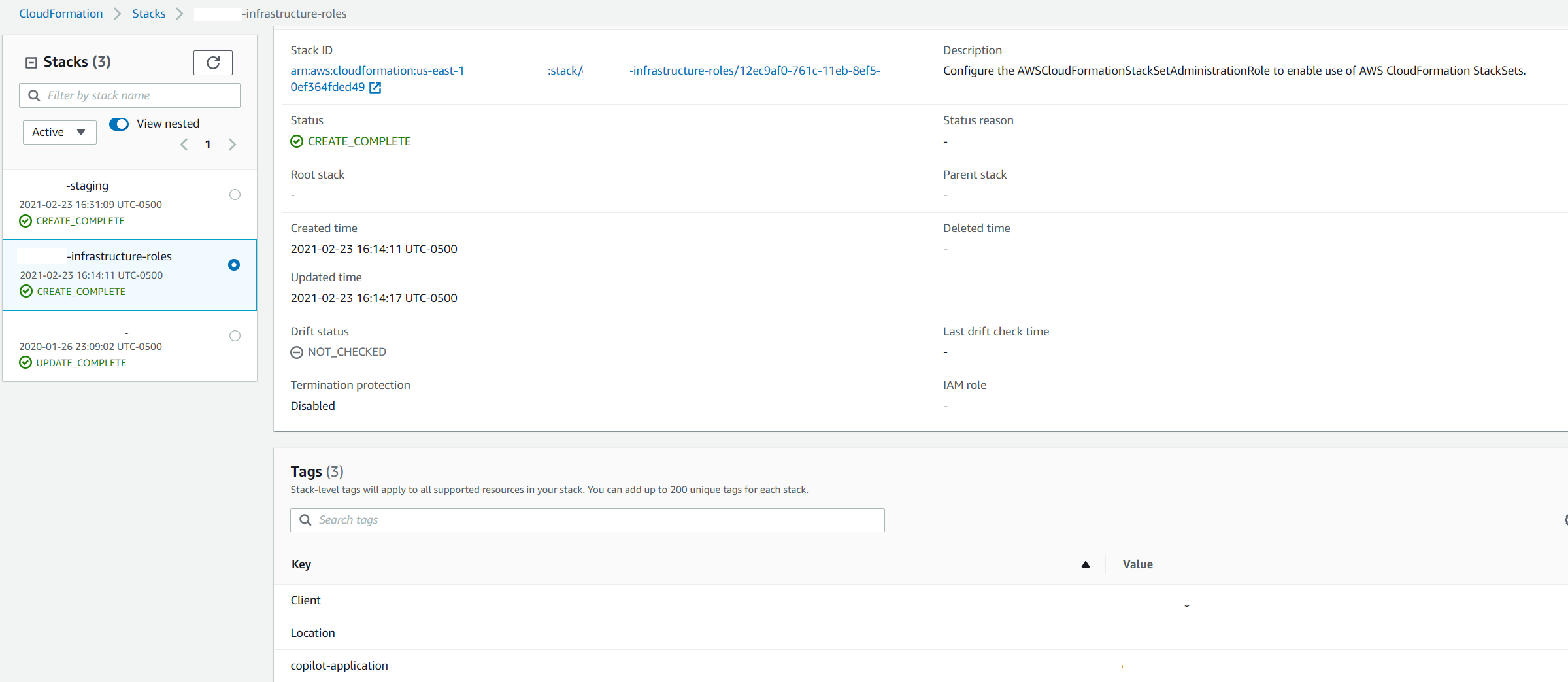
I did try that before making the original post, but I tried again just to be sure. Here is the result:
The tags were created on the application-name-infrastructure-roles cloud formation stack, but not on the application-name-environment cloud formation stack.
(Sorry this took me a minute to test again and redact these screenshots):
Here is the application-name-infrastructure-roles:
Here is the application-name-environment:

Though trying this again I did notice a CLI error -- maybe I need to start there instead:
copilot env init --name staging
Which credentials would you like to use to create staging? [profile default]
Would you like to use the default configuration for a new environment?
    - A new VPC with 2 AZs, 2 public subnets and 2 private subnets
    - A new ECS Cluster
    - New IAM Roles to manage services and jobs in your environment
 Yes, use default.
✔ Proposing infrastructure changes for the application-name-staging environment.
- Creating the infrastructure for the application-name-staging environment.     [create complete]  [80.9s]
  - An IAM Role for AWS CloudFormation to manage resources               [create complete]  [15.5s]
  - An ECS cluster to group your services                                [create complete]  [9.3s]
  - An IAM Role to describe resources in your environment                [create complete]  [15.6s]
  - A security group to allow your containers to talk to each other      [create complete]  [6.2s]
  - An Internet Gateway to connect to the public internet                [create complete]  [15.5s]
  - Private subnet 1 for resources with no internet access               [create complete]  [15.5s]
  - Private subnet 2 for resources with no internet access               [create complete]  [15.5s]
  - Public subnet 1 for resources that can access the internet           [create complete]  [15.5s]
  - Public subnet 2 for resources that can access the internet           [create complete]  [15.5s]
  - A Virtual Private Cloud to control networking of your AWS resources  [create complete]  [18.6s]
✘ Failed to link account account-number and region region to application application-name.

✘ deploy env staging to application application-name: adding staging environment resources to application: operation 14 for stack set application-name-infrastructure failed
Ok I just did the following two actions:
$ copilot app init --resource-tags department=MyDept,team=MyTeam
Use existing application: No
Application name: tagtester
✔ Created the infrastructure to manage services and jobs under application tagtester.
✔ The directory copilot will hold service manifests for application tagtester.

$ copilot env init
What is your environment's name? test
Which credentials would you like to use to create test? [profile default]
Would you like to use the default configuration for a new environment?
    - A new VPC with 2 AZs, 2 public subnets and 2 private subnets
    - A new ECS Cluster
    - New IAM Roles to manage services and jobs in your environment
 Yes, use default.
✔ Proposing infrastructure changes for the tagtester-test environment.
- Creating the infrastructure for the tagtester-test environment.        [create complete]  [78.3s]
  - An IAM Role for AWS CloudFormation to manage resources               [create complete]  [18.6s]
  - An ECS cluster to group your services                                [create complete]  [9.3s]
  - An IAM Role to describe resources in your environment                [create complete]  [19.4s]
  - A security group to allow your containers to talk to each other      [create complete]  [6.2s]
  - An Internet Gateway to connect to the public internet                [create complete]  [15.5s]
  - Private subnet 1 for resources with no internet access               [create complete]  [15.5s]
  - Private subnet 2 for resources with no internet access               [create complete]  [15.5s]
  - Public subnet 1 for resources that can access the internet           [create complete]  [15.5s]
  - Public subnet 2 for resources that can access the internet           [create complete]  [18.6s]
  - A Virtual Private Cloud to control networking of your AWS resources  [create complete]  [15.5s]
✔ Linked account 111111111 and region us-west-2 to application tagtester.

✔ Created environment test in region us-west-2 under application tagtester.
and can confirm that the tags do get created:
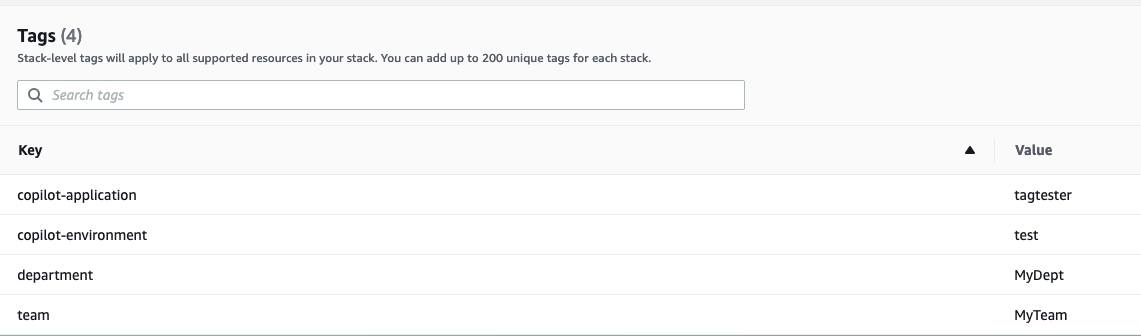
It's pretty strange that that the stack creation occurs successfully but the tags are not present 🤔
Was the application initialized with --resource-tags?
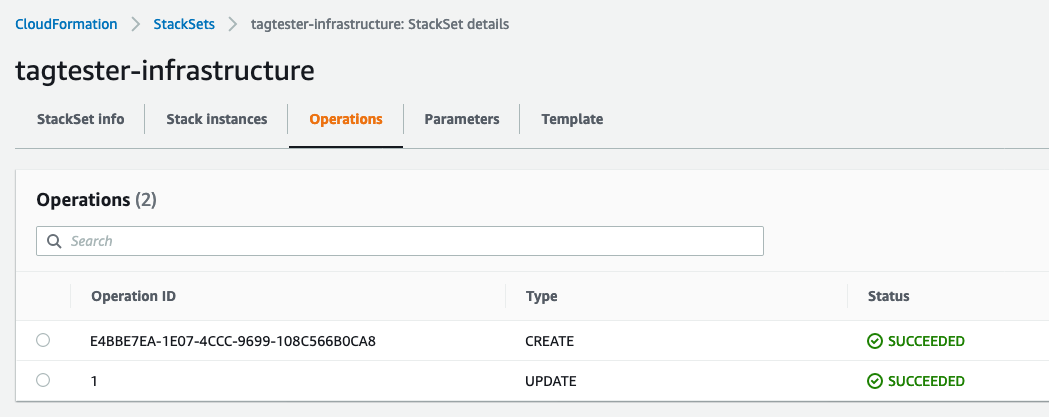
The link failure is also peculiar, you can find more information on the error by going to the StackSet console:
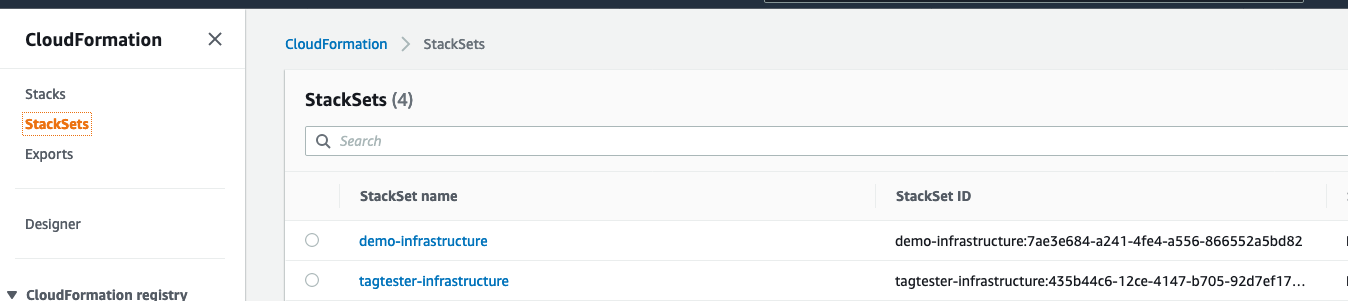
and then navigating to the operations tab:
efekarakus
on 24 Feb 2021
Looks like there were some old resources left over with the same application name. I cleared those out using copilot app delete. There were still a few resources left over that I had to manually delete as well. Once that was done, all worked well and as expected.
Note to anyone who sees this in the future: Don't do this in a production environment.
Thanks for your help and responsiveness @efekarakus
noahjahn
on 24 Feb 2021
Related issues
 mikelhamer
·
3Comments
mikelhamer
·
3Comments
 bvtujo
·
3Comments
kohidave
·
3Comments
bvtujo
·
3Comments
kohidave
·
3Comments
 iamhopaul123
·
3Comments
iamhopaul123
·
3Comments
iamhopaul123
·
3Comments
iamhopaul123
·
3Comments
Most helpful comment
Yes, I would like to tag the application stacks (
{project}-{env}-{app}) individually and use CFN tag propagation for the moment. For example, we require the use ofenvironment,serviceandteamtags for analyzing cost which is currently not possible with ecs-cli