Cookie-autodelete: Strange error message "e.settings(t) is undefined"
Describe the Bug/Feature
Error message saying "e.settings(t) is undefined" keeps popping up. Noticed it when started Firefox and started typing to "network search" bar in home page, perhaps not the reason though.
Also, "Settings"-page becomes full of only some kind of error text, after clicking a panel title on the left side.
Screenshot in which the bug can be seen
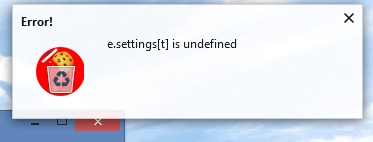

Steps for anyone to reproduce the bug
Error message:
- Start Firefox
- Start a new Firefox window (Ctrl-N)
- Close it.
Settings-issue:
- Open Settings
- Click a panel title on the leftside bar
Your settings
- OS/version: Windows 8.1
- Browser/version: Firefox Quantum 64.0.2 32-bit
- Cookie AutoDelete version: 3.0.0, updated Jan 1, 2019
 cookie-user
All 12 comments
It looks like your settings is corrupted. Have you tried resetting settings?
Also, can't reproduce this but can probably reproduce it by corrupting the settings manually.
 ke-d
on 14 Jan 2019
ke-d
on 14 Jan 2019
Also something similarly broken:
can't convert undefined to object t.defaultextension://e0f0292e-e7d6-4d86-b8ac-d9da2ef04052/bundles/common-popup-setting.bundle.js:20:3219 t.defaultextension://e0f0292e-e7d6-4d86-b8ac-d9da2ef04052/bundles/common-popup-setting.bundle.js:20:3191 t.default<@moz-extension://e0f0292e-e7d6-4d86-b8ac-d9da2ef04052/bundles/common-popup-setting.bundle.js:20:3169 di@moz-extension://e0f0292e-e7d6-4d86-b8ac-d9da2ef04052/bundles/common-popup-setting.bundle.js:36:61969 qi@moz-extension://e0f0292e-e7d6-4d86-b8ac-d9da2ef04052/bundles/common-popup-setting.bundle.js:36:78334 Ki@moz-extension://e0f0292e-e7d6-4d86-b8ac-d9da2ef04052/bundles/common-popup-setting.bundle.js:36:78711 Ao@moz-extension://e0f0292e-e7d6-4d86-b8ac-d9da2ef04052/bundles/common-popup-setting.bundle.js:36:85134 Oo@moz-extension://e0f0292e-e7d6-4d86-b8ac-d9da2ef04052/bundles/common-popup-setting.bundle.js:36:84514 Do@moz-extension://e0f0292e-e7d6-4d86-b8ac-d9da2ef04052/bundles/common-popup-setting.bundle.js:36:90725 Sn@moz-extension://e0f0292e-e7d6-4d86-b8ac-d9da2ef04052/bundles/common-popup-setting.bundle.js:36:30438 at line 20
After pressing the button to restore the default options, it just changes from:
can't convert undefined to object t.defaultextension://e0f0292e-e7d6-4d86-b8ac-d9da2ef04052/bundles/common-popup-setting.bundle.js:20:3219 t.defaultextension://e0f0292e-e7d6-4d86-b8ac-d9da2ef04052/bundles/common-popup-setting.bundle.js:20:3191 t.default<@moz-extension://e0f0292e-e7d6-4d86-b8ac-d9da2ef04052/bundles/common-popup-setting.bundle.js:20:3169 di@moz-extension://e0f0292e-e7d6-4d86-b8ac-d9da2ef04052/bundles/common-popup-setting.bundle.js:36:61969 qi@moz-extension://e0f0292e-e7d6-4d86-b8ac-d9da2ef04052/bundles/common-popup-setting.bundle.js:36:78334 Ki@moz-extension://e0f0292e-e7d6-4d86-b8ac-d9da2ef04052/bundles/common-popup-setting.bundle.js:36:78711 Ao@moz-extension://e0f0292e-e7d6-4d86-b8ac-d9da2ef04052/bundles/common-popup-setting.bundle.js:36:85134 Oo@moz-extension://e0f0292e-e7d6-4d86-b8ac-d9da2ef04052/bundles/common-popup-setting.bundle.js:36:84514 Co@moz-extension://e0f0292e-e7d6-4d86-b8ac-d9da2ef04052/bundles/common-popup-setting.bundle.js:36:83535 Zi@moz-extension://e0f0292e-e7d6-4d86-b8ac-d9da2ef04052/bundles/common-popup-setting.bundle.js:36:82438 enqueueSetState@moz-extension://e0f0292e-e7d6-4d86-b8ac-d9da2ef04052/bundles/common-popup-setting.bundle.js:36:47366 w.prototype.setState@moz-extension://e0f0292e-e7d6-4d86-b8ac-d9da2ef04052/bundles/common-popup-setting.bundle.js:28:1652 componentDidMount/<@moz-extension://e0f0292e-e7d6-4d86-b8ac-d9da2ef04052/bundles/setting.bundle.js:14:2565 a@moz-extension://e0f0292e-e7d6-4d86-b8ac-d9da2ef04052/bundles/common-background-popup-setting.bundle.js:30:1363 at line 20
to:
can't convert undefined to object t.defaultextension://e0f0292e-e7d6-4d86-b8ac-d9da2ef04052/bundles/common-popup-setting.bundle.js:20:3219 t.defaultextension://e0f0292e-e7d6-4d86-b8ac-d9da2ef04052/bundles/common-popup-setting.bundle.js:20:3191 t.default<@moz-extension://e0f0292e-e7d6-4d86-b8ac-d9da2ef04052/bundles/common-popup-setting.bundle.js:20:3169 di@moz-extension://e0f0292e-e7d6-4d86-b8ac-d9da2ef04052/bundles/common-popup-setting.bundle.js:36:61969 qi@moz-extension://e0f0292e-e7d6-4d86-b8ac-d9da2ef04052/bundles/common-popup-setting.bundle.js:36:78334 Ki@moz-extension://e0f0292e-e7d6-4d86-b8ac-d9da2ef04052/bundles/common-popup-setting.bundle.js:36:78711 Ao@moz-extension://e0f0292e-e7d6-4d86-b8ac-d9da2ef04052/bundles/common-popup-setting.bundle.js:36:85134 Oo@moz-extension://e0f0292e-e7d6-4d86-b8ac-d9da2ef04052/bundles/common-popup-setting.bundle.js:36:84514 Do@moz-extension://e0f0292e-e7d6-4d86-b8ac-d9da2ef04052/bundles/common-popup-setting.bundle.js:36:90725 Sn@moz-extension://e0f0292e-e7d6-4d86-b8ac-d9da2ef04052/bundles/common-popup-setting.bundle.js:36:30438 at line 20
After a reload, the old error message is there again.
And the options are not actually reset, i.e. it seems the reset button does not work either.
I think some update may have destroyed something here.
 rugk
on 14 Jan 2019
rugk
on 14 Jan 2019
@rugk That looks highly busted. Hmm..
What I could do is add more options to the Error message like a button to delete the extension storage (this would be different to the current Restore Default Setting). This way the extension can start from a clean slate. Maybe another button to export the lists as well.
ke-d
on 14 Jan 2019
I confirm this strange error message, started today. Coincidence?
 crtxcr
on 14 Jan 2019
crtxcr
on 14 Jan 2019
Tried resetting settings to defaults. It didn't seem to work at first,
there was a different text appearing, but after I closed them and
re-opened, everything seemed fine. Also, error message seems to be gone.
Jukka
Kenny Do kirjoitti 14.1.2019 klo 8:25:
>
It looks like your settings is corrupted. Have you tried resetting
settings?Also, can't reproduce this but can probably reproduce it by corrupting
the settings manually.—
You are receiving this because you authored the thread.
Reply to this email directly, view it on GitHub
https://github.com/Cookie-AutoDelete/Cookie-AutoDelete/issues/484#issuecomment-453911076,
or mute the thread
https://github.com/notifications/unsubscribe-auth/AsgQ4Qriv3fTH3T5_2CNgnvMgzOgJm0Iks5vDCLggaJpZM4Z9qiV.
cookie-user
on 14 Jan 2019
I haven't made any previous modifications to the settings on my own. For
me it looks like the latest update did something to cause this.
cookie-user
on 14 Jan 2019
It's possible you went from version 1 to version 3 without the migration from 1 to 2 first.

Either way this fix should solve extension data corruptions by allowing exporting of lists and then deleting/resetting of all data. At this point, I would recommend you to restart the browser as well.
ke-d
on 14 Jan 2019
For me just restoring settings to default using the existing "Restore default settings" - button seems to be working. Settings are still ok and error message hasn't showed up since.
cookie-user
on 14 Jan 2019
Clicking the restore default buttons enabled some of the settings submenus, allowing me at least to back up the settings, but it's a short-lived solution. The drop-down menu hasn't reappeared and updating to 3.0.1 hasn't made any difference.
Using Firefox 60.4.0esr on openSUSE Leap 15.0.
How can I cleanly purge the extension and start from scratch?
EDIT: nevermind, removing the extension, deleting its data folder and reinstalling did the trick for me.
 lgbaldoni
on 15 Jan 2019
lgbaldoni
on 15 Jan 2019
@luigino
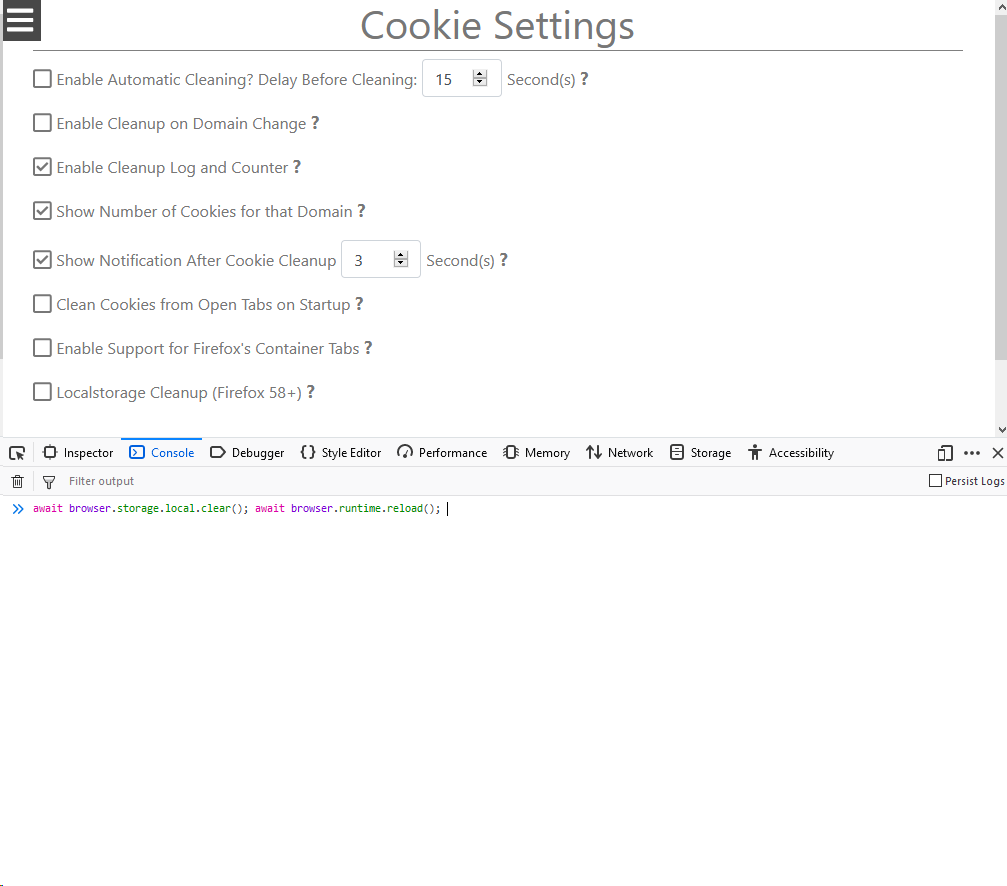
Open up the console in the settings of CAD and use these commands to clear and reload the extension.
await browser.storage.local.clear(); await browser.runtime.reload();
The new Reset Extension Data button also does these commands.
ke-d
on 15 Jan 2019
BTW, now I also remember how this happened. Before that error, CAD showed me this:
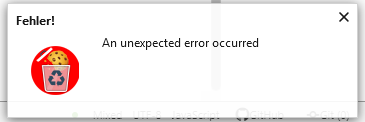
...every time it tried to clear cookies.
But the worst thing is: After resetting the options with the workaround (button) you've added, it actually does show it again. It did not show this bug red error message yet, but I am not convinced it won't happen again.
rugk
on 16 Jan 2019
Marking as resolved since there's now a workaround that works for most people.
ke-d
on 16 Feb 2019
Related issues
 GSF1200S
·
4Comments
GSF1200S
·
4Comments
 claudiopolis
·
5Comments
claudiopolis
·
5Comments
 MarkRH
·
5Comments
MarkRH
·
5Comments
 frankclaassens
·
4Comments
frankclaassens
·
4Comments
 xenopeek
·
4Comments
xenopeek
·
4Comments