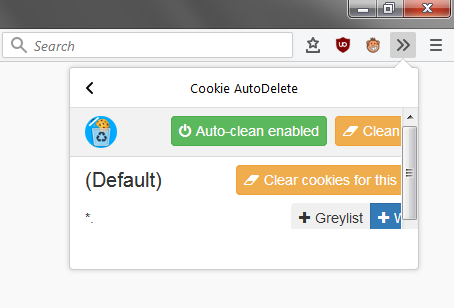
Cookie-autodelete: Weird UI when put into drop down list
right-click on toolbar -> Customise...
Like this...
 waqas
waqas
All 13 comments
It looks like the overflow menu doesn't like a min-width for the popup?
 ke-d
on 13 Oct 2017
ke-d
on 13 Oct 2017
Apprently, yes. Previous popup UI was also behaving like this.
waqas
on 13 Oct 2017
I'm not sure if I have to do anything or if Mozilla has to fix anything on their end?
I also noticed a couple of UI problems in the overflow menu with other extensions as well.
@jonathanKingston Do you know if there's a Bugzilla bug for this?
ke-d
on 13 Oct 2017
I believe this is the bug: https://bugzilla.mozilla.org/show_bug.cgi?id=1373490
 grenzor
on 13 Oct 2017
grenzor
on 13 Oct 2017
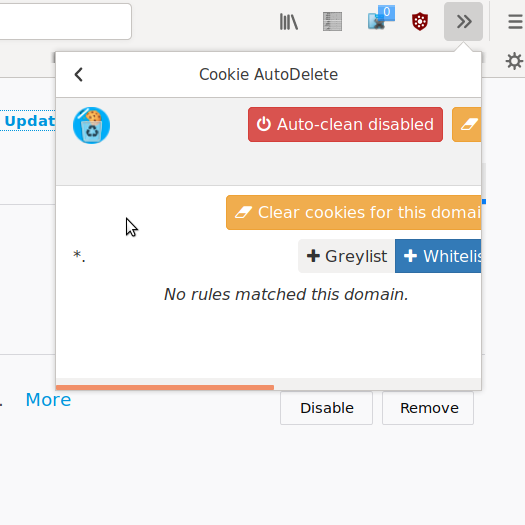
It feels like the new UI was designed in a desktop bubble. It seems to stretch horizontally when both on desktop and mobile, it makes more sense to design it vertically. I hope that @seansfkelley can resubmit a better and more useful design. Also it was far more useful (to me at least) to show the list of cleared cookies than just show the rules for the current domain in the popup.
Anyway, here's another screenshot to show how broken it looks on desktop
 pwd-github
on 13 Oct 2017
pwd-github
on 13 Oct 2017
@pwd-github just submitted #180 to fix the most egregious problems with the layout. I plan to take a deeper look at it over the next few days now that the design has had some time to bake/be in the wild.
The replacing of the "most recently cleared cookies" note on the bottom with the table was prior to my work, though I personally always found that note to be misleading and noisy and was happy to see it gone.
 seansfkelley
on 13 Oct 2017
seansfkelley
on 13 Oct 2017
Note that I added a min-width property in 8d3726bc9562876389e14547cebf8568152158b6 to fix the popup size in Chrome. What I could do (if it's still needed after @seansfkelley's PR), is apply it only on Chrome.
ke-d
on 13 Oct 2017
@seansfkelley I'm sure that everyone has different use cases for the extension, but for me. If I have had to open a few links, I often use CAD to clear the cookies from known trackers such as instagram. However I seldom ever open an instagram tab and only ever in fact use CAD at the end of a session. It's at that point, I'll want to confirm that CAD is doing its job and has gotten any cookies that may have infected me. However the current user experience doesn't allow that.
Also to check the mobile popup from a desktop, just open up the WEID/popup.html on your desktop browser. The first thing you'll need to do is not hardcode text sizes instead use relative textsizes and you'll also need to remove the useless margins.
pwd-github
on 13 Oct 2017
@pwd-github The "most recently cleared cookie list" caused weird popup stretching issues in Firefox Desktop. I think maybe a log tab in the options page might be better?
ke-d
on 13 Oct 2017
@mrdokenny ah, I was wondering why that was there. The commit message was a bit vague. Applying it only in Chrome seems like the right way to go, though as I mentioned on the PR (https://github.com/Cookie-AutoDelete/Cookie-AutoDelete/pull/180#issuecomment-336544993) I'm tooling around on changing some parts of the design closer to how they used to be to be more flexible w/r/t different widths and flows.
As for the "deleted cookies" message, the reason I found is misleading is because I use the time-based autodeletion behavior, so every time I saw it, it was just naming whichever sites I happened to close most recently (and therefore have the cookies cleaned from), which wasn't terribly useful and, in the cases where I had already forgotten the name of the site, confusing (as in, "where did this cookie come from in the first place that it claimed it deleted?").
A log tab seems like a good thing to have in general (opt-in, probably, since it'll effectively be tracking what sites you've been to). Then you could just link from the popup (and perhaps the optional system notification behavior?) to the Log section of the settings page. This would both (1) avoid crowding the popup with potentially a ton of domain names, making it difficult to read/use, (2) make the log discoverable, (3) give long domain lists space to breathe, and (4) not confuse users in my situation where we don't care and aren't auditing the deletions (I have also turned off notifications). How does that sound @pwd-github?
seansfkelley
on 13 Oct 2017
@mrdokenny I always kept it in the overflow menu on desktop, so I wouldn't know. It seemed to act properly for me, it was aesthetically pleasing and was an enjoyable user experience. It would be preferable if, for both desktop and mobile, I wouldn't have to leave the popup to confirm which cookies have just been cleared. But ultimately, as long as it can be checked, it's better than the current implementation.
@seansfkelley I never used the auto clean feature and so it was only ever cleaning on demand, at which point it was incredibly useful to me. I think the problem was that the assumption was that people used the auto clean function, that people never put it in the overflow menu and that mobile is a second-class citizen despite the issue being raised of the mobile UX long ago in issues such as that of #140 . Hopefully going forward these things can be taken into consideration when design decisions are being made.
Personally I feel that the new design is just really confusing and introduces a lot of complexity for reasons beyond my comprehension.
pwd-github
on 13 Oct 2017
I believe this is the bug: https://bugzilla.mozilla.org/show_bug.cgi?id=1373490
Yeah I think this is a central bug, I'm not sure there is much to fix from your side. I think the hope is to uplift this to 57.
 jonathanKingston
on 17 Oct 2017
jonathanKingston
on 17 Oct 2017
Fixed as of 2.0.1
ke-d
on 28 Oct 2017
Related issues
 nkestrel
·
6Comments
nkestrel
·
6Comments
 AtomicRobotMan0101
·
3Comments
AtomicRobotMan0101
·
3Comments
 xenopeek
·
4Comments
xenopeek
·
4Comments
 GSF1200S
·
4Comments
GSF1200S
·
4Comments
 erotavlasme
·
3Comments
erotavlasme
·
3Comments
Most helpful comment
I believe this is the bug: https://bugzilla.mozilla.org/show_bug.cgi?id=1373490