Cookie-autodelete: [UX] Active mode??
Describe the Bug/Feature
In the popup there is a checkbox:
- [ ] active mode
Now, I, as a user, still don't know what happens when I check that box? What is an active mode? What does it change? Does it mean I currently use a "passive mode"? And what are the differences between the modes.
Now looking into the settings I see the sentence (roughly translated):
When active mode is on, the cleanup is doen when closing a tab.
Now, to be honest, this does not explain a thing for me. Is not that the whole purpose of the add-on? Or does it otherwise only cleanup on shutdown? This should be clarified and you can maybe change the option text to "Cleanup while browsing" or similar if that is the correct behavior.
Please note: You do not need to answer my questions here, I'd rather like to have an implementation/change in the add-on to clarify these questions, as these affect all (new) users.
Your settings
- Cookie AutoDelete version: 1.4.0
 rugk
rugk
All 20 comments
Active mode enables the webextension that deletes cookies as soon as the tab closes.
Unchecking it makes the webext inactive, and cookies will stay after closing tabs.
Or does it otherwise only cleanup on shutdown?
Yes. It works like Self-Destructing Cookies addon.
The checkbox helps when a site has issues and the user has no clues about what to whitelist.
 Atavic
on 19 Aug 2017
Atavic
on 19 Aug 2017
So basically the checkbox just disables the whole add-on? So maybe name it "temporarily disable"?
rugk
on 19 Aug 2017
Seems a better term.
Atavic
on 19 Aug 2017
…and deactivate it by default (i.e. the add-on should, of course, be activated by default).
rugk
on 19 Aug 2017
temporarily disable
You can use the extension in manual mode as well. You basically turn off Active Mode and use the cleanup buttons manually.
activated by default
No it shouldn't cause people will probably get annoyed when cleanup gets done without their intervention.
This is a random review from SDC:
BE CAREFUL
On first run, the Program destroyed all my cookies WITHOUT WARNING and tells me how I can recover it afterwards.
Really? Ridiculous!
 ke-d
on 19 Aug 2017
ke-d
on 19 Aug 2017
Ah, okay…
Then maybe name the button "Autodelete mode". This makes clear the add-on otherwise only triggers when clicking the button.
rugk
on 19 Aug 2017
This is where the "Active Mode" term was inspired from:
https://addons.mozilla.org/firefox/addon/cookies-exterminator/
ke-d
on 19 Aug 2017
Okay, interesting, but that does not make the confusing term better, because the opposite of "active mode" would be "passive mode" (which would be used when the checkbox is not selected).
rugk
on 19 Aug 2017
I just installed the extension and this is my first concern. If the help could, in addition to the current text, explain what happens when "Active mode" is not checked, that would solve this issue for me.
Thank you for the extension. I've left a review on addons.
 ariddell
on 28 Aug 2017
ariddell
on 28 Aug 2017
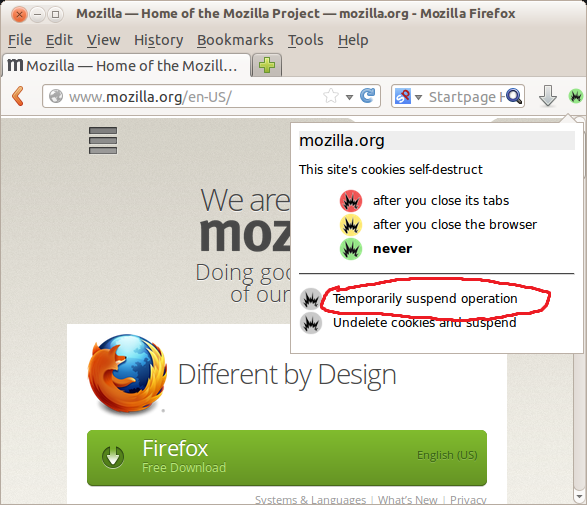
This is the closest setting in SDC to Active Mode.
ke-d
on 28 Aug 2017
The "Temporarily" in SDC doesn't make sense in C-AD since Active Mode can be permanently On or Off.
ke-d
on 28 Aug 2017
It seems like more people are having problems with the term "Active Mode". So I will be taking suggestions for what it should be renamed to.
Either way, this design decision should be taken carefully since a wording change isn't as simple now because it has to be changed for ALL the locales as well and that takes time depending on the translators.
https://github.com/mrdokenny/Cookie-AutoDelete/tree/master/extension/_locales
ke-d
on 6 Sep 2017
I'd suggest the term should be simply "Automatic Cleaning". Then its clearly tick for on and no tick for off.
 Merseybuoy
on 6 Sep 2017
Merseybuoy
on 6 Sep 2017
I second @rugk concerns. From a UX perspective the term is simply misleading. Up until now I had some assumptions what that could be referring to but I wasnt really sure either.
I'd scrap that toggle altogether. The very idea of the extension is remove cookies automatically and someone installing it shouldnt be surprised if that happens.
If that toggle has to be there by all mean, I'd suggest to "hide" it under some advanced setting, rename it to "Disable automatic cookie removal", and disable that flag by default.
 neroux
on 7 Sep 2017
neroux
on 7 Sep 2017
With respect, neroux, your suggestion is confusing in itself. Does one tick (check) the box to activate or deactivate "Disable automatic cookie removal"?
Merseybuoy
on 7 Sep 2017
Why would you find it confusing?
- [ ] Disable automatic cookie removal
By default it is unchecked. When ticked it will disable automatic cookie removal
neroux
on 7 Sep 2017
Alternatively, considering the extension should also cover local storage at some point, the phrasing could be
- [ ] Disable automatic cleanup
neroux
on 7 Sep 2017
OK, fair enough. I think my point was that you are changing the box to the opposite of it's current function.
Merseybuoy
on 7 Sep 2017
@neroux
The very idea of the extension is remove cookies automatically and someone installing it shouldnt be surprised if that happens
I rather not risk it since there's no recovery once it's gone. Either way, like I said before, I never really liked SDK's way of deleting ALL cookies on install and asking you to restore them later, especially since on install you haven't created your whitelist yet.
@Merseybuoy
I'd suggest the term should be simply "Automatic Cleaning".
I like this phrasing so far.
ke-d
on 9 Sep 2017
I rather not risk it since there's no recovery once it's gone. Either way, like I said before, I never really liked SDK's way of deleting ALL cookies on install and asking you to restore them later, especially since on install you haven't created your whitelist yet.
I understand your point but would argue that this is what people should expect when they install an extension with that purpose. Also, I understand you clean the cookies only when a tab is closed, so it should not have an immediate effect anyhow.
neroux
on 9 Sep 2017
Related issues
 AtomicRobotMan0101
·
3Comments
AtomicRobotMan0101
·
3Comments
 tedomedo
·
3Comments
tedomedo
·
3Comments
 gwarser
·
3Comments
gwarser
·
7Comments
gwarser
·
3Comments
gwarser
·
7Comments
 MarkRH
·
5Comments
MarkRH
·
5Comments
Most helpful comment
I'd suggest the term should be simply "Automatic Cleaning". Then its clearly tick for on and no tick for off.