Cookie-autodelete: Cookie per domain, not per website (Global Subdomain checkbox)
Describe the Bug/Feature
Currently the extensions seems to keep all cookies that a website save e.g. when I add pcgames.de to the website, Cookie AutoDelete also keep the cookie forum.pcgames.de, login.pcgames.de.
For my understand, Cookie AutoDelete should only keep cookies for pcgames.de strictly.
Steps for anyone to reproduce the bug
- Fresh profile, install Cookie AutoDelete
- Whitelist cookies only for pcgames.de
Your settings
- OS/version: Win7 Pro x86
- Browser/version: Firefox Nightly 56 x86
- Cookie AutoDelete version: 1.3.1
 heubergen
All 13 comments
Well, people have been asking for that behavior. See #3
 ke-d
on 14 Jun 2017
ke-d
on 14 Jun 2017
I had some stupid things in my head so I needed to edit my previous request.
I understand that it is always about keep the balance between the normal users who wish a simple solution and the pro users who wish a more advanced solution.
May you could do it like that:
Whitelist *.google.com - google.com and all subdomains
Whitelist google.com - google.com only
heubergen
on 14 Jun 2017
Whitelist *.google.com - google.com and all subdomains
Whitelist google.com - google.com only
That won't work with the way I implemented the whitelist. I'm thinking a global checkbox turning on or off subdomain cleaning.
ke-d
on 14 Jun 2017
Yes, that would also be helping :)
heubergen
on 14 Jun 2017
@mrdokenny That is an excellent idea, having a "Whitelist Domain" option or something along those lines.
Please do update here when you get around finishing that, since I have C-AD currently disabled, it is a bit annoying since most of the websites are a bit painful to work with without domain whitelisting.
 stpr-dev
on 17 Jun 2017
stpr-dev
on 17 Jun 2017
@collectorgeneral
it is a bit annoying since most of the websites are a bit painful to work with without domain whitelisting.
What do you mean cause Whitelisting domains in 1.3.0+ works like this. You add google.com and cookies from *.google.com are protected so drive.google.com would be protected.
In 1.2.0, whitelisting google.com only protected google.com and not drive.google.com.
What this issue is proposing is an option to switch between 1.2.0 whitelisting behavior and 1.3.0 whitelisting behavior.
1.3.0's behavior is simplier to use cause you don't have to whitelist as many domains while in 1.2.0's behavior, you have to whitelist google.com, gmail.google.com, drive.google.com, etc.
ke-d
on 17 Jun 2017
@mrdokenny Woops, upon a bit more investigation, I may have found a couple of issues with the current domain system implementation you have. I will open another issue since it does not belong here.
stpr-dev
on 17 Jun 2017
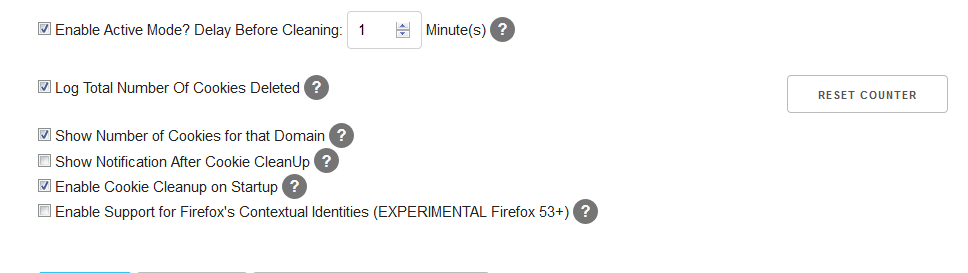
Added a setting called "Enable Check for Subdomains" that can be tested in 1.4.0b1.
ke-d
on 20 Jun 2017
looks great, thank you!
heubergen
on 20 Jun 2017
I usually leave the issue for major features open until the stable version of the extension is released on AMO and on Chrome Web Store, just in case people open up issues for the stable versions even though it's added in the development branch.
ke-d
on 20 Jun 2017
So there's this setting in SDC:

Anyone know if that setting is the same as the option I added in this issue or is it something completely different?
ke-d
on 22 Jun 2017
@mrdokenny Does the "Enable Check for Subdomains" setting work with the "clear all cookies for this domain" feature?
 07416
on 30 Jun 2017
07416
on 30 Jun 2017
@07416 No
ke-d
on 1 Jul 2017
Related issues
 erotavlasme
·
3Comments
erotavlasme
·
3Comments
 odiasodias
·
6Comments
odiasodias
·
6Comments
 GSF1200S
·
4Comments
GSF1200S
·
4Comments
 haarp
·
3Comments
haarp
·
3Comments
 xenopeek
·
4Comments
xenopeek
·
4Comments
Most helpful comment
Added a setting called "Enable Check for Subdomains" that can be tested in 1.4.0b1.