Contao: CSRF-Token kommt durcheinander und ein Login ist nicht mehr möglich
Affected version(s)
Contao 4.9
Description
In einem Projekt ist uns jetzt aufgefallen, dass der CSRF-Mechanismus durcheinander gebracht werden kann, so dass kein Login für mit Mitglieder mehr möglich ist. Aufgefallen war uns das beim IE11, das lässt sich aber auch bei anderen reproduzieren, wenn auch nicht so einfach. Ausgangspunkt:
- Eine Site mit Mitgliedern.
- eine 404-Umleitung auf ein Seite (z.b. Startseite oder Loginseite)
Wenn es jetzt auf der Seite ein fehlendes Element gibt, dann wird dafür die 404er geliefert, da da aber ein Login-Formular integriert ist wird das Token erneuert und das "richtige" in der Seite funktioniert nicht mehr.
Uns ist das aufgefallen, da die SourceMaps einiger JS-Files nicht mit deployed waren und der IE11 dafür dann die startseite.html geladen hatte. Die anderen Browser ignorieren wohl den 404er an der Stelle.
Und nein, das ist vermutlich nicht nur auf den IE beschränkt. Wie schnell kann es durch Unachtsamkeit passieren, dass ein Image im CSS fehlt. Dabei gehe ich mal davon aus, dass auch die anderen dem Link folgen würden und da das selbe passiert. Ich hatte im Chrome auch ein paar mal die CSRF-Fehlermeldung. Bin dem aber damals nicht nachgegangen, da ein reload das behoben hatte.
Volker
 volkerrichert
All 34 comments
Which Contao version exactly?
 fritzmg
on 7 Sep 2020
fritzmg
on 7 Sep 2020
LTS 4.9.5
volkerrichert
on 7 Sep 2020
Uns ist das aufgefallen, da die SourceMaps einiger JS-Files nicht mit deployed waren und der IE11 dafür dann die startseite.html geladen hatte.
So, just to be clear:
- In your site structure you have configured a 404 page.
- In the settings of that 404 page you have configured a redirect to a page with the alias
startseite. - Under a specific front end URL, which also contains a form, missing assets were included.
- The URL for these assets then generated the 404 page, which redirected to
startseite.html.
Question: does startseite.html also include a form?
fritzmg
on 7 Sep 2020
Did you use a https or an unsecure http-connection?
Can you confirm your Bug with forced https?
 HenryVolkmer
on 7 Sep 2020
HenryVolkmer
on 7 Sep 2020
In your site structure you have configured a 404 page.
yes
In the settings of that 404 page you have configured a redirect to a page with the alias startseite.
yes
Under a specific front end URL, which also contains a form, missing assets were included.
yes, it was a sourceMap.
The URL for these assets then generated the 404 page, which redirected to startseite.html.
yes
does startseite.html also include a form?
yes, every page contains the login form (or logout)
Did you use a https or an unsecure http-connection?
it's https only. The csfr-cookie is changed
volkerrichert
on 7 Sep 2020
Hm, I am unable to reproduce the problem in Firefox or IE 11. I tried the following reproduction:
- Create a login form.
- Integrate login form into your page layout.
- Create 404 page, enable the redirect setting and choose a page to redirect to.
- Add a non existent asset, e.g. via an event listener where you execute:
$GLOBALS['TL_JAVASCRIPT'][] = 'does/not/exist.js';. - Open the front end and try to log in.
According to your description a CSRF token error should occur, but none occurred for me. Are there any other requirements?
fritzmg
on 7 Sep 2020
ok, i try to create a minimal setup to repoduce.
- normal CTO 4.9.5
- create a minimal website mit theme, etc
- add a login form to the startpage
- add 404 redirect to that page
-> everything works fine
add a js to the files and link it inside the theme / layout. I used that one to have something "relevant"
`function test (test) {
console.log(test)
}
test('hallo')
//@ sourceMappingURL=jquery.min.map`
The last line does the trick. It forces the IE to do a XMLHttpRequest

and yes, login works fine, but logout doesn't in this minimal setup:
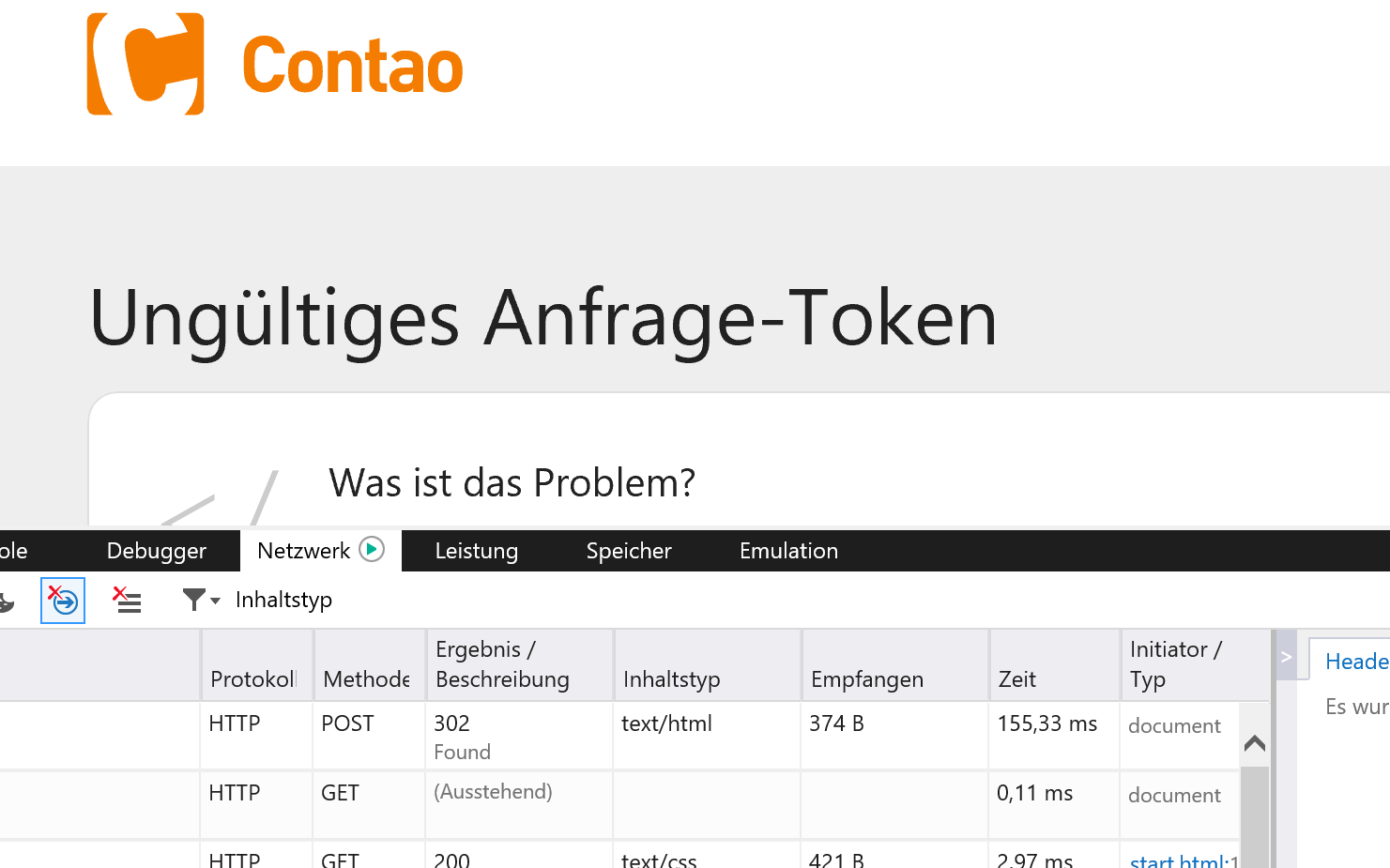
If you remove / invalidate that line logout work fine.
But you seems to be right. This effect doesn't work with images or CSS. That's good news
volkerrichert
on 7 Sep 2020
I see. Possibly related to #2186 as well? I'll do some further testing when I have the time.
fritzmg
on 7 Sep 2020
maybe. I'll try the fix
volkerrichert
on 7 Sep 2020
I am able to reproduce the problem now.
- Create a login form and a member with login details.
- Add login form to the start page via a
modulecontent element. - Create 404 page, enable the redirect setting and choose the start page to redirect to.
- Create a new template called
ce_html_test.html5with the following content (assuming thatfoobaris an invalid URL in your setup):
js <script> var req = new XMLHttpRequest(); req.open("GET", "foobar"); req.send(); </script> - On the start page, create a new HTML content element and choose the
ce_html_testtemplate. - Create a new private browsing window and open the start page in the front end.
- Try to log in.
The Invalid request token error will occur.
fritzmg
on 7 Sep 2020
The issue is still not solved. The CSRF-cookie will still be set by an 404 request. You will see the relevant parts of the apache logs. I add the output cookies to it.
This is a simple login / logout flow with just a simple page with a login module
[25/Oct/2020:17:13:42 +0100] "GET /start.html HTTP/1.1" 200 11135 "-" "Mozilla/5.0 (Windows NT 10.0; WOW64; Trident/7.0; rv:11.0) like Gecko" "Cookie:csrf_contao_csrf_token=TqrqF-MDzL9Hh4a5t50s-OQY6LDMPsCm499azzdIysY; path=/; httponly; samesite=lax"[25/Oct/2020:17:13:43 +0100] "GET /files/xxx/test.js?v=f78fe00c HTTP/1.1" 200 85 "http://localhost:8080/start.html" "Mozilla/5.0 (Windows NT 10.0; WOW64; Trident/7.0; rv:11.0) like Gecko" "Cookie:-"[25/Oct/2020:17:13:43 +0100] "GET /files/test.js.map HTTP/1.1" 404 278505 "-" "Mozilla/5.0 (Windows NT 10.0; WOW64; Trident/7.0; rv:11.0) like Gecko" "Cookie:-"[25/Oct/2020:17:14:02 +0100] "POST /start.html HTTP/1.1" 302 374 "http://localhost:8080/start.html" "Mozilla/5.0 (Windows NT 10.0; WOW64; Trident/7.0; rv:11.0) like Gecko" "Cookie:PHPSESSID=1750a7939f9ae8933e1e93ff8b55ecc1; path=/; httponly, REMEMBERME=deleted; expires=Sat, 26-Oct-2019 16:14:02 GMT; Max-Age=0; path=/; httponly, sf_redirect=%7B%22token%22%3A%22a9022c%22%2C%22route%22%3A%22tl_page.2%22%2C%22method%22%3A%22POST%22%2C%22controller%22%3A%7B%22class%22%3A%22Contao%5C%5CFrontendIndex%22%2C%22method%22%3A%22renderPage%22%2C%22file%22%3A%22%5C%2Fvar%5C%2Fwww%5C%2Fhtml%5C%2Fvendor%5C%2Fcontao%5C%2Fcore-bundle%5C%2Fsrc%5C%2FResources%5C%2Fcontao%5C%2Fcontrollers%5C%2FFrontendIndex.php%22%2C%22line%22%3A86%7D%2C%22status_code%22%3A302%2C%22status_text%22%3A%22Found%22%7D; path=/; httponly; samesite=lax, csrf_contao_csrf_token=57FR5k19nEfH503a6n0VCCnm6O8pgGHQI_Yg54vKads; path=/; httponly; samesite=lax"[25/Oct/2020:17:14:03 +0100] "GET /start.html HTTP/1.1" 200 11107 "http://localhost:8080/start.html" "Mozilla/5.0 (Windows NT 10.0; WOW64; Trident/7.0; rv:11.0) like Gecko" "Cookie:sf_redirect=deleted; expires=Sat, 26-Oct-2019 16:14:02 GMT; Max-Age=0; path=/; httponly"[25/Oct/2020:17:14:03 +0100] "GET /files/xxx/test.js?v=f78fe00c HTTP/1.1" 200 85 "http://localhost:8080/start.html" "Mozilla/5.0 (Windows NT 10.0; WOW64; Trident/7.0; rv:11.0) like Gecko" "Cookie:-"[25/Oct/2020:17:14:03 +0100] "GET /files/test.js.map HTTP/1.1" 404 278731 "-" "Mozilla/5.0 (Windows NT 10.0; WOW64; Trident/7.0; rv:11.0) like Gecko" "Cookie:csrf_contao_csrf_token=_Aa2odq4MOFiwFA-uoRj5H1lbS4eUV8RXR7R-1IWXFI; path=/; httponly; samesite=lax"[25/Oct/2020:17:14:03 +0100] "GET /favicon.ico HTTP/1.1" 404 - "-" "Mozilla/5.0 (Windows NT 10.0; WOW64; Trident/7.0; rv:11.0) like Gecko" "Cookie:-"[25/Oct/2020:17:14:13 +0100] "POST /_contao/logout HTTP/1.1" 400 268955 "http://localhost:8080/start.html" "Mozilla/5.0 (Windows NT 10.0; WOW64; Trident/7.0; rv:11.0) like Gecko" "Cookie:-"
Line 1 is the first requerst to start.html, which causes a reqeust to test.js & test.js.map. This works fine. After login in (line 4) and redirect to start.html (line 5), test,js & map will be requestet again. This time the request to test.js.map will set a new csrf token which will cause the 400 on logout.
Reloading start.html while being logged in will always generate a new csrf token by requesting the map
My setup is very simple
Contao 4.9.9
- dummy theme
- one layout with test.js as external JS (see below)
- the login module
- one page (start.html) with just that module
- and a member
test.js
console.log('here test.js')
//# sourceMappingURL=/files/xxx/test.js.map
This will also happen in 4.10.4.
volkerrichert
on 28 Oct 2020
If i add the 404.redirect page with fixed redirect to start.html, requests will still set cookies
1. [25/Oct/2020:18:12:53 +0100] "GET /start.html HTTP/1.1" 200 11134 "http://localhost:8080/start.html" "Mozilla/5.0 (Windows NT 10.0; WOW64; Trident/7.0; rv:11.0) like Gecko" "Cookie:csrf_contao_csrf_token=0J48P0Xc8uc2BYKTajpP-o0j0QsmZVHrGqmslr-p9Xc; path=/; httponly; samesite=lax"
2. [25/Oct/2020:18:12:54 +0100] "GET /files/xxx/test.js?v=030f21bd HTTP/1.1" 200 89 "http://localhost:8080/start.html" "Mozilla/5.0 (Windows NT 10.0; WOW64; Trident/7.0; rv:11.0) like Gecko" "Cookie:-"
3. [25/Oct/2020:18:12:54 +0100] "GET /files/xxx/test.js.map HTTP/1.1" 303 374 "-" "Mozilla/5.0 (Windows NT 10.0; WOW64; Trident/7.0; rv:11.0) like Gecko" "Cookie:sf_redirect=%7B%22token%22%3A%222efc11%22%2C%22route%22%3A%22tl_page.3.error_404%22%2C%22method%22%3A%22GET%22%2C%22controller%22%3A%7B%22class%22%3A%22Contao%5C%5CFrontendIndex%22%2C%22method%22%3A%22renderPage%22%2C%22file%22%3A%22%5C%2Fvar%5C%2Fwww%5C%2Fhtml%5C%2Fvendor%5C%2Fcontao%5C%2Fcore-bundle%5C%2Fsrc%5C%2FResources%5C%2Fcontao%5C%2Fcontrollers%5C%2FFrontendIndex.php%22%2C%22line%22%3A86%7D%2C%22status_code%22%3A303%2C%22status_text%22%3A%22See%20Other%22%7D; path=/; httponly; samesite=lax, csrf_contao_csrf_token=YMPqu2tSgofg89Tm-H79nD32PY1INOwp_ytTrfkDrnA; path=/; httponly; samesite=lax"
4. [25/Oct/2020:18:12:55 +0100] "GET /start.html HTTP/1.1" 200 11142 "-" "Mozilla/5.0 (Windows NT 10.0; WOW64; Trident/7.0; rv:11.0) like Gecko" "Cookie:csrf_contao_csrf_token=Ov9IRNU8Umk978PzLxNKIqCyK65YaWelK4T7WmOjXxg; path=/; httponly; samesite=lax"
There will be 3 different cookies set by contao. The first by the original request, the seconde by the map file which will redirect to start.html. The request (line 4) set the third one....
volkerrichert
on 28 Oct 2020
Why do these requests set the cookie? Don’t they get the cookie value in the request headers?
 ausi
on 29 Oct 2020
ausi
on 29 Oct 2020
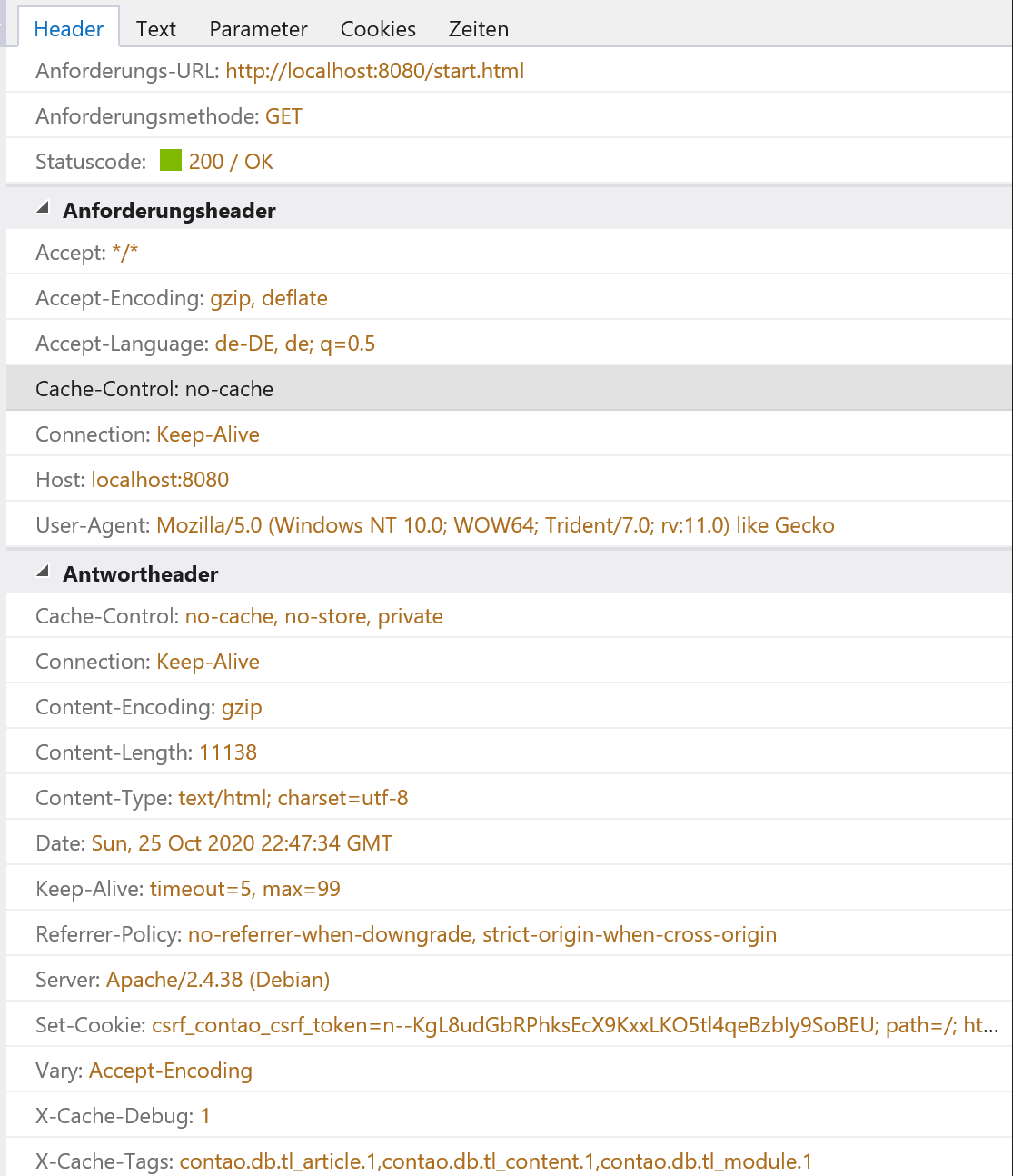
I don't know. Ich have to check by adding it to the log. The map request isnt shown in the network tab, but the page wo which it is redirected:

There is no csrf-cookie send but received:
volkerrichert
on 29 Oct 2020
No, there ist no cookie send during those requests. Look at the last two lines. These requests request are made during load of "start.html". I also add the location header of each request.
web_1      | 172.28.0.1 - - [26/Oct/2020:00:01:39 +0100] "GET /start.html HTTP/1.1" 200 11138 "-" "Mozilla/5.0 (Windows NT 10.0; WOW64; Trident/7.0; rv:11.0) like Gecko" "CookieIn:-" "CookieOut:csrf_contao_csrf_token=_8rkQ0tBBjQGHMRUjUuzbWvjXisYsztYXIIEiZ-Lgwc; path=/; httponly; samesite=lax" "Location:-"
web_1      | 172.28.0.1 - - [26/Oct/2020:00:01:40 +0100] "GET /assets/contao/css/layout.min.css?v=89e682c6 HTTP/1.1" 200 421 "http://localhost:8080/start.html" "Mozilla/5.0 (Windows NT 10.0; WOW64; Trident/7.0; rv:11.0) like Gecko" "CookieIn:csrf_contao_csrf_token=_8rkQ0tBBjQGHMRUjUuzbWvjXisYsztYXIIEiZ-Lgwc" "CookieOut:-" "Location:-"
web_1      | 172.28.0.1 - - [26/Oct/2020:00:01:40 +0100] "GET /assets/contao/css/responsive.min.css?v=89e682c6 HTTP/1.1" 200 315 "http://localhost:8080/start.html" "Mozilla/5.0 (Windows NT 10.0; WOW64; Trident/7.0; rv:11.0) like Gecko" "CookieIn:csrf_contao_csrf_token=_8rkQ0tBBjQGHMRUjUuzbWvjXisYsztYXIIEiZ-Lgwc" "CookieOut:-" "Location:-"
web_1      | 172.28.0.1 - - [26/Oct/2020:00:01:40 +0100] "GET /files/xxx/test.js?v=030f21bd HTTP/1.1" 200 89 "http://localhost:8080/start.html" "Mozilla/5.0 (Windows NT 10.0; WOW64; Trident/7.0; rv:11.0) like Gecko" "CookieIn:csrf_contao_csrf_token=_8rkQ0tBBjQGHMRUjUuzbWvjXisYsztYXIIEiZ-Lgwc" "CookieOut:-" "Location:-"
web_1      | 172.28.0.1 - - [26/Oct/2020:00:01:40 +0100] "GET /_wdt/cbc3c5 HTTP/1.1" 200 4287 "http://localhost:8080/start.html" "Mozilla/5.0 (Windows NT 10.0; WOW64; Trident/7.0; rv:11.0) like Gecko" "CookieIn:csrf_contao_csrf_token=_8rkQ0tBBjQGHMRUjUuzbWvjXisYsztYXIIEiZ-Lgwc" "CookieOut:csrf_contao_csrf_token=deleted; expires=Sat, 26-Oct-2019 23:01:40 GMT; Max-Age=0; path=/; httponly" "Location:-"
web_1      | 172.28.0.1 - - [26/Oct/2020:00:01:40 +0100] "GET /favicon.ico HTTP/1.1" 404 - "-" "Mozilla/5.0 (Windows NT 10.0; WOW64; Trident/7.0; rv:11.0) like Gecko" "CookieIn:csrf_contao_csrf_token=_8rkQ0tBBjQGHMRUjUuzbWvjXisYsztYXIIEiZ-Lgwc" "CookieOut:-" "Location:-"
web_1      | 172.28.0.1 - - [26/Oct/2020:00:01:40 +0100] "GET /files/xxx/test.js.map HTTP/1.1" 303 374 "-" "Mozilla/5.0 (Windows NT 10.0; WOW64; Trident/7.0; rv:11.0) like Gecko" "CookieIn:-" "CookieOut:sf_redirect=%7B%22token%22%3A%22c5d8cc%22%2C%22route%22%3A%22tl_page.3.error_404%22%2C%22method%22%3A%22GET%22%2C%22controller%22%3A%7B%22class%22%3A%22Contao%5C%5CFrontendIndex%22%2C%22method%22%3A%22renderPage%22%2C%22file%22%3A%22%5C%2Fvar%5C%2Fwww%5C%2Fhtml%5C%2Fvendor%5C%2Fcontao%5C%2Fcore-bundle%5C%2Fsrc%5C%2FResources%5C%2Fcontao%5C%2Fcontrollers%5C%2FFrontendIndex.php%22%2C%22line%22%3A86%7D%2C%22status_code%22%3A303%2C%22status_text%22%3A%22See%20Other%22%7D; path=/; httponly; samesite=lax, csrf_contao_csrf_token=1aIJkLOYcPF71TCAroJeiqMK1El1j7v7d_6RBKoYV6k; path=/; httponly; samesite=lax" "Location:http://localhost:8080/start.html"
web_1      | 172.28.0.1 - - [26/Oct/2020:00:01:42 +0100] "GET /start.html HTTP/1.1" 200 11136 "-" "Mozilla/5.0 (Windows NT 10.0; WOW64; Trident/7.0; rv:11.0) like Gecko" "CookieIn:-" "CookieOut:csrf_contao_csrf_token=vW7BmY5kjk2jpXpsz0YnQlfL8VW_s85jN1YpCecLO4c; path=/; httponly; samesite=lax" "Location:-"
I don't know. Ich have to check by adding it to the log. The map request isnt shown in the network tab, but the page wo which it is redirected:
There is no csrf-cookie send but received:
you are using http (unsecure connection).
Contao with isotope is not compatible with unsecure connections.
Either you enforce https or add these line
Would be nice to know, if it fix your bug.
HenryVolkmer
on 29 Oct 2020
yea, this is http. We saw this issue an https also, but i can retest it, just to be sure
volkerrichert
on 29 Oct 2020
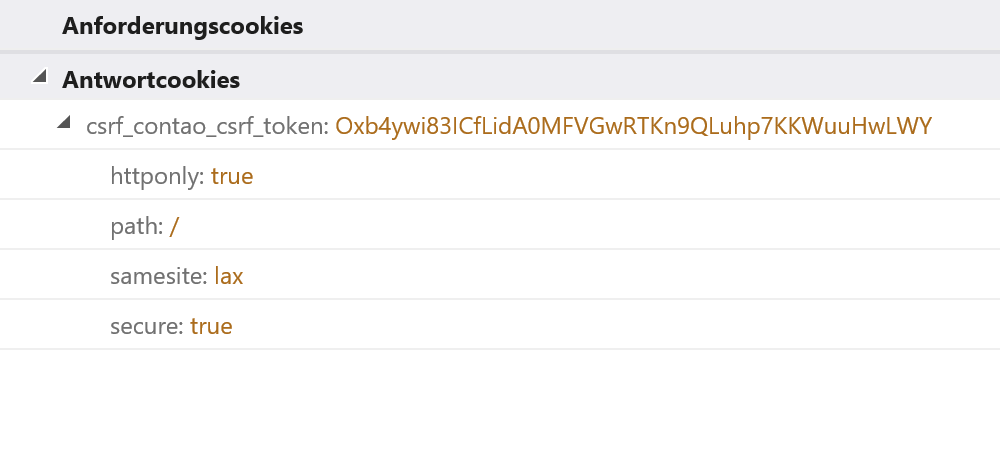
This will also happend using https

volkerrichert
on 29 Oct 2020
Can someone reopen that issue?
volkerrichert
on 2 Nov 2020
Danke Leo!
volkerrichert
on 2 Nov 2020
I can provide a demo system, if useful
volkerrichert
on 5 Nov 2020
Contao 4.9.9
- dummy theme
- one layout with test.js as external JS (see below)
- the login module
- one page (start.html) with just that module
- and a member
test.js
console.log('here test.js')
//# sourceMappingURL=/files/xxx/test.js.map
I was unable to reproduce the problem in Contao 4.9.9. Any kind of 404 response (be it from a missing favicon.ico or a missing sourceMapping file) does not interfere with the request token for the form of the current page.
fritzmg
on 19 Nov 2020
Did you use IE11? Adding a 404 rediekt to the start page will force the error at login. In the upper description it will happend during logout. I can still provide a test installation
volkerrichert
on 19 Nov 2020
Did you use IE11?
No, Firefox and Chrome. But I tried with IE11 just now and also was unable to reproduce the problem
Adding a 404 rediekt to the start page will force the error at login.
Ah ok, that was not in your original reproduction steps. However, I just tried with enabling the forwarding to the home page in the 404 page and still was not able to reproduce the problem in either of the aforementioned browsers.
I can still provide a test installation
Sure :). How would you be able to provide it?
fritzmg
on 19 Nov 2020
What about a SQL-dump?
volkerrichert
on 20 Nov 2020
I think it would be better if you hosted your test installation some where (and reproduce the problem there), so that we can rule out any environment differences.
fritzmg
on 20 Nov 2020
ok. I'll be back with an URL
volkerrichert
on 20 Nov 2020
ok. I set up an example site.
https://cto2246.extranet.addmore.cloud/
Steps to reproduce:
- use IE11
- open console (F12)
- open URL https://cto2246.extranet.addmore.cloud/
- login with volker / volker123
- logout again
-> unvalid token
to enter contao backend use "admin" / "admin123"
volkerrichert
on 26 Nov 2020
Yes, I can reproduce the problem there 👍
fritzmg
on 26 Nov 2020
So the request to /files/xxx/test.js.map doesn’t include the CSRF cookie (only the PHPSESSID one). I think this is a bug in IE11.
@volkerrichert why does /files/xxx/test.js.map redirect to /start.html? If /files/xxx/test.js.map would return a 404 response instead, the issue would not occur I think.
ausi
on 5 Dec 2020
@volkerrichert why does
/files/xxx/test.js.mapredirect to/start.html? If/files/xxx/test.js.mapwould return a 404 response instead, the issue would not occur I think.
In Contao you can enable a redirect for the 404 page. The response to /start.html then returns a new CSRF token in its response, because /start.html contains a form.
fritzmg
on 5 Dec 2020
yes, it's like fritz said.
volkerrichert
on 5 Dec 2020
The only “fix” I can think of would be to check in_array('text/html', $request->getAcceptableContentTypes()) to set the cookie only on “main” requests.
But this could be buggy and we would have to check for application/x-ms-application too if we want to support IE8 (because it doesn’t send text/html).
This is a bug in IE11 (less than 1% market share) that only occurs if you have SourceMaps that redirect to a page with a form on it and happens only if you have the developer tools open.
I think we should close this bug or debug further why IE11 only sends the PHPSESSID cookie and not the CSRF cookie.
ausi
on 7 Dec 2020
This is a bug in IE11 (less than 1% market share) that only occurs if you have SourceMaps that redirect to a page with a form on it and happens only if you have the developer tools open.
Since the scope is so narrow, I am for not adding a workaround on our side, too.
 leofeyer
on 7 Dec 2020
leofeyer
on 7 Dec 2020
Related issues
 Funbug
·
32Comments
Funbug
·
32Comments
 planepix
·
30Comments
planepix
·
30Comments
 contaoacademy
·
30Comments
contaoacademy
·
30Comments
 benfolds
·
75Comments
benfolds
·
75Comments
 exscorp
·
30Comments
exscorp
·
30Comments
Most helpful comment
Since the scope is so narrow, I am for not adding a workaround on our side, too.