Contacts: Remove quotes from TYPE for better external platforms compatibility
This is a resubmit as I ended up doing more investigation following a switch to using Google Contacts due to this problem - during the switch, I had to manually edit the VCF file to get it to work with Gmail.
The VCF file produced by Contacts doesn't use fields recognised by other applications and appears to be non-standard. As it currently stands, it appears Contacts is incompatible with all other major platforms.
Nextcloud 16.0.1, Contacts 3.1.1
Example:
- New contact created in the web app, with a phone number and email. The type (e.g. home, office) is left on the defaults.

The contact is downloaded through the web app (.VCF file).
The file is opened in Outlook, revealing a missing phone number.

The file is imported to gmail, again revealing a missing phone number.


Sync to iOS also reveals a missing phone number.

Opening the VCF in ATOM reveals the field names. You can see email has the type HOME but phone has (quotes included as in the file) "HOME,VOICE".

Removing ,VOICE and the quotation marks to leave the type as HOME results in Gmail and Outlook now seeing the phone number.

 42CF11059F2F
All 61 comments
Right, we should remove the quotations for compatibility. :)
Thanks for reporting!
 skjnldsv
on 23 May 2019
skjnldsv
on 23 May 2019
This is also happening with the popular productivity/email program eM Client.
 giddyhup
on 12 Aug 2019
giddyhup
on 12 Aug 2019
If I read it correctly, there were fixes to https://github.com/mozilla-comm/ical.js/issues/343 but that issue hasn't been closed yet. Is there hope that the fixes find their way to Nextcloud Contacts?
giddyhup
on 10 Sep 2019
@giddyhup Maybe, but we really need https://github.com/mozilla-comm/ical.js/issues/343
skjnldsv
on 11 Sep 2019
ACK. Understood.
giddyhup
on 11 Sep 2019
I looked into the topic again and would like to share my observations. According to RFC 6350 section 6.4.1 both ways to represent phone number types are okay:
The default type is "voice".  These type parameter values can be
      specified as a parameter list (e.g., TYPE=text;TYPE=voice) or as a
      value list (e.g., TYPE="text,voice").
In my tests my clients support parameter lists and have problems with value lists. The issue occurs since the Contacts app changes the parameter representation. Also, something like TEL;type=CELL;type=VOICE;type=pref: 555 1234 appears as undefined phone number in the web interface. When there are modifications to the address via the web interface in the synced VCard we only find TEL;TYPE=pref:555 1234.
giddyhup
on 11 Oct 2019
Yes, because the library we're using does not understand multiple parameters
skjnldsv
on 11 Oct 2019
Sorry, I now have the whole picture. I just went down the rabbit hole and and also found the pull request from April 5 which probably would fix it. : (
giddyhup
on 11 Oct 2019
The pull request has been merged! Yay!
giddyhup
on 13 Jan 2020
@giddyhup Do you know when it will be released?
42CF11059F2F
on 14 Jan 2020
@a1pilot nope. One needs to watch the respective repository. The last release was in 2018 and the one before that was in 2016. Then it is up to the Nextcloud/contacts maintainers to include it in their release. I assume that together can take some months.
giddyhup
on 14 Jan 2020
Hey, there was a new release :) That‘s the best easter present this year.
 Timokirch
on 13 Apr 2020
Timokirch
on 13 Apr 2020
In this repository, package.json references ical.js v1.4 (Mozzilla's recently released version with the fix). Does this mean version 3.2.0 of the Nextcloud contacts already includes the fix? Can we close the issue?
giddyhup
on 13 Apr 2020
For me there are still errors if i modify a contact on an ios device and looking at the object over the web browser.


Timokirch
on 13 Apr 2020
In this repository, package.json references ical.js v1.4 (Mozzilla's recently released version with the fix). Does this mean version 3.2.0 of the Nextcloud contacts already includes the fix? Can we close the issue?
no it means I need to release a new version :)
Would you be willing to test it here?
skjnldsv
on 14 Apr 2020
Please help test the new release (link in first post): https://github.com/nextcloud/contacts/pull/1579
skjnldsv
on 14 Apr 2020
Is there a testing procedure? Can the respective existing app folder simply renamed and the new folder put in its place instead?
giddyhup
on 14 Apr 2020
You can replace the app with this archive. If anything happens, delete it and reinstall contacts through the appstore as usual :)
skjnldsv
on 14 Apr 2020
Ok, I am testing. I can't tell if it is related to this release and to this issue but here it goes (just tell me if I should open a new issue).
One contact renders my Windows client (EM client) unresponsive when I try to add the downloaded vcf file manually (it won't get synced automatically).
An address appears in the web form in one field, in the vcf it appears like this:
item2.ADR;type=HOME;type=pref:;;STREET;TOWN;;ZIP;COUNTRY
Phone number entries appear like this:
TEL;TYPE="HOME,VOICE";VALUE=UNKNOWN:+1 555 1234567
Again, I don't know if this is related to the fix. Also, the entries have also been edited under iOS and the changes may come from there.
giddyhup
on 14 Apr 2020
item2.ADR;type=HOME;type=pref:;;STREET;TOWN;;ZIP;COUNTRY
We don't support type pref, so it's not coming from nextcloud here. :/
Phone number entries appear like this:
TEL;TYPE="HOME,VOICE";VALUE=UNKNOWN:+1 555 1234567
Same for this one, but that might be a bug, no idea.
What happen if you open the contact on nextcloud?
And edit it maybe?
Though this was supposed to fix the multiple types like TYPE=HOME,VOICE => TYPE=HOME,TYPE=VOICE, any similar contacts?
skjnldsv
on 14 Apr 2020
I'm directly downloading VFC files from the Contacts interface, I don't see the fixes in the raw file: TEL;TYPE="IPHONE,CELL,VOICE":
in eM Client's GUI this turns into

Here, I have to assume that is also related to the "pref":
ITEM1.EMAIL;TYPE="INTERNET,pref":[email protected]
ITEM1.X-ABLABEL:_$!<Other>!$_
It looks like your em client is not compatible with new vcards syntax :/
skjnldsv
on 14 Apr 2020
Yeah, you are right. I'll take that out of the equation. (And, as a paying customer, ask the eM people to fix it.)
giddyhup
on 14 Apr 2020
With eM client out of the picture, this (TEL;TYPE="CELL,VOICE";VALUE=UNKNOWN:...) still appears and I have troubles understanding what goes on during syncing between an iPhone and Nextcloud. I wonder what others are experiencing.
giddyhup
on 15 Apr 2020
Hi and sorry for the delay in testing. With Version 3.3.0 my contact looks better, but still not ideal. The contact shows now correcty "Work" , "Home" or "Mobile" on the numbers or addresses. Anyhow the anniversary will displayed as invalid date and the address is separated by multiple ";" in the web interface. Actual iOS and Thunderbird cardbook shows the information right.


Timokirch
on 16 Apr 2020
Can you post the date of your vcard?
skjnldsv
on 16 Apr 2020
sure :)

Timokirch
on 16 Apr 2020
This is another issue then :)
Please open a new one, and fill the report template.
Make sure to also include your browser log :hugs:
skjnldsv
on 16 Apr 2020
OK, i will find out how to do that and will create a new issue. Also for the address?
Timokirch
on 16 Apr 2020
Yes, open one for the two issues, we'll debug further :)
skjnldsv
on 16 Apr 2020
Sorry to bother again, but i can‘t help myself :(
Today i noticed that contacts on my iPhone and iPad will display an additional ‚“‘. Within the Webinterface and in Thunderbird these informations are shown with the correct description.

Timokirch
on 17 Apr 2020
Yes, same with me.
When I create a new contact in Nextcloud, it shows like that on my iPhone.
 GRaptor
on 17 Apr 2020
GRaptor
on 17 Apr 2020
I guess we fixed the first part, but because apple is not compatible with the quote-formatted types, we should try to see if we can enforce their removal :thinking:
skjnldsv
on 17 Apr 2020
I am experiencing this as well on iOS. Has anyone found a workaround until this is fixed?
 mhbates
on 3 May 2020
mhbates
on 3 May 2020
The comment made by 'skjnldsv' earlier in this discussion seem to imply that VCF allows a syntax like ..;TYPE="WORK,VOICE":.. My reading of RFC5545 Section 3.1 and Section 3.1.1 seems to indicate that this is not true. Section 3.1.1 says that some Properties (e.g. TYPE) can have multiple values separated by a COMMA. Section 3.1.1 further states that "For those parameter values that are specified in quoted-strings, the individual quoted-strings are separated by a COMMA character".
Thus, the proper way to enclose (if needed) parameter values of TYPE is: TYPE="WORK","VOICE". Of course, the quoted-strings in this example are not necessary, since the parameter values have no special characters, and thus, serialization of this parameter should be done as TYPE=WORK,VOICE, which is very compatible with other VCF apps such as iOS Contacts app and others.
I also am experiencing the behavior of seeing "WORK as the label in iOS Contacts app for contacts coming from Nextcloud. Clearly this is because the iOS Contacts app stupidly separates the values by splitting the string on COMMA without regard to the double-quote characters. So, it probably doesn't support the syntax TYPE="WORK","VOICE" either. However, if the code could be changed to avoid enclosing the TYPE parameter list with the outer double-quotes (an incorrect behavior), and avoid using double-quotes unless required by special characters in the value, then it would maximize compatibility with other apps like iOS Contacts and others.
 TimHalvorsen
on 6 May 2020
TimHalvorsen
on 6 May 2020
@TimHalvorsen https://tools.ietf.org/html/rfc6350#page-35
EDIT: corrected wrong link
skjnldsv
on 6 May 2020
Ah, my mistake. The RFC 5545 (iCalendar, 2009) I was using for reference is 2 years older than RFC 6350 that you cited (vCard, 2011). The later RFC clearly states that TYPE="WORK,VOICE" is legal syntax, so I withdraw my comment above indicating the opposite.
However, it still would increase compatibility if the serialized output wound up as TYPE=WORK,VOICE rather than TYPE="WORK,VOICE". The sabre/vobject "serialize" routine (module Parameter.php lines 304-316) adds double-quotes if a comma appears in any parameter value, but it will NOT add double-quotes if the value is passed as a list (e.g. ['WORK', 'VOICE'] rather than a single string (e.g. 'WORK,VOICE').
If there was a way to coerce the Contacts app to store the parameter values as a list rather than a single comma-separated string, then you would wind up with more-compatible serialization like TYPE=WORK,VOICE rather than TYPE="WORK,VOICE" in the output VCF.
TimHalvorsen
on 6 May 2020
If there was a way to coerce the Contacts app to store the parameter values as a list rather than a single comma-separated string, then you would wind up with more-compatible serialization like TYPE=WORK,VOICE rather than TYPE="WORK,VOICE" in the output VCF.
Currently, not that I'm aware of, need to dig deeper.
We're not managing this part. Our vCard javascript reader is Mozilla's ical.js library. They're the one doing the quoting and stuff, so it needs to be investigated. https://github.com/mozilla-comm/ical.js
skjnldsv
on 6 May 2020
The topic about allowed formats has also been discussed in the issue about the underlying library, ical.js.
It took several months for a fix there to come about but apparently it still doesn't help when Apple's implemenation is wrong.
giddyhup
on 6 May 2020
This one is just about multiple parameters :)
Not about quotes or not.
But to b honest, this is indeed an apple issue :(
skjnldsv
on 6 May 2020
I have the impression that one of the latest iOS updates fixed the iOS-specific display issue. @Timokirch, if you are on 13.5.1, do you still see it?
giddyhup
on 16 Jun 2020
Hi @giddyhup,
yes, something has changed but my newly created test contacts (webfrontend NC 19, FF & Chrome) still shows with "HOME on my ios devices.
Kind Regards
Timo
Timokirch
on 17 Jun 2020
Thanks @Timokirch for the feedback. You are right, on deeper inspection the issue on the iOS side is still there.
giddyhup
on 17 Jun 2020
This issue still exists for me in iOS 13.6 with Nextcloud 19.0.1 running Contacts 3.3.0.
When I edit existing contacts from my phone in the web gui it changes Home to "HOME, Work to "WORK and Mobile to "CELL
 superhero1
on 23 Jul 2020
superhero1
on 23 Jul 2020
Same problem here with eM Client 8.0.3385 and Nextcloud 19.0.3 / Contacts 3.3.0.
When I create a contact with eM Client, the VCF-file looks like this:
BEGIN:VCARD
VERSION:4.0
PRODID:-//MailClient.VObject/8.0.3385.0
UID:urn:uuid:ba7b423b-43fa-45e4-ac6a-9cd60e878151
REV:20200915T121621Z
N;SORT-AS=1-Test-Contact:1-Test-Contact;;;;
FN:1-Test-Contact
EMAIL;PREF=1:[email protected]
TEL;TYPE=CELL:+49 123 456789
TEL;TYPE=WORK,VOICE:+49 30 987654
TEL;TYPE=HOME,VOICE:+49 1234 987654
END:VCARD
When I open it in Nextcloud / Contacts, the following error message appears:
This contact was broken and received a fix. Please review the content and click here to save it.
When I save it, the VCF looks like this:
BEGIN:VCARD
VERSION:3.0
PRODID:-//Sabre//Sabre VObject 4.3.0//EN
UID:urn:uuid:ba7b423b-43fa-45e4-ac6a-9cd60e878151
N;SORT-AS=1-Test-Contact:1-Test-Contact;;;;
FN:1-Test-Contact
EMAIL;TYPE=PREF:[email protected]
TEL;TYPE=CELL:+49 123 456789
TEL;TYPE="WORK,VOICE":+49 30 987654
TEL;TYPE="HOME,VOICE":+49 1234 987654
REV;VALUE=DATE-AND-OR-TIME:20200915T122216Z
END:VCARD
And when eM Client synchronizes this contact, the labels of the eM Clients contact screen appear as "Work,voice" / "Home,voice" instead of Work / Home.
 Silvernerd1
on 15 Sep 2020
Silvernerd1
on 15 Sep 2020
I have a lifetime EM Client license and reported this issue twice. No reaction.
giddyhup
on 15 Sep 2020
I have lifetime EM Client license and reported this issue twice. No reaction.
Seems for me, that this is not an eM Client issue. Many other platforms (see above) have also problems with Nextcloud-Contacts' behaviour, to quote WORK,VOICE or HOME,VOICE.
Silvernerd1
on 16 Sep 2020
Seems for me, that this is not an eM Client issue
It totally is. Having quotes is 100% considered as valid by the vcard rfc.
skjnldsv
on 16 Sep 2020
Seems for me, that this is not an eM Client issue
It totally is. Having quotes is 100% considered as valid by the vcard rfc.
Nevertheless, this "incompatibility" results in Nextcloud users with iOS devices (for example) having an inferior user experience compared to users of competing projects such as ownCloud.
 UrbaneChimp
on 16 Sep 2020
UrbaneChimp
on 16 Sep 2020
Seems for me, that this is not an eM Client issue
It totally is. Having quotes is 100% considered as valid by the vcard rfc.
Nevertheless, this "incompatibility" results in Nextcloud users with iOS devices (for example) having an inferior user experience compared to users of competing projects such as ownCloud.
Yes, this is why there is this issue opened? I'm missing your point I think 🤔
skjnldsv
on 16 Sep 2020
Seems for me, that this is not an eM Client issue
It totally is. Having quotes is 100% considered as valid by the vcard rfc.
Nevertheless, this "incompatibility" results in Nextcloud users with iOS devices (for example) having an inferior user experience compared to users of competing projects such as ownCloud.
Correction - iOS, Gmail, and Outlook. I'd be curious on the rationale behind disregarding broken compatibility with three of the biggest platforms likely to interact with your software.
Simply quoting "it's in the standard" is a poor defence. Standards are guides only, with one aim being cross-compatibility.
From what I can see, both with and without quotes is valid under the standard. The only difference is with quotes breaking compatibility. So why not just go with the most compatible and standard compliant approach, instead of sticking with standard compliant but incompatible?
This feels like arguing over a grey area instead of working towards a mutually beneficial solution. This thread could have been closed a long time ago, while maintaining standard compliance, just by removing the quotes.
42CF11059F2F
on 16 Sep 2020
Seems for me, that this is not an eM Client issue
It totally is. Having quotes is 100% considered as valid by the vcard rfc.
Nevertheless, this "incompatibility" results in Nextcloud users with iOS devices (for example) having an inferior user experience compared to users of competing projects such as ownCloud.
Correction - iOS, Gmail, and Outlook. I'd be curious on the rationale behind disregarding broken compatibility with three of the biggest platforms likely to interact with your software.
Simply quoting "it's in the standard" is a poor defence. Standards are guides only, with one aim being cross-compatibility.
From what I can see, both with and without quotes is valid under the standard. The only difference is with quotes breaking compatibility. So why not just go with the most compatible and standard compliant approach, instead of sticking with standard compliant but incompatible?
This feels like arguing over a grey area instead of working towards a mutually beneficial solution. This thread could have been closed a long time ago, while maintaining standard compliance, just by removing the quotes.
I totally agree. It should not be to difficult to implement - if I find the time I will look into it this weekend. Maybe there can even be a checkbox in the options so you can enable it if desired and if not just leave it.
superhero1
on 16 Sep 2020
Seems for me, that this is not an eM Client issue
It totally is. Having quotes is 100% considered as valid by the vcard rfc.
Nevertheless, this "incompatibility" results in Nextcloud users with iOS devices (for example) having an inferior user experience compared to users of competing projects such as ownCloud.
Yes, this is why there is this issue opened? I'm missing your point I think 🤔
You seemed to be implying it was an issue that should be solved by the clients and not by Nextcloud but maybe I misinterpreted what you meant.
UrbaneChimp
on 16 Sep 2020
This feels like arguing over a grey area instead of working towards a mutually beneficial solution. This thread could have been closed a long time ago, while maintaining standard compliance, just by removing the quotes.
@a1pilot absolutely not. My point is exactly that we should remove the quotes to enlarge our compatibility. I mean, have you read the other comments I posted?
No one is arguing anything other than the fact that this is what we should do. Otherwise I would have closed this a long time ago.
I literally changed the title to this exact solution 😅
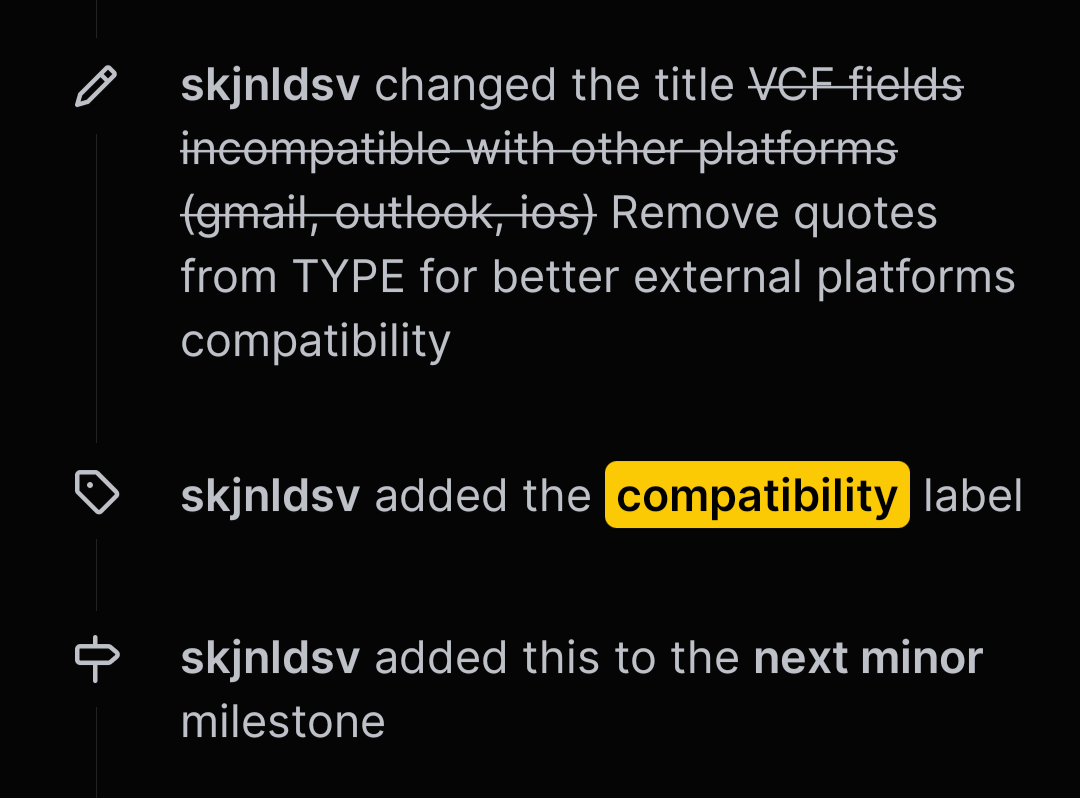
Let's keep it civil here. I feel weirdly blamed and I'm not feeling super confortable with this. As always, if anyone have time to jump on it, feel free.
This is the only reason it's not fixed yet! ✌️
skjnldsv
on 16 Sep 2020
if I find the time I will look into it this weekend.
That would be awesome!!
Feel free to join the contacts dev talk room
https://cloud.nextcloud.com/call/wx2oqhpy
Maybe there can even be a checkbox in the options so you can enable it if desired and if not just leave it.
Please don't. No custom config is needed. It should be the default 🤗👌
skjnldsv
on 16 Sep 2020
Hi,
this is my first comment in this project. I followed this issue because I have problems using eM-Client and Outlook with NextCloud. The contacts are corrupted after synchronizing with CaldavSynchronizer. Mobile numbers stated as Work numbers, work numbers as mobile and so forth.
I just update to version 3.1.4 of the contact app. Now there no quotes anymore what increases compatibility a lot. But I have seen a small issue. Telephone numbers for work are exported with: 'WORK' but entries for Home are exported with 'HOME,VOICE'. I think that work numbers should also be formatted in this case: WORK,VOICE. Within eM-Client entries with WORK,VOICE are shown as "Geschäftlich" (sorry German) whereas entries with WORK are shown as "Firma". The same within Outlook. Although RFC 6350 states VOICE as default it seem that some applications like eM-Client and Outlook handles those entries in different ways.
Maybe this is a new issue?
 th3112
on 2 Oct 2020
th3112
on 2 Oct 2020
Same problem here, but no new issue. The problem discussed here is not fixed yet by the Nextcloud developers.
I created a new contact with NC 19.0.4 and Contacts 3.4.0. Here ist the result:
BEGIN:VCARD
VERSION:3.0
PRODID:-//Sabre//Sabre VObject 4.3.0//EN
UID:c218c817-4da6-49f8-8852-2e265a50c2c5
FN:000 von Nextcloud
ADR;TYPE=HOME:;;;;;;
EMAIL;TYPE=HOME:
TEL;TYPE="HOME,VOICE":+49 511 123456
TEL;TYPE="WORK,VOICE":+49 511 23456789
TEL;TYPE=CELL:+49 172 456789123
TEL;TYPE="WORK,CELL":+49 171 897564
N:000 von Nextcloud;;;;
REV;VALUE=DATE-AND-OR-TIME:20201010T071436Z
END:VCARD
The fileds "HOME,VOICE", "WORK,VOICE" and "WORK,CELL" are still stored with quotes, and that is exactly the incompatibility issue we discuss here.
Silvernerd1
on 10 Oct 2020
Same for the import procedure. But in general, support seems to be there!
How to reproduce:
- import vcards with
TEL;type=OTHER;type=VOICE:666 - in Nextcloud it is imported with
TEL;TYPE="OTHER,VOICE":666(which looks funny in iOS) - change the type manually on the phone and sync
- now it is correct in Nextcloud with
TEL;type=OTHER;type=VOICE:666and also in iOS devices.
My workaround to create/import the vCard with iOS does not work, as this messes up the X-SOCIALPROFILE. iOS adds an x-apple to the value for instagram X-SOCIALPROFILE;type=INSTAGRAM;x-user=nextclouders:x-apple:nextclouders, which Nextcloud interpretes like this:

damn them!
 call-me-matt
on 10 Oct 2020
call-me-matt
on 10 Oct 2020
Unlike earlier versions, Contacts 3.4.0 leaves the fields as they are, as long, as you don't change anything on the Nextcloud side.
Step 1: I create a contact with eM Client and look into the vcf file
BEGIN:VCARD
VERSION:4.0
PRODID:-//MailClient.VObject/8.0.3385.0
UID:urn:uuid:cfbfc468-4a70-4557-890e-5a3180a3f4be
REV:20201011T073739Z
N;SORT-AS=002 from eM Client:002 from eM Client;;;;
FN:002 from eM Client
TEL;TYPE=CELL:+49 174 mobile
TEL;TYPE=WORK,VOICE:+49 511 work
TEL;TYPE=WORK:+49 511 company
TEL;TYPE=HOME,VOICE:+49 511 home
TEL;TYPE=OTHER:+49 511 other
END:VCARD
Step 2: I synchronize with Nextcloud, open the contact and immediately chose ... > Download. The vcf file is still correct / compatible
BEGIN:VCARD
VERSION:3.0
PRODID:-//Sabre//Sabre VObject 4.3.0//EN
UID:urn:uuid:cfbfc468-4a70-4557-890e-5a3180a3f4be
REV:20201011T073739Z
N;SORT-AS=002 from eM Client:002 from eM Client;;;;
FN:002 from eM Client
TEL;TYPE=CELL:+49 174 mobile
TEL;TYPE=WORK,VOICE:+49 511 work
TEL;TYPE=WORK:+49 511 company
TEL;TYPE=HOME,VOICE:+49 511 home
TEL;TYPE=OTHER:+49 511 other
END:VCARD
Step 3: I change anything within contacts. Must not necessarily be a phone field. When I download the contact as vcf, the phone fields appear with quotes and eM Client dows not recognise them.
BEGIN:VCARD
VERSION:3.0
PRODID:-//Sabre//Sabre VObject 4.3.0//EN
UID:urn:uuid:cfbfc468-4a70-4557-890e-5a3180a3f4be
N;SORT-AS=002 from eM Client:002 from eM Client;My Firstname;;;
FN:002 from eM Client
TEL;TYPE=CELL:+49 174 mobile
TEL;TYPE="WORK,VOICE":+49 511 work
TEL;TYPE=WORK:+49 511 company
TEL;TYPE="HOME,VOICE":+49 511 home
TEL;TYPE=OTHER:+49 511 other
REV;VALUE=DATE-AND-OR-TIME:20201011T073957Z
END:VCARD
Conclusion
When you use Nextcloud / Contacts only as a place to store your contacts data and exclusively use your client for all editing, then you should be lucky with the current version. Unlike earlier versions, it does not change your record at synchronization time and it does not tell you, that something is wrong with your contact record.
When you use Nextcloud / Contacts for editing contact data, too, the problem discussed here still persists. The fields WORK,VOICE and HOME,VOICE are stored with quotes, and as soon, as you synchronize the record, you run into the incompatibility issue.
Silvernerd1
on 11 Oct 2020
Maybe it‘s related to this issue: #25485 - Number labels are shown as "HOME, "CELL or "WORK on iOS if created in WebGUI
There I‘ve mentioned this:
When I create or modify a contact and download this from the contact app as vcf-file I get this:
BEGIN:VCARD
VERSION:3.0
PRODID:-//Sabre//Sabre VObject 4.3.0//EN
UID:817a532d-3ef9-4f8f-97f0-26a8e0981195
FN:Max Mustermann
ADR;TYPE=HOME:;;Haupstraße 3;Paderborn;NRW;33161;Deutschland
EMAIL;TYPE=HOME:[email protected]
TEL;TYPE="HOME,VOICE":08001234567890
TEL;TYPE="WORK,VOICE":09001234567890
CATEGORIES:???
ORG:Musterfirma AG
TITLE:Dr.
REV;VALUE=DATE-AND-OR-TIME:20210219T201648Z
END:VCARD
As written in the mentioned issue #942 in the RFC 6350 - Section 6.4.1 the line with the telephone number is correct (Value-List with quotation mark), but in https://tools.ietf.org/html/rfc6350#section-6.7.9 is the version field defined with this value:
The value MUST be "4.0" if the vCard corresponds to this specification.
So I take a look in this RFC 2426 - Section 3.6.9 and here is specified, that the value-list doesn't have quotion-marks.
TEL;TYPE=work,voice,pref,msg:+1-213-555-1234
So I think there is a bug in cration of the vcf-structure. It must be checked if this should correspond to the RFC 6350 (V 4.0) or to RFC 2426 (V3.0).
I tried to change the Version-Attribute to 4.0 - With this modification iOS will import the contact correct.
 FackelAB
on 21 Mar 2021
FackelAB
on 21 Mar 2021
Happy birthday to my favorite issue. I know it's heartless but I hope you die soon.
giddyhup
on 23 May 2021
Related issues
 Dennis1993
·
5Comments
Dennis1993
·
5Comments
 Kalytis
·
4Comments
Kalytis
·
4Comments
 brantje
·
5Comments
brantje
·
5Comments
 kangaroo72
·
4Comments
kangaroo72
·
4Comments
 keunes
·
4Comments
keunes
·
4Comments
Most helpful comment
Happy birthday to my favorite issue. I know it's heartless but I hope you die soon.