Contacts: No longer able to disregard year in birthday
Describe the bug
I just updated the Contacts app. I now can no longer able to disable/hide/ignore the year in the birthday, something I'm convinced was possible before
To Reproduce
Steps to reproduce the behaviour:
- Go to a contact without a birthday
- Click on 'Add new property' and select 'Birthday'
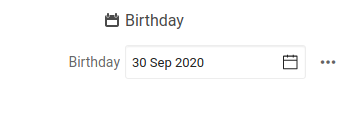
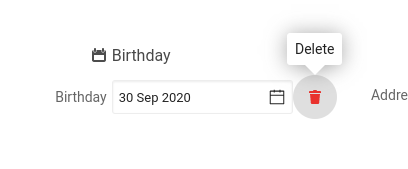
- Hover the three dots, and click it
- See error
Expected behavior
Have a menu which allows to delete, and hide/ignore the year in this field
Actual behavior
Clicking changes the three dots into a delete button.
Screenshots
Server configuration
Nextcloud version: 19.0.3
Contacts version: 3.4.0
Updated from an older Nextcloud or fresh install: fresh
 keunes
All 4 comments
Also, the three dots show on first loading a contact, but after the 'Delete' button has been shown when moving away (end hover), the trash icon and the three dots disappear. Not sure if that's intended, but either way it feels inconsistent (like something is wrong).
keunes
on 30 Sep 2020
Yes, it was possible before. Now you can't enter a birthday without a year.
Workaround: I enter the birthday without a year on my phone and sync. Kind of embarrassing, but hey, what can you do.
 tessus
on 1 Nov 2020
tessus
on 1 Nov 2020
Those who upvoted this issue: are you actually able to set a birthday at all, now (in the browser app)? I just tried, with Contacts app version 3.4.2, and when I select a date (even including a year) via the date-picker, this date doesn't get stored. @3c7 @Luzifer @call-me-matt @tessus @csware
keunes
on 24 Nov 2020
Those who upvoted this issue: are you actually able to set a birthday at all, now (in the browser app)? I just tried, with Contacts app version 3.4.2, and when I select a date (even including a year) via the date-picker, this date doesn't get stored. @3c7 @Luzifer @call-me-matt @tessus @csware
Yes, I'm able to set the birthday.
 3c7
on 24 Nov 2020
3c7
on 24 Nov 2020
Related issues
 caugner
·
3Comments
caugner
·
3Comments
 IamSAB
·
4Comments
IamSAB
·
4Comments
 stvogel
·
3Comments
stvogel
·
3Comments
 irgendwie
·
5Comments
irgendwie
·
5Comments
 spoorun
·
5Comments
spoorun
·
5Comments
Most helpful comment
Yes, it was possible before. Now you can't enter a birthday without a year.
Workaround: I enter the birthday without a year on my phone and sync. Kind of embarrassing, but hey, what can you do.