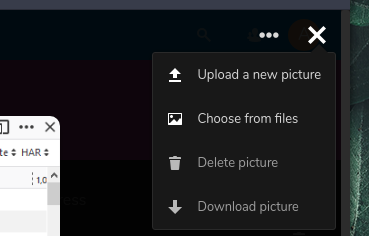
Contacts: Modal contact picture menu is barely visible
Steps to reproduce
- create a contact
- upload a picture
Expected behaviour
It is somehow possible to edit or delete the contact picture
Actual behaviour
Clicking the image just shows the actual picture, but without any change options.
Server configuration
Nextcloud version: (see Nextcloud admin page)
15.0.7
Contacts version: (see Nextcloud apps page)
3.1.1
Updated from an older Nextcloud or fresh install:
fresh install
i think, all this login and log stuff is not necessary here. I've seen the feature of editing contact pictures described in a manual I was googling for, but the buttons in the picture view simply aren't present. Not visible, and also nothing that might be suspected to do the job in the HTML source.
Client configuration
Browser:
Edge, Firefox, Vivaldi
Want to back this issue? Post a bounty on it! We accept bounties via Bountysource.
 jkischel
All 6 comments
Hello!
Have you tried clicking the picture?
It will open the picture and you will be able to edit it :)
 skjnldsv
on 2 May 2019
skjnldsv
on 2 May 2019

woah, okay. Finally found them.
The three points icon is on all my devices (HP laptop, Android Smartphone, Home PC) very well hidden as it has nearly the same color as the background. I'll fix this locally by adding some custom CSS, but this is still a usability issue.
In the manual, they were listed as icons at the bottom, but of course not that critical.
jkischel
on 2 May 2019
Ah yes, I can indeed reproduce the issue.
I'll take a look. I guess this needs a fix!
Thanks for reporting :)
skjnldsv
on 2 May 2019
Can also confirm this is happening on brand new install and confused me for a few mins!
 OverByThere
on 14 May 2019
OverByThere
on 14 May 2019
Sorry everyone :)
Should be fixed in upcoming version ;)
skjnldsv
on 14 May 2019
Fixed by #1099
skjnldsv
on 14 May 2019
Related issues
 brantje
·
5Comments
brantje
·
5Comments
 IamSAB
·
4Comments
IamSAB
·
4Comments
 Kalytis
·
4Comments
Kalytis
·
4Comments
 despens
·
3Comments
despens
·
3Comments
 keunes
·
4Comments
keunes
·
4Comments
Most helpful comment
Ah yes, I can indeed reproduce the issue.
I'll take a look. I guess this needs a fix!
Thanks for reporting :)