Contacts: NC13b3 regression: big vertical spaces in left column
Steps to reproduce
- Upgrade to Nextcloud 13 (b3 in my case)
- Open Contacts app
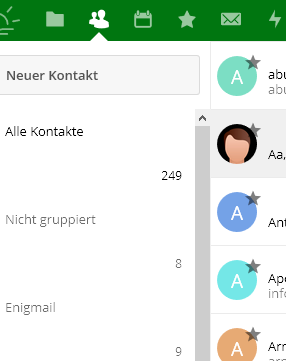
- Group chooser / Left column is no longer neatly formatted
Expected behaviour
Should look nicely, as it did in NC 12.
Actual behaviour
Large vertical spaces between lines:
Server configuration
Operating system: Debian Stretch (up to date)
Web server: Apache 2.4.10
Database: MySQL 5.5.58
PHP version: 5.6.30
Nextcloud version: 13.0.0 Beta 3
Updated from an older Nextcloud/ownCloud or fresh install: Upgraded from 12.0.4
Where did you install Nextcloud from: admin page / installer
Signing status: no errors upon signing: http://example.com/index.php/settings/integrity/failed reports "No errors have been found."
Contacts version: 2.0.1
Where did you install Contacts from: apps page / updated after NC upgrade
List of activated apps:: Seems irrelevant, isn't it?
Nextcloud configuration:
{
"system": {
"instanceid": "REMOVED SENSITIVE VALUE",
"passwordsalt": "REMOVED SENSITIVE VALUE",
"secret": "REMOVED SENSITIVE VALUE",
"trusted_domains": [
"seyfarth.de"
],
"datadirectory": "REMOVED SENSITIVE VALUE",
"overwrite.cli.url": "https:\/\/seyfarth.de\/cloud",
"dbtype": "mysql",
"version": "13.0.0.8",
"dbname": "REMOVED SENSITIVE VALUE",
"dbhost": "REMOVED SENSITIVE VALUE",
"dbport": "",
"dbtableprefix": "oc_",
"dbuser": "REMOVED SENSITIVE VALUE",
"dbpassword": "REMOVED SENSITIVE VALUE",
"logtimezone": "Europe\/Berlin",
"installed": true,
"trashbin_retention_obligation": "auto,90",
"versions_retention_obligation": "90,auto",
"memcache.local": "\OC\Memcache\APCu",
"memcache.locking": "\OC\Memcache\Redis",
"filelocking.enabled": "true",
"redis": {
"host": "REMOVED SENSITIVE VALUE",
"port": 6379,
"timeout": 0
},
"mail_from_address": "REMOVED SENSITIVE VALUE",
"mail_smtpmode": "php",
"mail_domain": "REMOVED SENSITIVE VALUE",
"defaultapp": "calendar",
"maintenance": false,
"loglevel": 2,
"theme": "",
"appstore.experimental.enabled": true,
"updater.release.channel": "beta",
"mail_smtpauthtype": "PLAIN",
"mail_smtpsecure": "tls",
"mail_smtpauth": 1
}
}
Are you using external storage, if yes which one: no
Are you using encryption: no
Are you using an external user-backend, if yes which one: no
Client configuration
Browser: Firefox 57 / Chrome 63
Operating system: W10
CardDAV-clients:: issue ist with NC web interface only (browser)
Logs
Web server error log: No entry while doing password reset.
But I see this:
[ssl:error] AH02032: Hostname www.seyfarth.de provided via SNI and hostname seyfarth.de provided via HTTP are different
Yet, Let's Encrypt seems to be correct:
Certificate Name: seyfarth.de
Domains: www.seyfarth.de seyfarth.de
Expiry Date: 2018-03-07 22:32:14+00:00 (VALID: 78 days)
Paths: ...
Nextcloud log (data/nextcloud.log): No entry when starting contacts app in browser.
Browser log (Firefox Browser Console):
JQMIGRATE: Migrate is installed, version 1.4.0 core.js:7
getAttributeNode() sollte nicht mehr verwendet werden. Verwenden Sie stattdessen getAttribute(). core.js:7:1714
Das nodeValue-Attribut von Attributen sollte nicht mehr verwendet werden. Verwenden Sie value stattdessen. core.js:7:1714
Content Security Policy: Die Einstellungen der Seite haben das Laden einer Ressource auf self blockiert ("script-src 'nonce-NGRPZTRSdW45empjcHF3YUUwK0MwUXE3a1VrS3lWV2Fua3YrRXJOTldLUT06cTc2cTJFM2pyV3l3OVBaVFd6L3ovbWFPL25saG5SYko3VE9mS3Njdkdldz0=' 'unsafe-eval'"). Source: ondrop attribute on INPUT element. contacts
 nursoda
All 23 comments
Might this (and other issues I encounter) be caused by an over-protective cross-site policy? Reason is the browser JS and the web server error log entries above, possibly caused by not honoring "Alternative DNS names" within the webserver TLS certificate?
nursoda
on 19 Dec 2017
Similar issue in calendar, too: https://github.com/nextcloud/calendar/issues/666
nursoda
on 19 Dec 2017
Thanks!
@nursoda can you try with latest nightlies? :)
 skjnldsv
on 19 Dec 2017
skjnldsv
on 19 Dec 2017
Sure, but how? Please step by step, like Download ZIP from github master branch, copy to server, unpack, chmod -R 640?
nursoda
on 19 Dec 2017
Download zip from https://nightly.portknox.net/contacts/?C=M;O=D
Extract content with your http user
should be fine then
skjnldsv
on 19 Dec 2017
No, definitely not. What I get is worse:

The red dot is where my cursor is, and the bar on the left changes with the cursor position - and seems to have the right height, yet white on white ;-)
... and it seems most contact pics are not loaded or WAY slower that with 2.0.1
nursoda
on 19 Dec 2017
For me this issue also persists with the latest Nextcloud Beta and contacts app git master
 onny
on 13 Jan 2018
onny
on 13 Jan 2018
Fixed with #438
skjnldsv
on 14 Jan 2018
I tried the current git master and this issue is still present for me

@ Nextcloud 13 Beta 3
Also note the avatar icons are missplaced
onny
on 19 Jan 2018
In Chromium, the stylesheet looks better but the contact list is still way too small :(

onny
on 27 Jan 2018
If you redesign the left pane, please consider sorting it, too.
As seen in last Screenshot, its unsortet, order there: F O W S U F K.
nursoda
on 6 Feb 2018
Styling issue is still present with the latest release of contacts, version 2.1
onny
on 12 Feb 2018
Not here: 2.1 solved it for me:

However, the sorting issue remains.
nursoda
on 13 Feb 2018
@nursoda This happens on wide screens.
skjnldsv
on 13 Feb 2018
Hmmm, I have a screen resolution of 2440px wide and it does not happen here. In Firefox release, current. No matter how I resize the FX window.
nursoda
on 13 Feb 2018
@nursoda sorting is currently by amount of contacts in a group. I think we had a discussion about this before, but can't remember where.
@onny can you please make sure this isn't a caching issue?
 Henni
on 13 Feb 2018
Henni
on 13 Feb 2018
I can reproduce @Henni This is a server side issue, but this is created by the column system we're using here (which push the flex to the maximum)
This will require a small fix from our side and then a fix for the server :)
skjnldsv
on 13 Feb 2018
@Henni: Thanks for asking. Indeed it seems to be a caching issue. It is working better now in Firefox. One thing is still present, the avatars in the contact list are not correctly vertical aliged as seen in this old screenshot here (https://github.com/nextcloud/contacts/issues/453#issuecomment-359104441). But this only affects Firefox.
onny
on 13 Feb 2018
@skjnldsv then please let us get rid of the column system.
@onny strange... the vertical misalignment flickers for me on firefox. Can you open a new issue for this?
Henni
on 13 Feb 2018
Yep I can do this
//edit
Done: https://github.com/nextcloud/contacts/issues/478
onny
on 13 Feb 2018
@Henni Sorting is off-topic here, but to answer: I don't recall a discussion, wasn't aware of "sort by no of contacts in group" which I realize now. One should be able to set how to sort. For many groups/categories, this is odd.
nursoda
on 14 Feb 2018
It seems almost all discussion is about the left column too wide and sorting. Most important problem is the "middle" contacts list too narrow. And details part of the window gets almost all space. This makes the contacts app almost unusable.
 rollanders
on 22 Feb 2018
rollanders
on 22 Feb 2018
It's being fixed in #481
skjnldsv
on 22 Feb 2018
Related issues
 keunes
·
4Comments
keunes
·
4Comments
keunes
·
4Comments
keunes
·
4Comments
 despens
·
3Comments
despens
·
3Comments
 caugner
·
3Comments
caugner
·
3Comments
 Kalytis
·
4Comments
Kalytis
·
4Comments
Most helpful comment
In Chromium, the stylesheet looks better but the contact list is still way too small :(
