Conemu: New release breaks shell input
Versions
ConEmu build: 180617 x64
OS version: Windows 10 x64
Used shell version (Far Manager, git-bash, cmd, powershell, cygwin, whatever): ???
tmux + zsh in WSL ubuntu 1804
Problem description
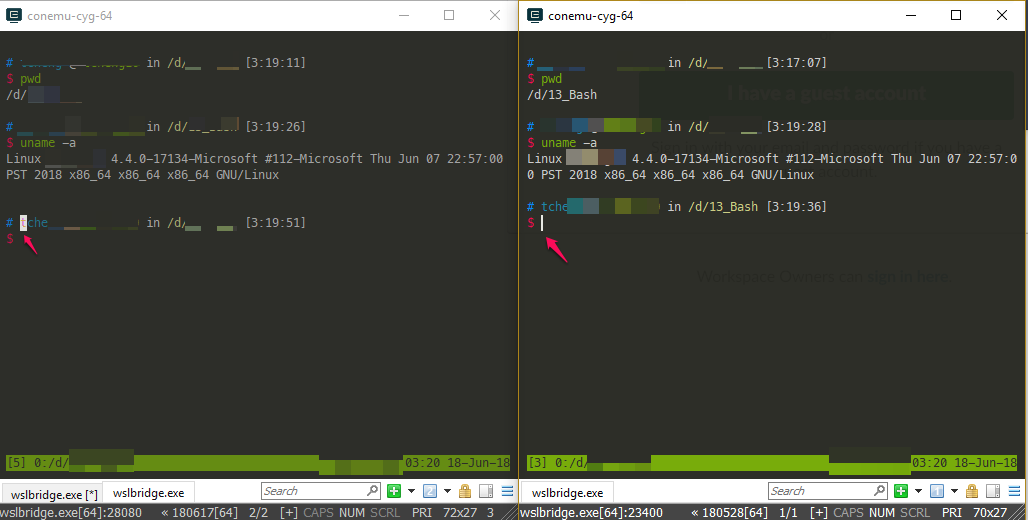
The cursor in the updated version stays in the same line as shown in the image without changing newline after each input. (left 180617 build on portable version, right 180528 build installed)
Steps to reproduce
- launch a zsh with mutiple line input theme.
Actual results
It doesn't changes newline and it overwrites the characters
Expected results
works normally
 a2975667
All 17 comments
How to enable multiline zsh prompt? An example?
 Maximus5
on 17 Jun 2018
Maximus5
on 17 Jun 2018
I'm not sure if mutiline is the correct term, I'm just trying to express the start of the shell involves in some kind of newline setup. This theme name is oxide on oh my zsh, I did not make any changes to the theme itself so it should be reproduceable.
a2975667
on 17 Jun 2018
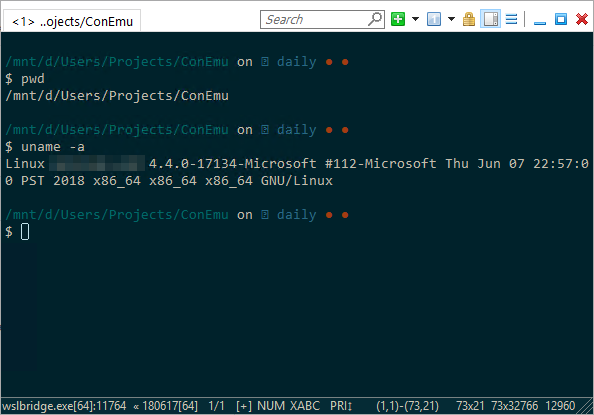
Nope. I don't see any problems with standard oxide theme
Maximus5
on 17 Jun 2018
Please make log files via connector --log switch, reproduce the issue creating step-by-step screenshots and attach them here (gist or zip).
Maximus5
on 17 Jun 2018
I created a new issue for mine, sorry for the distraction.
gh-1615
 shughes-uk
on 21 Jun 2018
shughes-uk
on 21 Jun 2018
@a2975667 have you found a solution to this porblem? I have the same. 😅
 SweeD
on 30 Aug 2018
SweeD
on 30 Aug 2018
@SweeD I just went back to use the older version...... didn't have enough time to see if there's anything I could fix or if some other issues caused it...
a2975667
on 31 Aug 2018
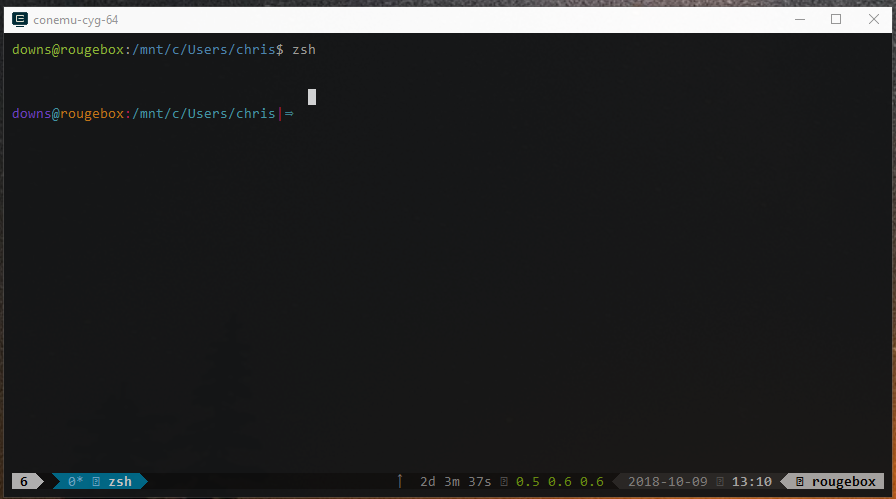
I can repro this on ConEmu v180626 preview running on Windows 10 Pro Insider Build 18252. I have oh-my-zsh installed and am using the 'pygmalion' theme that comes with it. Everything works fine with zsh standalone, but when it is run inside of tmux the cursor ends up a line above the prompt as pictured.
The $PS1 for the prompt is:
%{$fg[magenta]%}%n%{$reset_color%}%{$fg[cyan]%}@%{$reset_color%}%{$fg[yellow]%}%m%{$reset_color%}%{$fg[red]%}:%{$reset_color%}%{$fg[cyan]%}%0~%{$reset_color%}%{$fg[red]%}|%{$reset_color%}%{$fg[cyan]%}⇒%{$reset_color%}
This does not repro on cmd.exe WSL.
 chris-downs
on 9 Oct 2018
chris-downs
on 9 Oct 2018
Interestingly, I just noticed that if I do an ls the issue is fixed permanently in the current tmux window (i can exit zsh and come back and its still good, only broken again inside of a new window). I'm guessing the issue lies somewhere in color escaping and resetting, as ls uses colors.
chris-downs
on 9 Oct 2018
So recently I reinstalled my workingstack and ran into the same problem again. the problem is not with zsh but due to tmux, I should have noticed.
ConEmu build: 180626 x64
OS version: Windows 10 x64 (build 1809)
Used shell version (Far Manager, git-bash, cmd, powershell, cygwin, whatever):
tmux + zsh running WSL
-
Reproduce issue:
run zsh as default shell with bashrc
run tmux with conemu at startup with the following command:
set "PATH=%ConEmuBaseDirShort%\wsl;%PATH%" & %ConEmuBaseDirShort%\conemu-cyg-64.exe --wsl -cur_console:pnm:/mnt -l -t tmux -new_console:m:"" -new_console:d:D:\*****
The cursor floats upward. If I remove -t tmux everything would be fine as what the author posted.
Not sure if this is a tmux problem or a font problem. Should I still attach the log file? @Maximus5
a2975667
on 20 Oct 2018
I'm an old-timer still using screen instead of tmux (on a linux box, ssh'd there from a conemu cmd.exe shell). The same bug exists there. If I PgUp and PgDn in irssi, then the cursor is left on the last line updated in the channel window, and not positioned back down on the command line where it belongs. Downgrading to the version before 180617 (i.e. choco install conemu --allow-downgrade --version 18.5.6.0) works around the issue.
Prior to this, I noticed an even simpler failure mode in ruby which I distilled down to a minimal failing case, though I'm unsure if it's the same bug. In 180626, this fails in a git-bash shell:
$ ruby -e "gets"
Rather than accepting a line of input and exiting, ruby hangs until I bail with ctrl-C. In 18.5.6.0, the above succeeds, and since it's messing up some of my ruby code, I'm going to just stick with that until both issues are resolved.
Please let me know if you think they're unrelated & I'll file this one separately.
 bg
on 27 Nov 2018
bg
on 27 Nov 2018
choco install conemu --allow-downgrade --version 18.5.6.0 seems to have resolved the issue for me, thanks @bg!
 pyro2927
on 6 Jan 2019
pyro2927
on 6 Jan 2019
Does the problem persist in the current ConEmu build?
Maximus5
on 3 Mar 2019
BTW, I've requested log files long ago: https://github.com/Maximus5/ConEmu/issues/1609#issuecomment-397907723
If the problem persist, I Need them with screenshots.
Maximus5
on 3 Mar 2019
Sorry I overlooked the unanswered request for logs. On the latest version I haven't noticed issues yet but in the interim have finally switched fully from screen to tmux so my current usage isn't exactly as before. I believe it is resolved, though. I'll make a point of re-executing that ruby simple reproducer, though and let you know (along with version details). I intend to do this by end of day tomorrow, if not sooner.
bg
on 3 Mar 2019
My "ruby -e gets" test works as expected now, both from cmd.exe & git bash. Pg-up & Pg-dn when ssh'd to another system from git-bash & connected to my tmux session there seems to behave correctly too.
Windows 10 x64
ConEmu: 19.1.8.0 & 19.3.1.0
Git for Windows: 2.19.2
I didn't bother with collecting logs & screenshots since everything seems fine now. Thanks!
bg
on 3 Mar 2019
So, I consider this is solved.
If someone still observe the bug, don't hesitate to reopen with logs and screenshots.
Maximus5
on 3 Mar 2019
Related issues
 marfillaster
·
6Comments
marfillaster
·
6Comments
 vampiricwulf
·
5Comments
vampiricwulf
·
5Comments
 DrMerlin
·
4Comments
DrMerlin
·
4Comments
 altbdoor
·
4Comments
altbdoor
·
4Comments
 Daniel15
·
3Comments
Daniel15
·
3Comments
Most helpful comment
I can repro this on ConEmu v180626 preview running on Windows 10 Pro Insider Build 18252. I have oh-my-zsh installed and am using the 'pygmalion' theme that comes with it. Everything works fine with zsh standalone, but when it is run inside of tmux the cursor ends up a line above the prompt as pictured.
The $PS1 for the prompt is:
This does not repro on cmd.exe WSL.