Conemu: Not able to start new bash tab with cd into a directory and run a simple npm command
Please do not post problems found in old builds, update first.
ConEmu versions has following formatYYMMDD, so if you are using old build,
there are chances that your problem was fixed long ago.
https://conemu.github.io/en/OldBuild.html.Please do search first in the open https://github.com/Maximus5/ConEmu/issues?q=is%3Aopen
or closed https://github.com/Maximus5/ConEmu/issues?q=is%3Aclosed issues.Please do not try to attach or paste here large files like crash dumps, logs or xml settings.
Use external hosting services like https://conemu.github.io/en/DropBox.html
or https://gist.github.com/.Please do not post here third-party problems, this is ConEmu project issue tracker.
Versions
ConEmu build: 161206 x64
OS version: Windows 10 latest Developer Mode Enabled
Used shell version : git-bash, cmd, powershell
Problem description
Trie to build a automated task step base on the existing Bash Script task was not successful
I did
%ConEmuDrive%\Git\git-cmd.exe --no-cd --command=usr/bin/bash.exe -l -i
cmd.exe -new_console:d:"cd C:\www && npm start"
Steps to reproduce
- create task copy from Bash task
- run it
- see it open two new tabs instead of running inside the Bash tab
Actual results
two tabs, with one bash and another really just regular windows command line
Expected results
open one bash tab and running the command cd C:\www && npm start in it!
Additional files

*Also curious, what exactly are the tasks been written in ConEmu? Are they actually multiple different languages?
 achenwei-chwy
All 8 comments
The -new_console:d: doesn't support cd or any other commands.
I don't understand the question about languages.
 Maximus5
on 14 Jan 2018
Maximus5
on 14 Jan 2018
@Maximus5 the script, or the command that wrote in task, clearly they are not shell script no? I mean that, I dont really type all that in the command line to get into a directory, like in console I only need to do cd C:\www and in this "task" script I have to write all that command, what language is it?
achenwei-chwy
on 14 Jan 2018
Did you really read the links I posted?
Maximus5
on 14 Jan 2018
@Maximus5 I did and in additional, I read https://superuser.com/questions/1104567/how-can-i-find-out-the-command-line-options-for-git-bash-exe and https://stackoverflow.com/questions/19916670/how-to-launch-a-git-bash-window-with-particular-working-directory-using-a-script and they are different than what in the ConEmu instruction. Super confused, I am still not too familiar with different kind of command line languages.
Would you able to instruct me on at minmum, how to define a task that opens a default bash command and execute one more command after it? like cd c:\www && npm start?
Just tried -c, but still not working
%ConEmuDrive%\Git\git-cmd.exe --command=usr/bin/bash.exe -l -i -c " cd C:\www"
achenwei-chwy
on 14 Jan 2018
- Be precise. Read the messages tools display to you. Words "it doesn't work" means nothing.
- Don't mix switches from different tools in one place. There is absolutely no sence to pass
cd c:\www && npm startinto-new_console:d:"...". ConEmu is not a bash. - Learn about paths in POSIX,
c:\wwwis illegal there! You must use/c/wwwinstead. - At last, your question was answered many times, and there is CygwinStartCmd and CygwinStartDir. And actually, it is related to git-for-windows in much, but not to ConEmu.
%ProgramFiles%\Git\git-cmd.exe --command=usr/bin/bash.exe -c "cd /c/www; pwd; npm start"
One more link
Maximus5
on 14 Jan 2018
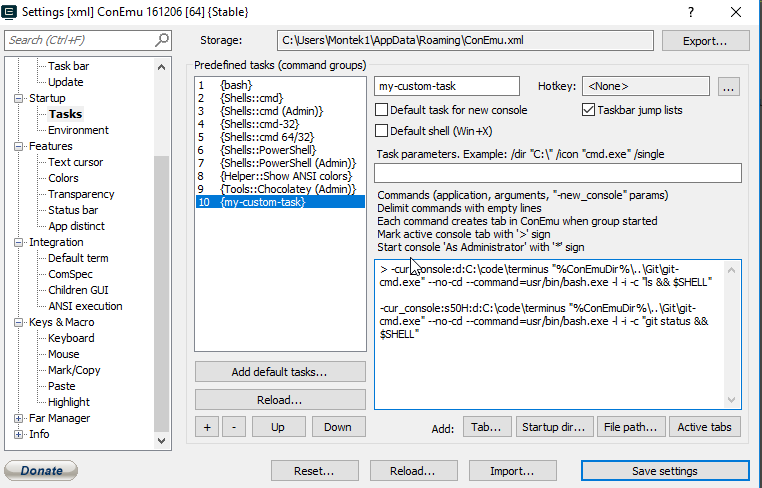
@adamchenwei do something like this:
> -cur_console:d:C:\code\terminus "%ConEmuDir%\..\Git\git-cmd.exe" --no-cd --command=usr/bin/bash.exe -l -i -c "ls && $SHELL"

-cur_console:s50H:d:C:\code\terminus "%ConEmuDir%\..\Git\git-cmd.exe" --no-cd --command=usr/bin/bash.exe -l -i -c "git status && $SHELL"
Screenshot:
 kdelmonte
on 29 Mar 2018
kdelmonte
on 29 Mar 2018
@kdelmonte this final "...&& $SHELL " , was what I was missing.
because git pull would complete , bash.exe would exit and I always got a notification from ConEmu that the command finished in less than 10 seconds and I would never get a command prompt.
Makes sense to add this specific task invokation in GitForWindows as a new subsection "start git for windows, run a command in bash and provide a prompt afterwards"
 synthnassizer
on 31 May 2019
synthnassizer
on 31 May 2019
Related issues
 dandv
·
3Comments
dandv
·
3Comments
 altbdoor
·
4Comments
altbdoor
·
4Comments
 pyhedgehog
·
3Comments
pyhedgehog
·
3Comments
 Chirishman
·
3Comments
Chirishman
·
3Comments
 phazei
·
6Comments
phazei
·
6Comments
Most helpful comment
@adamchenwei do something like this:
Screenshot:
