Versions
ConEmu build: 170316 x64
OS version: Windows 10.0.14393 x64
Used shell version (Far Manager, git-bash, cmd, powershell, cygwin, whatever): ANY
Problem description
The icons on the tab bar appear ugly to my eyes. Furthermore the admin shield is not fully displayed.

For comparison here is what the Bash for Windows icon looks like on the taskbar:

Steps to reproduce
- Simply open a few tasks on ConEmu and observe the tab icons.
Actual results
The tab bar icons appear with jagged edges and not properly scaled.
Expected results
The tab bar icons should scale correctly to the tab bar size and look smooth.
Additional files
See embedded images above.
 billziss-gh
All 12 comments
Admin shield is displayed as expected. By design.
 Maximus5
on 19 Mar 2017
Maximus5
on 19 Mar 2017
Admin shield is displayed as expected. By design.
@Maximus5 thanks for your comment re: admin shield. I understand that this is by design.
Would you agree that the tab bar icons appear jagged and not properly scaled?
billziss-gh
on 20 Mar 2017
At the moment standard Windows' TabBar control is used and ConEmu does not draw icons itself.
I future improvements would be possible.
Maximus5
on 20 Mar 2017
At the moment standard Windows' TabBar control is used and ConEmu does not draw icons itself.
I future improvements would be possible.
Thanks for accepting this.
I have not done any Windows GUI development since the late 90's, so please take what I say with a grain of salt. I took a brief look at your code and it appears to me that the code may be "munging" the icons in CIconList::CreateTabIconInt with the ImageList_* API's. I am wondering if this is what causes the icon aliasing.
https://github.com/Maximus5/ConEmu/blob/master/src/ConEmu/IconList.cpp#L284
billziss-gh
on 20 Mar 2017
@billziss-gh, thanks for your advice, it was helpful!
After studying the code you linked, I think I've been able to fix the issue. Will send a PR soon.
 ForNeVeR
on 10 Dec 2017
ForNeVeR
on 10 Dec 2017
Alright, the task is much harder that I thought.
My initial idea was to use 32-bit color depth to properly attribute the icon transparency. Here I've replaced ILC_COLOR24 with ILC_COLOR32:
It worked, look:
(these're PowerShell Core icons; the third image is taken from the PowerShell window without ConEmu for comparison; as you can see, after my patch the icon seems to be pixel-to-pixel perfect)
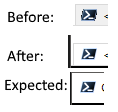
But then I saw the admin icons after my patch:
Before: 
After: 
(Yes, that's literally a fully-transparent hole instead of a shield icon).
I wasn't been able to debug this trouble. Here're my current results:
1. At this point, the icon seems to be okay (right after the ImageList_Merge):
To check the generated icon, I've added the following code:
IMAGEINFO ii;
ImageList_GetImageInfo(hAdmList, 0, &ii);
SaveImageEx(L"T:\\hAdmList.png", ii.hbmImage);
SaveImageEx(L"T:\\hAdmList_mask.png", ii.hbmMask);
I got the following image:

And the following mask:

2. It seems that any further change to hAdmList, not matter if you copy the image to somewhere or just replace it in place (e.g. ImageList_Replace(hAdmList, 0, ii.hbmImage, ii.hbmMask)) will mangle the image. After the replacement the resulting image looks like that:

Unfortunately, (after long debugging sessions) I still have no idea how to fix that 😭
ForNeVeR
on 12 Dec 2017
I'll take a look
Maximus5
on 12 Dec 2017
@ForNeVeR thank you for your work on this!
billziss-gh
on 12 Dec 2017
Is there a way to hide the icons in the tab bar?
 moodmosaic
on 9 Aug 2018
moodmosaic
on 9 Aug 2018
There is an option in ConEmu.xml
Maximus5
on 9 Aug 2018
Good to know, thank you. There's also this https://superuser.com/q/609418/135094 that I found useful.
moodmosaic
on 9 Aug 2018
The one who started it all should finish it, right? So, I think I got it.
ILC_COLOR32|ILC_MASK makes the image lists to behave very bizarre if you're trying to combine the images from different lists. But I was able to overcome (hopefully) all the issues by using a single image list and setting up the overlays using ImageList_SetOverlayImage (as probably intended actually).
Pull request fixing the issue is already in works.
ForNeVeR
on 27 Aug 2019
Related issues
 wildeyes
·
4Comments
wildeyes
·
4Comments
 joanis
·
3Comments
joanis
·
3Comments
 pyhedgehog
·
3Comments
pyhedgehog
·
3Comments
 eblis
·
5Comments
eblis
·
5Comments
 xkx
·
3Comments
xkx
·
3Comments
Most helpful comment
Is there a way to hide the icons in the tab bar?