(I love ConEmu - thanks for it!)
If I drag-n-drop a file from Windows explorer onto cygwin bash running in a mintty window, the path is converted to Unix format, with "/cygdrive/c/" (or whatever), prepended. This is fantastically useful!
Could we have an option to do the same conversion of filenames when dropped on to a ConEmu tab/window? (The prefix could be an option, if it is not easy to work it out)
(I hope this isn't already there - I looked and couldn't find it :-) !)
Martin
 mcatkins
All 17 comments
-1
- Do you want to drop files in unix format to non-unix consoles? How unix console should be detected?
- How you propose to convert path to unix format? It's not just prepending "/cygdrive/". Mintty takes cygwin mounts into account. There are functions in cygwin dll -
cygwin_conv_path()and relatives. They only can be called from cygwin process. Also there are cygwin binary -cygpath. You definitely don't want to create new process for each D&D. - What about having several installations of cygwin on single computer (cygwin32 and cygwin64 for example). Mintty supposed to run binaries of same cygwin installation. How you propose to detect which cygwin to use?
 pyhedgehog
on 25 Sep 2015
pyhedgehog
on 25 Sep 2015
@pyhedgehog That's too severily ;)
- Anyone may paste path from clipboard in unix format: Apps+Ins is default hotkey for this.
- It's not so hard to detect if
cygwin1.dllormsys*.dllis loaded into active process. If ConEmuHk is enabled of course. - Personally, I hate
/cygdriveprefix and remove it from all cygwin installations: http://conemu.github.io/en/CygwinStartDir.html#cygdrive
Bottom line. It's possible and most probably will be implemented.
 Maximus5
on 25 Sep 2015
Maximus5
on 25 Sep 2015
What about SFU of other posix layer versions?
pyhedgehog
on 25 Sep 2015
For example?
Maximus5
on 25 Sep 2015
There was several similar packages:
- POSIX subsystem delivered with NT since 3.51 till 2000.
- Interix
- Microsoft Windows Services for UNIX (SFU).
pyhedgehog
on 26 Sep 2015
No one of them are well known or used.
Maximus5
on 26 Sep 2015
Build 151015
Maximus5
on 16 Oct 2015
BTW:
- Thanks for referencing
Apps+Ins. I was unaware of this feature. - This feature has nothing near "cygwin path" it states. Real cygwin path should do same as
cygpath -udo.
pyhedgehog
on 20 Oct 2015
Ctrl-V now converts path automatically if current app is cygwin/msys
Maximus5
on 20 Oct 2015
Is there any way to disabled this feature? The description for keyboard shortcuts mentions only that Ctrl+Alt+Shift+V autoconverts, but Ctrl+Shift+V does this as well. Maybe add this to the paste options page? I have a use case, where I need the verbatim paths and it is tedious to change paths after pasting.
 kevin-stuart
on 12 Sep 2016
kevin-stuart
on 12 Sep 2016
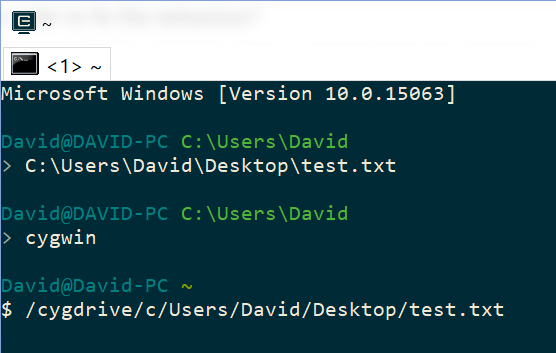
@Maximus5 Hey there, when I drag a file into a cmder (ConEmu) window, it replaces to the unix /cygdrive prefix. However, I've modified the /etc/fstab to "mount" the Windows drives inside /mnt/, like this:
/mnt/c/Users/David/Desktop
However, ConEmu doesn't use the correct path, but instead uses /cygdrive which doesn't exist.
This doesn't happen in mintty.exe, is uses the correct /mnt path.
What should I do in order to fix this behaviour?

 DRSDavidSoft
on 14 Oct 2017
DRSDavidSoft
on 14 Oct 2017
You should use -new_console to define desired mount prefix.
Maximus5
on 14 Oct 2017
Mintty is working "inside" cygwin workspace, but ConEmu is an external aggregator which starts cygwin shells.
Maximus5
on 14 Oct 2017
@Maximus5 Thanks for replying!
How would I call the cygwin.bat with the -new_console parameter? Is the switch being integrated into the below batch file correctly?
@echo off & cd /d %0\..
set PWD=%~1
set CMDER_ROOT=C:\development\cmder
set CYGWIN_ROOT=C:\development\cygwin
set BASH_COMMAND=pushd "%CYGWIN_ROOT%" ^& "%CYGWIN_ROOT%\bin\bash" --login -i -c 'cd "`cygpath -au '%PWD:\=/%'`"; exec bash' ^& popd
set CONEMU_SWITCHES=-new_console:m:/mnt -new_console:a
start "Cygwin Shell" %CMDER_ROOT%\vendor\conemu-maximus5\ConEmu.exe /icon "%CYGWIN_ROOT%\bin\mintty.exe" /title Bash /loadcfgfile "%CMDER_ROOT%\config\ConEmu.xml" /cmd cmd /c "%BASH_COMMAND%" %CONEMU_SWITCHES%
https://github.com/cmderdev/cmder/issues/1562#issuecomment-347924086
DRSDavidSoft
on 14 Oct 2017
start %CMDER_ROOT%\vendor\conemu-maximus5\ConEmu.exe /icon "%CYGWIN_ROOT%\bin\mintty.exe" /title Bash /loadcfgfile "%CMDER_ROOT%\config\ConEmu.xml" /cmd cmd /c "%BASH_COMMAND%" that is absolutely crazy...
- You are trying to run
minttyas ChildGui, that mean that you D&D intomintty, but not a ConEmu. But you said "This doesn't happen in mintty.exe"... minttyis minimalistics terminal for cygwin shells. If was not designed to runcmd.exe, completely. You'll get only problems from this usecase.- ConEmu provides correct Tasks for all installed bash shells from the box. Read docs: https://conemu.github.io/en/Tasks.html
Maximus5
on 14 Oct 2017
I think you misinterpreted the command line, I've used mintty.exe simply as the icon for the new tab:
/icon "%CYGWIN_ROOT%\bin\mintty.exe"
The purpose of the above batch file is load bash with the working directory set to a custom path %PWD%.
(Yes I know the correct way to do this is -new_console:d:%PWD% and I should have probably used it instead of the workaround I'm using, but it would have then only worked in ConEmu and not Console2, so I decided against the switch.)
In fact, I see when the Bash task is launched in ConEmu, the -new_console:m:/ switch is used:
set CHERE_INVOKING=1 & %ConEmuDir%\..\cygwin\bin\bash.exe --login -i -new_console:m:/cygdrive -new_console:C:"%ConEmuDir%\..\cygwin\Cygwin.ico"
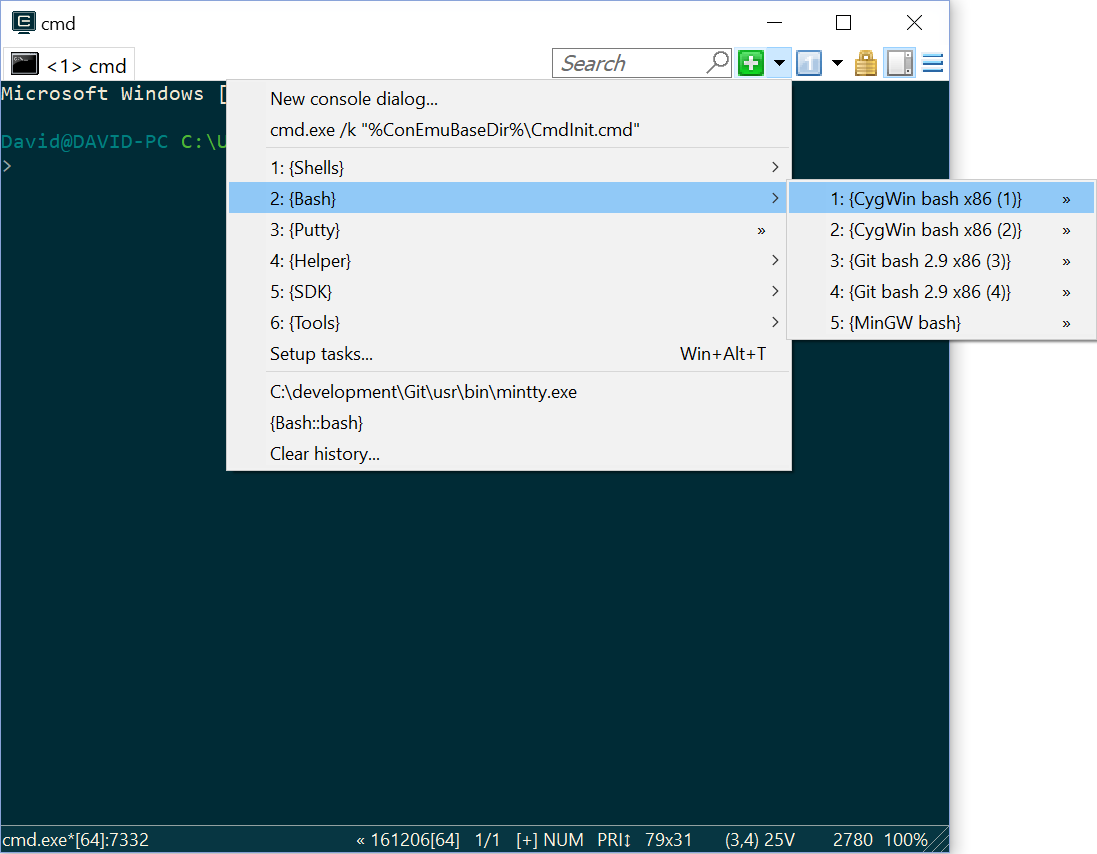
Which means that as specified in the documentation, using -new_console:m:/mnt is the key!
Anyways, thanks for your time! I really appreciate the work and effort you've put into ConEmu. I first encountered it on a stackoverflow answer you made a while ago, and since then I've fallen in love with it! :)

I guess I should make sure to read as much as the documentation as I can, to avoid using it incorrectly like you mentioned.
Cheers!
DRSDavidSoft
on 15 Oct 2017
Yeah, I've missed -icon switch...
Maximus5
on 15 Oct 2017
Related issues
 phazei
·
6Comments
phazei
·
6Comments
 dandv
·
3Comments
dandv
·
3Comments
 Chirishman
·
3Comments
Chirishman
·
3Comments
 marfillaster
·
6Comments
marfillaster
·
6Comments
 altbdoor
·
4Comments
altbdoor
·
4Comments
Most helpful comment
Ctrl-V now converts path automatically if current app is cygwin/msys