Conda: request: conda "rename" (or conda "move") for changing name of an environment
All is in the title :)
Today I wanted to rename my historic "dev" environment to "devel".
This did the trick:
conda create --name devel --clone dev
conda remove --name dev --all
This however seemed to (temporarily) duplicate disk usage. And maybe a specific command could do something smarter than "copy + remove", I do not know.
T.
 TomLav
All 54 comments
Any advancement with this?
 eduartua
on 20 Nov 2016
eduartua
on 20 Nov 2016
Is it ok to just change the name of the folder under env?
 wandonye
on 13 Jan 2017
wandonye
on 13 Jan 2017
I just tried your suggestion wandonye and it seems to be working so far.
Edit: It looks like it can't find pip now that I've done this.
 kaumaron
on 18 Jan 2017
kaumaron
on 18 Jan 2017
+1
 H0R5E
on 13 Mar 2017
H0R5E
on 13 Mar 2017
+1
 shachar-i
on 22 Mar 2017
shachar-i
on 22 Mar 2017
Yes this would be great. Not only does the work around posted above temporarily duplicate disk usage but it hits remote repos and uses network
 ashander
on 31 Mar 2017
ashander
on 31 Mar 2017
+1
 DheerajAgarwal
on 25 Apr 2017
DheerajAgarwal
on 25 Apr 2017
Though I too would like to see this feature implemented, "+1" posts send every subscriber a useless notification--I (and I suspect many other subscribers) would greatly appreciate it if you instead gave the OP a thumbs up (by clicking the smiley face in its top right corner).
(In case you didn't notice, GitHub's issue tracker can sort issues by the numbers of reactions they've garnered--ideally, IMO, we'd have explicit issue voting with votes displayed next to the number of comments as in https://github.com/isaacs/github/issues/9 or, e.g., GitLab, but that doesn't look like it will happen in the near future.)
 braham-snyder
on 25 Apr 2017
braham-snyder
on 25 Apr 2017
@kalefranz I'd like to suggest that this is a duplicate of #1845
 ijstokes
on 30 May 2017
ijstokes
on 30 May 2017
Hi,
I tried renaming my environment directory name in the filesystem from test to test3 and inside $HOME/.conda/environments.txt file but it does not seem enough :
$ source activate test3
$ ipython -V
-bash: /usr/local/miniconda3/envs/test3/bin/ipython: /usr/local/miniconda3/envs/test/bin/python: bad interpreter: No such file or directory
Any idea ?
 sebma
on 15 Jun 2017
sebma
on 15 Jun 2017
I found why :
I seems the path to environment is included in the shebang of the scripts in the environment bin directory and also in other files.
Therefore unless script a recursive search'n'replace, rename the environment directory is a VERY BAD IDEA.
I won't do it next time, I promise :) !
sebma
on 15 Jun 2017
Until this feature request is implemented, I will use a little bash function I just created.
If anyone is interested, here is the code :)
function condaRename {
    oldName=$1
    newName=$2
    test $# = 2 && {
        conda create --name $newName --clone $oldName
        conda remove --name $oldName --all
    }
}
Any progress with this?
 mat2py
on 1 Jul 2017
mat2py
on 1 Jul 2017
Hi,
I wanted to add some information to that thread: I'm on Windows and have a conda environment with pyinstaller pip installed into it.
I used the above command to rename that environment, e.g.
conda create --name python-2.7 --clone platform-windows
In the new python-2.7 environment the pyinstaller.exe executable was erroring:
Fatal error in launcher: Unable to create process using '"'
After hexadecimal inspection, it turns out that the executable embeds absolute path to the Python interpreter and it does not get updated when cloning the environment:
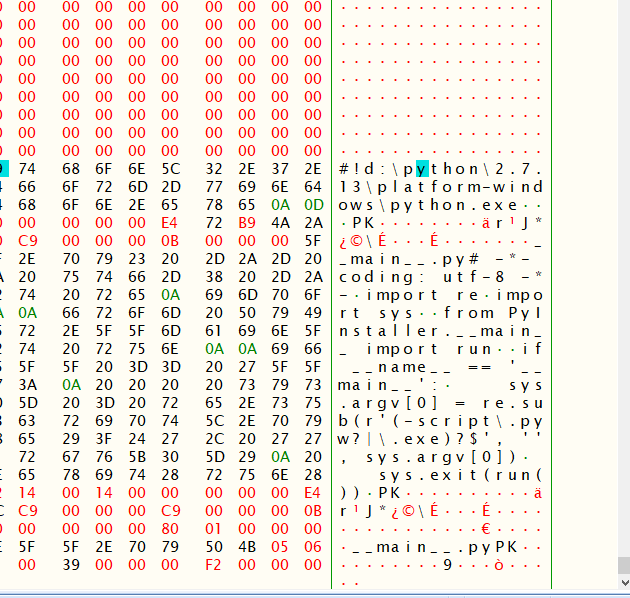
cheers,
Thomas
 KelSolaar
on 10 Jul 2017
KelSolaar
on 10 Jul 2017
I just renamed my old environment directory and it worked.
mv ~/anaconda3/envs/old_name ~/anaconda3/envs/new_name
 cham11ng
on 11 Jul 2017
cham11ng
on 11 Jul 2017
@ashander you can use --offline flag to disable hitting a network. Conda will just copy existing files from other envs.
 pirtim
on 14 Jul 2017
pirtim
on 14 Jul 2017
@cham11ng Oh that's strange. Can you please type these 2 commands and give us the result of the second one?
source activate new_name
which python python2 python3
@pirtim Thanks for the tip :)
sebma
on 14 Jul 2017
@sebma it gives the path of environment's python location.
cham11ng
on 14 Jul 2017
@cham11ng Can you please be more precise and give the output of the which python python2 python3 ?
sebma
on 15 Jul 2017
@sebma I tried @cham11ng's approach, and it correctly gave me
> which python python2 python3
/Users/me/anaconda3/envs/out_of_core_fft/bin/python
/usr/local/bin/python2
/Users/me/anaconda3/envs/out_of_core_fft/bin/python3
However, the problem is that other scripts don't typically work. For example ipython still fails, as you said above, because things like ipython don't get the message that the directory has changed.
Another (less-than-ideal) solution is to simply symbolically link the old directory to the new directory, rather than moving it. Then, ipython still finds the right (old) directory, even though you're using the new name. The only problem is that the old name still exists, and occupies that name's place.
 moble
on 24 Jul 2017
moble
on 24 Jul 2017
@moble Can you check ipython paths with this command which ipython ipython2 ipython3 ?
What are the names of your two environments ?
sebma
on 27 Jul 2017
Same things, but with is. But now they work because they're just symbolic links to the originals, which point to other things in the original directory — which still exists.
moble
on 27 Jul 2017
(Cross posting this from my post to the [email protected] list)
I've had sufficient success in creating a portable bundle based on Anaconda. I wrote a shell script that patches a couple of files and gets python scripts (shebang), PyQt and ssl working, independent of the absolute path of the bundle. This also works with renamed environments.
mv old_name new_name
conda install -y -n new_name -c schrodinger makeportable
bash new_name/make-portable.sh
 speleo3
on 6 Oct 2017
speleo3
on 6 Oct 2017
@cham11ng It is bad to do like this:
mv ~/anaconda3/envs/old_name ~/anaconda3/envs/new_name
Because some executables in this environment have the environment path hardcoded. As far as I know, jupyter / Ipython does that. And this affect me a lot. Now my jupyter is messed up the packages and environment and I still have no idea how to fix my jupyter.
 nnn144
on 5 Feb 2018
nnn144
on 5 Feb 2018
Is there any progress with this Now?
 velconia
on 16 May 2018
velconia
on 16 May 2018
Bump!
 millett
on 11 Jul 2018
millett
on 11 Jul 2018
The equivalent on virtualenv would be this
virtualenv --relocatable env_folder
But it is a experimental feature
 chesucr
on 7 Aug 2018
chesucr
on 7 Aug 2018
Definitely a basic, needed feature, +1 and a bump. Thanks
 ghost
on 30 Aug 2018
ghost
on 30 Aug 2018
This workaround may be useful?
conda activate OLD_NAME
conda env export > env.yaml
conda activate base
conda env create -n NEW_NAME -f env.yaml
rm -rf $CONDA_PREFIX/envs/OLD_NAME
 mingwandroid
on 30 Aug 2018
mingwandroid
on 30 Aug 2018
And while moving an env may appear basic, it is far from it.
mingwandroid
on 30 Aug 2018
And while moving an env may appear basic, it is far from it.
Agreed. We have fairly complicated C++/python build/install system that uses conda. As far as I can see, the only real way to handle this is to add a new script hook to the system to relocate a package. The existing post install scripts assume they're starting from the original, unpackaged files and won't work on previously installed scripts (the fact that some package scripts may work has nothing to do with - it's not required and not every package behaves the same way). Adding a new system to support a relocate script and then adding it to all the packages that need it seems like a lot of work when you can just reinstall in the new location.
 TD22057
on 30 Aug 2018
TD22057
on 30 Aug 2018
By basic, I didn't mean that it's simple, just that it is a useful primitive. I obviously accept that Conda is a complicated feat, with inherent endless cases.
But why relocation is needed in the first place? From what you guys say, I understand that conda does not use some intermediary env reference symbol in its metadata?
Let's see if I understand, take this unrelated example - someone coded a piece of "make" dev-ops system with direct references to some objects instead of using some global symbol, (for simplicity, say some "const myType& myRef=..." is not used in the metadata), now when he tries to change something, the metadata has to be scrutinized, instead of just changing the myRef line in it. So if relocation is necessary, then it sounds like the metadata of the environment works like physical referencing, with no intermediate symbols in the metadata?
Obviously adding references across the metadata engine is a big task, that is why I am just adding my vote, for the powers that be to consider if the need is worth it. But if referencing is redone then it eliminates the need for relocation. I've seen it done in huge source control dev-op systems and in complicated "make" systems, and the bonus is significant and it alleviates so many end cases.
So if I'm wrong and the metadata already has a single reference to physical names and locations, then I would be interested in what is the real reason environment relocation is needed?
Thanks!
ghost
on 30 Aug 2018
But why relocation is needed in the first place? From what you guys say, I understand that conda does not use some intermediary env reference symbol in its metadata?
Relocation has little to do with metadata just that the information about what text and binary files need to be relocated is stored in each package's metadata.
The need for relocation is demonstrated very easily with this pseudo-C code:
static char config_file[] = PREFIX ## "/share/config";
void main() {
  fopen(install_prefix);
}
Here PREFIX was passed in as the folder in which the software was configured to live in at build-time, so this software does no relocate itself. We need to actually patch these binaries with their installed location instead (or better, patch the upstream software to support relocation). Doing this is tricky, esp with C++11 and beyond.
We also relocate text files, but this is safer and easier.
mingwandroid
on 31 Aug 2018
So you say that the routes are physically packed along the packages? Some sort of general pip structure constraint? That's a bit short-sighted on the python design's part. Ok, I get you, conda obviously can't contend with that. It seems the python community's scripting origins won't let go :)
Just a quick question, as an aside, I used to know C++03/98 more or less down to the assembly level, but has moved on to architecture jobs before C++11 became popular, so I'm just familiar with the changes on a broad sense - now while I didn't like some changes, they seemed to still allow you to do whatever C++03 did, so why do you say that C++11 made it harder? Just curious..
ghost
on 31 Aug 2018
I'm not sure what you mean. This had nothing to do with Python nor pip. I gave you a simple c example that illustrates the problem.
These subsequent questions suggest you didn't read or else didn't understand my example.
Since SSO (small string optimization) and in general with std::string there's a stored length variable to contend with and that requires some assumptions about the memory layout. Currently we do not attempt to detect and patch such strings, we pretend they are normal c strings instead.
mingwandroid
on 31 Aug 2018
When an explanation I make doesn't go through, I check where I can fix the explanation, not attack the "explainee". For instance, your example contained install_prefix, which doesn't seem to relate to either the PREFIX you concatenated, nor the config_file you defined, not syntactically and not semantically, at least for someone who doesn't already know conda's arch. So for me, even for pseudo code this did not "compile" (pun intended), and therefore I filled out the blanks with what I knew from build systems I had to work with in the past.
As for C++11, I didn't expect the reason to be the usage of STL containers due to their extremely high performance drain (move semantics from C++11 just fixed a small part of their cost), interesting to know it's used, but now that's beside the point.
You have a right to be impatient, you volunteer your time to answer, having said that, with the tone where it is, perhaps we should end it here, I appreciate your time.
ghost
on 31 Aug 2018
Why not put the environments somewhere else (less obvious) and use symbolic links in the envs folder? Then renaming the environment would be a matter of regenerating the symbolic link and menu items for Windows, I guess.
I know this is a large structural change but it would decouple the name of an environment from its physical location.
Just a thought, you know, given the thread is on 🔥 right now.
H0R5E
on 1 Sep 2018
I don't think I was rude in the slightest and stand by what I wrote. Thanks.
mingwandroid
on 1 Sep 2018
This issue also has nothing to do with the STL.
mingwandroid
on 1 Sep 2018
Conda cannot use symlinks because they are too opaque. To be explicit, software installed in a path where a folder contains a symlink can behave differently should said software call readlink() on said path for any reason.
mingwandroid
on 1 Sep 2018
Ok, does the name of an environment have to be the same as the folder which contains it? Is the issue about the use of conda or where it places stuff on disk?
H0R5E
on 1 Sep 2018
You mentioned std::string, it's an STL container with all the performance diseases that come with such containers to this day, hence I was surprised it's in use in conda.
ghost
on 1 Sep 2018
H0R5E, the response was not to you, it was to ming
ghost
on 1 Sep 2018
I think there's some misunderstanding and misinterpretation here. Conda has no knowledge of std::string.
 kalefranz
on 1 Sep 2018
kalefranz
on 1 Sep 2018
Please see above comment by mingwandroid at https://github.com/conda/conda/issues/3097#issuecomment-417790065 it is his statement, not mine
ghost
on 1 Sep 2018
Is it ok to just change the name of the folder under env?
That would result in error bad interpreter: anaconda3/envs/myenv/bin/python: no such file or directory in my case if you pip freeze | grep some package.
 huanli2012
on 18 Jun 2020
huanli2012
on 18 Jun 2020
+1
 ahmedkhalf
on 3 Jul 2020
ahmedkhalf
on 3 Jul 2020
bump
 simozanin
on 14 Jul 2020
simozanin
on 14 Jul 2020
+1
 sathishkumark27
on 5 Aug 2020
sathishkumark27
on 5 Aug 2020
Important basic feature that's missing since 4 years (and counting)!
+1
 shailensobhee
on 2 Oct 2020
shailensobhee
on 2 Oct 2020
+1
conda is great, thanks for all the hard work :)
adding this feature would be a huge help
 rumble-up
on 13 Oct 2020
rumble-up
on 13 Oct 2020
+1
 wogong
on 15 Nov 2020
wogong
on 15 Nov 2020
+1
 CamiloMartinezM
on 7 Jan 2021
CamiloMartinezM
on 7 Jan 2021
Related issues
 asmeurer
·
73Comments
asmeurer
·
73Comments
 cpcloud
·
61Comments
cpcloud
·
61Comments
 12avnisharma
·
72Comments
12avnisharma
·
72Comments
 majeedus
·
128Comments
majeedus
·
128Comments
 Chaztikov
·
114Comments
Chaztikov
·
114Comments
Most helpful comment
Though I too would like to see this feature implemented, "+1" posts send every subscriber a useless notification--I (and I suspect many other subscribers) would greatly appreciate it if you instead gave the OP a thumbs up (by clicking the smiley face in its top right corner).
(In case you didn't notice, GitHub's issue tracker can sort issues by the numbers of reactions they've garnered--ideally, IMO, we'd have explicit issue voting with votes displayed next to the number of comments as in https://github.com/isaacs/github/issues/9 or, e.g., GitLab, but that doesn't look like it will happen in the near future.)