Compromise: Typescript plugin support
After the final compromise.min.js update (v12.1.0) the function nlp.plugin() doesn't work.
E.g.:
let plugin = {
        tags:{
            Noun:
            {
            isA: 'Entity'
            },
            Verb:
            {
            isA: 'Action'
            },
        }
    }
    nlp.plugin(plugin);
Such simple code - and it doesn't seem to work so far. Had to roll back to 11.14.3 at least to not experience any difficulties.
Any idea?
Btw, you had an awesome project description a month ago. What happened to it?
 DimaMayd
All 15 comments
Same happened to me. Trying to extend a plugin:
nlp.extend(require('compromise-numbers'))
Environment: browser
Version: 12.1.0
 changhz
on 2 Dec 2019
changhz
on 2 Dec 2019
you'll need to re-write any custom plugins to work with the latest version: https://observablehq.com/@spencermountain/compromise-plugins?collection=@spencermountain/nlp-compromise
It's not actually a big problem, you just need to wrap you plugin in a function and set the custom worlds using the methods outlined in the docs.
I ended up having to do this in some of my code where i'm using a boat load of pattern matches (might be an easier way, this is just how i did it).
e.g.
const plugin = (doc, world) => {
const patterns = {
open: "Verb",
cup: "Noun",
golden: "Adjective",
"(it)": "Ignore",
"(light|mix)$": "Noun",
"^(light|mix|move|shift|pick)": "Verb",
"(#Conjunction|above|adjacent|beside|under|over|above|on|over|in|inside)":
"Join",
"(north|east|south|west|left|right|up|down)": "Direction",
"#Verb (#Determiner|#Preposition)? #Adjective+ (with|using|on|using|and) (#Determiner|#Preposition)? #Adjective #Noun$":
"#ParserComplexImplicit",
"#Verb (#Determiner|#Preposition)? #Adjective+? #Noun #Join? (#Determiner|#Preposition)? #Adjective+? #Noun":
"#ParserComplex",
"#Verb (#Determiner|#Preposition)? #Adjective+? #Noun": "ParserSimple"
};
world.postProcess(doc => {
Object.keys(patterns).map(p => doc.match(p).tag(patterns[p]));
});
};
nlp.extend(plugin);
 aMadReason
on 2 Dec 2019
aMadReason
on 2 Dec 2019
thank you @aMadReason that's precisely how I'd do it too.
Yeah, sorry about the breaking change to the plugin system. I think you'll find the new scheme makes a lot more sense in most purposes. Internally, we've been able to rebuild big chunks of the code-base using it.
I'm going to work on improving the documentation for this stuff this week. @DimaMayd you can see an example of using .extend() to add new tags here
cheers
 spencermountain
on 2 Dec 2019
spencermountain
on 2 Dec 2019
Same happened to me. Trying to extend a plugin:
nlp.extend(require('compromise-numbers'))Environment: browser
Version: 12.1.0
Turns out it needs to add 'default' after requiring the module
// This works
nlp.extend(require('compromise-numbers').default)
I also extended the original type definitions from the module 'compromise' to writing type definitions for 'compromise-numbers' in order to work with TypeScript
changhz
on 3 Dec 2019
ahh @changhz thank you. I could really use some help setting those type definitions up! I haven't been able to figure-out how the plugin scheme can work with typescript, too. That would be really helpful.
that's interesting with the .default issue. You must be importing the esmodule version, from webpack config or something? When I run basic node, i haven't had to use .default. I'd be happy to add this to the docs, or something. This new module-stuff is beyond me.
spencermountain
on 4 Dec 2019
@spencermountain you are probably right on the .default issue. My project was initialised with npx create-react-app my-app --template typescript.
by the way, this is how i extended the original type definitions within my project to make the plugin compromise-numbers work with typescript (in which i also fixed the wrong return type that the method .has() was returning:
// nlpx.d.ts
import compromise from "compromise";
export as namespace nlpx;
declare function nlpx(text: string): nlpx.Document;
declare module nlpx {
class Document extends compromise.Document {
numbers(something?: any): NlpXNumber;
has(something: string): boolean;
}
class NlpXNumber {
json(x?: any): any;
units(x?: any): any;
isOrdinal(x?: any): any;
isCardinal(x?: any): any;
toNumber(x?: any): any;
toLocaleString(x?: any): any;
toText(x?: any): any;
toCardinal(x?: any): any;
toOrdinal(x?: any): any;
isEqual(x?: any): any;
greaterThan(x?: any): any;
lessThan(x?: any): any;
between(x?: any): any;
set(x?: any): any;
add(x?: any): any;
subtract(x?: any): any;
increment(x?: any): any;
decrement(x?: any): any;
fractions(x?: any): any;
romanNumerals(x?: any): any;
money(x?: any): any;
}
}
export default nlpx;
then export an nlp constructor which will use the extended type definitions (i call it nlpx):
// nlpx.ts
import compromise from "compromise";
import nlpx from "types/nlpx";
compromise.extend(require("compromise-numbers").default);
export default function main(text: string) {
return (compromise(text) as unknown) as nlpx.Document;
}
export const numeric = (text: string) => {
const doc = main(text);
doc.numbers().toNumber();
return doc.text();
};
export type Document = nlpx.Document;
thank you Honchung i really appreciate this.
I think we're close - i've added those types here, and added it to the package-json.
What's the process for adding the nlp-numbers types, so typescript knows they're there?
i've tried it here but haven't got it working yet.
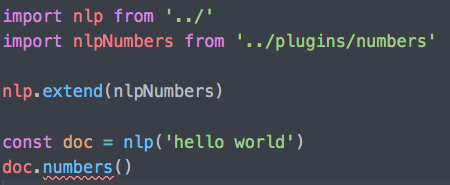
Any ideas?
thank you
spencermountain
on 6 Dec 2019
Hi Spencer, thank you for your appreciation and for making those changes.
To answer your question:
Since nlp-numbers isn't a constructor function like nlp, we can't say
nlpNumbers(text: String) -> Document
The reality is rather like
// after this
nlp.extend(nlpNumbers)
// the instance of Document that nlp returns now contains the method "numbers()->Numbers"
Therefore, in the type definitions of nlp-numbers, the function nlpNumbers shouldn't exist. And it is righteous to include the method numbers() -> Numbers into the Document class in the type definitions of nlp, before which the class Numbers should be imported
Thus, the type definitions of nlp-numbers should look like this
// compromise-numbers/types/index.d.ts
export class Numbers {
json(n?: Number): Document
fractions(): Document
toText(): Document
toNumber(): Document
// ... other methods
}
and in the type definitions of nlp:
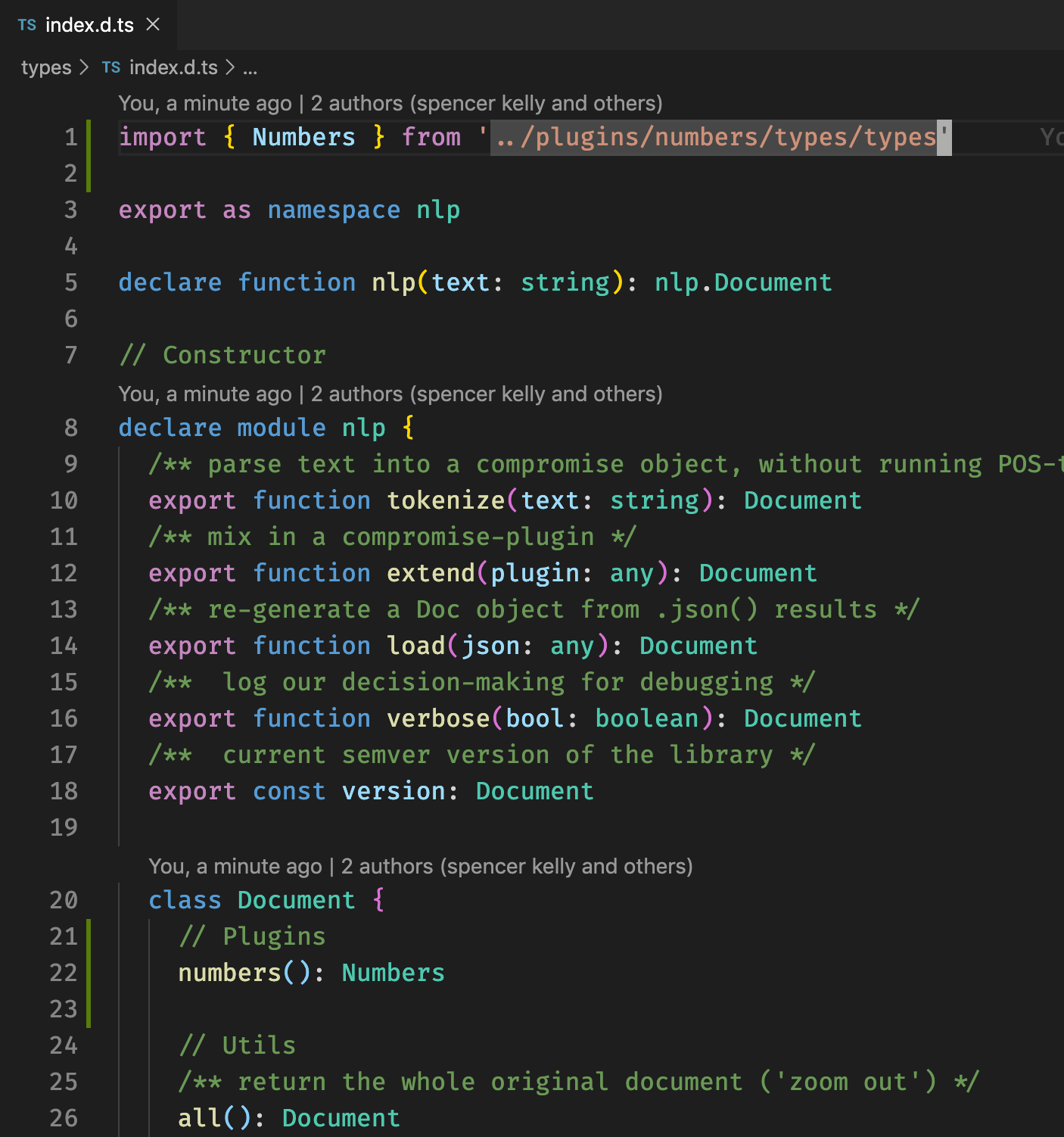
changhz
on 8 Dec 2019
Same happened to me. Trying to extend a plugin:
nlp.extend(require('compromise-numbers'))Environment: browser
Version: 12.1.0Turns out it needs to add 'default' after requiring the module
// This works nlp.extend(require('compromise-numbers').default)I also extended the original type definitions from the module 'compromise' to writing type definitions for 'compromise-numbers' in order to work with TypeScript
Why 'compromise-numbers' exactly? Do you mean it's required, even though I don't use numbers in my program?
DimaMayd
on 17 Dec 2019
thank you @changhz !
@DimaMayd you only need to include the plugin if you're using the .numbers() functions.
spencermountain
on 18 Dec 2019
One option I was looking at was to use the returned value from .extend.
If plugins return a world, we can use that type to enhance the NLP type.
type Plugin<W extends DefaultWorld = DefaultWorld> = (
  Doc: DefaultDocument,
  world: DefaultWorld,
) => W;

interface NLP<World extends DefaultWorld = DefaultWorld> {}
type getWorld<N extends NLP> = N extends NLP<infer W> ? W : N;

// In real world, NLP type will be coming from `this`
const extend = <W extends DefaultWorld = DefaultWorld, N extends NLP = NLP>(
  nlp: N,
  plugin: Plugin<W>,
): NLP<getWorld<N> & W> => {
  return 'placeholder' as any; // normal extend logic here
};

const plugin = (Doc: DefaultDocument, world: DefaultWorld) => {
  return world as DefaultWorld & { b: string };
};

const plugin2 = (Doc: DefaultDocument, world: DefaultWorld) => {
  return world as DefaultWorld & { c: string };
};

const nlpx = extend({}, plugin);
const nlpx2 = extend(nlpx, plugin2);

Best part is by inferring the current world type stored on the NLP type, we can keep adding to it with more extends.

Final part, anything in NLP can then use this type...
interface NLP<World extends DefaultWorld = DefaultWorld> {
  (text: string): DefaultDocument<World>;
}

const doc = nlpx2('match this');

 Drache93
on 20 Dec 2019
Drache93
on 20 Dec 2019
I'm upgrading from version 11 to v13.1.1.
This works in version 11
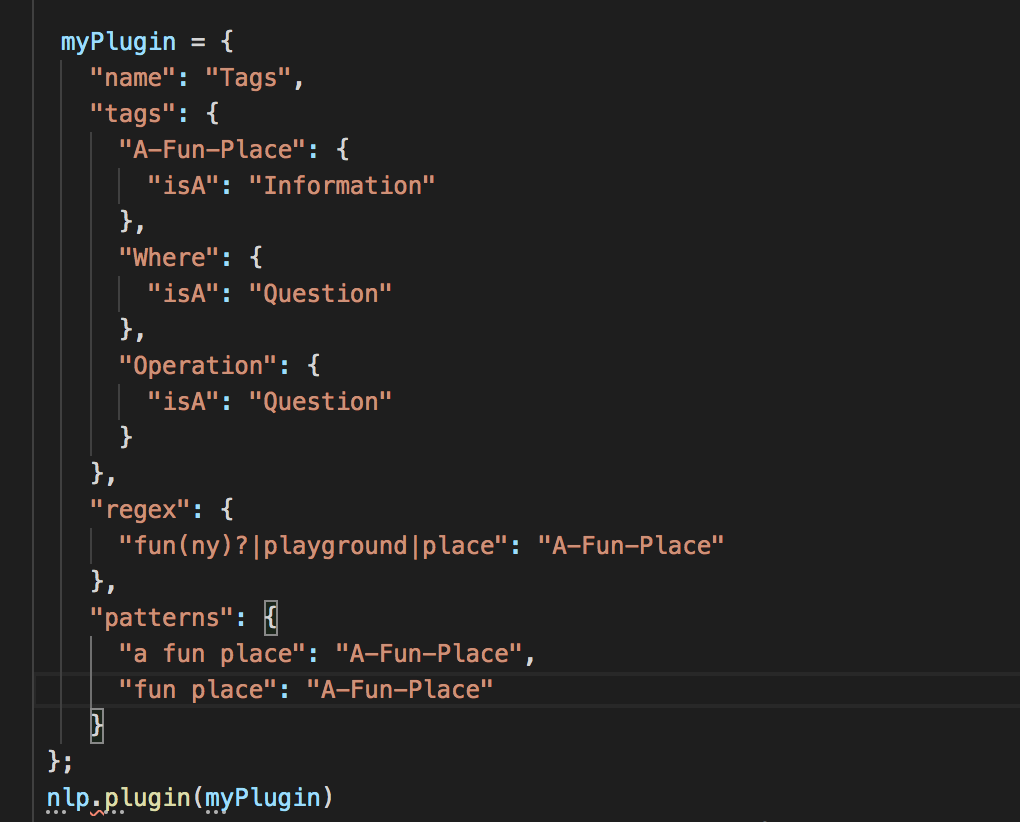
Now I try this with the new version but it's not working. What am I doing wrong?
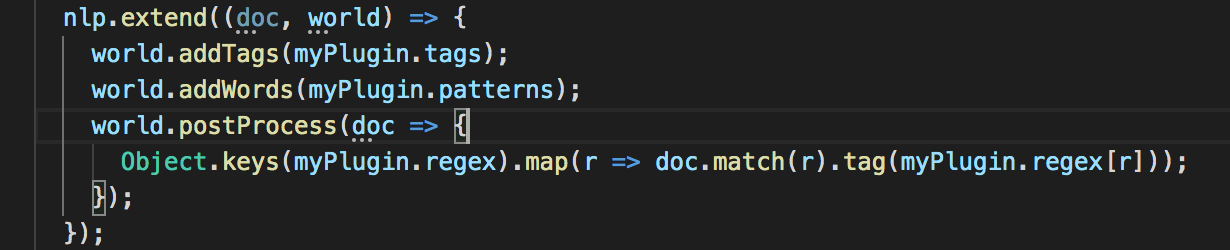
 playground
on 11 Mar 2020
playground
on 11 Mar 2020
nm, got it working terms is not a method.
playground
on 11 Mar 2020
actually the regex part of the plugin doesn't seem work as before.
how to handle optional characters such as "fun(ny)?" or words "fun place"?
playground
on 12 Mar 2020
@playground please read the match syntax docs
cheers
spencermountain
on 12 Mar 2020
Related issues
 zeke
·
3Comments
zeke
·
3Comments
 zzj0402
·
4Comments
zzj0402
·
4Comments
 elderbas
·
7Comments
elderbas
·
7Comments
 MarkHerhold
·
5Comments
MarkHerhold
·
5Comments
 charles-toller
·
3Comments
charles-toller
·
3Comments
Most helpful comment
One option I was looking at was to use the returned value from
.extend.If plugins return a world, we can use that type to enhance the NLP type.
Best part is by inferring the current world type stored on the NLP type, we can keep adding to it with more extends.
Final part, anything in NLP can then use this type...