Compodoc: [BUG] Lazy loaded routes are not documented
Overview of the issue
Lazy Loaded routes are not showing in documentation:

Operating System, Node.js, npm, compodoc version(s)
OS: Windows
Node: 12.8.0
npm: 6.10.2
Angular CLI: 9.1.0
Compodoc installed globally or locally ?
Tried both
If possible sourcecode of the file where it breaks
Here is part of my app-routing.module.ts
// src/app/app-routing.module.ts
const routes: Routes = [
  {
    path: 'module1',
    loadChildren: () =>
      import('./modules/module1/module1.module').then((m) => m.Module1Module),
  }
]
And for each module, such as Module1:
// src/app/modules/module1/module1-routing.module.ts
const routes: Routes = [
  {
    path: '',
    component: Module1Component,
    data: {
      ...
    },
    canActivate: [AuthGuard],
    children: [
      {
        path: '',
        redirectTo: 'list'
      },
      {
        path: 'list',
        pathMatch: 'full',
        component: ListComponent,
        data: {
          ...
        },
      },
      {
        path: ':id',
        component: DetailsComponent,
        data: {
          ...
        },
      },
    ],
  },
];
If possible your terminal logs before the error
Error during generation of routes JSON file, maybe a trailing comma or an external variable inside one route.

Motivation for or Use Case
It should document all routes in the corresponding section.
Reproduce the error
- Create a new app using the CLI and adding
--routing - Create a new module (
ng g m module --routing) - Add some routes an sample components as previously specified.
- Try to create the documentation (
npx compodoc -p tsconfig.json)
Related issues
Several times, but all of them have been closed due to inactivity
690, #569, #609, #805, #819.
Suggest a Fix
I haven't found a solution yet.
 moramike
All 15 comments
I'm having the same issue. It feels like the routes don't support the new syntax for lazy loading.
If that's the case, is there anyone looking into this?
 fbaba-nibtravel
on 1 Jun 2020
fbaba-nibtravel
on 1 Jun 2020
I offer myself to work on this, but I am available starting next week.
 m4r4c00ch0
on 13 Jun 2020
m4r4c00ch0
on 13 Jun 2020
I too need this bug fixed. Thanks @diegovincent to get started.
 ikumaran
on 20 Jun 2020
ikumaran
on 20 Jun 2020
same problem here.
 cwistedt
on 23 Jun 2020
cwistedt
on 23 Jun 2020
Same Problem here - I upgraded to Angular 9 - now no routes will be included into the documentation at all
I get an error with asm.js (don't know, if it is related)
(node:14104) V8: C:\repos\myProject\webapp\node_modules\viz.js\viz.js:33 Invalid asm.js: Function definition doesn't match use
(Use
node --trace-warnings ...to show where the warning was created)
 felixlindemann
on 18 Jul 2020
felixlindemann
on 18 Jul 2020
I have the same problem no routes presented.
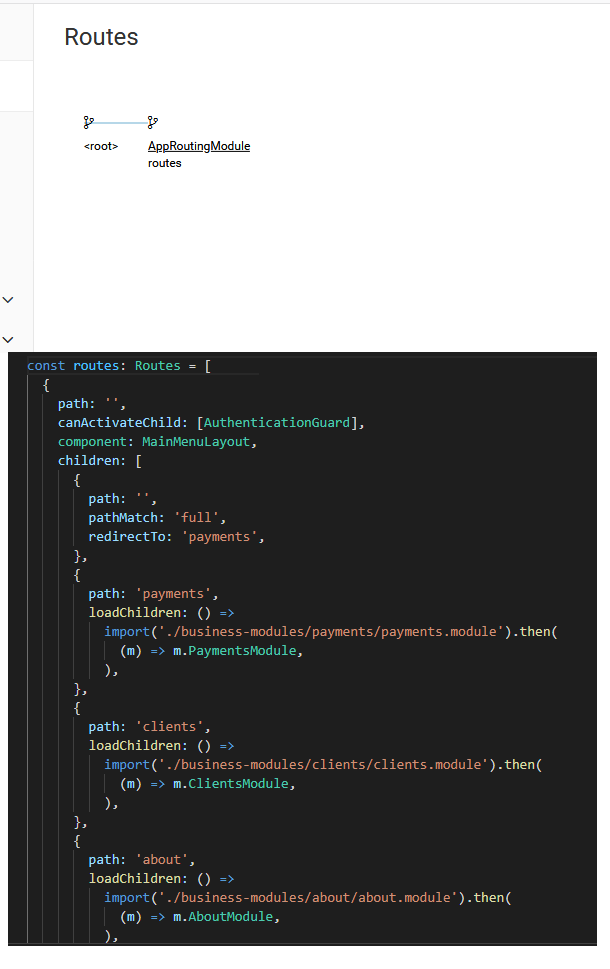
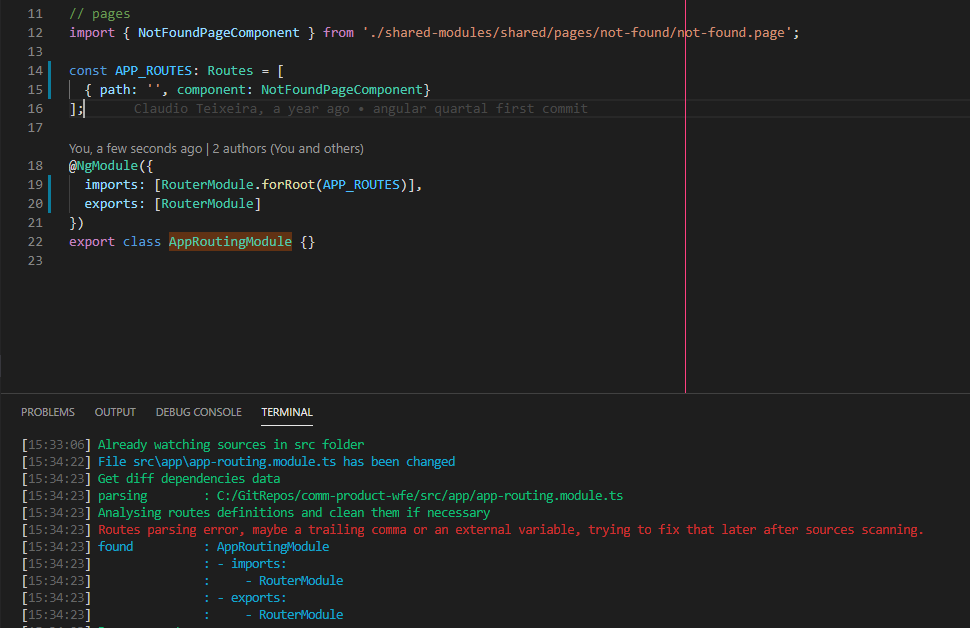
But even when I remove all lazy loading logic the same error is shown:
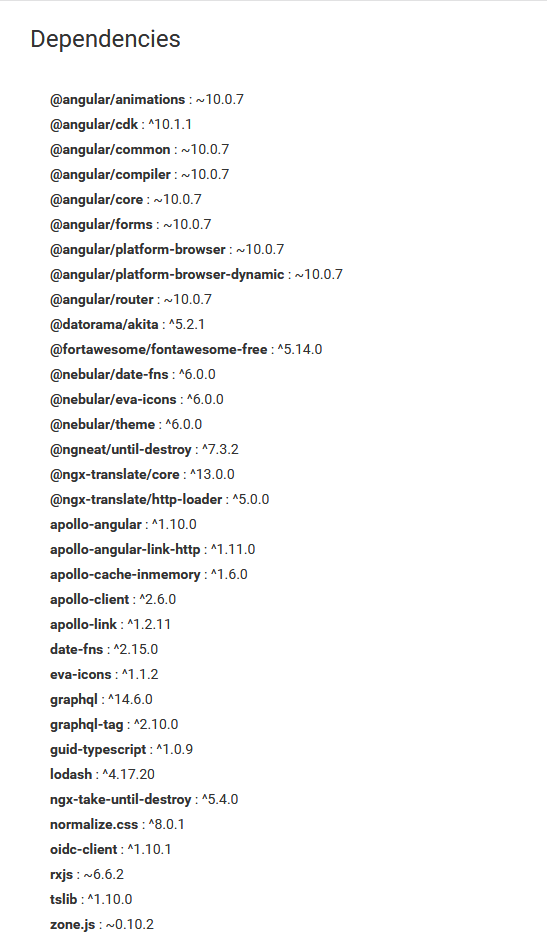
I'm using this dependencies:
 jgomesmv
on 31 Aug 2020
jgomesmv
on 31 Aug 2020
getting this error as well on angular 10.1.1 and compodoc 1.1.11
is there any progress on this?
 codingsamuel
on 21 Sep 2020
codingsamuel
on 21 Sep 2020
Hi there. I getting the same issue and what i see.
TL;DR; globally installed compodoc, seems works well (for me)
:red_circle: compodoc(version 0.0.41) installed as devDependency
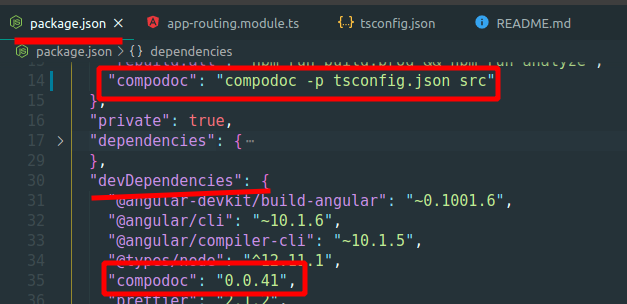
npm run compodoc

:green_circle: compodoc(v0.0.41) installed as GLOBAL package ("npm install -g compodoc")
All works without router parsing errors !!! and documentation looks good
compodoc -p tsconfig.json src

So it seems some shared local dependency or special working mode of compodoc as devDependency adds side effect
 rodmax
on 12 Oct 2020
rodmax
on 12 Oct 2020
Hi,
I've just found a workaround that works for me on compodoc 1.1.11. Just replace
(m) => m.MyModule
by
m => m.MyModule
I think the regex need some improvement here : https://github.com/compodoc/compodoc/blob/8c509f0c130fb7cfc63f470a16e2fce73ddca092/src/utils/router-parser.util.ts#L25
 headonkeyboard
on 15 Oct 2020
headonkeyboard
on 15 Oct 2020
I was always using the global package, still it did not work.
But I can confirm the workaround posted by @headonkeyboard
 christian-fries
on 15 Oct 2020
christian-fries
on 15 Oct 2020
I was always using the global package, still it did not work.
But I can confirm the workaround posted by @headonkeyboard
Same here, but its not a correct solution because when u build with --prod, got an error
 NurGuz
on 20 Oct 2020
NurGuz
on 20 Oct 2020
Routes parsing error, maybe a trailing comma or an external variable ?
Same for me as @rodmax
 alastair-todd
on 20 Oct 2020
alastair-todd
on 20 Oct 2020
This issue has been automatically marked as stale because it has not had recent activity. It will be closed if no further activity occurs. Thank you for your contributions.
![stale[bot] picture](https://avatars.githubusercontent.com/in/1724?v=4&s=40) stale[bot]
on 20 Dec 2020
stale[bot]
on 20 Dec 2020
This issue has been automatically closed because it has not had recent activity. Please file a new issue if you are encountering a similar or related problem. Thank you for your contributions.
stale[bot]
on 27 Dec 2020
I've tried the workaround by @headonkeyboard , but it's not working for me
Angular version: 11.2.0
Compodoc version: 1.1.11
 saidsoualhi
on 16 Feb 2021
saidsoualhi
on 16 Feb 2021
Related issues
 ghost
·
17Comments
ghost
·
17Comments
 DimitriRO-IBM
·
15Comments
DimitriRO-IBM
·
15Comments
 x1unix
·
18Comments
x1unix
·
18Comments
 nikhilknoldus
·
18Comments
nikhilknoldus
·
18Comments
 elvisbegovic
·
14Comments
elvisbegovic
·
14Comments
Most helpful comment
Hi,
I've just found a workaround that works for me on compodoc 1.1.11. Just replace
(m) => m.MyModuleby
m => m.MyModuleI think the regex need some improvement here : https://github.com/compodoc/compodoc/blob/8c509f0c130fb7cfc63f470a16e2fce73ddca092/src/utils/router-parser.util.ts#L25