Common-voice: Revisit Keyboard Shortcuts
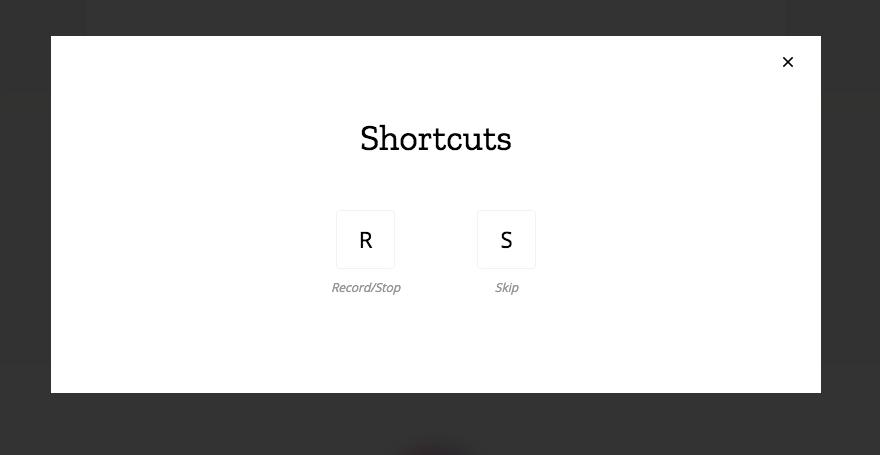
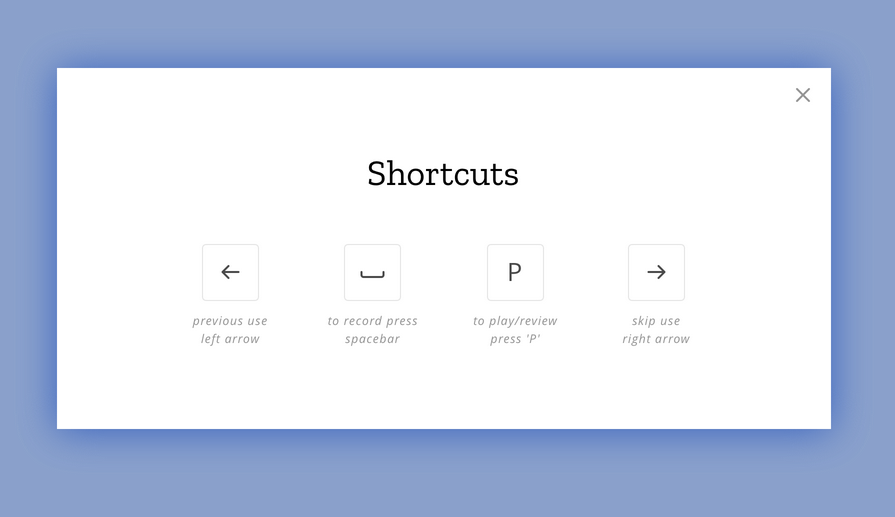
@Gregoor let's review our current shortcuts vs. those proposed by @georai and make a decision for what to take forward for localization and implementation.
Current:
Proposed:
 mbransn
All 19 comments
Thanks! @jdittrich since you started our interest in adding shortcuts, I wonder what your take on this is. 🙂
Here's mine: While I'd like to use the arrow keys, I find it slightly confusing that the action they perform are not the inverse of one another. I.e. press left to rerecord previous sentence, but when you press right now you won't get back to the top of the queue but instead stay with that clip and get a different sentence. I think that'd feel a bit strange.
And for completeness sake, the shortcuts for the listen screen are:
P - Play/Pause
Y - Vote Yes
N - Vote No
 Gregoor
on 5 Jun 2018
Gregoor
on 5 Jun 2018
Hi @Gregoor, it is hard for me to judge – what is the current UI-element triggering the proposed left-key action?
 jdittrich
on 7 Jun 2018
jdittrich
on 7 Jun 2018
@jdittrich currently to move back, the UI requires a click on the previous clips at the right of the screen (on desktop web view). In the proposed shortcuts the left arrow would move you back through the clips.
mbransn
on 26 Jun 2018
In this case, I find the mapping off:
Pressing the left arrow key moves a clip back. The same action is done by buttons on the right. The direction of where these previous clips are is also the right.
I would assume that future is right and past is left (in LTR languages); however, past clips are right, future clips are left in this UI. This coexists with the idea of "previous screen is left", as with the ← button in the upper left corner.
jdittrich
on 26 Jun 2018
Note to this discussion as well from Y-combinator
https://news.ycombinator.com/item?id=17436958
Input: The other thing is that it's very cool to see the "you helped us reach out x% goal" thing but it locks up all the previous / next shortcuts which means I have to switch back to the mouse after 5 entries.
What can we do to create shortcut to make it easy to continue contributions.
@m-branson @Gregoor
 flekkowich
on 2 Jul 2018
flekkowich
on 2 Jul 2018
What can we do to create shortcut to make it easy to continue contributions.
@flekkowich that specific interaction is being tracked at #1179
Currently @Gregoor is allowing the use of Enter to continue the flow without need for mouse click. I'll think on how to better surface this in the UI on that screen.
mbransn
on 2 Jul 2018
I would assume that future is right and past is left (in LTR languages); however, past clips are right, future clips are left in this UI. This coexists with the idea of "previous screen is left", as with the ← button in the upper left corner.
@jdittrich thanks for the thoughts here, great feedback.
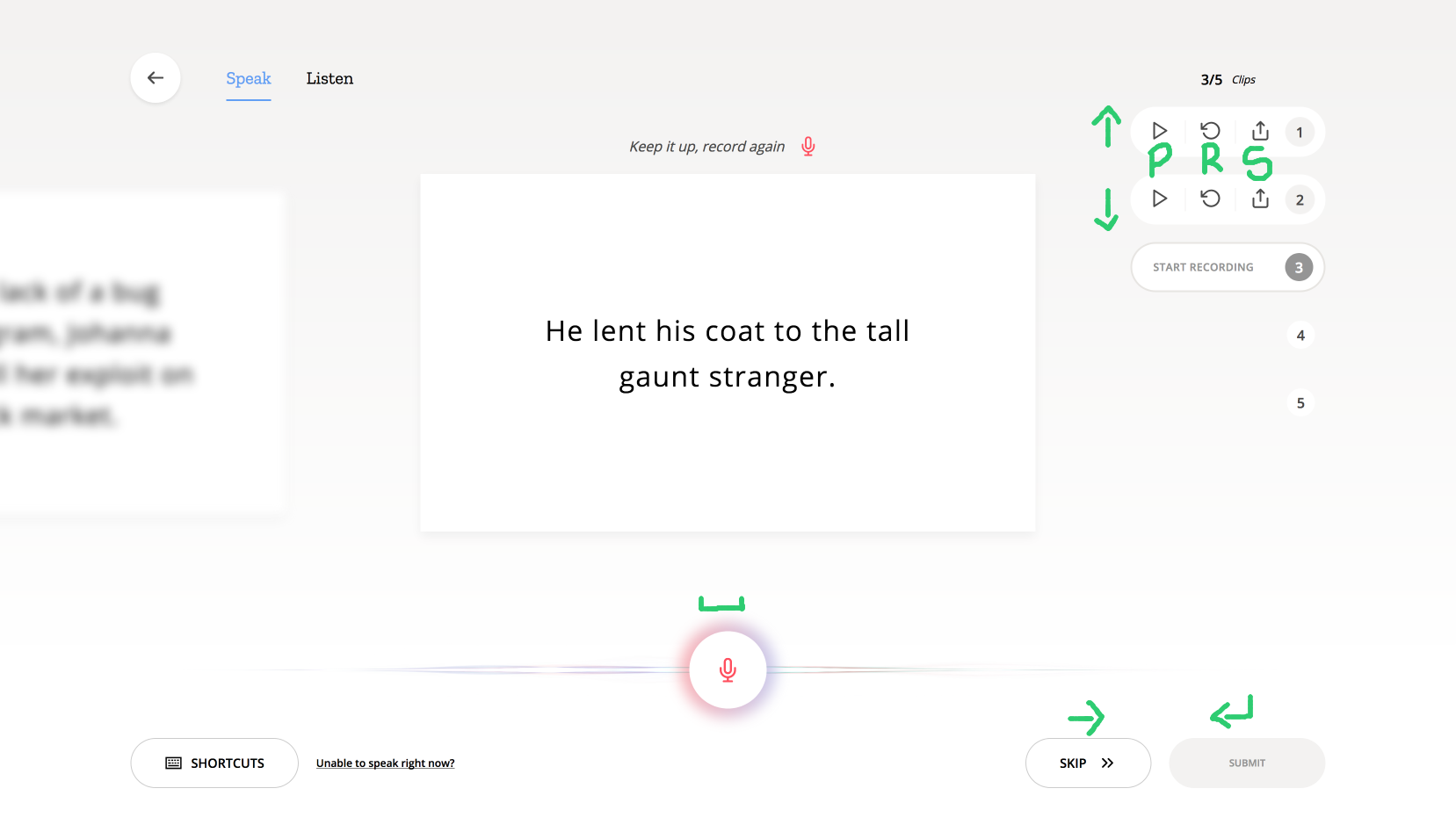
Proposal based on feedback:
_Speak session_
- Record main sentence with spacebar
- Skip with the right arrow button
- Move through previous clips with up & down arrow buttons
- Play these with
P - Re-record these with
R - Share these with
S
- Play these with
- Submit with Enter button
_Listen session_
- Play main sentence with spacebar
- Skip with the right arrow button
- Vote Yes with up arrow
- Vote No with down arrow
- Submit with Enter button
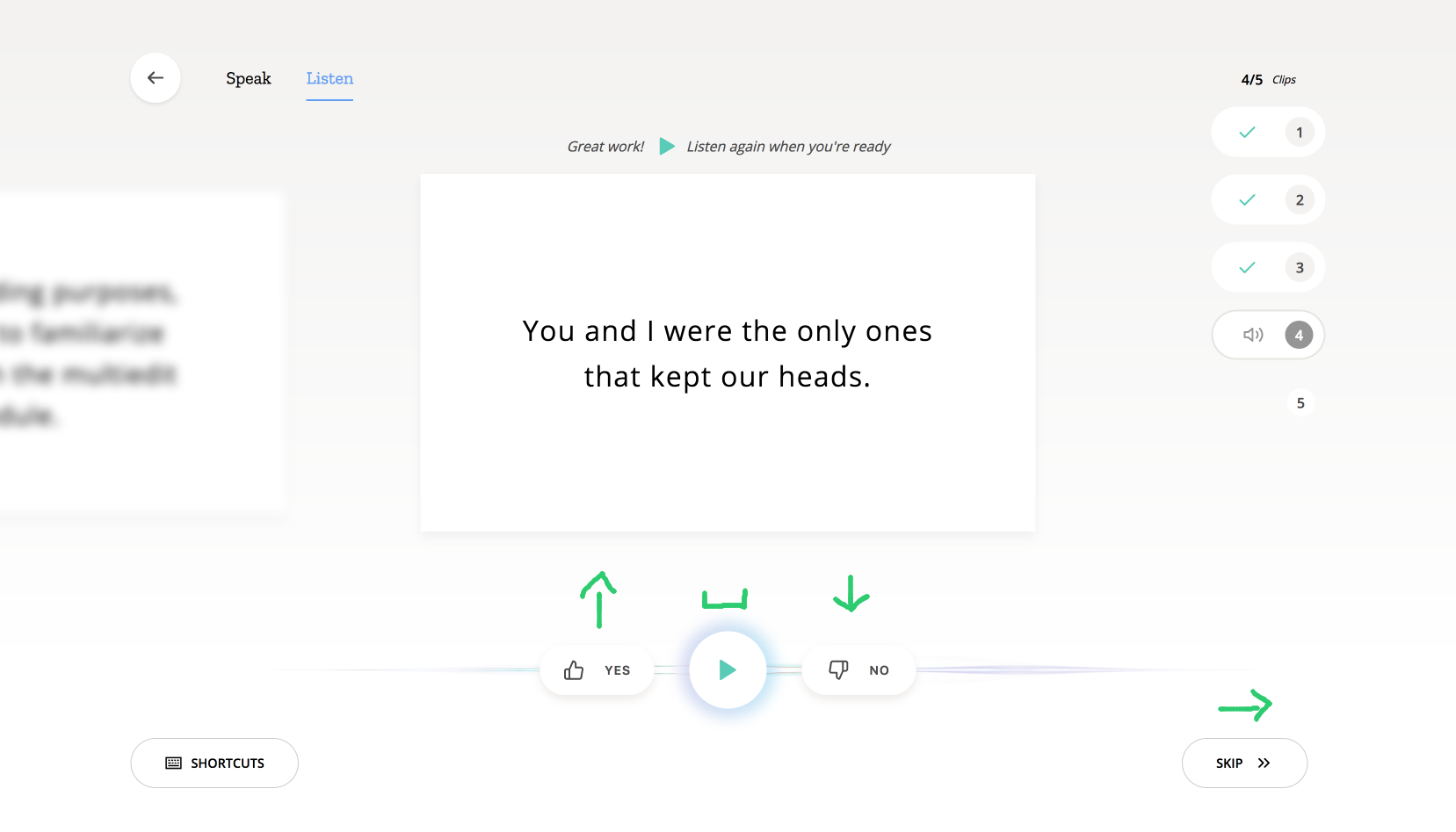
My reasoning for the above: Keep primary key actions close together where possible. Eg; less stretch or letter association required. Additionally, as in with the validation voting, use the thumbs up & down icon visual to aid with up & down arrow connection.
Thoughts?
mbransn
on 2 Jul 2018
@m-branson I personally don't like to use the up/down arrow for critical shortcuts, such as voting yes/no.
I normally work from laptops in which they crammed both the up and down arrow in the same space as either the left or right arrow, making them fiddly to use for such a shortcut.
An example of such a keyboard:

EDIT: Using the left (yes)/right(no) arrows for the voting (analogous to 'swiping') would be a solution to this issue. However, I wouldn't know what to use for 'skip' then.
 sroet
on 3 Jul 2018
sroet
on 3 Jul 2018
Thanks for the feedback @sroet, regarding this comment:
normally work from laptops in which they crammed both the up and down arrow in the same space as either the left or right arrow, making them fiddly to use for such a shortcut.
I use the same keyboard and don't mind the up/down arrow. :) Great example of how humans can differ! For myself, the proximity of the arrows to the enter button means less stretch and faster movement.
Couple thoughts here:
- @Gregoor can we assign two keys to an action? eg; Yes <=>
up arrowORY? User can utilize whichever is their preference? - As we work on rolling out Profiles, we are also looking into ways for user customization of the contribution experience. Keyboard shortcut preference could be one of the things we allow each user to customize on top of our default shortcuts, currently tracking this in #1209 :)
mbransn
on 9 Aug 2018
We can assign as many keys to an action as we like 🙂 Though I'd need some direction on how the shortcut modal should look like then.
Gregoor
on 9 Aug 2018
Thanks for the quick reply @Gregoor -- I'm of the mind that we utilize only one shortcut per action for now and move toward the cursor key method as it is most inclusive in this multi-lingual instance. Understood that some detail shortcuts will still be letter based, and yes, those can be localized for each langauge.
As we rollout Preferences customization in the future, we can look to include shortcut customization as we're tracking in #1209.
So, no change to the modal styling, except to eventually get here. 😁
mbransn
on 10 Aug 2018
@Gregoor capturing this here as requested from #1207:
so it would be really cool to have an additional shortcut to get back to the last sentence for re-recording.
@Gregoor how about using the back arrow for this?
Arrow-Left? Sure! Maybe we should move this discussion over to #1052 so that it's consistent. I think I'm starting to like the idea more of utilizing the cursor keys (especially your proposal). And and undo key also seems very valuable to have.
Additionally, this arrow-left is part of the new UI slide-up recommendation done by @georai, noted in my previous comment. ;)
mbransn
on 10 Aug 2018
My two cents.
It would speed up validation if the shortcuts were more ergonomic. Currently the require two hands. In my experience with Anki, flashcards, the number keys are very good shortcuts for large volumes of yes/no inputs.
I would suggest including an alternate set of keys, in addition to the word based ones.
Now:

Also incude an alternate set:

(images made with this http://www.keyboard-layout-editor.com/#/)
 iveskins
on 21 Sep 2018
iveskins
on 21 Sep 2018
i would be very much in favour of a rerecord shortcut!
since misspellings happen, but currently they break the workflow quiet a lot. since you need to touch the mouse.
i even tried to immedeatly stop the recording after misspelings or saying a lot of blabla after hit with the hope of triggering the too long / too short filters (which i ran into quiet sometimes in the old days) but they seem to be not existend at allanymore...
(so all of this helps me nothing to bee fast)
 paskalito
on 17 Mar 2019
paskalito
on 17 Mar 2019
@iveskins @paskalito @sroet @jdittrich would you be in favor of customizable shortcuts (e.g. you assign your own within your accounts settings)? UX best practice indicates it would be good to establish a baseline and then allow people to edit / set as they see fit -- I'd like to close this out and track that feature ask instead. Let me know by March 15 if you have a different opinion and thanks for the input!
mbransn
on 10 Mar 2020
@mbransn Sane defaults and the ability to edit sounds good. I do think the existing defaults are hard enough to use that somewhat defeat the purpose of being shortcuts. Particularly the Y and N keys would be more comfortable to use as some set of two keys side by side. Be that my suggestion of the number keys, or the left/right arrows or something.
iveskins
on 10 Mar 2020
+1 on default with the ability to edit
sroet
on 10 Mar 2020
@mbransn thanks for asking back.
im also in favour of that approach.
some thoughts:
about the right/left thing. Is also the UI for right to left languages right to left (meaning that the next sentence is on the left there)? because if yes i think it would be quiet standardized and universal to use yes/no keys (in the respective languages) but also evenly standardized and universal to use the arrow keys. (with left an right behaviour according to language). So then i would argue that best defaults would be to allow both of this systems at the same time.
So every anonymous user can use either of these quiet clear standards.
the other thing:
I noticed that its now possible to jump to the specific recordings. and there you can also rerecord them.
That is great but a bit much work if you just misspelled something.
I would like to have a shortcut that triggers an immediate rerecord on whatever recording you are.
So workflow would be:
you press R
you start talking and make a mistake
you stop speaking reconcentrate read the difficult part again prepare for second try
you Press "the rerecord button"
you read your sentence without mistake and finish by pressing R
paskalito
on 10 Mar 2020
Understood that some detail shortcuts will still be letter based, and yes, those can be localized for each langauge.
I find the experience of having to switch shortcuts when I switch languages to be quite awkward, so mapping yes and no to the user's mother tongue as well as whatever language they're working on might improve UX for some multilingual folks.
 taowa
on 27 May 2020
taowa
on 27 May 2020
Related issues
 orschiro
·
5Comments
orschiro
·
5Comments
 mikehenrty
·
3Comments
mikehenrty
·
3Comments
 kenrick95
·
3Comments
mbransn
·
5Comments
kenrick95
·
3Comments
mbransn
·
5Comments
 psubhashish
·
5Comments
psubhashish
·
5Comments
Most helpful comment
@iveskins @paskalito @sroet @jdittrich would you be in favor of customizable shortcuts (e.g. you assign your own within your accounts settings)? UX best practice indicates it would be good to establish a baseline and then allow people to edit / set as they see fit -- I'd like to close this out and track that feature ask instead. Let me know by March 15 if you have a different opinion and thanks for the input!