Codimd: Font files become 404 when setup in subdirectory
I have set up HackMD in subdirectory (eg: https://example.com/hackmd/) using reverse proxy. Then the font files got a 404 error.

For example,
https://example.com/build/1234abc.woff should be https://example.com/hackmd/build/1234abc.woff.
It seems that urlpath of config.json is not working. Should I configure something?
// My config.json
{
    "production": {
        "domain": "example.com",
        "urlpath": "hackmd",
        "port": 8000,
        "usessl": false,
        "protocolusessl": true,
        "usecdn": false
    }
}
 miyahan
All 13 comments
Confirmed.
This looks very hard-coded:
Update: Looks like the real problem is caused by webpack which rewrites the path. Since this happens during build time, it breaks.
After some further investigation we probably need to write our own fork of the font-loader
 SISheogorath
on 2 Nov 2017
SISheogorath
on 2 Nov 2017
Hi @miyahan
You have to run npm run build again after you setup the configs.
And the relative path will write to the CSS and other generated files.
Hope this helps.
 jackycute
on 18 Jan 2018
jackycute
on 18 Jan 2018
Hi @jackycute
But when you change config.json to reflect new urlpath and run docker-compose up then changes will not be applied to the mentioned font.css file with respect to absolute paths. How can we run npm run build in a docker container? I think it should be a part of the process of setting up the app container.
 DenisValeev
on 13 Feb 2018
DenisValeev
on 13 Feb 2018
@DenisValeev Hi, here are two options you could do when you running in docker.
- bash into the docker container using
docker exec -it <mycontainer> bashand executenpm run build - build your own docker image, see https://github.com/hackmdio/docker-hackmd#custom-build
Since this is the part of our building process, it'll have to rebuild whenever you change urlpath.
Thanks.
jackycute
on 13 Feb 2018
@jackycute Thanks. Tried the first option. And it failed horribly :)
hackmd@2b157d4ea060:/hackmd$ npm run build

> [email protected] build /hackmd
> webpack --config webpack.production.js --progress --colors --bail

module.js:471
    throw err;
    ^

Error: Cannot find module 'webpack'
    at Function.Module._resolveFilename (module.js:469:15)
    at Function.Module._load (module.js:417:25)
    at Module.require (module.js:497:17)
    at require (internal/module.js:20:19)
    at Object.<anonymous> (/hackmd/webpackBaseConfig.js:1:77)
    at Module._compile (module.js:570:32)
    at Object.Module._extensions..js (module.js:579:10)
    at Module.load (module.js:487:32)
    at tryModuleLoad (module.js:446:12)
    at Function.Module._load (module.js:438:3)
And it is not present in the node_modules folder:
hackmd@2b157d4ea060:/hackmd$ cd node_modules/
hackmd@2b157d4ea060:/hackmd/node_modules$ ls | grep webpack
(nothing)
npm install webpack fails as well:
hackmd@2b157d4ea060:/hackmd$ npm install webpack
[email protected] /hackmd
+-- UNMET PEER DEPENDENCY grunt@>=0.4.0
`-- [email protected]
The first version can't work because we remove all build tools from the image.
Sadly right now you need to build your own image if you want to run HackMD on a sub directory. I wish we can change that in future, but for now that's the solution.
SISheogorath
on 13 Feb 2018
@SISheogorath @jackycute Thanks guys!
DenisValeev
on 14 Feb 2018
This should be added to the readme or fixed.
 xandershelley
on 19 Apr 2018
xandershelley
on 19 Apr 2018
I think everyone agrees that it should be fixed. The important question is: Who will do it and when it'll be done.
It's a papercut issue. Not critical but should be fixed some day ^^
Feel free to put some work into it. Pull requests are very welcome.
SISheogorath
on 20 Apr 2018
FYI - temporary fix
The magic rule which basically replaces every occurrence of an illegal combination of url(/build, url('/fonts, etc. in pages and styles to a valid url, is a regex replace url\(('?/)(build|fonts) -> url({R:1}hackmd/{R:2} :
                <rule name="url(/build -> url(/hackmd/build" preCondition="ContentTypeIsText" enabled="true">
                    <match filterByTags="None" pattern="url\(('?/)(build|fonts)" />
                    <action type="Rewrite" value="url({R:1}hackmd/{R:2}" />
                </rule>
My current config for the IIS setup:
<?xml version="1.0" encoding="UTF-8"?>
<configuration>
    <system.webServer>
        <rewrite>
            <rules>
                <rule name="features -> intro" stopProcessing="true">
                    <match url="features" />
                    <action type="Redirect" url="intro" redirectType="Found" />
                </rule>
                <rule name="ReverseProxyInboundRule1" stopProcessing="true">
                    <match url="(.*)" />
                    <serverVariables>
                        <set name="HTTP_X_ORIGINAL_ACCEPT_ENCODING" value="{HTTP_ACCEPT_ENCODING}"></set>
                        <set name="HTTP_ACCEPT_ENCODING" value=""></set>
                    </serverVariables>
                    <action type="Rewrite" url="http://localhost:3000/{R:1}" />
                </rule>
            </rules>
            <outboundRules>
                <rule name="url(/build -> url(/hackmd/build" preCondition="ContentTypeIsText" enabled="true">
                    <match filterByTags="None" pattern="url\(('?/)(build|fonts)" />
                    <action type="Rewrite" value="url({R:1}hackmd/{R:2}" />
                </rule>
                <rule name="Restore-AcceptEncoding" preCondition="NeedsRestoringAcceptEncoding" enabled="true">
                    <match serverVariable="HTTP_ACCEPT_ENCODING" pattern="^(.*)"></match>
                    <action type="Rewrite" value="{HTTP_X_ORIGINAL_ACCEPT_ENCODING}"></action>
                </rule>
                <preConditions>
                    <preCondition name="ContentTypeIsText">
                        <add input="{RESPONSE_CONTENT_TYPE}" pattern="^text/(.+)" />
                    </preCondition>
                    <preCondition name="NeedsRestoringAcceptEncoding">
                        <add input="{HTTP_X_ORIGINAL_ACCEPT_ENCODING}" pattern=".+"></add>
                    </preCondition>
                </preConditions>
            </outboundRules>
        </rewrite>
        <security>
          <requestFiltering allowDoubleEscaping="true" />
        </security>
    </system.webServer>
</configuration>
I ran into the same problem. As suggested, I tried setting the CMD_URL_PATH environment variable and (just to be sure) urlPath in config.json before actually creating a custom build, but the source references in font-pack.css won't change from their /fonts/ default.
Is this supposed to work and I'm just doing something wrong or is there currently no way to make it work correctly under a subPath (without resorting to some reverse-proxy rewriting hackery)?
 soulchild
on 20 Feb 2019
soulchild
on 20 Feb 2019
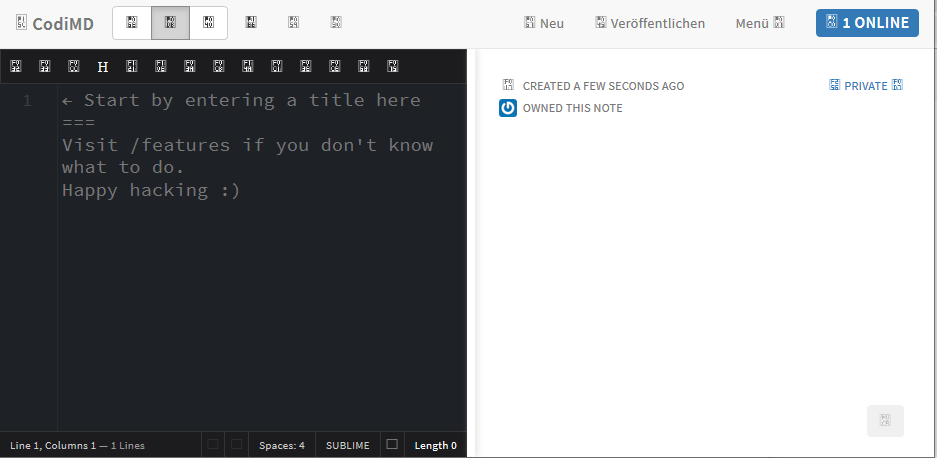
In my opinion this issue is rather critical:
 pagnotta
on 23 Feb 2019
pagnotta
on 23 Feb 2019
Its the same error/issue as https://github.com/hackmdio/codimd/issues/1440
 nmaas87
on 20 Apr 2020
nmaas87
on 20 Apr 2020
Related issues
 LukasKalbertodt
·
4Comments
LukasKalbertodt
·
4Comments
 dsprenkels
·
3Comments
dsprenkels
·
3Comments
 yaxu
·
4Comments
yaxu
·
4Comments
 neopostmodern
·
4Comments
neopostmodern
·
4Comments
 sagesharp
·
4Comments
sagesharp
·
4Comments
Most helpful comment
In my opinion this issue is rather critical: