Codesandbox-client: Can the preview iframe access the webcam?
❔ Question
Can the preview iframe access the webcam?
Looking at the iframe attributes, it looks like the camera permissions are enabled. But a quick-&-dirty test wasn't able to access my webcam.
<iframe sandbox="allow-forms allow-scripts allow-same-origin allow-modals allow-popups allow-presentation" allow="geolocation; microphone; camera; midi; vr; accelerometer; gyroscope; payment; ambient-light-sensor; encrypted-media; usb" src="https://k3d0p.csb.app/" title="Go to url" id="sandbox-preview" class="sc-gGBfsJ hTuYJr" style="opacity: 1; z-index: 1; background-color: white; pointer-events: initial;"></iframe>
_Related to: https://github.com/codesandbox/codesandbox-client/issues/1112_
Link to sandbox:
I can update later with a Sandbox that requests camera access
Your Environment
| Software | Name/Version |
| ---------------- | ------------ |
| Сodesandbox |
| Browser | Chrome 78.0.3904.87 |
| Operating System | MacOS 10.14.6 |
 bz-stripe
All 6 comments
_Update_: I'm testing a cross-origin use-case.
The sandbox I'm testing starts in CodeSandbox's domain and then redirects to another domain where it requests webcam access.
bz-stripe
on 19 Nov 2019
Hi @bz-stripe!
As you can see in Google’s post, you have to explicitly add permissions for the redirected website, since camera is (by default) only enabled for the embed domain.
 MichaelDeBoey
on 19 Nov 2019
MichaelDeBoey
on 19 Nov 2019
@MichaelDeBoey how would folks feel about granting access to all origins? Or is there an obvious security concern?
bz-stripe
on 19 Nov 2019
I think it's logical to keep the default behaviour, but if you as a user of the sandbox would like to have other permissions, you can just change the iframe code when using it.
Nobody's permitting you to do so on your own website.
to enable geolocation and mic/camera for an iframe, the following would be specified:
<iframe src="https://example.com" allow="geolocation; microphone; camera"></iframe>Note that the above will grant geolocation, microphone and camera access to the origin specified in the "src" attribute, i.e. in this case it would be https://example.com. In some cases, other origins will be loaded in the iframe that you may also wish to grant access to. In those cases you can explicitly specify the origins to grant access to:
<iframe src="https://example.com" allow="geolocation https://example.com https://foo.com;"></iframe>The above example would grant geolocation to https://example.com as well as https://foo.com when they are loaded in the iframe.
To grant access to all origins that might be loaded in the iframe, the * syntax can be used. This should be used carefully as it means that any page that gets loaded in the iframe can request geolocation, which is often not the intent.
MichaelDeBoey
on 19 Nov 2019
Sorry, last question: is there an easier way to "change the iframe code" than to use the dev console every time?
bz-stripe
on 19 Nov 2019
Yes - use the 'Share' menu in the top-right of the editor view for the sandbox you want to embed 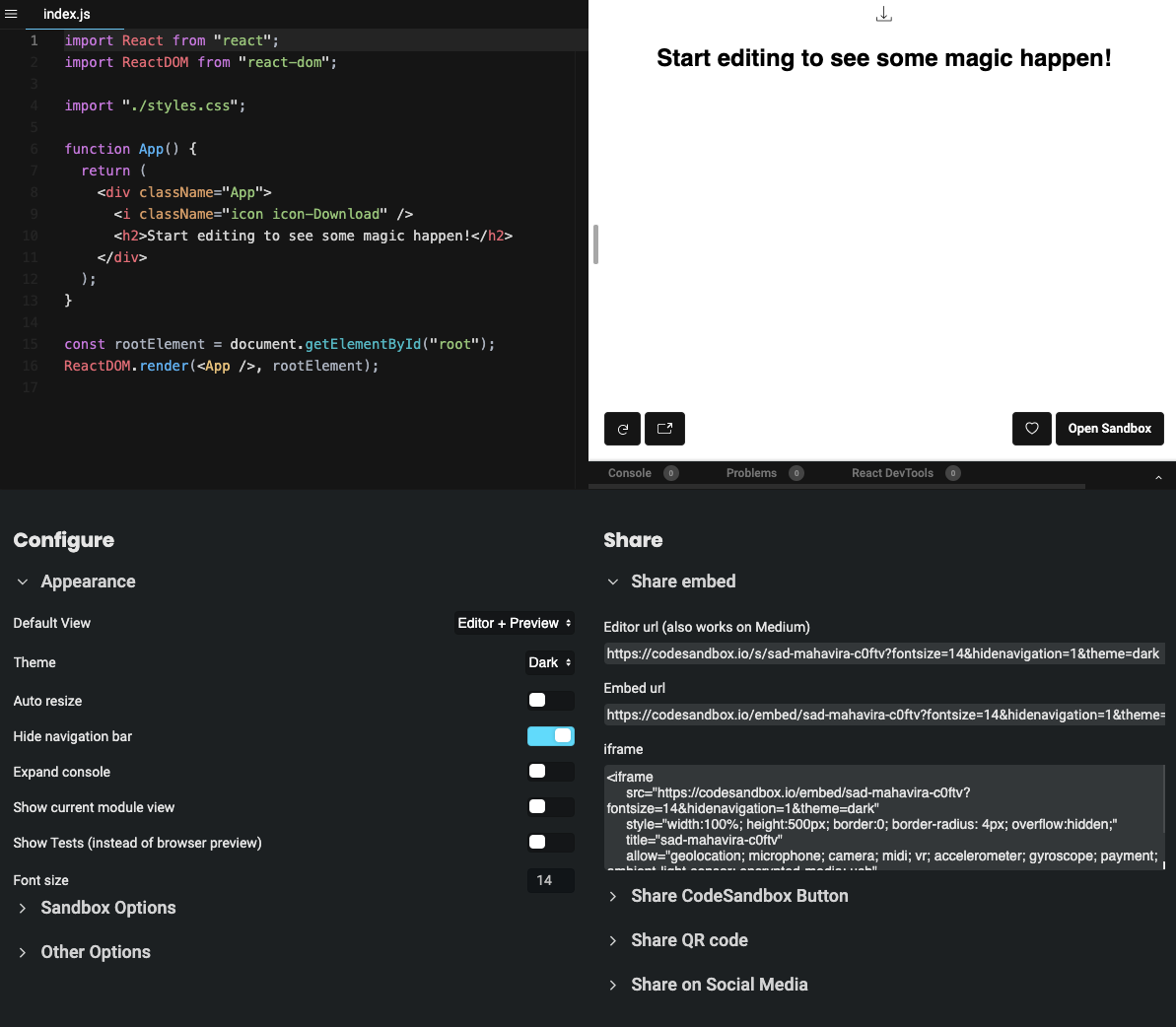
 garethx
on 20 Nov 2019
garethx
on 20 Nov 2019
Related issues
 donavon
·
3Comments
donavon
·
3Comments
 oliversturm
·
3Comments
oliversturm
·
3Comments
 NataliaTepluhina
·
3Comments
NataliaTepluhina
·
3Comments
 yazaabed
·
3Comments
yazaabed
·
3Comments
 wojciechczerniak
·
3Comments
wojciechczerniak
·
3Comments
Most helpful comment
Yes - use the 'Share' menu in the top-right of the editor view for the sandbox you want to embed