Codesandbox-client: Add emmet support
 kenyk7
All 22 comments
There is already support for emmet in the (default) Monaco editor, you can access it with Ctrl+F10.

 lbogdan
on 11 Sep 2017
lbogdan
on 11 Sep 2017
You can change the keys to use the key tab :)
kenyk7
on 11 Sep 2017
Initially I tried binding it to the Tab character, but it overrode the existing behaviour (autocomplete, indent, insert tab characters). Maybe there is a way to retain existing functionality and add emmet behind the Tab press, we need to look into this. Would be possible if we can call the functionality behind Tab manually.
 CompuIves
on 11 Sep 2017
CompuIves
on 11 Sep 2017
Ctrl+E would be the alternative, at least on sublime that's the default :D
 viankakrisna
on 11 Sep 2017
viankakrisna
on 11 Sep 2017
For css or sass in vue files: Ctrl + F10 it works badly :(
kenyk7
on 14 Sep 2017
Hi Van, have to agree with kenyk7 there. I've been trying to us use Ctrl+F10 but its exceptionally cumbersome. Which is a shame coz I really like codesandbox. I'd be much happier with something that can be done with one hand. Crtl + E or even Ctrl + Alt + A etc
 HamedPour
on 17 Feb 2018
HamedPour
on 17 Feb 2018
I completely agree, this is too cumbersome right now. I'll experiment with CTRL+E/CMD+E a bit!
CompuIves
on 18 Feb 2018
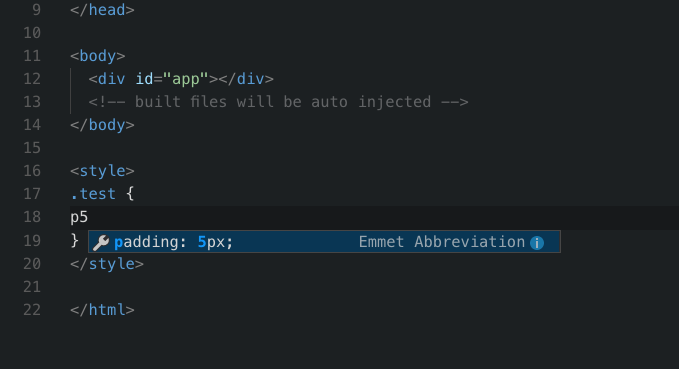
Some updates on this! I've been experimenting a bit and got it working with Tab, will deploy that today. It only works for HTML now, but I'm working on an vscode like implementation:
CompuIves
on 18 Feb 2018
However Emmer seems to have stopped working for anything else but HTML. For example in JSX I'm no longer able to use abbreviations, nor in CSS.
 dfsq
on 21 Feb 2018
dfsq
on 21 Feb 2018
I'll deploy the old functionality for in JSX as well to fix that!
On Wed, Feb 21, 2018 at 11:24 AM Aliaksandr Astashenkau <
[email protected]> wrote:
However Emmer seems to have stopped working for anything else but HTML.
For example in JSX I'm no longer able to use abbreviations, nor in CSS.—
You are receiving this because you commented.Reply to this email directly, view it on GitHub
https://github.com/CompuIves/codesandbox-client/issues/194#issuecomment-367279436,
or mute the thread
https://github.com/notifications/unsubscribe-auth/AAj1CG0qiwN6bwfySNhL-bzXWjVVQKe7ks5tW-7bgaJpZM4PSbQH
.
CompuIves
on 21 Feb 2018
@CompuIves Is this deployed?
lbogdan
on 10 May 2018
Deployed!
On Thu, May 10, 2018, 17:17 Bogdan Luca notifications@github.com wrote:
@CompuIves https://github.com/CompuIves Is this deployed?
—
You are receiving this because you were mentioned.Reply to this email directly, view it on GitHub
https://github.com/CompuIves/codesandbox-client/issues/194#issuecomment-388085604,
or mute the thread
https://github.com/notifications/unsubscribe-auth/AAj1CNYZ9mAOzoKBpwzG0lonBjx4Jp7dks5txFolgaJpZM4PSbQH
.
CompuIves
on 10 May 2018
Emmet keybinding is broken until last release, pressing cmd + E it opens the find component instead 🙈
 cloud-walker
on 22 Jul 2018
cloud-walker
on 22 Jul 2018
This probably happened because of our move to the new Monaco. The functionality is still there, it just needs to be connected again. Reopened the issue for this!
CompuIves
on 22 Jul 2018
@CompuIves I'm interested! anything helpful to look into? :)
 satyarohith
on 22 Jul 2018
satyarohith
on 22 Jul 2018
Emmet is back!
CompuIves
on 23 Oct 2018
I can't seem to get it to work with either ctrl-e or command-e (editing an HTML file). And control-F10 isn't possible to test on my current keyboard :D, any tips?
https://codesandbox.io/s/7zoozjw4w0
Brave Browser.
 mrmurphy
on 20 Nov 2018
mrmurphy
on 20 Nov 2018
Ahh, it seems like I haven't enabled it in the HTML templates yet. I'll enable that either this or next week with the new VSCode deploy.
CompuIves
on 20 Nov 2018
Thanks!
On Nov 20, 2018, 1:54 PM -0700, Ives van Hoorne notifications@github.com, wrote:
Ahh, it seems like I haven't enabled it in the HTML templates yet. I'll enable that either this or next week with the new VSCode deploy.
—
You are receiving this because you commented.
Reply to this email directly, view it on GitHub, or mute the thread.
mrmurphy
on 20 Nov 2018
ctrl-e also doesn't work in js(x) contexts, though it will expand with tab if it recognizes an html element name. Meaning emmet doesn't work at all for React components right now.
 samsch
on 20 Nov 2018
samsch
on 20 Nov 2018
Anything new this week? Without emmet tab function in HTML is really painful :(
 pamcy
on 5 Dec 2018
pamcy
on 5 Dec 2018
Assuming Emmet isn't working atm on Monaco? as well as VSCode & CodeMirror too, correct?
 quangv
on 11 Jan 2019
quangv
on 11 Jan 2019
Related issues
 MarcelloTheArcane
·
3Comments
MarcelloTheArcane
·
3Comments
 donavon
·
3Comments
donavon
·
3Comments
 zocky
·
3Comments
zocky
·
3Comments
 Haroenv
·
3Comments
Haroenv
·
3Comments
 alansouzati
·
3Comments
alansouzati
·
3Comments
Most helpful comment
Anything new this week? Without emmet tab function in HTML is really painful :(