Codeceptjs: accessing elements inside an iframe with puppeteer 1.20
What are you trying to achieve?
I am trying fill an input field inside an iframe with puppeteer 1.20 and codecptjs 2.32
What do you get instead?
with puppeteer 1.20 codeceptjs does not find the input inside the iframe. with puppeteer 1.19, it's working perfectly
test source code
    I.amOnPage('https://pac.com/');
    await within({frame: "#pac-card-field-cardNumber > iframe"}, () => {
        I.fillField("input[name=\"cardnumber\"]", "4012001037484447");
    });
result with puppeteer 1.19
> [email protected] pacon /home/mtoure/workspace/nr-stage
> codeceptjs run --grep @pacon --verbose

headless=false
env=stage
browser=chrome
CodeceptJS v2.3.2
Using test root "/home/mtoure/workspace/nr-stage"
Helpers: Puppeteer, REST, Mochawesome, FileSystem, puppeteerHelper, fileHelper
Plugins: screenshotOnFail, stepByStepReport, retryFailedStep, allure

Provider pacON @pacon --
    [1] Starting recording promises
    Emitted | suite.before ([object Object])
 › [Session] Starting singleton browser session
  Transaction by api Hpacment with a VISA @visa
    Emitted | test.before ([object Object])
 › [Dir] /home/mtoure/workspace/nr-stage
    Emitted | test.start ([object Object])
    Emitted | step.before (I am on page "https://pac.com/")
    Emitted | step.after (I am on page "https://pac.com/")
    Emitted | step.start (I am on page "https://pac.com/")
    I am on page "https://pac.com/"
    › [Url] https://pac.com/
    › [Browser:Log] pac Javascript SDK v1.9.1JSHandle:pac Javascript SDK v1.9.1
    › Screenshot is saving to /home/mtoure/workspace/nr-stage/output/record_6d0d1ad42898ab0fd80d8b4babbb14c7/0000.png
    Emitted | step.passed (I am on page "https://pac.com/")
    Emitted | step.finish (I am on page "https://pac.com/")
    [1] Starting <within> session
    Emitted | step.before (I fill field "input[name="cardnumber"]", "4012001037484447")
    Emitted | step.after (I fill field "input[name="cardnumber"]", "4012001037484447")
    Emitted | step.start (I fill field "input[name="cardnumber"]", "4012001037484447")
    Emitted | step.comment (Within "{"frame":"#pac-card-field-cardNumber > iframe"}" )
    Within "{"frame":"#pac-card-field-cardNumber > iframe"}"
      I fill field "input[name="cardnumber"]", "4012001037484447"
      › Screenshot is saving to /home/mtoure/workspace/nr-stage/output/record_6d0d1ad42898ab0fd80d8b4babbb14c7/0001.png
    Emitted | step.passed (I fill field "input[name="cardnumber"]", "4012001037484447")
    Emitted | step.finish (I fill field "input[name="cardnumber"]", "4012001037484447")
    [1] <within> Finalize <within> session
    Emitted | test.passed ([object Object])
    Emitted | test.finish ([object Object])
  ✔ OK in 7853ms

    Emitted | test.after ([object Object])
  › [Session] cleaning cookies and localStorage
    Emitted | suite.after ([object Object])

  OK  | 1 passed   // 10s
Process finished with exit code 0
result with puppeteer 1.20
> [email protected] pacon /home/mtoure/workspace/nr-stage
> codeceptjs run --grep @pacon --verbose

headless=false
env=stage
browser=chrome
CodeceptJS v2.3.2
Using test root "/home/mtoure/workspace/nr-stage"
Helpers: Puppeteer, REST, Mochawesome, FileSystem, puppeteerHelper, fileHelper
Plugins: screenshotOnFail, stepByStepReport, retryFailedStep, allure

Provider pacON @pacon --
    [1] Starting recording promises
    Emitted | suite.before ([object Object])
 › [Session] Starting singleton browser session
  Transaction by api Hpacment with a VISA @visa
    Emitted | test.before ([object Object])
 › [Dir] /home/mtoure/workspace/nr-stage
    Emitted | test.start ([object Object])
    Emitted | step.before (I am on page "https://pac.com/")
    Emitted | step.after (I am on page "https://pac.com/")
    Emitted | step.start (I am on page "https://pac.com/")
    I am on page "https://pac.com/"
    › [Url] https://pac.com/
    › [Browser:Log] pac Javascript SDK v1.9.1JSHandle:pac Javascript SDK v1.9.1
    › [Url]
    › [Url] https://libs.pac.com/hostedfields/index.html#type=carousel&element=carousel&instanceId=714712&referrer=https://pac.com
    › [Url]
    › [Url]
    › [Url]
    › [Url]
    › [Url]
    › Screenshot is saving to /home/mtoure/workspace/nr-stage/output/record_6d0d1ad42898ab0fd80d8b4babbb14c7/0000.png
    › [Url] https://libs.pac.com/hostedfields/index.html#type=card&element=controller&instanceId=862569&referrer=https://pac.com
    › [Url] https://libs.pac.com/hostedfields/index.html#type=card&element=cardHolder&instanceId=862569&referrer=https://pac.com
    › [Url] https://libs.pac.com/hostedfields/index.html#type=card&element=cardNumber&instanceId=862569&referrer=https://pac.com
    › [Url] https://libs.pac.com/hostedfields/index.html#type=card&element=expiryDate&instanceId=862569&referrer=https://pac.com
    Emitted | step.passed (I am on page "https://pac.com/")
    Emitted | step.finish (I am on page "https://pac.com/")
    [1] Starting <within> session
    Emitted | step.before (I fill field "input[name="cardnumber"]", "4012001037484447")
    Emitted | step.after (I fill field "input[name="cardnumber"]", "4012001037484447")
 › [Url] https://libs.pac.com/hostedfields/index.html#type=card&element=cvc&instanceId=862569&referrer=https://pac.com
    Emitted | step.start (I fill field "input[name="cardnumber"]", "4012001037484447")
    Emitted | step.comment (Within "{"frame":"#pac-card-field-cardNumber > iframe"}" )
    Within "{"frame":"#pac-card-field-cardNumber > iframe"}"
      I fill field "input[name="cardnumber"]", "4012001037484447"
    [1] <within> Retrying... Attempt #2
    [1] <within> Retrying... Attempt #3
    [1] <within> Retrying... Attempt #4
    [1] <within> Retrying... Attempt #5
    [1] <within> Retrying... Attempt #6
    [1] <within> Error | Error: Field "input[name="cardnumber"]" was not found by text|CSS|XPath
    Emitted | step.failed (I fill field "input[name="cardnumber"]", "4012001037484447")
      › Screenshot is saving to /home/mtoure/workspace/nr-stage/output/record_6d0d1ad42898ab0fd80d8b4babbb14c7/0001.png
    Emitted | step.finish (I fill field "input[name="cardnumber"]", "4012001037484447")
    [1] <within> Error | Error: Field "input[name="cardnumber"]" was not found by text|CSS|XPath
    [1] <within> Error | Error: Field "input[name="cardnumber"]" was not found by text|CSS|XPath
    [1] <within> Starting <teardown> session
    Emitted | test.failed ([object Object])
    Emitted | test.finish ([object Object])
    [1] <teardown> Stopping recording promises
  › <screenshotOnFail> Test failed, saving screenshot
  › Screenshot is saving to /home/mtoure/workspace/nr-stage/output/Transactio_1569482685.failed.png
  ✖ FAILED in 10346ms

    [2] Starting recording promises
    Emitted | test.after ([object Object])
  › [Session] cleaning cookies and localStorage
    Emitted | suite.after ([object Object])

-- FAILURES:

  1) Provider pacON @pacon
       Transaction by api Hpacment with a VISA @visa:
     Field "input[name="cardnumber"]" was not found by text|CSS|XPath

  Scenario Steps:

  - I.fillField("input[name="cardnumber"]", "4012001037484447") at within (tests/Acceptance/Providers/pacon.js:28:11)
  - I.amOnPage("https://pac.com/") at Test.Scenario (tests/Acceptance/Providers/pacon.js:26:3)

  Error: Field "input[name="cardnumber"]" was not found by text|CSS|XPath
      at new ElementNotFound (node_modules/codeceptjs/lib/helper/errors/ElementNotFound.js:14:11)
      at assertElementExists (node_modules/codeceptjs/lib/helper/Puppeteer.js:2266:11)
      at Puppeteer.fillField (node_modules/codeceptjs/lib/helper/Puppeteer.js:1071:5)
      at process._tickCallback (internal/process/next_tick.js:68:7)


  FAIL  | 0 passed, 1 failed   // 13s
    Emitted | global.result ([object Object])
◉ Step-by-step preview: file:///home/mtoure/workspace/nr-stage/output/records.html
    Emitted | global.after ([object Object])
npm ERR! code ELIFECYCLE
npm ERR! errno 1
npm ERR! [email protected] pacon: `codeceptjs run --grep @pacon --verbose`
npm ERR! Exit status 1
npm ERR!
npm ERR! Failed at the [email protected] pacon script.
npm ERR! This is probably not a problem with npm. There is likely additional logging output above.

npm ERR! A complete log of this run can be found in:
npm ERR!     /home/mtoure/.npm/_logs/2019-09-26T07_24_49_116Z-debug.log

Process finished with exit code 1
Details
- CodeceptJS version:2.32
- Operating System: Ubuntu 18
- Puppeteer: 1.20
 medtoure18
All 14 comments

is it the page staying the same without any changes yet?
 PeterNgTr
on 27 Sep 2019
PeterNgTr
on 27 Sep 2019
Hi @PeterNgTr ,
I changed all urls (with fake ones) because our project is still private.
Do you have an app to test a selctor within an iframe ?
Thank you
medtoure18
on 27 Sep 2019
@PeterNgTr
the right url is this one:
https://demo-front-test-dot-pi-poc-224414.appspot.com/
I.amOnPage('https://demo-front-test-dot-pi-poc-224414.appspot.com/');
await within({frame: "#pac-card-field-cardNumber > iframe"}, () => {
I.fillField("input[name=\"cardnumber\"]", "4012001037484447");
});
medtoure18
on 27 Sep 2019
@medtoure18 didn't know that it was the URL you were testing against. :)
PeterNgTr
on 27 Sep 2019
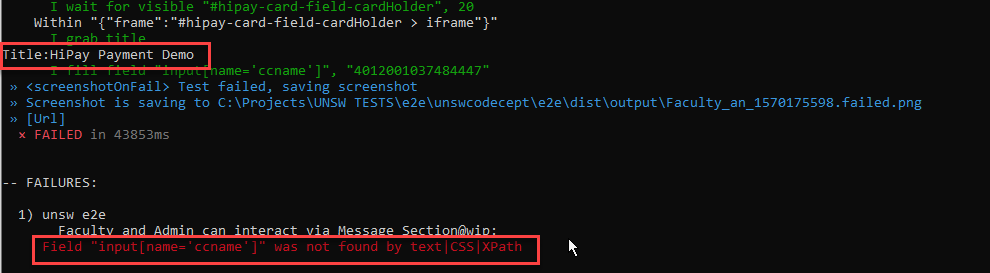
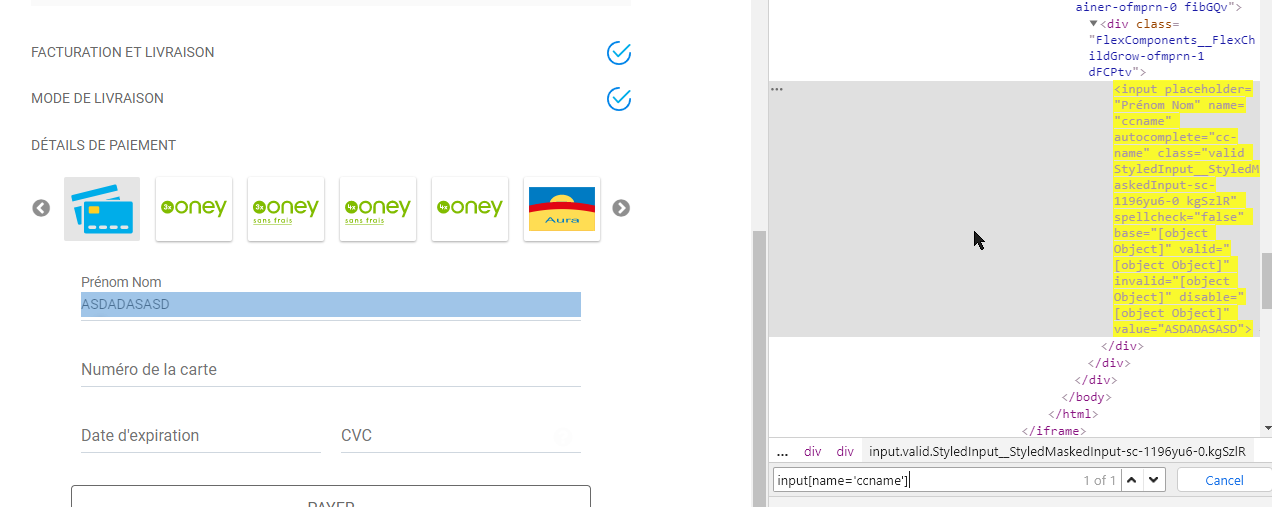
@PeterNgTr : Does that snippet work?
I executed the same but got error.

 samaysimantbarik
on 4 Oct 2019
samaysimantbarik
on 4 Oct 2019
Have tried all possible means, but switching frames doesnt work.
versions:
"codeceptjs": "^2.3.2",
"puppeteer": "^1.20.0"
samaysimantbarik
on 4 Oct 2019
@samaysimantbarik I tried, it is such an issue when using puppeteer 1.20.0.
PeterNgTr
on 4 Oct 2019
@PeterNgTr: That's Bad and sad ! Are you aware of any alternative approach to solve this problem?
samaysimantbarik
on 4 Oct 2019
@medtoure18 @samaysimantbarik seems like it is an issue when accessing the iframe in headful mode, headless mode works fine.
  Emitted | step.start (I fill field "input[name="ccname"]", "4012001037484447")
    Emitted | step.comment (Within "{"frame":"#hipay-card-field-cardHolder > iframe"}" )
    Within "{"frame":"#hipay-card-field-cardHolder > iframe"}"
      I fill field "input[name="ccname"]", "4012001037484447"
    Emitted | step.passed (I fill field "input[name="ccname"]", "4012001037484447")
    Emitted | step.finish (I fill field "input[name="ccname"]", "4012001037484447")
    [1] Finalize <within> session
    Emitted | test.passed ([object Object])
    Emitted | test.finish ([object Object])
  ✔ OK in 76361ms
That would be the fix from puppeteer itself, I believe. As it is logged here https://github.com/GoogleChrome/puppeteer/issues/4964
In the meantime, I would say either use puppeteer 1.19.0 or running 1.20.0 with headless mode.
PeterNgTr
on 4 Oct 2019
@PeterNgTr : Thanks a ton Mate . You saved my day. Cheers 👍
samaysimantbarik
on 4 Oct 2019
thanks @PeterNgTr and @samaysimantbarik
medtoure18
on 4 Oct 2019
I am facing a similar issue when the headless mode is off. I am unable to reach out to iframe. And when the headless mode is on, it works. Thanks @PeterNgTr for pointing out this. Any updates for the fix, I am currently running 2.0.0
 rajat-np
on 5 Nov 2019
rajat-np
on 5 Nov 2019
Any update on this fix? I am having trouble both when headless is true and false. I am using
"version": "3.2.0".
 tshettyThinkful
on 10 Jun 2020
tshettyThinkful
on 10 Jun 2020
Seems like the fix is from puppeteer itself. https://github.com/puppeteer/puppeteer/issues/4964
PeterNgTr
on 10 Jun 2020
Related issues
 nhu
·
11Comments
nhu
·
11Comments
 luisgzvs
·
19Comments
luisgzvs
·
19Comments
 gaurav21r
·
10Comments
gaurav21r
·
10Comments
 mrvicadai
·
10Comments
mrvicadai
·
10Comments
 ebuster
·
16Comments
ebuster
·
16Comments
Most helpful comment
@medtoure18 @samaysimantbarik seems like it is an issue when accessing the iframe in headful mode, headless mode works fine.
That would be the fix from puppeteer itself, I believe. As it is logged here https://github.com/GoogleChrome/puppeteer/issues/4964
In the meantime, I would say either use puppeteer
1.19.0or running1.20.0with headless mode.