Codeceptjs: Could not load helper Mochawesome from module './helper/Mochawesome' error msg
I've received this error trying to run mochawesome reporter (odeceptjs run --reporter mochawesome)
 . I'm using VSCode as IDE. I followed reports guide from CodeceptJS site, so my codecept.json looks like this:
{
  "output": "./output",
  "helpers": {
    "Mochawesome": {
      "uniqueScreenshotNames": "true"
    },
    "WebDriverIO": {
      "url": "",
      "browser": "chrome",
      "windowSize": "maximize",
      "restart": true,
      "smartWait": 15000
    }
  },
  "include": {
    "I": "./steps_file.js",
    "basePage": "./base/BasePage.js"
  },
  "mocha": {
    "reporterOptions": {
      "reportDir": "output"
    }
  },
  "bootstrap": false,
  "teardown": null,
  "hooks": [],
  "tests": "./test/DashBoardTest.js",
  "timeout": 10000,
  "name": ""
}
Why did I receive that message above? Am I missing some configuration?
 luisgzvs
All 19 comments
@luisgzvs which codeceptjs version do you use?
 BorisOsipov
on 12 Sep 2017
BorisOsipov
on 12 Sep 2017
I'm having the same issue.
[email protected]
[email protected]
I followed the instructions from the docs as far as I know
My error message is slightly different:
Could not load helper Mochawesome from module './helper/Mochawesome':
Could not require module 'mochawesome/addContext'
{"nested":{"code":"MODULE_NOT_FOUND"}}
 leojh
on 12 Sep 2017
leojh
on 12 Sep 2017
Hi @BorisOsipov my current version is: CodeceptJS v1.0.2
luisgzvs
on 13 Sep 2017
@luisgzvs @leojh
Do you use there packages in global npm or local? Also what OS do you use?
 APshenkin
on 13 Sep 2017
APshenkin
on 13 Sep 2017
@APshenkin I use them global, and in one PC I have windows 10 and in other one MacOS Sierra, but I see the same message in both OS
luisgzvs
on 13 Sep 2017
I use local references only
leojh
on 14 Sep 2017
Any suggestions?
luisgzvs
on 14 Sep 2017
@luisgzvs @leojh looks like it's Windows issue, so I need some time to investigate this. Yet I can not give any estimates
APshenkin
on 15 Sep 2017
I'm definitely seeing this both in MacOS and Docker so not just a Windows issue. I'm glad to help troubleshoot this issue, just not sure where to even start.
leojh
on 15 Sep 2017
@leojh Ok, make sense, because I can't reproduce this issue.
First, require is here: https://github.com/Codeception/CodeceptJS/blob/master/lib/helper/Mochawesome.js#L22
So you should have codeceptjs and mochawesome in node_modules
Also there should be addContext.js in mochawesome dir. Could you please check this?
APshenkin
on 15 Sep 2017
@APshenkin you mean if we don't have codeceptjs in our node_modules folder, we have to create it and add the require you mention above?
Also I do have the ddContext.js file in my mochawesome dir, thanks!
luisgzvs
on 18 Sep 2017
@luisgzvs So in your case the problem is that you try to use codeceptjs, which was installed as global package.
When you want to use custom reports you have to install codeceptjs locally in your dependencies
You should:
- Update package.json in your project:
{
"scripts": {
"codeceptjs": "codeceptjs run --reporter mochawesome"
},
"dependencies": {
"codeceptjs": "1.0.3",
"mochawesome": "2.3.1",
//.... other deps
}
}
- then install deps that was described in package.json
npm i - Remove global codeceptjs
npm remove -g codeceptjs - Run codeceptjs from local deps via npm script
npm run codeceptjs
I strongly recommend to use local deps. This will guarantied that your dependencies are installed correctly and you will not face deps issues
At that moment, custom reports works only when codeceptjs is installed locally.
This is not explained on the website. We'll think about how to add this.
APshenkin
on 19 Sep 2017
Thanks, @APshenkin that solved the issue, originally what I was trying to do was to add images to the HTML reports when a Scenario fails, now I can run mochawesome with this command: "codeceptjs run --reporter mochawesome" and there are no errors, but still no screenshots are being attached to the HTML when a Scenario fails, the next step I made was to add
"Mochawesome": {
"uniqueScreenshotNames": "true"
},
to my condecept.json file, but I'm still not seeing screenshots in the HTML output, do you know why is that?
Thanks in advance!
luisgzvs
on 19 Sep 2017
@luisgzvs Hi!
Wheb you use uniqueScreenshotNames option in mochawesome helper, you should use it in webdriverIO helper too. Add it to helper configuration and it will work
APshenkin
on 19 Sep 2017
Can you give an example, I've tried in different ways, my config file is:
{
"output": "./output",
"helpers": {
"Mochawesome": {
"uniqueScreenshotNames": "true"
},
"WebDriverIO": {
"url": "...",
"browser": "chrome",
"windowSize": "maximize",
"restart": true,
"smartWait": 15000,
"Mochawesome": {
"uniqueScreenshotNames": "true"
}
}
},
"include": {
"I": "./steps_file.js",
"basePage": "./base/BasePage.js"
},
"mocha": {
"reporterOptions": {
"reportDir": "output"
}
},
"bootstrap": false,
"teardown": null,
"hooks": [],
"tests": "./test/DashBoardTest.js",
"timeout": 10000,
"name": ""
}
How's the correct way to do that?
luisgzvs
on 19 Sep 2017
Thank @APshenkin I have try follow your advise.
I have run in locally but still no screenshot on fail case in html report.
Thanks in advance
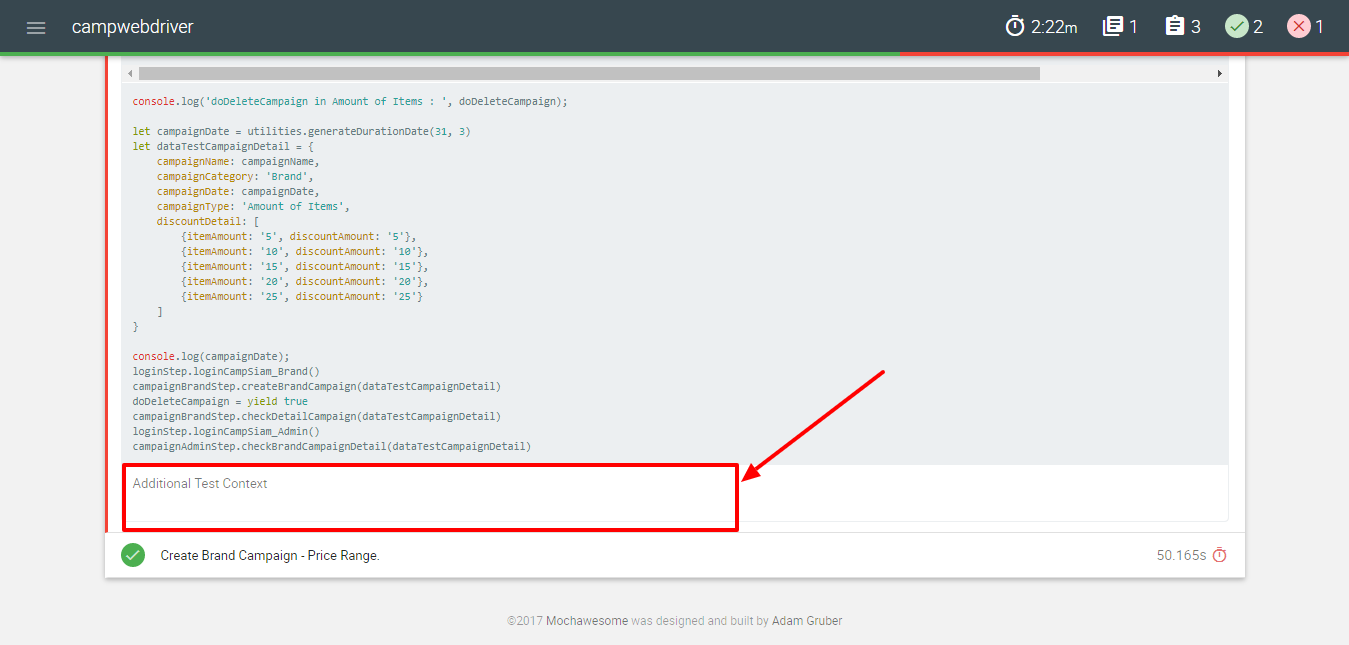
 guruparanun
on 20 Sep 2017
guruparanun
on 20 Sep 2017
@luisgzvs @guruparanun
output folders for screenshots and html report should be same. So try to modify your configs this way:
{
  "output": "./output",
  "helpers": {
    "Mochawesome": {
      "uniqueScreenshotNames": "true" // uniqueScreenshotNames in Mochawesome helper
    },
    "WebDriverIO": {
      "url": "...",
      "browser": "chrome",
      "windowSize": "maximize",
      "restart": true,
      "smartWait": 15000,
      "uniqueScreenshotNames": "true" // uniqueScreenshotNames in selenium helper
    }
  },
  "include": {
    "I": "./steps_file.js",
    // other pages
  },
  "mocha": {
    "reporterOptions": {
      "reportDir": "./output"
    }
  },
 // other options
}
Thanks a lot, @APshenkin now is working fine screenshots are being attached when a scenario fails, thank you very much!
luisgzvs
on 20 Sep 2017
Thank you very much, @APshenkin now screenshot is show on html report too.
Thank 👍
guruparanun
on 21 Sep 2017
Related issues
 philipstanislaus
·
10Comments
philipstanislaus
·
10Comments
 arclak
·
12Comments
arclak
·
12Comments
 mrvicadai
·
10Comments
mrvicadai
·
10Comments
 ninpop25
·
10Comments
ninpop25
·
10Comments
 medtoure18
·
14Comments
medtoure18
·
14Comments
Most helpful comment
@luisgzvs @guruparanun
output folders for screenshots and html report should be same. So try to modify your configs this way: