Code-settings-sync: Auto Upload / Download : Unable to read syncLocalSettings.json. Make sure its Valid JSON.
🐛 Describe the bug
When I start VSCode I get error in dev console:
Sync : Unable to read syncLocalSettings.json. Make sure its Valid JSON.
Afterwards extension opens link to:
http://shanalikhan.github.io/2017/02/19/Option-to-ignore-settings-folders-code-settings-sync.html
Also the notification appears. It happens everytime I start VSCode.
🌴 Visual Studio Code Version : 1.29.0
🌴 Code Settings Sync Version : 3.2.0
🌴 Standard or Insiders : Standard
🌴 OSS or Portable : OSS
🌴 Operating System : Ubuntu 18.04.1 LTS
🌴 Occurs On: when I start vscode
🌴 Proxy Enabled: no
🌴 Gist Id: [ ID_HERE ]
📰 To Reproduce
Not sure, it says invalid json, but my json is valid.
I have these settings:
  "sync.autoDownload": true,
  "sync.autoUpload": true,
  "sync.forceDownload": true,
  "sync.quietSync": true,
  "sync.askGistName": false,
  "sync.removeExtensions": true,
  "sync.syncExtensions": true,
💪 Expected behavior
It shouldn't error out, atleast not open the browser.
📺 Console Error Log
I added console.error(this.en.FILE_CUSTOMIZEDSETTINGS, customSettingStr); to see some output, but it seems to log only the path, like the there is no json :thinking:

 GuskiS
All 20 comments
It is referring to this global settings.
https://github.com/shanalikhan/code-settings-sync#global-settings
Reset the Settings Sync Settings to fix it.
 shanalikhan
on 14 Nov 2018
shanalikhan
on 14 Nov 2018
I have already done that. It still rises the error next time I open vscode.
GuskiS
on 14 Nov 2018
can you write the content of file available in that path ?
shanalikhan
on 14 Nov 2018
Sure. Token removed:
{"ignoreUploadFiles":["projects.json","projects_cache_vscode.json","projects_cache_git.json","projects_cache_svn.json","gpm_projects.json","gpm-recentItems.json"],"ignoreUploadFolders":["workspaceStorage"],"ignoreExtensions":[],"replaceCodeSettings":{},"gistDescription":"Visual Studio Code Settings Sync Gist","version":320,"token":"removed","downloadPublicGist":false,"supportedFileExtensions":["json","code-snippets"],"openTokenLink":true,"disableUpdateMessage":false,"lastUpload":"2018-11-14T08:50:59.289Z","lastDownload":"2018-11-14T08:50:59.289Z","githubEnterpriseUrl":null,"askGistName":false,"customFiles":{},"hostName":null}
If you take a look at Console Error Log part of issue, I mention I have added logger. Which outputs path, but not the content or the content is empty at that step.
What is weirder, it seems to output file content 3 times before and then it throws error.
GuskiS
on 14 Nov 2018
Can you try to remove this file from the drive and restart the code and then try adding token in that file.
shanalikhan
on 14 Nov 2018
Same thing.
GuskiS
on 14 Nov 2018
It started happening recently(maybe a month), I have been using this extension for a long time.
Here is the full console output:
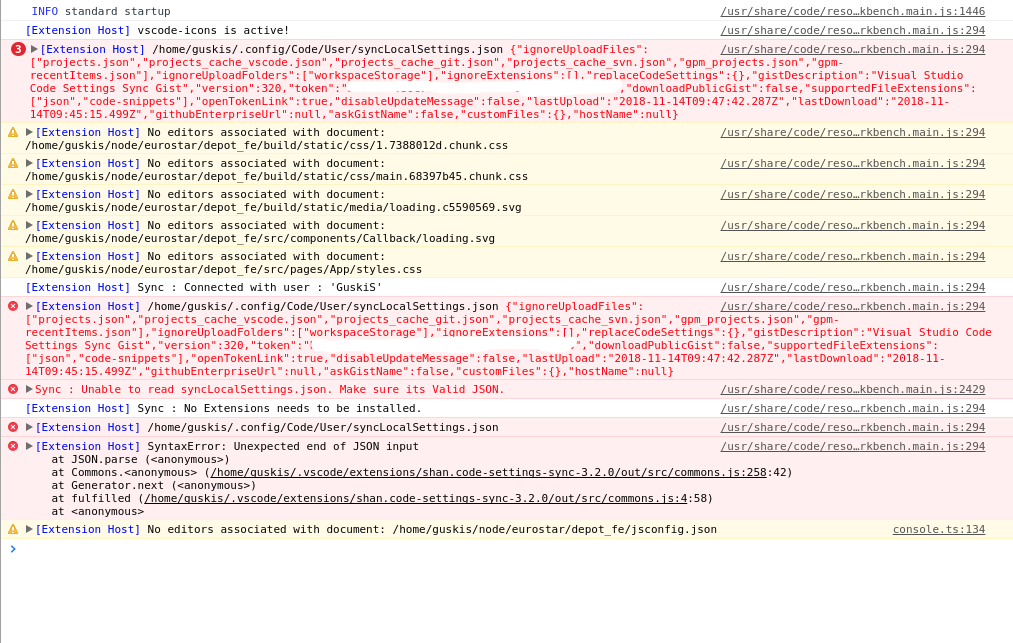
As you can see, it prints out the content of JSON couple of times, and then it just dies.
Also, I have noticed same thing happening on my other computer (haven't used it much).
GuskiS
on 14 Nov 2018
Same error here.
 hadim
on 26 Nov 2018
hadim
on 26 Nov 2018
Auto upload and Auto Download isnt working perfectly right now. Use Settings Sync by turning them off the the moment.
shanalikhan
on 27 Nov 2018
@shanalikhan Hello Shan! I have this exact same issue with one difference, it only happens when I open a 2nd VSCode window (ctrl+shift+n). I've experienced it for a very long time though, several months at least. Let me know if I should open a new issue or not -- it just seems so similar to this. Thanks for your work!
 curtisbelt
on 28 Nov 2018
curtisbelt
on 28 Nov 2018
@CurtisBelt I suppose your either Auto Upload / Download is turned on - Try turning off them.
shanalikhan
on 28 Nov 2018
Before you posted temp fix, I changed sync.forceDownload to false and it stopped.
GuskiS
on 28 Nov 2018
Currently there are issues on autoUpload / Download - Issues are already opened for this already, there is no point to keep this thread alive.
OSS is not supported by Settings Sync , issue is being tracked at https://github.com/shanalikhan/code-settings-sync/issues/668
I'm closing this issue in favor of those 2 issues.
Feel free to discuss related to those problems in those threads.
shanalikhan
on 1 Apr 2019
I have auto upload / download and force download turned off and still getting this. What can I do?
 juliuscrn
on 9 Aug 2019
juliuscrn
on 9 Aug 2019
What can I do?
@joolius
Have you tried resetting the extension settings? This mainly happens when configurations are not in valid JSON format.
shanalikhan
on 9 Aug 2019
I also have auto upload and download off and get this error. Moreover, I just downloaded this extension on fresh VSCode on fresh PC and on fresh (just installed) OS. I did reset settings several times and login with github, but error is the same:
Sync : Unable to read syncLocalSettings.json. Make sure its Valid JSON.
 TrayHard
on 12 Aug 2019
TrayHard
on 12 Aug 2019
I recently encountered the same problem with a message saying: "Sync : Unable to read syncLocalSettings.json. Make sure its Valid JSON."But I solved this problem with just one click. Check "Download Public Gist" in Sync Settings and it will be successfully synchronized.(Or modify {"downloadPublicGist": true} in the %APPDATA%\Code\User\syncLocalSettings.json file)
我最近遇到了相同的问题,提示信息显示:"Sync : Unable to read syncLocalSettings.json. Make sure its Valid JSON."
但是我只用了一次点击便解决了这个问题,在Sync Settings里面勾选"下载公开Gist",立刻就能成功同步了。(或者在%APPDATA%\Code\User\syncLocalSettings.json文件中修改{"downloadPublicGist": true})
 Nyaasu66
on 24 Sep 2019
Nyaasu66
on 24 Sep 2019
I got this issue when I downloaded the extension in VSC and click on login to GitHub button.
For this issue, instead of direct login into my Github account, I click on the Edit configuration button and copy-paste gist ID and gist token manually.
Then I did sync: Download in VSC and it is working.
 AnshulNautiyal
on 12 Oct 2019
AnshulNautiyal
on 12 Oct 2019
Solve this issue by reset everything then enter gist id and token manually :) thanks to @AnshulNautiyal
 vortechron
on 16 Mar 2020
vortechron
on 16 Mar 2020
If you're having trouble location the syncLocalSettings.json file in Ubuntu, it's here:
~/.config/Code/User/syncLocalSettings.json
I had to add my gist token manually to that file. and then in settings i had to clear my Gist ID. After pressing Alt+Shift+U, it worked and a Gist ID was somehow autmatically generated
 pwkip
on 25 Apr 2020
pwkip
on 25 Apr 2020
Related issues
 dawsbot
·
5Comments
dawsbot
·
5Comments
 jdshkolnik
·
3Comments
jdshkolnik
·
3Comments
 pravic
·
5Comments
pravic
·
5Comments
 OlegChep
·
5Comments
OlegChep
·
5Comments
 larrym
·
4Comments
larrym
·
4Comments
Most helpful comment
I got this issue when I downloaded the extension in VSC and click on login to GitHub button.
For this issue, instead of direct login into my Github account, I click on the Edit configuration button and copy-paste gist ID and gist token manually.
Then I did sync: Download in VSC and it is working.