Code-settings-sync: Error - [Spawn Eaccess] On Hitting Extension Commands
Visual Studio Code Version : [ 1.13.0 ]
Code Settings Sync Version : [ 2.8.2 ]
Operating System : [ Ubuntu 17.04 ]
Occurs On: [ Help Configuring ]
Proxy Enabled: [ No ]
GIst Id: [ NA ]
First I thought the key bindings are not working since there was no response,
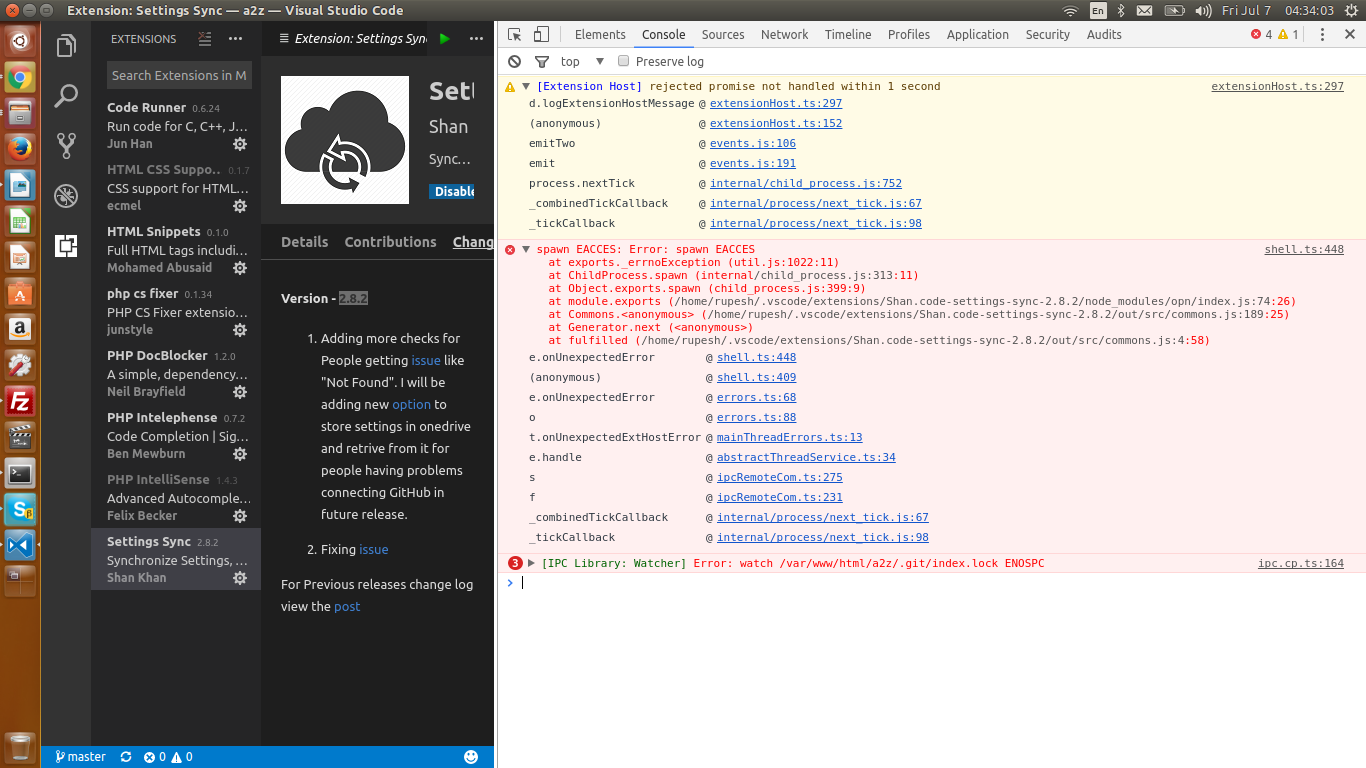
typing Sync manually into the command palette also didn't work, Then I opened console to see the errors attached.
It may be a permission fault on my system but still, the extensions should through some exception.
 cybersupernova
All 9 comments
Having the same issue on Solus.
 Jimmyscene
on 7 Jul 2017
Jimmyscene
on 7 Jul 2017
Try this and let me know
https://github.com/shanalikhan/code-settings-sync/issues/327#issuecomment-313500009
 shanalikhan
on 7 Jul 2017
shanalikhan
on 7 Jul 2017
That did it. Thanks!
Jimmyscene
on 7 Jul 2017
thanks it worked, although I suggest handling the exception properly
cybersupernova
on 7 Jul 2017
Will be fixed in next version.
shanalikhan
on 7 Jul 2017
having same issue, provided quickfix worked :)
 xiorcal
on 12 Jul 2017
xiorcal
on 12 Jul 2017
+1 ("having same issue, provided quickfix worked")
 gyermolenko
on 12 Jul 2017
gyermolenko
on 12 Jul 2017
I was also having the same issue on Ubuntu 16.04, the solution provided fixed it for me. Thanks. :smile:
 malagutti
on 28 Jul 2017
malagutti
on 28 Jul 2017
This issue if fixed in v2.8.3
let me know if there is any problem
shanalikhan
on 20 Aug 2017
Related issues
 mklement0
·
5Comments
mklement0
·
5Comments
 dawsbot
·
5Comments
dawsbot
·
5Comments
 hfcheng66
·
5Comments
hfcheng66
·
5Comments
 dagrooms52
·
3Comments
mklement0
·
5Comments
dagrooms52
·
3Comments
mklement0
·
5Comments
Most helpful comment
Try this and let me know
https://github.com/shanalikhan/code-settings-sync/issues/327#issuecomment-313500009