Code-server: Cannot sign in to Github account
Cannot sign in to Github.
When I click on "Clone repository" under SCM tab and provide the repo url and folder, it asks me to sign in to Github.
The authorization page opens in a new tab:

After clicking on "Continue", the following error occurs:

I tried to generate "Personal Access Token" on Github, then entered that here:
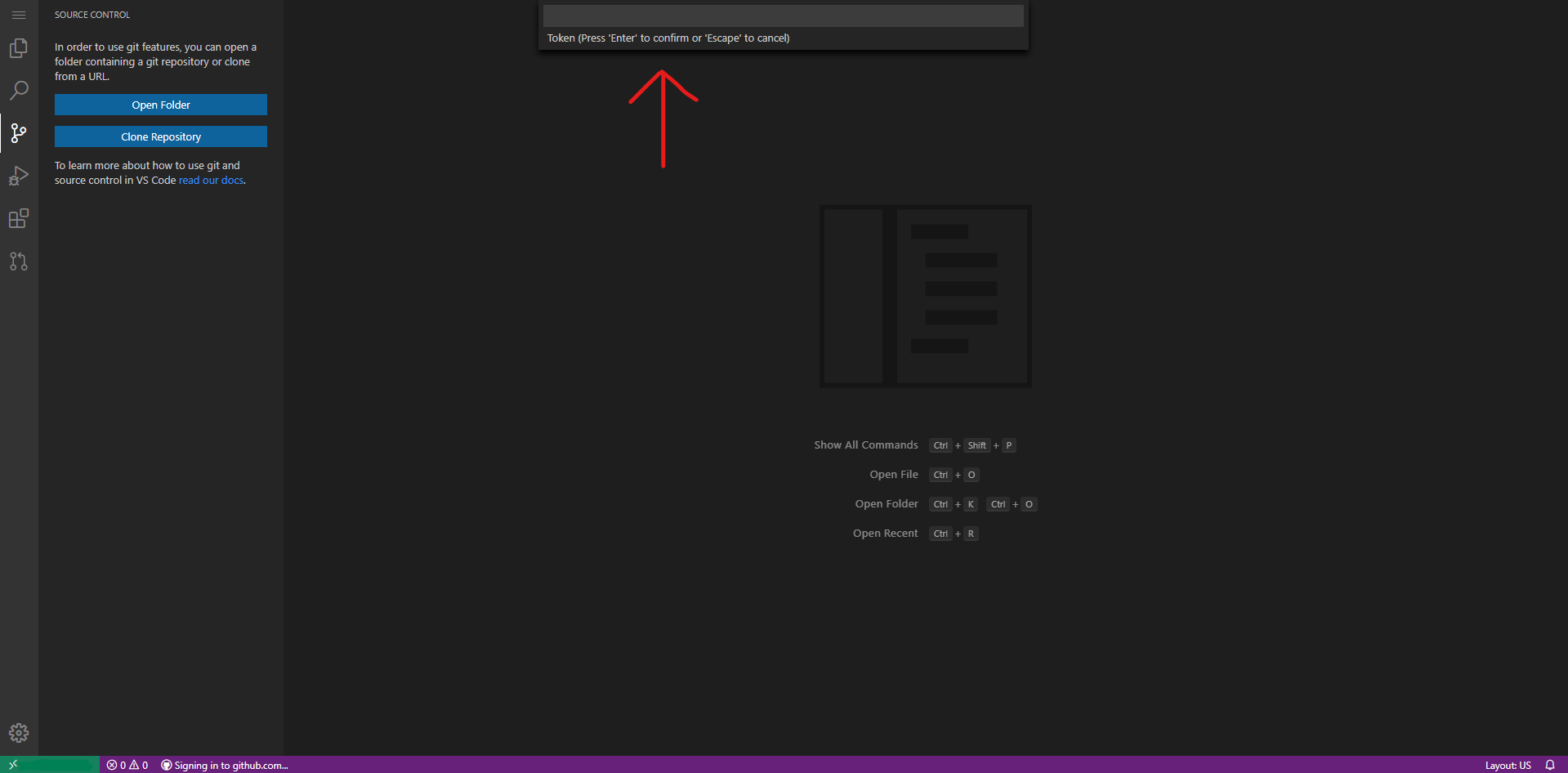
This did not work either.
- Web Browser: Microsoft Egde (Chromium)
- Local OS: Windows 10
- Remote OS: Ubuntu 18.04.3 (LTS)
- Remote Architecture: x64
code-server --version: 3.4.1
 subhamayd2
All 15 comments
Definitely need to look into this, I took a swing a few weeks ago but wasn't able to figure it out at the time.
 code-asher
on 16 Jul 2020
code-asher
on 16 Jul 2020
I had the same issue and was able to figure out a solution. I took the url that a regular instance of VSCode spits out and used it to reverse engineer how the url is put together.
A auth url from code-server looks like this:
https://vscode-auth.github.com/authorize/?callbackUri=https://example.com/callback%3Fvscode-requestId%xxxxxxxxxx-xxxx-xxxx-xxxx-xxxxxxxxxxxx%26vscode-scheme%3Dcode-oss%26vscode-authority%3Dvscode.github-authentication%26vscode-path%3D%252Fdid-authenticate&scope=repo&state=state-from-code-server&responseType=code
What I did was take the state parameter at the end of the auth url given by code-server and insert it into the url below which is derived from the url a normal version of VSCode spits out.
A final url will look like this:
https://vscode-auth.github.com/authorize/?callbackUri=vscode://vscode.github-authentication/did-authenticate&scope=repo&state=insert-state-from-code-server-here&responseType=code
After going to the page you will get an auth token that looks something like this:
vscode://vscode.github-authentication/did-authenticate?code=secretcode&state=magicstate
Then, back in code-server you can click signing into github.com in the task bar and paste the auth token.
Hope this helps!
 jinexists-oldaccount
on 17 Jul 2020
jinexists-oldaccount
on 17 Jul 2020
@jinexists Thanks. It works. 😁
subhamayd2
on 17 Jul 2020
So I guess we're spitting out the URL incorrectly for some reason.
 nhooyr
on 21 Jul 2020
nhooyr
on 21 Jul 2020
Looking at that URL, maybe we need to add a handler for vscode://?
code-asher
on 21 Jul 2020
OMG, I just couldn't find your post on my own googling. Luckily Quietsy from the linuxserver group helped point me your way. I will say that the structure changed a little bit for me so I'll paste my case for future reference. Thank you again for troubleshooting this.
https://vscode-auth.github.com/authorize/?callbackUri=vscode://vscode.github-authentication/did-authenticate&scope=repo&state=PASTE-CODE-HERE&responseType=code
https://vscode-auth.github.com/authorize/?callbackUri=https://code.example.com/callback%XXXXX-requestId%XXXXX-XXXXXX-XXXXX%26vscode-scheme%3XXXX-XXXX%26vscode-authority%XXXXXXgithub-authentication%26vscode-path%3D%252Fdid-authenticate&scope=read:user repo user:email&state=COPY-CODE-HERE&responseType=code
 imnobaka
on 28 Jul 2020
imnobaka
on 28 Jul 2020
thanks for the workaround, worked for me! this was driving me nuts!
 mal5305
on 25 Aug 2020
mal5305
on 25 Aug 2020
I get this error:
The input did not matched the expected format
Is there absolutely no way add GitHub sign-in other than this?
 agneevX
on 27 Aug 2020
agneevX
on 27 Aug 2020
I can confirm this bug (it's probably already confirmed enough though)
 Heath123
on 28 Aug 2020
Heath123
on 28 Aug 2020
I had the same issue and was able to figure out a solution. I took the url that a regular instance of VSCode spits out and used it to reverse engineer how the url is put together.
A auth url from code-server looks like this:
https://vscode-auth.github.com/authorize/?callbackUri=https://example.com/callback%3Fvscode-requestId%xxxxxxxxxx-xxxx-xxxx-xxxx-xxxxxxxxxxxx%26vscode-scheme%3Dcode-oss%26vscode-authority%3Dvscode.github-authentication%26vscode-path%3D%252Fdid-authenticate&scope=repo&state=state-from-code-server&responseType=codeWhat I did was take the state parameter at the end of the auth url given by code-server and insert it into the url below which is derived from the url a normal version of VSCode spits out.
A final url will look like this:
https://vscode-auth.github.com/authorize/?callbackUri=vscode://vscode.github-authentication/did-authenticate&scope=repo&state=insert-state-from-code-server-here&responseType=codeAfter going to the page you will get an auth token that looks something like this:
vscode://vscode.github-authentication/did-authenticate?code=secretcode&state=magicstateThen, back in code-server you can click signing into github.com in the task bar and paste the auth token.
Hope this helps!
It gave me Sign in failed: Error: network error
 garytou2
on 12 Sep 2020
garytou2
on 12 Sep 2020
I had the same issue and was able to figure out a solution. I took the url that a regular instance of VSCode spits out and used it to reverse engineer how the url is put together.
A auth url from code-server looks like this:
https://vscode-auth.github.com/authorize/?callbackUri=https://example.com/callback%3Fvscode-requestId%xxxxxxxxxx-xxxx-xxxx-xxxx-xxxxxxxxxxxx%26vscode-scheme%3Dcode-oss%26vscode-authority%3Dvscode.github-authentication%26vscode-path%3D%252Fdid-authenticate&scope=repo&state=state-from-code-server&responseType=codeWhat I did was take the state parameter at the end of the auth url given by code-server and insert it into the url below which is derived from the url a normal version of VSCode spits out.
A final url will look like this:
https://vscode-auth.github.com/authorize/?callbackUri=vscode://vscode.github-authentication/did-authenticate&scope=repo&state=insert-state-from-code-server-here&responseType=codeAfter going to the page you will get an auth token that looks something like this:
vscode://vscode.github-authentication/did-authenticate?code=secretcode&state=magicstateThen, back in code-server you can click signing into github.com in the task bar and paste the auth token.
Hope this helps!
Hi i appreciate the help this solution worked perfect for me.
 raestrada95
on 16 Sep 2020
raestrada95
on 16 Sep 2020
I had the same issue and was able to figure out a solution. I took the url that a regular instance of VSCode spits out and used it to reverse engineer how the url is put together.
A auth url from code-server looks like this:
https://vscode-auth.github.com/authorize/?callbackUri=https://example.com/callback%3Fvscode-requestId%xxxxxxxxxx-xxxx-xxxx-xxxx-xxxxxxxxxxxx%26vscode-scheme%3Dcode-oss%26vscode-authority%3Dvscode.github-authentication%26vscode-path%3D%252Fdid-authenticate&scope=repo&state=state-from-code-server&responseType=codeWhat I did was take the state parameter at the end of the auth url given by code-server and insert it into the url below which is derived from the url a normal version of VSCode spits out.
A final url will look like this:
https://vscode-auth.github.com/authorize/?callbackUri=vscode://vscode.github-authentication/did-authenticate&scope=repo&state=insert-state-from-code-server-here&responseType=codeAfter going to the page you will get an auth token that looks something like this:
vscode://vscode.github-authentication/did-authenticate?code=secretcode&state=magicstateThen, back in code-server you can click signing into github.com in the task bar and paste the auth token.
Hope this helps!
I just tried this and it works, thanks. However, it seems like private repositories don't load up in the search results and therefore I cannot clone a private repository.
 bt
on 23 Sep 2020
bt
on 23 Sep 2020
I am also blocked by this error. The workaround failed, and gave me the error “Sign in Failed: Received mismatched state”.
 TristanBrotherton
on 9 Oct 2020
TristanBrotherton
on 9 Oct 2020
If anyone wants to modify GitHub workflow files, I modified the URL a bit:
https://vscode-auth.github.com/authorize/?callbackUri=vscode://vscode.github-authentication/did-authenticate&scope=repo,workflow&state=insert-state-from-code-server-here&responseType=code
 gmrukwa
on 20 Oct 2020
gmrukwa
on 20 Oct 2020
I can confirm the structure mentionde by @gmrukwa works fine 👍🏻
@bt You need to type in the actual repo name, as by default, only public repos will initially show up in the search result. Otherwise, if it still doesn't work, try adding "scope=repo,wokflow" instead of just repo to the sign in callback URL, as mentioend in @gmrukwa's answer.
I've tried it and works fine cloning private repos.
Regards!
 edi
on 6 Nov 2020
edi
on 6 Nov 2020
Related issues
 pchecinski
·
3Comments
pchecinski
·
3Comments
 broady
·
3Comments
broady
·
3Comments
 avelino
·
3Comments
avelino
·
3Comments
 balazssoltesz
·
3Comments
balazssoltesz
·
3Comments
 tecosaur
·
3Comments
tecosaur
·
3Comments
Most helpful comment
I had the same issue and was able to figure out a solution. I took the url that a regular instance of VSCode spits out and used it to reverse engineer how the url is put together.
A auth url from code-server looks like this:
https://vscode-auth.github.com/authorize/?callbackUri=https://example.com/callback%3Fvscode-requestId%xxxxxxxxxx-xxxx-xxxx-xxxx-xxxxxxxxxxxx%26vscode-scheme%3Dcode-oss%26vscode-authority%3Dvscode.github-authentication%26vscode-path%3D%252Fdid-authenticate&scope=repo&state=state-from-code-server&responseType=codeWhat I did was take the state parameter at the end of the auth url given by code-server and insert it into the url below which is derived from the url a normal version of VSCode spits out.
A final url will look like this:
https://vscode-auth.github.com/authorize/?callbackUri=vscode://vscode.github-authentication/did-authenticate&scope=repo&state=insert-state-from-code-server-here&responseType=codeAfter going to the page you will get an auth token that looks something like this:
vscode://vscode.github-authentication/did-authenticate?code=secretcode&state=magicstateThen, back in code-server you can click signing into github.com in the task bar and paste the auth token.
Hope this helps!