Code-server: Can't install extensions through CLI
code-serverversion: codercom/code-server:2.1698- OS Version: Docker
Description
I can't install any extensions using the CLI:
$ code-server --install-extension redhat.vscode-xml
Installing extensions...
Extension 'redhat.vscode-xml' not found.
Make sure you use the full extension ID, including the publisher, e.g.: ms-vscode.csharp
error undefined
$ code-server --install-extension ms-vscode.csharp
Installing extensions...
Extension 'ms-vscode.csharp' not found.
Make sure you use the full extension ID, including the publisher, e.g.: ms-vscode.csharp
error undefined
I was able to do this earlier today (morning time GMT).
Steps to Reproduce
 sstone1
All 13 comments
@kylecarbs I believe this is related to the new extension marketplace deployment.
 nhooyr
on 19 Feb 2020
nhooyr
on 19 Feb 2020
It is. Investigating now.
 kylecarbs
on 19 Feb 2020
kylecarbs
on 19 Feb 2020
Pushed a new version of the extension marketplace.
Confirmed to be fixed!
kylecarbs
on 19 Feb 2020
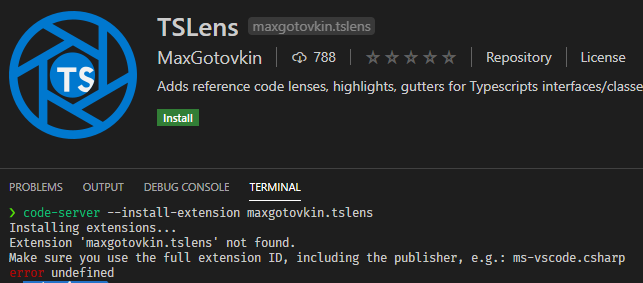
@kylecarbs some extensions still can't be installed via CLI, even if they're available in the UI, eg:
 rabidpug
on 20 Feb 2020
rabidpug
on 20 Feb 2020
Hm will check it out. Thanks!
kylecarbs
on 20 Feb 2020
Ah there's a case sensitivity issue. Will fix.
Try: code-server --install-extension MaxGotovkin.tslens
Edit: Nevermind. It is a case issue, but gotta adjust the extensions.
kylecarbs
on 20 Feb 2020
Looks like it changes it to all lowercase:

rabidpug
on 20 Feb 2020
Yup. Will fix!
kylecarbs
on 20 Feb 2020
Fixed 🎊
kylecarbs
on 20 Feb 2020
@kylecarbs thanks for the fixes and updates - I've had luck installing most of the extensions we install through the CLI, but for some reason vscjava.vscode-java-pack (https://marketplace.visualstudio.com/items?itemName=vscjava.vscode-java-pack) is no longer available. Any ideas?
sstone1
on 20 Feb 2020
I'll take a look!
kylecarbs
on 20 Feb 2020
Found the problem. That Java pack was failing to build with our extension marketplace. Fixing now.
kylecarbs
on 20 Feb 2020
Hm. Seems like the latest release for that Java pack isn't building correctly. An issue with installing node-sass.
kylecarbs
on 20 Feb 2020
Related issues
 rcarmo
·
3Comments
rcarmo
·
3Comments
 Arsaev
·
3Comments
Arsaev
·
3Comments
 KSXGitHub
·
3Comments
KSXGitHub
·
3Comments
 pchecinski
·
3Comments
pchecinski
·
3Comments
 RealSlimMahdi
·
3Comments
RealSlimMahdi
·
3Comments