Code-server: Visual Studio Online - getAccessToken is not implemented
code-serverversion: latest (Docker Hub:codercom/code-server:latest)- OS Version: Host: Ubuntu 18.04.3 LTS
- Extension: https://marketplace.visualstudio.com/items?itemName=ms-vsonline.vsonline
Description
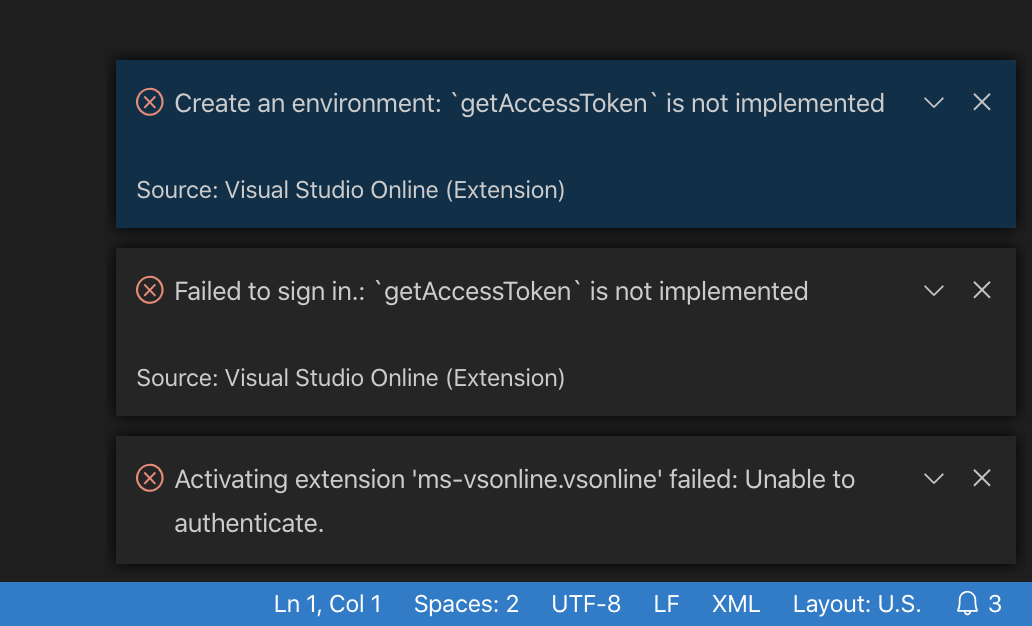
Steps to Reproduce
apt install -y bsdtar
wget -4 -O ms-vsonline.vsonline-1.0.1214.vsix https://marketplace.visualstudio.com/_apis/public/gallery/publishers/ms-vsonline/vsextensions/vsonline/1.0.1214/vspackage
bsdtar -xvf ms-vsonline.vsonline-1.0.1214.vsix
mv extension ../.local/share/code-server/extensions/ms-vsonline.vsonline-1.0.1214
mv extension.vsixmanifest ../.local/share/code-server/extensions/ms-vsonline.vsonline-1.0.1214/..vsixmanifest
and reload the page.
 BirkhoffLee
All 12 comments
I'm not sure it's possible for us to hook up code-server to VS Online
but we could certainly give it a try. But it does seem like at that point
you should just use VS Online directly? Or am I missing something?
 code-asher
on 5 Nov 2019
code-asher
on 5 Nov 2019
Yeah, but VS Online is pretty expensive. Why not OSS? :)
BirkhoffLee
on 5 Nov 2019
Doesn't this extension connect to VS Online? Which means you need to be
paying for VS Online in order to use it?
code-asher
on 5 Nov 2019
VSO has an option to self-host, which is free
On Wed, Nov 6, 2019 at 3:22 AM Asher notifications@github.com wrote:
Doesn't this extension connect to VS Online? Which means you need to be
paying for VS Online in order to use it?—
You are receiving this because you authored the thread.Reply to this email directly, view it on GitHub
https://github.com/cdr/code-server/issues/1150?email_source=notifications&email_token=AB6FI76253SPXEIQ7YIYFZDQSHBYXA5CNFSM4JJCW422YY3PNVWWK3TUL52HS4DFVREXG43VMVBW63LNMVXHJKTDN5WW2ZLOORPWSZGOEDEAGCY#issuecomment-549978891,
or unsubscribe
https://github.com/notifications/unsubscribe-auth/AB6FI7YIHQ3VJ76BH7ACCODQSHBYXANCNFSM4JJCW42Q
.
BirkhoffLee
on 6 Nov 2019
Ahhhh I see. If you're self-hosting could you use code-server directly
on your host? In any case, I'll take a look and see if we can fix this.
code-asher
on 6 Nov 2019
https://docs.microsoft.com/en-us/visualstudio/online/how-to/vscode#self-hosted
Self-hosted requires you to trigger it from within VS Code. I'd really like this functionality as well
 matmunn
on 7 Nov 2019
matmunn
on 7 Nov 2019
I'm still a little bit confused. Is the use case to host code-server on
a remote machine then use code-server on that remote machine to connect
to yet another remote machine that is hosting a self-hosted VS Online
instance?
And if so, could you run code-server directly on that second remote
machine instead of using VS Online?
I'll still take a look, just wanna make sure I understand the value so I
can prioritize appropriately.
code-asher
on 7 Nov 2019
Let’s say I have a laptop and remote server A.
My laptop has VSCode installed, and A has code-server installed.
The self-hosted VSOnline requires to be activated on a VSCode instance, which in case we’re using code-server here. After it’s activated, I can now simply use the VSCode on my laptop and use VSOnline to connect to A.
On Nov 8, 2019, at 12:52 AM, Asher notifications@github.com wrote:
I'm still a little bit confused. Is the use case to host code-server on
a remote machine then use code-server on that remote machine to connect
to yet another remote machine that is hosting a self-hosted VS Online
instance?And if so, could you run code-server directly on that second remote
machine instead of using VS Online?I'll still take a look, just wanna make sure I understand the value so I
can prioritize appropriately.
—
You are receiving this because you authored the thread.
Reply to this email directly, view it on GitHub, or unsubscribe.
BirkhoffLee
on 7 Nov 2019
Ahhhhhhh I gotcha. Thanks for that explanation.
code-asher
on 7 Nov 2019
Sorry to jump in this issue, but @BirkhoffLee I'm curious about the use case:
Are you trying to use VS Code ("Classic" Electron Client) to connect to an instance of code-server?
Why not using VS Code with SSH Remote Development? Do you have any reason behind?
I'm asking only to understand.
In my case, I use mainly code-server on one of the servers I'm working on because it has no outer internet access, therefore the installation of the packages required for SSH R.D. is not possible.
Although I would be very interested in being able to use my code-server instance from the VS Code client...
 elgandoz
on 21 Nov 2019
elgandoz
on 21 Nov 2019
@elgandoz I’m not sure if you have ever tried the SSH remote but I’d say it feels like more of a SFTP client integrated with code editor and terminal. It’s pretty unstable on my side.
BirkhoffLee
on 21 Nov 2019
Can't really do this due to licensing restrictions.
 nhooyr
on 29 Jan 2020
nhooyr
on 29 Jan 2020
Related issues
 grant
·
3Comments
grant
·
3Comments
 tecosaur
·
3Comments
tecosaur
·
3Comments
 justmao945
·
3Comments
justmao945
·
3Comments
 lshamis
·
3Comments
lshamis
·
3Comments
 infogulch
·
3Comments
infogulch
·
3Comments
Most helpful comment
Let’s say I have a laptop and remote server A.
My laptop has VSCode installed, and A has code-server installed.
The self-hosted VSOnline requires to be activated on a VSCode instance, which in case we’re using code-server here. After it’s activated, I can now simply use the VSCode on my laptop and use VSOnline to connect to A.