[build] Not running inside VS Code
[build] rootPath is "/root/vs/code-server"
[build] outPath is "/root/vs/code-server"
[build] arch is "x86_64"
[build] target is "linux"
[build] vscodeVersion is "1.39.2"
[build] codeServerVersion is "1.39.2"
[build] Installing code-server dependencies...took 1482ms
[build] Using existing VS Code directory
[build] Patching VS Code...took 565ms
[build] Copying code-server into VS Code...took 21659ms
[build] Building VS Code...aaagfwtook 430040ms
[build] Optimizing VS Code...etook 68451ms
[build] Generating final package.json and product.json...stook 837ms
[build] Copying into final build directory...took 12539ms
[build] Writing final package.json and product.json...took 1ms
[build] Removing copied server...took 1330ms
[build] Prepending nbin loader...failed
ENOENT: no such file or directory, open '/root/vs/code-server/build/code-server1.39.2-vsc1.39.2-linux-x86_64-built/extensions/node_modules/typescript/lib/tsserver.js'
error Command failed with exit code 1.
info Visit https://yarnpkg.com/en/docs/cli/run for documentation about this comm                                                                                                                                                          and.
error Command failed with exit code 1.
info Visit https://yarnpkg.com/en/docs/cli/run for documentation about this comm                                                                                                                                                          and.
/root/vs/code-server/build/code-server1.39.2-vsc1.39.2-linux-x86_64-built/extensions/
exist but is empty
 Dj-jom2x
All 29 comments
its because of this
fs.copy(path.join(vscodeSourcePath, ".build/extensions"), path.join(finalBuildPath, "extensions")),
it should be
fs.copy(path.join(vscodeSourcePath, "extensions"), path.join(finalBuildPath, "extensions")),
[build] Not running inside VS Code
[build] rootPath is "/root/vs/code-server"
[build] outPath is "/root/vs/code-server"
[build] arch is "x86_64"
[build] target is "linux"
[build] vscodeVersion is "1.39.2"
[build] codeServerVersion is "1.39.2"
/root/vs/code-server/source/vscode-1.39.2-source/node_modules
[build] Installing code-server dependencies...took 1165ms
[build] Using existing VS Code directory
[build] Patching VS Code...took 183ms
[build] Copying code-server into VS Code...took 13995ms
[build] Building VS Code...wgggtook 412786ms
[build] Optimizing VS Code...took 65143ms
[build] Generating final package.json and product.json...took 817ms
[build] Copying into final build directory...took 70441ms
[build] Writing final package.json and product.json...took 3ms
[build] Removing copied server...took 1226ms
[build] Prepending nbin loader...took 564ms
[build] Final build: /root/vs/code-server/build/code-server1.39.2-vsc1.39.2-linux-x86_64-built

3 of the extension doesnt work... if i dont change the fs.copy part it will say /root/vs/code-server/source/vscode-1.39.2-source/.build is not exist etc
Dj-jom2x
on 22 Oct 2019
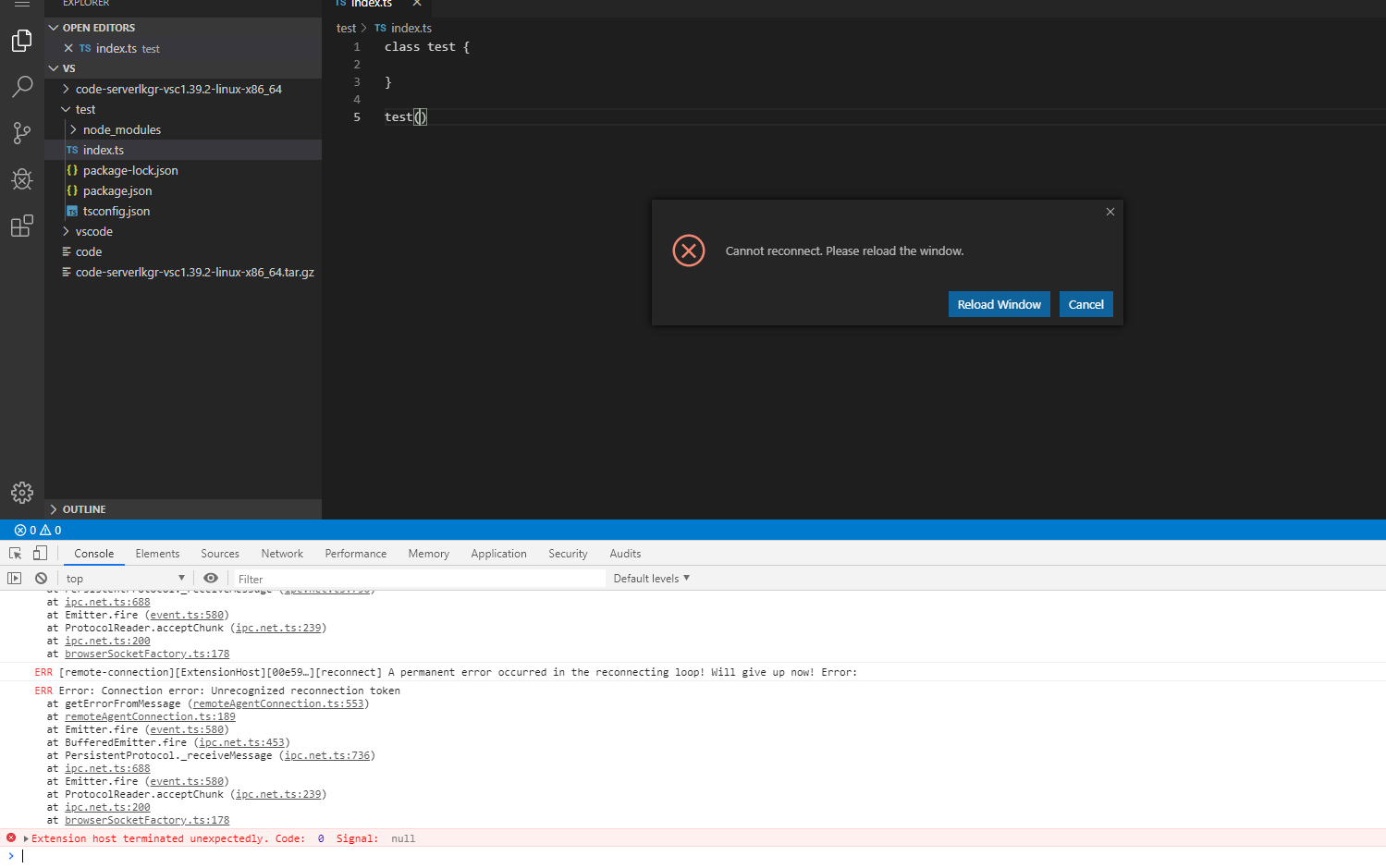
building using Development method looks nice.. but i always get this it loads then it cant connect?


Dj-jom2x
on 22 Oct 2019
I wanna debug this in my LKGR builds so give them a try.
 sr229
on 22 Oct 2019
sr229
on 22 Oct 2019
sorry, the late reply I will try this now .. btw LKGR builds ? is that somewhere at Switch branches/tags ? xD Sorry for my noobness... I'm so close to build this xD it doesn't scatter everywhere and I can just reinstall easily + I wonder how to apply the patch without rebuilding the vscode again. if you have discord I can just let you in the server it's a spare server that I use for backup purposes only xD and tell me what's wrong and the steps for future ubuntu 18.04 build. if u had spare time
Dj-jom2x
on 22 Oct 2019
I maintain LKGR builds here, so just download from there. I'll investigate why local building would not work.
sr229
on 22 Oct 2019
same
Dj-jom2x
on 22 Oct 2019
CC @code-asher
sr229
on 22 Oct 2019
@Dj-jom2x Next time make your issue titles descriptive, you seem to have a habit of making your issues ambiguous which makes it hard for us to know what is wrong.
sr229
on 22 Oct 2019
sorry.
Dj-jom2x
on 22 Oct 2019
.build/extensions is correct. extensions is the source for the extensions while .build/extensions contains the built extensions.
If .build/extensions doesn't exist then the extensions probably haven't been built yet.
The build process is kind of dumb and just checks if the VS Code directory exists. It should probably look inside the directory and also check if the extensions have been built. The easiest fix would be to delete the VS Code directory and let the build process try again.
 code-asher
on 22 Oct 2019
code-asher
on 22 Oct 2019
Pushed a fix to check if the extensions exist and to build them if not so give it another try and let me know what happens.
code-asher
on 22 Oct 2019
sure .. I will try this now..
Dj-jom2x
on 22 Oct 2019
[ FRESH INSTALL UBUNTU ]
[ USING BUILD METHOD ]
mkdir vc
cd vc
git clone https://github.com/cdr/code-server

Cloning into 'code-server'...
remote: Enumerating objects: 50, done.
remote: Counting objects: 100% (50/50), done.
remote: Compressing objects: 100% (33/33), done.
remote: Total 5655 (delta 26), reused 32 (delta 16), pack-reused 5605
Receiving objects: 100% (5655/5655), 9.22 MiB | 7.98 MiB/s, done.
Resolving deltas: 100% (3616/3616), done.

cd code-server
export OUT=/root/vc/bin

wget https://raw.githubusercontent.com/tj/n/master/bin/n
chmod +x n
./n 10.16.0 #instaling node 10.16.0 (.travis.yml)
installing : node-v10.16.0
mkdir : /usr/local/n/versions/node/10.16.0
fetch : https://nodejs.org/dist/v10.16.0/node-v10.16.0-linux-x64.tar.gz
installed : v10.16.0 (with npm 6.9.0)
npm install -g yarn

/usr/local/bin/yarn -> /usr/local/lib/node_modules/yarn/bin/yarn.js
/usr/local/bin/yarnpkg -> /usr/local/lib/node_modules/yarn/bin/yarn.js
+ [email protected]
added 1 package in 1.015s

pwd
/root/vc/code-server
npm install gulp-bom
npm install -g gulp-bom
yarn add gulp-bom
### xD fuk this gulp boom if I dont install it before hand the build will stop
### I need to rm -r node_modules if i dont install it before hand.
### so ignore the fact that i installed it in different way XD

yarn build 1.39.2 1.39.2


Command failed: yarn
warning " > @microsoft/[email protected]" has unmet peer dependency "tslib@^1.9.3".
warning " > [email protected]" has incorrect peer dependency "xterm@^3.14.0".
warning " > [email protected]" has incorrect peer dependency "xterm@^3.14.0".
error /root/vc/bin/source/vscode-1.39.2-source/node_modules/native-is-elevated: Command failed.
Exit code: 1
Command: node-gyp rebuild
Arguments:
Directory: /root/vc/bin/source/vscode-1.39.2-source/node_modules/native-is-elevated
Output:
gyp info it worked if it ends with ok
gyp info using [email protected]
gyp info using [email protected] | linux | x64
gyp http GET https://atom.io/download/electron/v4.2.10/node-v4.2.10-headers.tar.gz
gyp WARN install got an error, rolling back install
gyp ERR! configure error
gyp ERR! stack Error: getaddrinfo EAI_AGAIN gh-contractor-zcbenz.s3.amazonaws.com gh-contractor-zcbenz.s3.amazonaws.com:443
gyp ERR! stack     at GetAddrInfoReqWrap.onlookup [as oncomplete] (dns.js:56:26)
gyp ERR! System Linux 4.15.0-65-generic
gyp ERR! command "/usr/local/bin/node" "/usr/local/lib/node_modules/npm/node_modules/node-gyp/bin/node-gyp.js" "rebuild"
gyp ERR! cwd /root/vc/bin/source/vscode-1.39.2-source/node_modules/native-is-elevated
gyp ERR! node -v v10.16.0
gyp ERR! node-gyp -v v3.8.0
gyp ERR! not ok

error Command failed with exit code 1.
info Visit https://yarnpkg.com/en/docs/cli/run for documentation about this command.
error Command failed with exit code 1.
info Visit https://yarnpkg.com/en/docs/cli/run for documentation about this command.
I will post the dev installation log next hold one
Dj-jom2x
on 22 Oct 2019
Yeah that's weird I just started getting the same errors on our Docker build. Nothing has changed with dependencies so I'm very confused.
code-asher
on 22 Oct 2019
It might be hitting a rate limit when trying to download a dependency.
code-asher
on 22 Oct 2019
trying to fix the error above first maybe theres a hope
I tried to install this globaly npm install -g node-gyp .. but still using 10.16.0 nothing happend
it seems they are using 10.15.1 not 10.16.0
https://github.com/microsoft/vscode/commit/254f6835b73bf7c868dc965649072144530be2b8
let me try that....
./n 10.15.1

  installing : node-v10.15.1
       mkdir : /usr/local/n/versions/node/10.15.1
       fetch : https://nodejs.org/dist/v10.15.1/node-v10.15.1-linux-x64.tar.gz
   installed : v10.15.1 (with npm 6.4.1)

node -v
v10.15.1

#cleanup
rm -r /root/vc/bin/
rm -r node_modules
rm package-lock.json
npm install gulp-bom
yarn add gulp-bom

yarn build 1.39.2 1.39.2
The error is different now..
$ cd ./scripts && node --max-old-space-size=32384 -r ts-node/register ./build.ts build 1.39.2 1.39.2
[build] Not running inside VS Code
[build] rootPath is "/root/vc/code-server"
[build] outPath is "/root/vc/bin"
[build] arch is "x86_64"
[build] target is "linux"
[build] vscodeVersion is "1.39.2"
[build] codeServerVersion is "1.39.2"
[build] Installing code-server dependencies...took 1909ms
[build] Cloning VS Code...took 5997ms
[build] Installing VS Code dependencies...aaaaafailed
Command failed: yarn
warning " > @microsoft/[email protected]" has unmet peer dependency "tslib@^1.9.3".
warning " > [email protected]" has incorrect peer dependency "xterm@^3.14.0".
warning " > [email protected]" has incorrect peer dependency "xterm@^3.14.0".
error /root/vc/bin/source/vscode-1.39.2-source/node_modules/native-keymap: Command failed.
Exit code: 1
Command: node-gyp rebuild
Arguments:
Directory: /root/vc/bin/source/vscode-1.39.2-source/node_modules/native-keymap
Output:
gyp info it worked if it ends with ok
gyp info using [email protected]
gyp info using [email protected] | linux | x64
gyp info spawn /usr/bin/python2
gyp info spawn args [ '/usr/local/lib/node_modules/npm/node_modules/node-gyp/gyp/gyp_main.py',
gyp info spawn args   'binding.gyp',
gyp info spawn args   '-f',
gyp info spawn args   'make',
gyp info spawn args   '-I',
gyp info spawn args   '/root/vc/bin/source/vscode-1.39.2-source/node_modules/native-keymap/build/config.gypi',
gyp info spawn args   '-I',
gyp info spawn args   '/usr/local/lib/node_modules/npm/node_modules/node-gyp/addon.gypi',
gyp info spawn args   '-I',
gyp info spawn args   '/root/.node-gyp/4.2.10/include/node/common.gypi',
gyp info spawn args   '-Dlibrary=shared_library',
gyp info spawn args   '-Dvisibility=default',
gyp info spawn args   '-Dnode_root_dir=/root/.node-gyp/4.2.10',
gyp info spawn args   '-Dnode_gyp_dir=/usr/local/lib/node_modules/npm/node_modules/node-gyp',
gyp info spawn args   '-Dnode_lib_file=/root/.node-gyp/4.2.10/<(target_arch)/node.lib',
gyp info spawn args   '-Dmodule_root_dir=/root/vc/bin/source/vscode-1.39.2-source/node_modules/native-keymap',
gyp info spawn args   '-Dnode_engine=v8',
gyp info spawn args   '--depth=.',
gyp info spawn args   '--no-parallel',
gyp info spawn args   '--generator-output',
gyp info spawn args   'build',
gyp info spawn args   '-Goutput_dir=.' ]
Package xkbfile was not found in the pkg-config search path.
Perhaps you should add the directory containing `xkbfile.pc'
to the PKG_CONFIG_PATH environment variable
No package 'xkbfile' found
gyp: Call to 'pkg-config x11 xkbfile --libs' returned exit status 1 while in binding.gyp. while trying to load binding.gyp
gyp ERR! configure error
gyp ERR! stack Error: `gyp` failed with exit code: 1
gyp ERR! stack     at ChildProcess.onCpExit (/usr/local/lib/node_modules/npm/node_modules/node-gyp/lib/configure.js:345:16)
gyp ERR! stack     at ChildProcess.emit (events.js:189:13)
gyp ERR! stack     at Process.ChildProcess._handle.onexit (internal/child_process.js:248:12)
gyp ERR! System Linux 4.15.0-65-generic
gyp ERR! command "/usr/local/bin/node" "/usr/local/lib/node_modules/npm/node_modules/node-gyp/bin/node-gyp.js" "rebuild"
gyp ERR! cwd /root/vc/bin/source/vscode-1.39.2-source/node_modules/native-keymap
gyp ERR! node -v v10.15.1
gyp ERR! node-gyp -v v3.8.0
gyp ERR! not ok

error Command failed with exit code 1.
info Visit https://yarnpkg.com/en/docs/cli/run for documentation about this command.
error Command failed with exit code 1.
info Visit https://yarnpkg.com/en/docs/cli/run for documentation about this command.
I think i need to install x11...
sudo apt install libx11-dev libxkbfile-dev libxkbfile-dev
lets try again...
#cleanup
rm -r /root/vc/bin/
rm -r node_modules
rm package-lock.json
npm install gulp-bom
yarn add gulp-bom
yarn build 1.39.2 1.39.2
yarn run v1.19.1
$ yarn && yarn runner build 1.39.2 1.39.2
warning package-lock.json found. Your project contains lock files generated by tools other than Yarn. It is advised not to mix package managers in order to avoid resolution inconsistencies caused by unsynchronized lock files. To clear this warning, remove package-lock.json.
[1/4] Resolving packages...
success Already up-to-date.
$ cd ./scripts && node --max-old-space-size=32384 -r ts-node/register ./build.ts build 1.39.2 1.39.2
[build] Not running inside VS Code
[build] rootPath is "/root/vc/code-server"
[build] outPath is "/root/vc/bin"
[build] arch is "x86_64"
[build] target is "linux"
[build] vscodeVersion is "1.39.2"
[build] codeServerVersion is "1.39.2"
[build] Installing code-server dependencies...took 1600ms
[build] Cloning VS Code...took 7033ms
[build] Installing VS Code dependencies...took 560668ms
[build] Building default extensions...took 383132ms
[build] Patching VS Code...took 2840ms
[build] Copying code-server into VS Code...took 26443ms
[build] Building VS Code...took 468048ms
[build] Optimizing VS Code...took 72809ms
[build] Generating final package.json and product.json...took 843ms
[build] Copying into final build directory...took 15069ms
[build] Writing final package.json and product.json...took 1ms
[build] Removing build files for smaller cache...took 6390ms
[build] Prepending nbin loader...took 449ms
[build] Applying onigasm PHP fix...took 35698ms
[build] Final build: /root/vc/bin/build/code-server1.39.2-vsc1.39.2-linux-x86_64-built
Done in 1589.24s.
omg finally xD
but i will test it first.. hold on
Dj-jom2x
on 23 Oct 2019
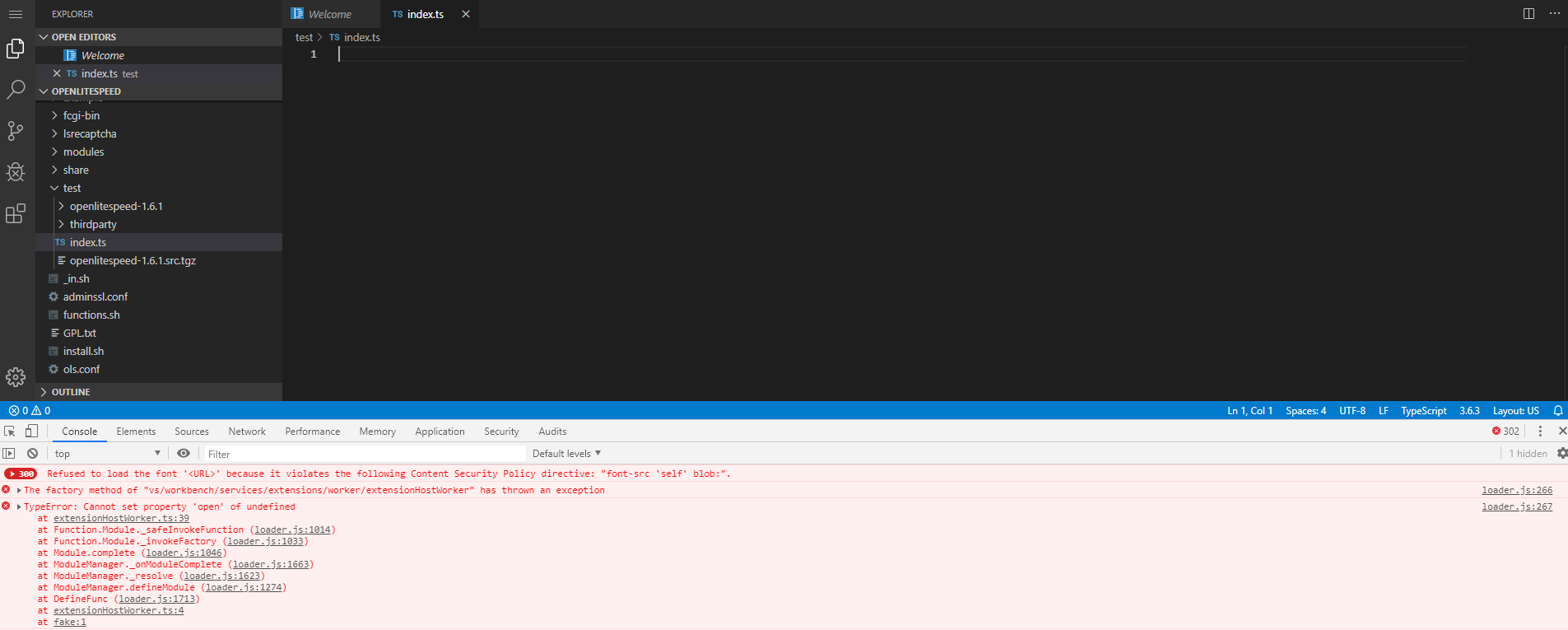
only 3 errors xD unlike before hahaha
Dj-jom2x
on 23 Oct 2019
:P That error usually means you're accessing code-server from an insecure URL. Using https or localhost should resolve it.
code-asher
on 23 Oct 2019
I will install on 2nd server and add SSL on it..
Dj-jom2x
on 23 Oct 2019
I'm gonna add the prerequisites like libx11-dev to the readme. I should have done that a while ago.
code-asher
on 23 Oct 2019
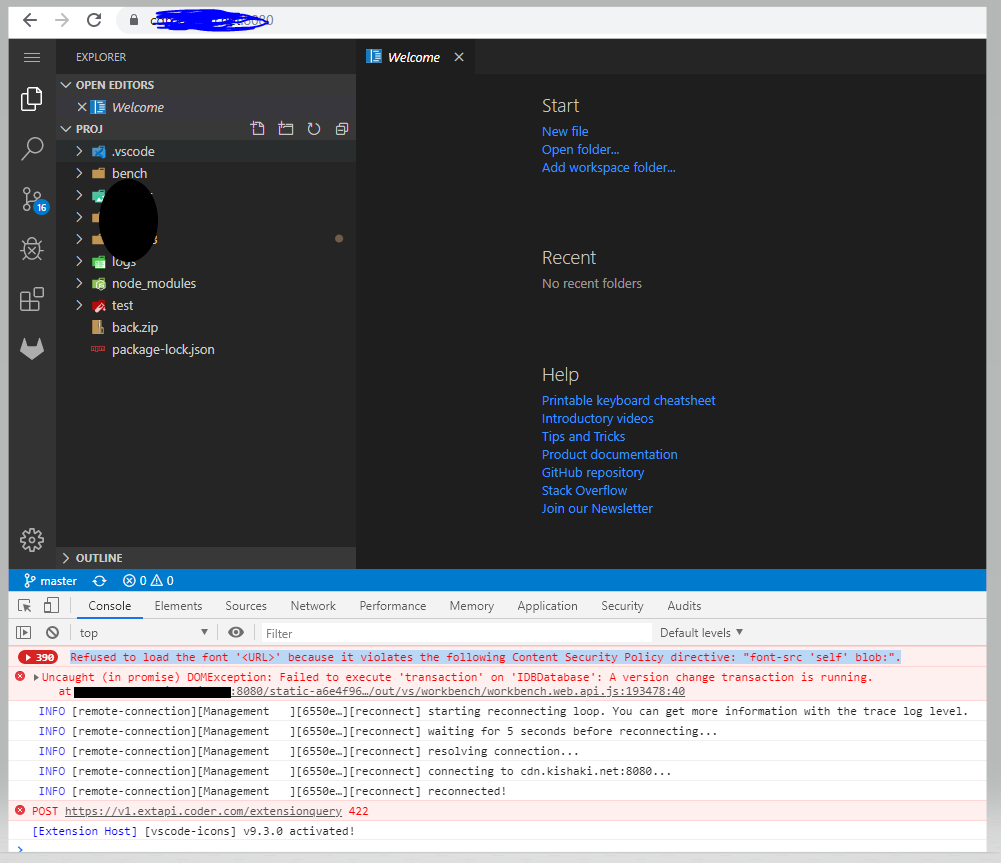
still have those even with ssl.. but i think those doesnt matter? or they do?
Dj-jom2x
on 23 Oct 2019
last thing, now that I follow the build section.. if somehow you had a new update .. is there a faster way to patch stuff? so I don't need to wait a lot of minutes hehe
Dj-jom2x
on 23 Oct 2019
The 422 usually means that the extensions were downloaded from a different marketplace (for example from Microsoft's official marketplace) because they use different IDs then we. It's harmless but it will prevent automatic updates.
I've seen the database one but it's new and I'm not entirely sure what it is yet. It seems to go away on a refresh. I'll be looking into at some point to be sure it's not an issue but it seems fine.
The font one is interesting; I'm not sure where that's coming from. Maybe it's from a browser extension? You could also try a hard refresh. Those errors shouldn't normally be there but they won't affect the experience at all.
code-asher
on 23 Oct 2019
As long as you keep the VS Code source directory in place subsequent builds can just re-use it. So these shouldn't happen on subsequent builds unless we update the VS Code version:
[build] Cloning VS Code...took 7033ms
[build] Installing VS Code dependencies...took 560668ms
[build] Building default extensions...took 383132ms
The rest is pretty much unavoidable but I'm always looking into ways to speed up the build.
code-asher
on 23 Oct 2019
Also you might want to use the MINIFY environment variable if you find the initial browser load is too slow, but keep in mind that'll increase the build time.
code-asher
on 23 Oct 2019
i found a bug.. now xD no error but its closing it self why is that?
info  Server listening on https://localhost:8080
info    - Password is xxxxxxxxxxxxxxxxxx
info    - To use your own password, set the PASSWORD environment variable
info    - Using provided certificate and key for HTTPS
then when you visit the browser and login it takes time then if you close your browser xD it kills it self..
or even if you just wait.. its being killed
Dj-jom2x
on 24 Oct 2019
omg its suicidal ps aux .. the process is gone.. the log no error what so ever xD what
Dj-jom2x
on 24 Oct 2019
OP is posting too much unrelated stuff already so to keep in context, I'm locking it down for now.
sr229
on 24 Oct 2019
Related issues
 nol166
·
3Comments
nol166
·
3Comments
 rcarmo
·
3Comments
rcarmo
·
3Comments
 chrischabot
·
3Comments
chrischabot
·
3Comments
 lshamis
·
3Comments
lshamis
·
3Comments
 balazssoltesz
·
3Comments
balazssoltesz
·
3Comments