Code-server: Crash after WebSocket opened "Error: spawn ENOMEM"
code-serverversion: 1.408-vsc1.32.0- OS Version: ubuntu 18.10 cloud // vulture - 1 CPU /1024MB Memory
Description
Error
root@node:~# code-server
INFO  code-server v1.408-vsc1.32.0
INFO  Additional documentation: http://github.com/codercom/code-server
INFO  Initializing {"data-dir":"/root/.local/share/code-server","working-dir":"/root","log-dir":"/root/.cache/code-server/logs/20190403071721342"}
INFO  Starting webserver... {"host":"0.0.0.0","port":8443}
WARN  No certificate specified. This could be insecure.
WARN  Documentation on securing your setup: https://coder.com/docs
INFO
INFO  Password: 1dc067aad902ac9e90fbadf0
INFO
INFO  Started (click the link below to open):
INFO  http://localhost:8443/
INFO
INFO  Starting shared process [1/5]...
INFO  Connected to shared process
ERROR SHARED stderr {"data":"Uncaught Exception:  Error: ENOENT: no such file or directory, open '/root/.local/share/code-server/Backups/workspaces.json'\n\nError: ENOENT: no such file or directory, open '/root/.local/share/code-server/Backups/workspaces.json'\n    at Timeout.setTimeout [as _onTimeout] (/home/travis/build/codercom/code-server/packages/server/build/bootstrap-fork.js.gz:52540:31)\n    at ontimeout (timers.js:498:11)\n    at tryOnTimeout (timers.js:323:5)\n    at Timer.listOnTimeout (timers.js:290:5)\n"}
INFO  WebSocket opened / {"client":1,"ip":"37.237.144.27"}
internal/child_process.js:313
    throw errnoException(err, 'spawn');
    ^

Error: spawn ENOMEM
    at ChildProcess.spawn (internal/child_process.js:313:11)
    at Object.exports.spawn [as _spawn] (child_process.js:508:9)
    at t.async (/home/travis/build/codercom/code-server/packages/server/out/cli.js:504:34463)
    at e.exports (/home/travis/build/codercom/code-server/packages/server/out/cli.js:504:33964)
    at e (/home/travis/build/codercom/code-server/packages/server/out/cli.js:504:32689)
    at Timeout.u [as _onTimeout] (/home/travis/build/codercom/code-server/packages/server/out/cli.js:504:32982)
    at ontimeout (timers.js:498:11)
    at tryOnTimeout (timers.js:323:5)
    at Timer.listOnTimeout (timers.js:290:5)
 Mahdi-Sahib
All 10 comments
Seeing a similar issue on a fresh install of Ubuntu 18.04:
INFO code-server v1.408-vsc1.32.0
INFO Additional documentation: http://github.com/codercom/code-server
INFO Initializing {"data-dir":"/root/.local/share/code-server","working-dir":"/usr/local/workspace/ng-hybrid-cloud-manager","log-dir":"/root/.cache/code-server/logs/20190403094537673"}
INFO Starting shared process [1/5]...
INFO Starting webserver... {"host":"0.0.0.0","port":8443}
WARN No certificate specified. This could be insecure.
WARN Documentation on securing your setup: https://coder.com/docs
INFO
INFO Password: 723a63107af95ae84751d8ca
INFO
INFO Started (click the link below to open):
INFO http://localhost:8443/
INFO
ERROR Port scanning will not be available: spawn netstat ENOENT.
INFO Connected to shared process
ERROR SHARED stderr {"data":"Uncaught Exception: Error: ENOENT: no such file or directory, open '/root/.local/share/code-server/Backups/workspaces.json'\n\nError: ENOENT: no such file or directory, open '/root/.local/share/code-server/Backups/workspaces.json'\n at Timeout.setTimeout [as _onTimeout] (/home/travis/build/codercom/code-server/packages/server/build/bootstrap-fork.js.gz:52540:31)\n at ontimeout (timers.js:498:11)\n at tryOnTimeout (timers.js:323:5)\n at Timer.listOnTimeout (timers.js:290:5)\n"}
 ksemba
on 3 Apr 2019
ksemba
on 3 Apr 2019
You might need to bump up the memory a bit, the memory management should be much better in later releases.
 nol166
on 3 Apr 2019
nol166
on 3 Apr 2019
I just stopped code-server and ran this
free -m
total used free shared buff/cache available
Mem: 12008 2061 7438 124 2509 9527
Swap: 2047 0 2047
Then I just restarted code-server and it started! :) No idea why, I didn't change anything...
I still see this error here - not sure whether this is something that needs to be fixed:
ERROR Port scanning will not be available: spawn netstat ENOENT.
Thanks
ksemba
on 3 Apr 2019
Yeah, that definitely looks like a bug. Thank you for reporting.
nol166
on 3 Apr 2019
awesome product, by the way ;)
ksemba
on 3 Apr 2019
You'll need to install netstat for the port-scanning to work properly. It isn't used yet, but will be in the future!
Closing for now :)
 kylecarbs
on 4 Apr 2019
kylecarbs
on 4 Apr 2019
cool, thanks for the hint - worked. I did:
sudo apt update
sudo apt install net-tools
ksemba
on 4 Apr 2019
I have the same error.so how can I solv
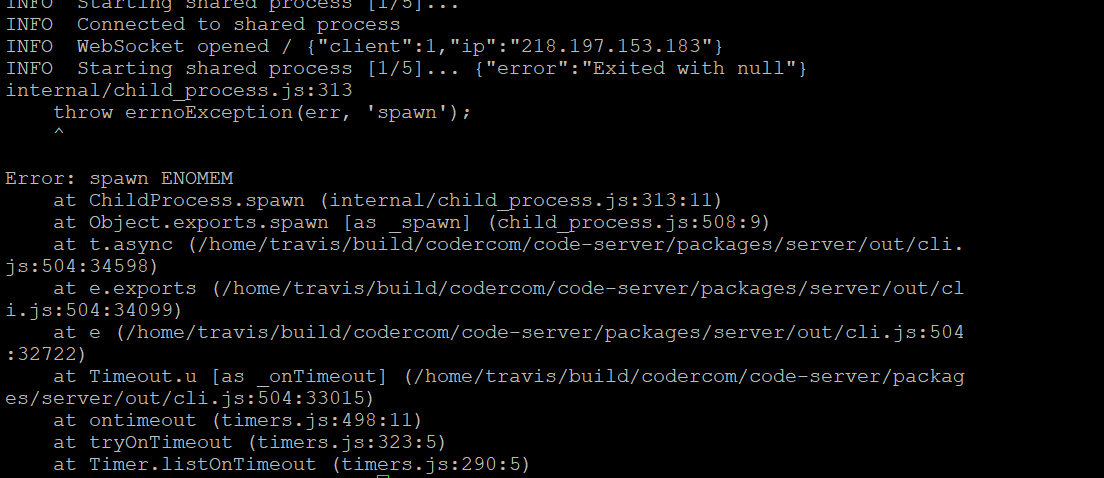
e it?
 Lin-boy
on 15 Apr 2019
Lin-boy
on 15 Apr 2019
ENOMEM = Error. No Memory.
You may need more RAM, some users have reported problems running the binary on machines with less than 1GB of RAM.
 MichaelDesantis
on 15 Apr 2019
MichaelDesantis
on 15 Apr 2019
Thanks.I create a server .It has 4gb of RAM.Now it works well.
Michael Desantis notifications@github.com 于2019年4月16日周二 上午12:36写道:
ENOMEM = Error. No Memory.
You may need more RAM, some users have reported problems running the
binary on machines with less than 1GB of RAM.—
You are receiving this because you commented.
Reply to this email directly, view it on GitHub
https://github.com/codercom/code-server/issues/410#issuecomment-483326808,
or mute the thread
https://github.com/notifications/unsubscribe-auth/ApK1K4XpApMd3uJic93-shBtLlqVkLs3ks5vhKqigaJpZM4cZz_s
.
Lin-boy
on 16 Apr 2019
Related issues
nol166
·
3Comments
 balazssoltesz
·
3Comments
balazssoltesz
·
3Comments
 KSXGitHub
·
3Comments
KSXGitHub
·
3Comments
 korzq
·
3Comments
korzq
·
3Comments
 broady
·
3Comments
broady
·
3Comments
Most helpful comment
Thanks.I create a server .It has 4gb of RAM.Now it works well.
Michael Desantis notifications@github.com 于2019年4月16日周二 上午12:36写道: