I have a RPi 3B+ module,and i hope code-server will be running within this platform, thank u
 frozenmaple
All 146 comments
@frozenmaple due to the resource usage of VSCode, no, its not possible unless you use a Memory-optimized version of Electron for Raspberry Pi.
 sr229
on 6 Mar 2019
sr229
on 6 Mar 2019
We'll be reducing the amount of memory code-server uses. It's a decently-high priority for us.
Would running this on a PI just require us to have an ARM target?
 kylecarbs
on 6 Mar 2019
kylecarbs
on 6 Mar 2019
@kylecarbs yep, armhf and arm64.
sr229
on 6 Mar 2019
Will take a bit as nexe 2.x.x doesn't support arm as a target.
kylecarbs
on 7 Mar 2019
@kylecarbs do you insist on using nexe? pkg is a similar project to create executable from Node project with arm support. It's just my two cents.
 icebob
on 7 Mar 2019
icebob
on 7 Mar 2019
Hm that's fair. We've considered using pkg, will consider it again especially for the additional targets.
kylecarbs
on 7 Mar 2019
It would be amazing to be able to run this in docker on my Odroid XU4Q & ODROID-N2 when it's released.
 Jakst3r
on 14 Mar 2019
Jakst3r
on 14 Mar 2019
@Jakst3r are they arm64? If not you can forget it cause build time on qemu arm32 is like 10x and more.
 SuperSandro2000
on 14 Mar 2019
SuperSandro2000
on 14 Mar 2019
@SuperSandro2000
Looks like the Odroid XU4Q is out of the question, what do you think about the ODROID-N2?
Odroid XU4Q = 32-bit
Samsung Exynos-5422 : Cortex™-A15 and Cortex™-A7 big.LITTLE processor with 2GByte LPDDR3 RAM
ODROID-N2 = 64-bit
quad-core ARM Cortex-A73 CPU cluster and a dual core Cortex-A53 cluster with a new generation Mali-G52 GPU. 4GByte DDR4 RAM running at 1320Mhz
Jakst3r
on 14 Mar 2019
@kylecarbs I would like to also note we need to tell V8 explicitly to use Ignition (JITLess) to lower memory requirements for ARM boards (but I believe we should also apply this to x86 as well).
sr229
on 14 Mar 2019
Would love to see this also. 👍 A couple notes on pkg though..
- Currently it only builds to 32bit (ARMv6 and ARMv7). There are no AArch64 targets. It may be possible using your own "base binaries" with --build, but I wouldn't bet my life on it.
- Currently it's not able to build Linux ARM from MacOS or Windows, regardless of qemu. There seems to be some base package naming bug involved. Building directly on Linux ARM works as expected (which is what we do). I think it would probably build from Linux x86/qemu (or inside a Linux "ARM" container) though, given resources like ld-linux-armhf.so.3 are available.
As much as I'd like to see ARM binaries, it seems like another option would be to just offer "binaries" for x86 (Linux, Mac, Windows), but Docker images to include ARM32 and ARM64 -- where the entrypoint is node rather than a packaged code-server binary.
Really I'd find this project more useful on ARM than x86 for our projects. Would be great to have nice Web IDE access to IoT projects -- similar to how some devices used to bundle Cloud9 back in the day. For now we just mound the FS over SSH and use VS Code. :/ .
@SuperSandro2000 is build time that important? I assume that would just be automated in the end.
 Codelica
on 14 Mar 2019
Codelica
on 14 Mar 2019
@Codelica I didn't pay to much attention to the arm builds yesterday and basically build amd64 trough qemu. Derp
So forget my time estimate.
But I encountered another problem while building the image.
Locally I got amd64 buidling like a charm but on travis I get GitHub Api rate limits from that line https://github.com/codercom/code-server/blob/master/build/tasks.ts#L200
The travis job https://travis-ci.org/SuperSandro2000/docker-images/jobs/506429199
And the problem with build times is that I hate using Docker Hub cause it is really slow and travis limits opensource projects to like 50 min of runtime.
SuperSandro2000
on 14 Mar 2019
Progress has been made on this with our binary packager nbin.
Should allow us to export for arm very soon!
kylecarbs
on 26 Mar 2019
Any ETA on this? Pi server users would appreciate.
 mqmq0
on 29 Mar 2019
mqmq0
on 29 Mar 2019
@mqmq0 last time I checked it used so much RAM that you would need a pi for this alone.
SuperSandro2000
on 29 Mar 2019
@mqmq0 the RAM usage of code-server is not optimized enough for Pis, please be patient as the team are trying their best to deliver this for our venerable Raspberry Pi community.
sr229
on 30 Mar 2019
Have you made any progress on this? It would be nice to use this project on raspis! thank you.
 ibuky
on 14 Apr 2019
ibuky
on 14 Apr 2019
nbin will need to be compiled for an ARM target. Shouldn't be too tricky.
Edit: Trying it now. Might be able to get a release out for this today if there are no bumps!
Update: Got nbin working. Published a new version 1.1.1. code-server will need to be built within an alpine container, then it should all just work :confetti_ball:
Update 2: Building code-server inside the container for alpine seems to work perfectly. Will update the CI in a bit.
kylecarbs
on 14 Apr 2019
@ibuky no as the idle CPU usage of this is insane.
SuperSandro2000
on 14 Apr 2019
I would love to see this also. Just as a note in my case I am not planning to use it on a Rasberry Pi so the ram isn't an issue. Was wanting it for a large Scaleway ARM64 server. As I am traveling to Europe next month and was trying to figure out if I can just bring my iPad and use Code Server. That might be an easier target until the memory usage is down. Keep up the great work everybody this project looks amazing!
 corbinu
on 14 Apr 2019
corbinu
on 14 Apr 2019
An ARM build would open the door to Samsung dex+termux being a full standalone web dev environment without having to rely on shoddy or remote IDEs.
 francispeixoto
on 15 Apr 2019
francispeixoto
on 15 Apr 2019
Who wants to go crazy with Travis CI? I found a way to compile this project in arm
sr229
on 17 May 2019
@sr229 I suggest this newer approach from Balena. It uses a docker container with QEMU to cross compile. Only need to add two lines to the Dockerfile to build, and they support a huge list of devices.
 sedlund
on 18 May 2019
sedlund
on 18 May 2019
Lemme see what I can brew and I'll do some test releases
I can't promise that I can get them with good quality though
sr229
on 18 May 2019
Lemme see what I can brew and I'll do some test releases
I can't promise that I can get them with good quality though
I could do some test for you if needed
mqmq0
on 18 May 2019
Here is a first draft - it is building now:
https://github.com/sedlund/code-server/blob/feat/rpi3/Dockerfile.raspberrypi3
sedlund
on 18 May 2019
Just a few thoughts in a random order:
- Use a more generic image like https://hub.docker.com/r/balenalib/armv7hf-alpine to not create any incompatibility with other arm devices
- I would add some -q to
aptto not spam the log - Don't line break every package. Just makes the Dockerfile long and harder to read.
- Put the cross build RUNs at the beginning of the RUN section and not on the beginning of everything.
- Remove the Volume and Port expose cause A maybe I don't want a volume and B with a reverse proxy like Traefik I don't need that exposed port.
- and final nig nack: I don't like the file naming sceme. I always treat
Dockerfileas a file extension so that VSCode highlights it correctly and I am pushing that.
SuperSandro2000
on 18 May 2019
Progress:
In order to compile
code-serverin ARM, we need to make surenbindoes as well. I made some progress with the ARM builders and I don't know if they work. Feel free to use my nbin fork.Then we simply edit the build script lightly on
code-serverwith absolutely no gotchas.
@sedlund that'll work as well but nbin has to be compiled for ARM, I'm working on the CI part rn to see if we can do that.
sr229
on 18 May 2019
@SuperSandro2000
- The target device images have software repositories setup in the resultant image. If you are developing on a RPI3 board in VSCode you may want to use software from it's package repo - making it a more complete development environment.
Using the generic image in the build step, and then using the targeted image for the final image creation might be best. Other targets could then reuse the build image.
2 & 3 With regard to Dockerfile formatting I did not change anything from what was in the master repo.
- Please rephrase.
- I did not add this.
- Agreed, the project may need to make a new nested directory for targets with individual Dockerfiles in each target dir.
Anyway - this is not a PR yet. Just showing how it could work. Appreciate your feedback!
sedlund
on 18 May 2019
@sedlund
Yeah, I wanted to squeeze in support for ARM servers without having trouble with the rpi image.
Well, I didn't like the original Dockerfile to much either but just a personal opinion.
I would do it like this https://github.com/SuperSandro2000/docker-images/blob/master/reddiscord/arm32v7.Dockerfile#L24
Note: The RUN statement is a bit big and should probably be split up to optimize cache usage and avoid pulling on giant layer.I may or may not fix that when I use the image but last time I checked it the idle RAM and CPU usage was just way to high for my liking.
I usually name them like
arm32.Dockerfile. I know this is technically not 100% right but it is better than having 6 directories with one file in it.
SuperSandro2000
on 18 May 2019
Hey all,
I opened a PR in nbin so we can faciliate building this in a CI. It should be cdr/nbin#7
Travis kinda fails but please let me know if it works
sr229
on 18 May 2019
I will go over and bash your additions.
Hehe bash on alpine. 😂
SuperSandro2000
on 18 May 2019
I'm very looking forward to.
 wowton
on 29 May 2019
wowton
on 29 May 2019
Could an ARM release please be reconsidered before RAM limits are addressed now that there are Raspberry Pi 4’s with 4GB of RAM in the wild? Very keep to see if this is possible.
 BinaryBen
on 26 Jun 2019
BinaryBen
on 26 Jun 2019
@BinaryBen we're working on it. I already submitted patches but it'll take a while for it to get merged
and were not just compensating for Rpi4, we think about the Rpi3 audience as well
sr229
on 26 Jun 2019
While not the same as running code-server on ARM, just FYI that the VS Code remote-ssh plugin now has support for ARM via their insiders/nightly builds. I've been using it with RPi's and it's been working well. :)
Codelica
on 26 Jun 2019
@sr229 Thank you for your work! My limited understanding was that any work supporting RPi specific releases was delayed because of the RAM limitations, so I was hoping someone might make it work for RPi 4 specifically if addressing RAM limitations was still a while away. Would be great to see it working on any fruity system soon though! Don't mind how it happens and will be grateful either way.
@Codelica I saw that. Very exciting, but sadly an entirely different workflow from what I am looking for. :)
BinaryBen
on 27 Jun 2019
I tried to build code-server for Fedora 30 aarch64. but can not find nbin prebuilt .
https://nbin.cdr.sh/1.1.2/node-10.15.1-linux-arm64 return 403
Then I tried to build nbin myself.
After build nbin, I put the binary to my own http server and set the ip of nbin.cdr.sh in /etc/hosts
I also change https to http.
After all, rebuild code-sever and got the code-server binary.
Now the code-server can run on my platform. But it seems cost too much memory.
 gt945
on 16 Sep 2019
gt945
on 16 Sep 2019
I tried to build code-server for Fedora 30 aarch64. but can not find nbin prebuilt .
https://nbin.cdr.sh/1.1.2/node-10.15.1-linux-arm64 return 403
Then I tried to build nbin myself.
After build nbin, I put the binary to my own http server and set the ip of nbin.cdr.sh in /etc/hosts
I also change https to http.
After all, rebuild code-sever and got the code-server binary.
Now the code-server can run on my platform. But it seems cost too much memory.
We do not support ARM yet as for now. I'm currently working on the CI to alleviate this.
sr229
on 16 Sep 2019
Revisiting this and will be prioritizing this for my TODOs. Expect nbin to have the support early on, then sail, then code-server.
sr229
on 26 Sep 2019
You asked, we listened, and it's coming this October.

Rejoice ARM users :confetti:
sr229
on 30 Sep 2019
Why CentOS? I am pretty sure most people prefer Debian or even Alpine over it to debug problems.
SuperSandro2000
on 30 Sep 2019
Why CentOS? I am pretty sure most people prefer Debian or even Alpine over it to debug problems.
You don't understand. CentOS allows backwards compatibility with some ancient distros because it uses a rather old GLIBC. This is for nbin, not for `code-server.
sr229
on 30 Sep 2019
And to clarify, nbin is a dependency of code-server. If we target ARM for nbin, we target code-server for ARM as well.
sr229
on 30 Sep 2019
You don't understand.
Thats why I asked.
some ancient distros
Maybe it is not a great idea to support ancient software. Sounds like a bug fixing nightmare.
SuperSandro2000
on 30 Sep 2019
Maybe it is not a great idea to support ancient software. Sounds like a bug fixing nightmare.
Tell that to Node.js. But we have users using CentOS, and they're still within the supported range. We'll keep providing backwards-compatibility until their support timeline ends.
It's literally easier said than done.
sr229
on 30 Sep 2019
So... When should we expect code-server running on Raspberry? :)
 maciejtreder
on 30 Sep 2019
maciejtreder
on 30 Sep 2019
So... When should we expect code-server running on Raspberry? :)
Around this October we'll have a usable build.
sr229
on 30 Sep 2019
Be so kind to inform us here, when we should test it on different ARM devices
mqmq0
on 30 Sep 2019
Be so kind to inform us here, when we should test it on different ARM devices
I think by the time I get ARM support done in nbin, which would be October 1 in Japan time. Artifacts on CircleCI will appear soon since I need to fix the pipeline. It's quite a big change so don't expect it to happen today or so.
sr229
on 30 Sep 2019
I do want to remind everyone that ARM builds are very much incompatible with CentOS due to the toolchain not being built for ARM. You all need to use something close to Ubuntu 18.04 in terms of GLIBC version.
sr229
on 30 Sep 2019
I don't mean to rush you but is there any news on the release of ARM binaries?
 ghost
on 4 Oct 2019
ghost
on 4 Oct 2019
commenting to be in loop for arm release. (waiting since half a year for this day to come)
 v0idp
on 11 Oct 2019
v0idp
on 11 Oct 2019
BTW one interesting but maybe not super-fun workaround is to build code-server but not package it into a binary and just use the loose files with an ARM version of Node:
node /path/to/build/out/vs/server/main.js
 code-asher
on 1 Nov 2019
code-asher
on 1 Nov 2019
BTW one interesting but maybe not super-fun workaround is to build code-server but not package it into a binary and just use the loose files with an ARM version of Node:
node /path/to/build/out/vs/server/main.js
Followed this on my RPi 3b+ and received this error
`internal/modules/cjs/loader.js:583
    throw err;
    ^

Error: Cannot find module '../../bootstrap-amd'`
If you know how to fix it please reply :)
 Kroha1999
on 7 Nov 2019
Kroha1999
on 7 Nov 2019
Someone has experience with this container implementation of Code-server on RPI/similar?
https://github.com/linuxserver/docker-code-server
mqmq0
on 7 Nov 2019
x86 only, see https://github.com/linuxserver/docker-code-server/blob/master/Dockerfile#L27
Also I can't recommend them as I had very bad experience with them in the past and they refused to even acknowledge basic design flaws which render one of their images totally useless.
SuperSandro2000
on 7 Nov 2019

I thought because of this
mqmq0
on 7 Nov 2019
@Kroha1999 could you verify the contents of the build? For reference here's what I ran fresh off master to test:
$ OUT=$HOME/pkg/code-server yarn build 1.39.2 development
(bunch of build output)
$ cd ~/pkg/code-server
$ node ./build/code-serverdevelopment-vsc1.39.2-linux-x86_64-built/out/vs/server/main.js
info  Server listening on http://localhost:8080
(more server output)
^C
$ ls ./build/code-serverdevelopment-vsc1.39.2-linux-x86_64-built/out
bootstrap-amd.js  bootstrap-fork.js  bootstrap.js  nls.metadata.json  paths.js  vs
@Kroha1999 could you verify the contents of the build? For reference here's what I ran fresh off master to test:
$ OUT=$HOME/pkg/code-server yarn build 1.39.2 development
(bunch of build output)
$ cd ~/pkg/code-server
$ node ./build/code-serverdevelopment-vsc1.39.2-linux-x86_64-built/out/vs/server/main.js
info  Server listening on http://localhost:8080
(more server output)
^C
$ ls ./build/code-serverdevelopment-vsc1.39.2-linux-x86_64-built/out
bootstrap-amd.js  bootstrap-fork.js  bootstrap.js  nls.metadata.json  paths.js  vs
that was a stupid mistake, I found the solution for that, but still, I have another problem, while node main.js I receive the next error. I checked /home/pi/projects_/vscode_remote/vscode/src/vs/server/src/node/ directory and found there cli.tsnot cli.js
{ [Error: ENOENT: no such file or directory, open '/home/pi/projects_/vscode_remote/vscode/src/vs/server/src/node/cli.js']
  errno: -2,
  code: 'ENOENT',
  syscall: 'open',
  path:
   '/home/pi/projects_/vscode_remote/vscode/src/vs/server/src/node/cli.js',
  phase: 'loading',
  moduleId: 'vs/server/src/node/cli',
  neededBy: [ '===anonymous1===' ] }
Is there any way to install this server on RPI 3B+?
Kroha1999
on 8 Nov 2019
Is there any way to install this server on RPI 3B+?
not yet sadly, the devs are working on it.
@Kroha1999 you can follow this github https://github.com/sr229/cdr-web-lkgr where the first ARM build will be upload.
i hope a first ARM build will be up for Christmas, would be dope :)
 mirsella
on 10 Nov 2019
mirsella
on 10 Nov 2019
@Kroha1999 it looks like you are trying to run the source directly. You'll need to run the built code instead. By default (assuming you haven't set the OUT environment variable and you built it with the command yarn build 1.39.2 development) it should be something like src/vs/server/build/code-serverdevelopment-vsc1.39.2-linux-x86_64-built/out/vs/server/main.js.
code-asher
on 14 Nov 2019
Is there any way to install this server on RPI 3B+?
not yet sadly, the devs are working on it.
@Kroha1999 you can follow this github https://github.com/sr229/cdr-web-lkgr where the first ARM build will be upload.
i hope a first ARM build will be up for Christmas, would be dope :)
Oh, that is so good, hope my AArch64 android pad can run code-server.
 lingoWu
on 22 Nov 2019
lingoWu
on 22 Nov 2019
Any news about this? I'm really excited to run code-server on my Raspberry PI 4.
 diruuu
on 29 Dec 2019
diruuu
on 29 Dec 2019
@diruuu we're out of office till January 6 so we'll inform you when we get a successful build.
sr229
on 29 Dec 2019
Looking forward to get this running on my pi4 :)
 mariuszkreft
on 3 Jan 2020
mariuszkreft
on 3 Jan 2020
Does anyone have an older arm 32-bit NAS w/ 16GB of RAM in it? i.e. QNAP-ts531p
We're going to need either that running a docker container or a patched build of qemu-arm-static (that can allocate more than 2GB of ram) in order to get a 32-bit build of code server for the Pi3/2/0 and other armv6/armv7 devices...
I have a build of arm64v8 / aarch64 running on my Pi 4 and my Android phone. It took ~12GB of RAM and 78 minutes to build inside a qemu-aarch64-static Alpine aarch64 container on a core i7-8809. qemu-aarch64-static doesn't have a memory allocation cap.
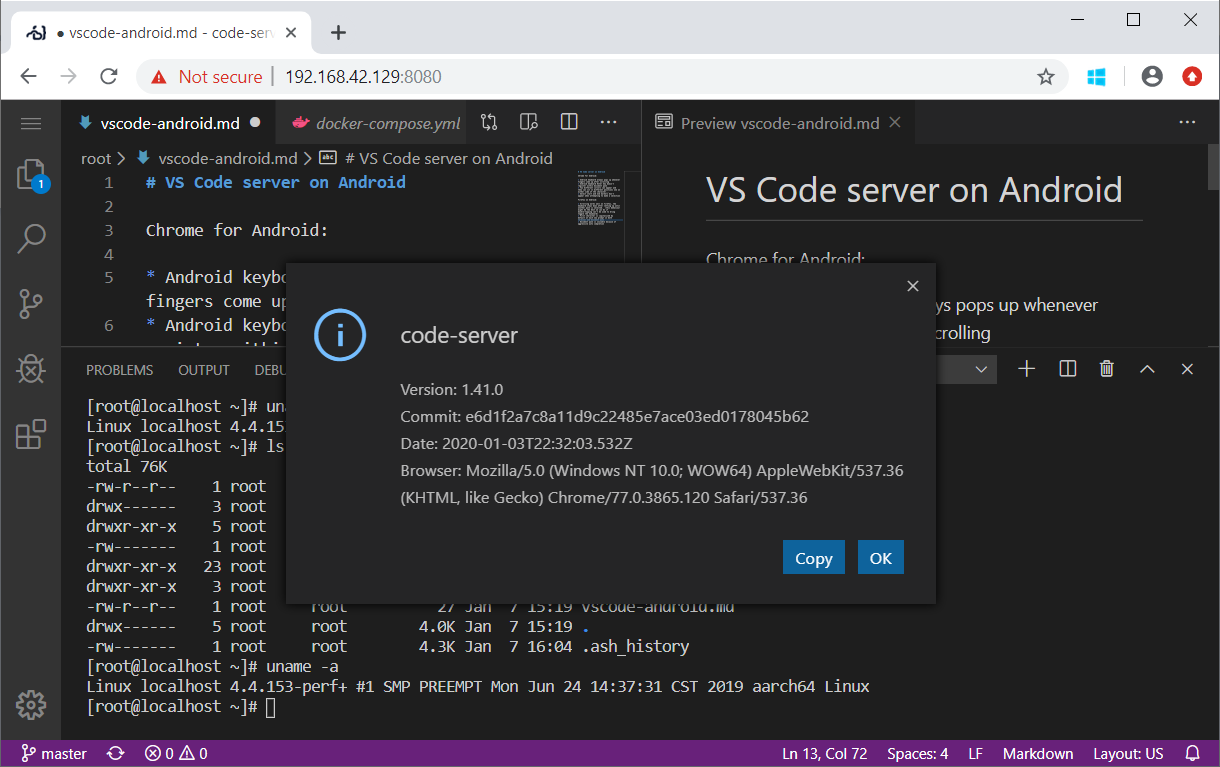
 deftdawg
on 7 Jan 2020
deftdawg
on 7 Jan 2020
I don't but I can do builds locally on a beefy x86 machine if it helps take
the load off yours.
Keith I Myers
http://KMyers.me
Mobile : (305)-929-3475
On Tue, Jan 7, 2020, 12:45 PM deftdawg notifications@github.com wrote:
Does anyone have an older arm 32-bit NAS w/ 16GB of RAM in it? i.e.
QNAP-ts531p https://www.qnap.com/en/product/ts-531p/specs/hardwareWe're going to need either that running a docker container or a patched
build of qemu-arm-static (that can allocate more than 2GB of ram) in order
to get a 32-bit build of code server for the Pi3/2/0 and other armv6/armv7
devices...I have a build of arm64v8 / aarch64 build running off my Pi 4 and my
Android phone. It took ~12GB of RAM and 78 minutes to build inside a
qemu-aarch64-static Alpine aarch64 container on a core i7-8809.
qemu-aarch64-static doesn't have a memory allocation cap.[image: image]
https://user-images.githubusercontent.com/4991612/71914832-79420e80-3148-11ea-8628-238d8f148278.png—
You are receiving this because you are subscribed to this thread.
Reply to this email directly, view it on GitHub
https://github.com/cdr/code-server/issues/35?email_source=notifications&email_token=ABPP27CGNII4TQMKCCHLEC3Q4S5SRA5CNFSM4G4DCJOKYY3PNVWWK3TUL52HS4DFVREXG43VMVBW63LNMVXHJKTDN5WW2ZLOORPWSZGOEIJV52Y#issuecomment-571694827,
or unsubscribe
https://github.com/notifications/unsubscribe-auth/ABPP27GS45TTA5IOTLEPNBDQ4S5SRANCNFSM4G4DCJOA
.
 KeithIMyers
on 7 Jan 2020
KeithIMyers
on 7 Jan 2020
Y'all owe me a beer now

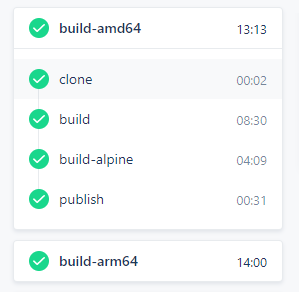
Yes its a working nbin ARM compiling, yes its really coming now
sr229
on 7 Jan 2020
@sr229 you got a solution for armhf (32-bit) too? Pi2/Pi3/Pi0 are 32-bit arm. If not I may have found a way to get past the ram limitation for 32-bit.
deftdawg
on 7 Jan 2020
@deftdawg the Pi3 is 64-bit.
SuperSandro2000
on 7 Jan 2020
@SuperSandro2000 I stand corrected! Thanks! 😄 I may still have a go at building 32-bit arm for my pi zero w too.
deftdawg
on 7 Jan 2020
@deftdawg yes we do
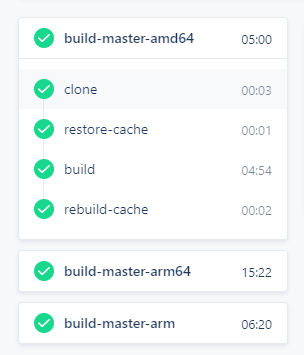
sr229
on 7 Jan 2020
party time! thanks for all your great work guys. so excited for this
v0idp
on 8 Jan 2020
@sr229 hey this is amazing! When will this be released? So excited to use this on my pi 4.
diruuu
on 8 Jan 2020
@diruuu I would say next week but that's a understatement :3c
sr229
on 8 Jan 2020
Psst.... hey, look at this
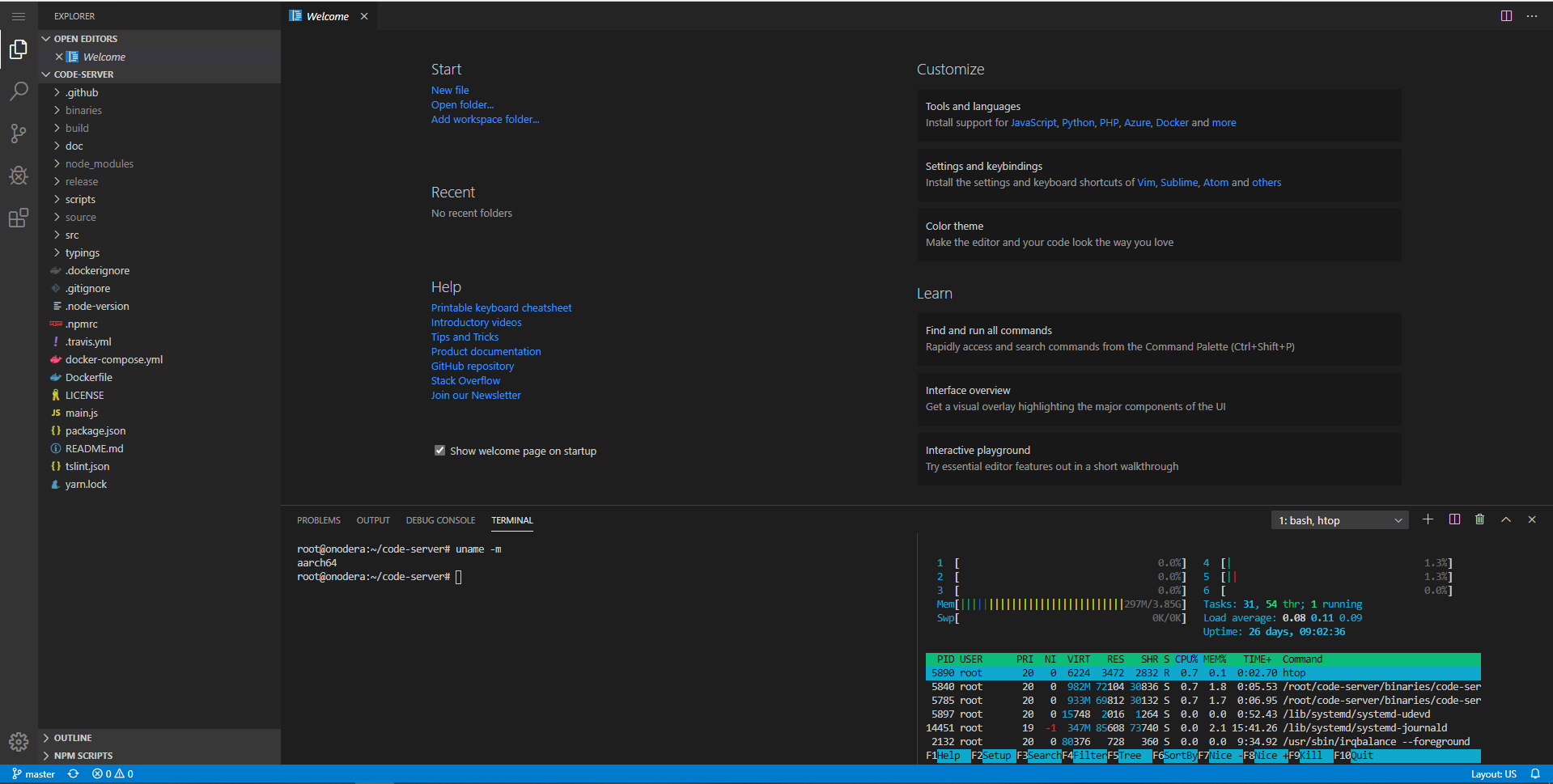
sr229
on 9 Jan 2020
I WANT. can you build a docker image for us plebs ?
v0idp
on 9 Jan 2020
@sr229 I see your fancy aarch64 build and I raise you an arm build (in progress) :smile:
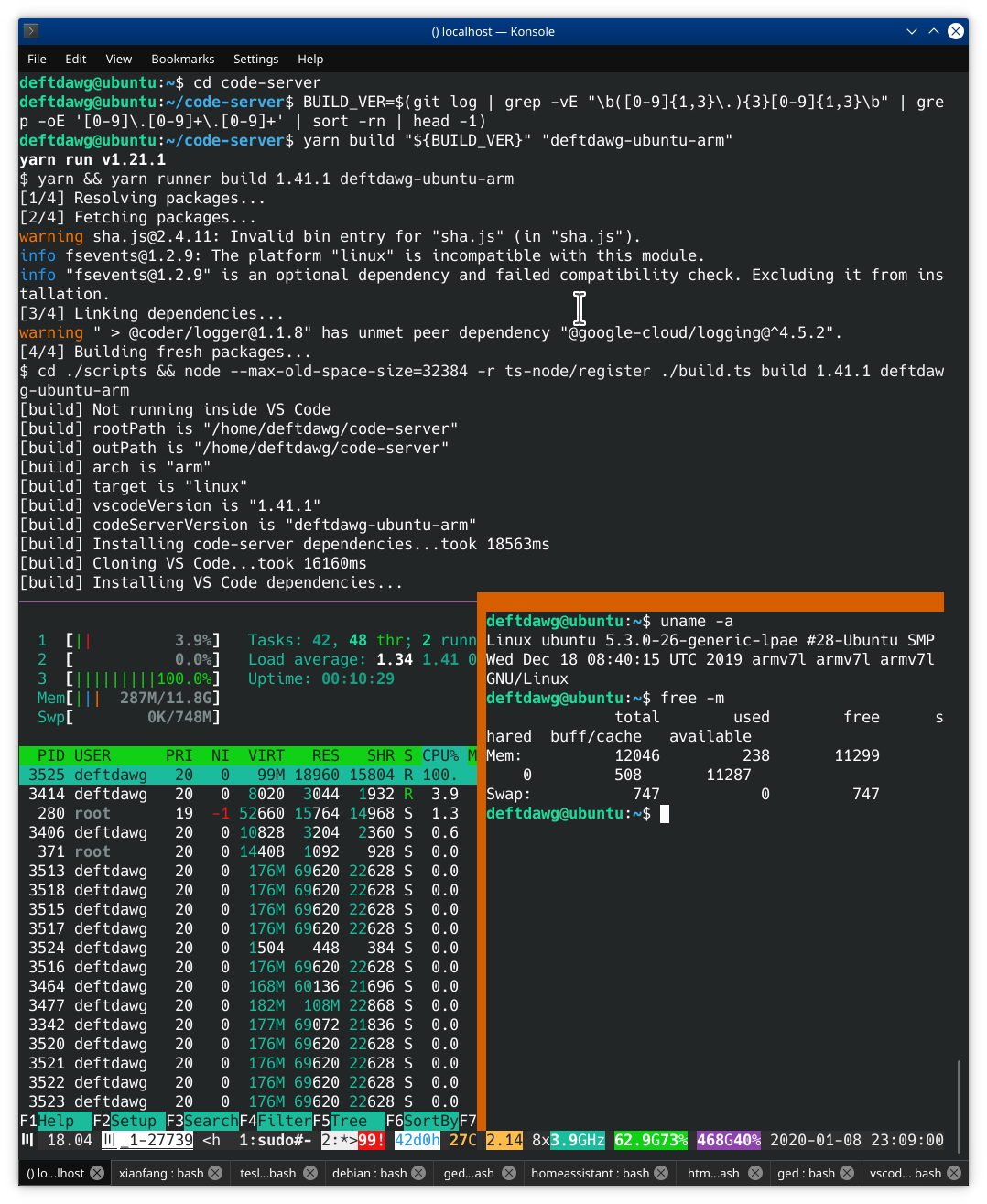
@v0idp shouldn't be too long, sr229 is very close to getting the Drone CI sorted.
deftdawg
on 9 Jan 2020
Good new and bad news...
Bad news, the qemu-system-arm instances I have is running LPAE w/ 12GB of ram, however because armv7 node.js is a 32-bit elf, it's max addressable ram is 4GB per process instance; node won't accurately allocate heap values with --max-old-space-size exceeding 4071. That means building fails with exit code 134 (node runs out of heap memory).
Good news, I shipped the aarch64 build across and it sort of works as is on armv7... It loads up, can open, edit, and save files, extensions can be loaded, however terminal doesn't want to spawn a shell and spdlog complains about wrong elf class...
deftdawg@ubuntu:~$ uname -a
Linux ubuntu 5.3.0-26-generic-lpae #28-Ubuntu SMP Wed Dec 18 08:40:15 UTC 2019 armv7l armv7l armv7l GNU/Linux
deftdawg@ubuntu:~$ free -m
              total        used        free      shared  buff/cache   available
Mem:          12046         179       11612           0         254       11418
Swap:           747           0         747
deftdawg@ubuntu:~$
deftdawg@ubuntu:~$ cd cs-aa64/ && node ./build/code-server*/out/vs/server/main.js --auth none # http://localhost:8080
Error: /home/deftdawg/cs-aa64/build/code-serverdeftdawg-alpine-arm64-vsc1.41.0-alpine-arm64-built/node_modules/spdlog/build/Release/spdlog.node: wrong ELF class: ELF
CLASS64
    at Object.Module._extensions..node (internal/modules/cjs/loader.js:1021:18)
    at Module.load (internal/modules/cjs/loader.js:811:32)
    at Function.Module._load (internal/modules/cjs/loader.js:723:14)
    at Module.require (internal/modules/cjs/loader.js:848:19)
    at Module.patchedRequire [as require] (/home/deftdawg/cs-aa64/build/code-serverdeftdawg-alpine-arm64-vsc1.41.0-alpine-arm64-built/node_modules/diagnostic-channel
/dist/src/patchRequire.js:14:46)
    at require (internal/modules/cjs/helpers.js:74:18)
    at bindings (/home/deftdawg/cs-aa64/build/code-serverdeftdawg-alpine-arm64-vsc1.41.0-alpine-arm64-built/node_modules/bindings/bindings.js:112:48)
    at Object.<anonymous> (/home/deftdawg/cs-aa64/build/code-serverdeftdawg-alpine-arm64-vsc1.41.0-alpine-arm64-built/node_modules/spdlog/index.js:3:35)
    at Module._compile (internal/modules/cjs/loader.js:955:30)
    at Object.Module._extensions..js (internal/modules/cjs/loader.js:991:10)
    at Module.load (internal/modules/cjs/loader.js:811:32)
    at Function.Module._load (internal/modules/cjs/loader.js:723:14)
    at Module.require (internal/modules/cjs/loader.js:848:19)
    at Module.patchedRequire [as require] (/home/deftdawg/cs-aa64/build/code-serverdeftdawg-alpine-arm64-vsc1.41.0-alpine-arm64-built/node_modules/diagnostic-channel
/dist/src/patchRequire.js:14:46)
    at require (internal/modules/cjs/helpers.js:74:18)
    at NodeScriptLoader.load (/home/deftdawg/cs-aa64/build/code-serverdeftdawg-alpine-arm64-vsc1.41.0-alpine-arm64-built/out/vs/loader.js:750:39)
    at OnlyOnceScriptLoader.load (/home/deftdawg/cs-aa64/build/code-serverdeftdawg-alpine-arm64-vsc1.41.0-alpine-arm64-built/out/vs/loader.js:588:32)
    at loadNextPath (/home/deftdawg/cs-aa64/build/code-serverdeftdawg-alpine-arm64-vsc1.41.0-alpine-arm64-built/out/vs/loader.js:1526:41)
    at Object.errorback (/home/deftdawg/cs-aa64/build/code-serverdeftdawg-alpine-arm64-vsc1.41.0-alpine-arm64-built/out/vs/loader.js:1534:25)
    at OnlyOnceScriptLoader.triggerErrorback (/home/deftdawg/cs-aa64/build/code-serverdeftdawg-alpine-arm64-vsc1.41.0-alpine-arm64-built/out/vs/loader.js:601:36)
    at /home/deftdawg/cs-aa64/build/code-serverdeftdawg-alpine-arm64-vsc1.41.0-alpine-arm64-built/out/vs/loader.js:588:151
    at ReadFileContext.callback (/home/deftdawg/cs-aa64/build/code-serverdeftdawg-alpine-arm64-vsc1.41.0-alpine-arm64-built/out/vs/loader.js:767:25)
    at FSReqCallback.readFileAfterOpen [as oncomplete] (fs.js:239:13) {
  phase: 'loading',
  moduleId: 'spdlog',
  neededBy: [ '===anonymous3===' ]
}
info  Server listening on http://localhost:8080
info    - No authentication
info    - Not serving HTTPS
warn  ENOENT: no such file or directory, scandir '/home/deftdawg/.local/share/code-server/logs'
I'm super curious how @sr229 got build-master-arm built in https://github.com/cdr/code-server/issues/35#issuecomment-571769722 ❔
deftdawg
on 9 Jan 2020
@deftdawg the CI he showed was probably for nbin. See https://cloud.drone.io/cdr/nbin/25
SuperSandro2000
on 10 Jan 2020
Great job! Just bought an arm tablet yesterday and hoping to install code-server on it (in a chroot ubuntu) so that I can do all my coding there. Looking forward to its release!
 hongwen000
on 10 Jan 2020
hongwen000
on 10 Jan 2020
@deftdawg I received the same error message after building this on an aws arm64 ubuntu. Then I tested theia on my rpi4 and it runs oob. maybe they found a solution?
 werty1st
on 10 Jan 2020
werty1st
on 10 Jan 2020
@deftdawg I received the same error message after building this on an aws arm64 ubuntu. Then I tested theia on my rpi4 and it runs oob. maybe they found a solution?
hello, just learn about theia, what's the difference between code-server ans theia ?
mirsella
on 10 Jan 2020
@deftdawg I received the same error message after building this on an aws arm64 ubuntu. Then I tested theia on my rpi4 and it runs oob. maybe they found a solution?
hello, just learn about theia, what's the difference between code-server ans theia ?
https://github.com/eclipse-theia/theia/issues/5347#issuecomment-498385901
SuperSandro2000
on 10 Jan 2020
 sr229
on 12 Jan 2020
sr229
on 12 Jan 2020
ARM Builds are now available for testing. ARM64 only for now.
Sorry if I'm just dumb and mistaken, would this work on a Pi 4 with Buster?
 brycebba
on 13 Jan 2020
brycebba
on 13 Jan 2020
ARM Builds are now available for testing. ARM64 only for now.
LKGR build
Sorry if I'm just dumb and mistaken, would this work on a Pi 4 with Buster?
Unfortunately not. Raspbian buster is not 64 bit OS.
diruuu
on 14 Jan 2020
Unfortunately not. Raspbian buster is not 64 bit OS.
Adding arm_64bit=1 to config.txt enables the 64 bit kernel which apparently means installing and running 64 bit packages is possible. I was going to try last night but ran out of time. Keen to hear how anybody else gets it working if they do in the mean time.
BinaryBen
on 14 Jan 2020
Unfortunately not. Raspbian buster is not 64 bit OS.
Thankfully there is Ubuntu and Debian 64 bit for it.
SuperSandro2000
on 14 Jan 2020
Unfortunately not. Raspbian buster is not 64 bit OS.
Thankfully there is Ubuntu and Debian 64 bit for it.
and arch 🙃 (manjaro btw)
@BinaryBen as a good answer who doesn't need to switch OS if you are on pi4 :
arm_64bit=1 in config.txt, more here : https://www.raspberrypi.org/forums/viewtopic.php?t=250730
mirsella
on 14 Jan 2020
Unfortunately not. Raspbian buster is not 64 bit OS.
Thankfully there is Ubuntu and Debian 64 bit for it.
and arch 🙃 (manjaro btw)
@BinaryBen as a good answer who doesn't need to switch OS if you are on pi4 :
arm_64bit=1 in config.txt, more here : https://www.raspberrypi.org/forums/viewtopic.php?t=250730
Can you confirm if it can run code-server? Because mine can't. Raspbian Buster already detected as aarch64 but the binary still can't run.
diruuu
on 14 Jan 2020
Unfortunately not. Raspbian buster is not 64 bit OS.
Thankfully there is Ubuntu and Debian 64 bit for it.
and arch upside_down_face (manjaro btw)
@BinaryBen as a good answer who doesn't need to switch OS if you are on pi4 :
arm_64bit=1 in config.txt, more here : https://www.raspberrypi.org/forums/viewtopic.php?t=250730Can you confirm if it can run code-server? Because mine can't. Raspbian Buster already detected as aarch64 but the binary still can't run.
that sad, I will try when I'll get home, near 18h GMT. I'll try manjaro arm if it doesn't work, in case someone is interested. what error did you get when running it in buster aarch64 ?
edit : tried arm_64bit=1 and got the normal cannot execute binary file: Exec format error, doesn't work for me too, but it seems the issue is with raspbian, even with arm_64bit=1, uname -a still show armv7l. i have a outdated kernel for this feature to work
mirsella
on 14 Jan 2020
What are the steps to execute code-server once unzipped? I did uname -a and see aarch64
brycebba
on 14 Jan 2020
What are the steps to execute code-server once unzipped? I did uname -a and see aarch64
just ./code-server in the console
mirsella
on 14 Jan 2020
I'm using a RPi4 and when I did uname -a I see aarch64 but if I try to execute ./code-server It will show: no such file or directory: ./code-server
 filippobenozzi
on 14 Jan 2020
filippobenozzi
on 14 Jan 2020
Same her
brycebba
on 14 Jan 2020
I'm using a RPi4 and when I did uname -a I see aarch64 but if I try to execute ./code-server It will show:
no such file or directory: ./code-server
after some research it seems the issue is ld-linux-aarch64.so.1, file code-server show it use it as interpreter but is not where code-server use it on my pi4, i'm trying to download it.
got it downloaded cd /lib && sudo wget https://github.com/angr/binaries/blob/master/tests/aarch64/ld-linux-aarch64.so.1 now i'm having the same problem as on termux, -bash: ./code-server: Permission denied i chmod +x and 777 nothing done it. i got the same error when trying on my phone.
manjaro for pi4 (other like ubuntu debian etc who natively run on aarch64 should work too) is working perfectly with a fresh install. thanks you guys https://i.imgur.com/O5GghbU.png
mirsella
on 14 Jan 2020
The README.md states that these builds are built against glibc...
Termux on Android is built on Bionic libc
Alpine uses musl libc which results in the same /bin/sh: ./code-server: not found because there are symbols missing/not implemented in musl libc.
[root@localhost code-server.lkgr-vsc1.41.1-linux-arm64]# ldd code-server
        /lib/ld-linux-aarch64.so.1 (0x3000000000)
        libdl.so.2 => /lib/ld-linux-aarch64.so.1 (0x3000000000)
        libstdc++.so.6 => /usr/lib/libstdc++.so.6 (0x7a69718000)
        libm.so.6 => /lib/ld-linux-aarch64.so.1 (0x3000000000)
        libgcc_s.so.1 => /usr/lib/libgcc_s.so.1 (0x7a696f6000)
        libpthread.so.0 => /lib/ld-linux-aarch64.so.1 (0x3000000000)
        libc.so.6 => /lib/ld-linux-aarch64.so.1 (0x3000000000)
Error relocating code-server: __register_atfork: symbol not found
Error relocating code-server: makecontext: symbol not found
Error relocating code-server: backtrace: symbol not found
Error relocating code-server: setcontext: symbol not found
Error relocating code-server: getcontext: symbol not found
Error relocating code-server: secure_getenv: symbol not found
Error relocating code-server: gnu_get_libc_version: symbol not found
Error relocating code-server: __strdup: symbol not found
Perhaps those of you running on 32-bit distros of Rasbian / Debian or whatever should do an ldd and find out how to resolve the missing symbols (perhaps install 64-bit libc libraries or reinstall the OS with a 64-bit distro).
deftdawg
on 14 Jan 2020
Got this working on my RPi4 (running Raspbian) using a 64-bit Debian nspawn guest OS. See here: https://www.raspberrypi.org/forums/viewtopic.php?p=1422775#p1422775
 kuestess
on 15 Jan 2020
kuestess
on 15 Jan 2020
I also got it running on Android using Termux in Samsung DeX
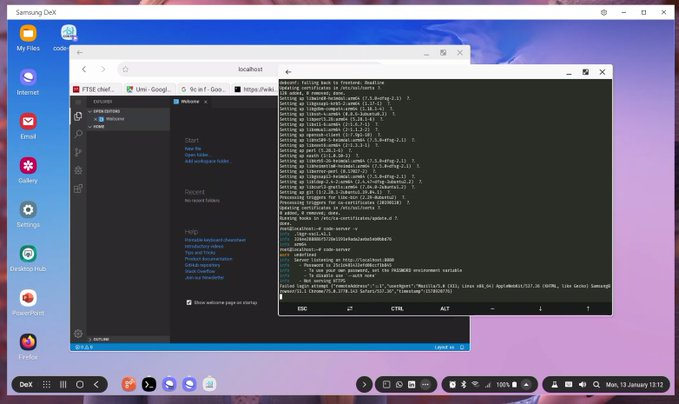
 AdaRoseCannon
on 15 Jan 2020
AdaRoseCannon
on 15 Jan 2020
Bummer, hopefully an arm build that works on buster natively will happen soon.
brycebba
on 15 Jan 2020
Any time we can expect a arm32 release ?
v0idp
on 15 Jan 2020
I couldn't wait and reimaged with Ubuntu server and had it running in minutes. Piece of cake and works awesome! Way to go!
brycebba
on 15 Jan 2020
Althogh there are some bugs, It still works good on my android tablet with ubuntu 18.04 installed in termux.
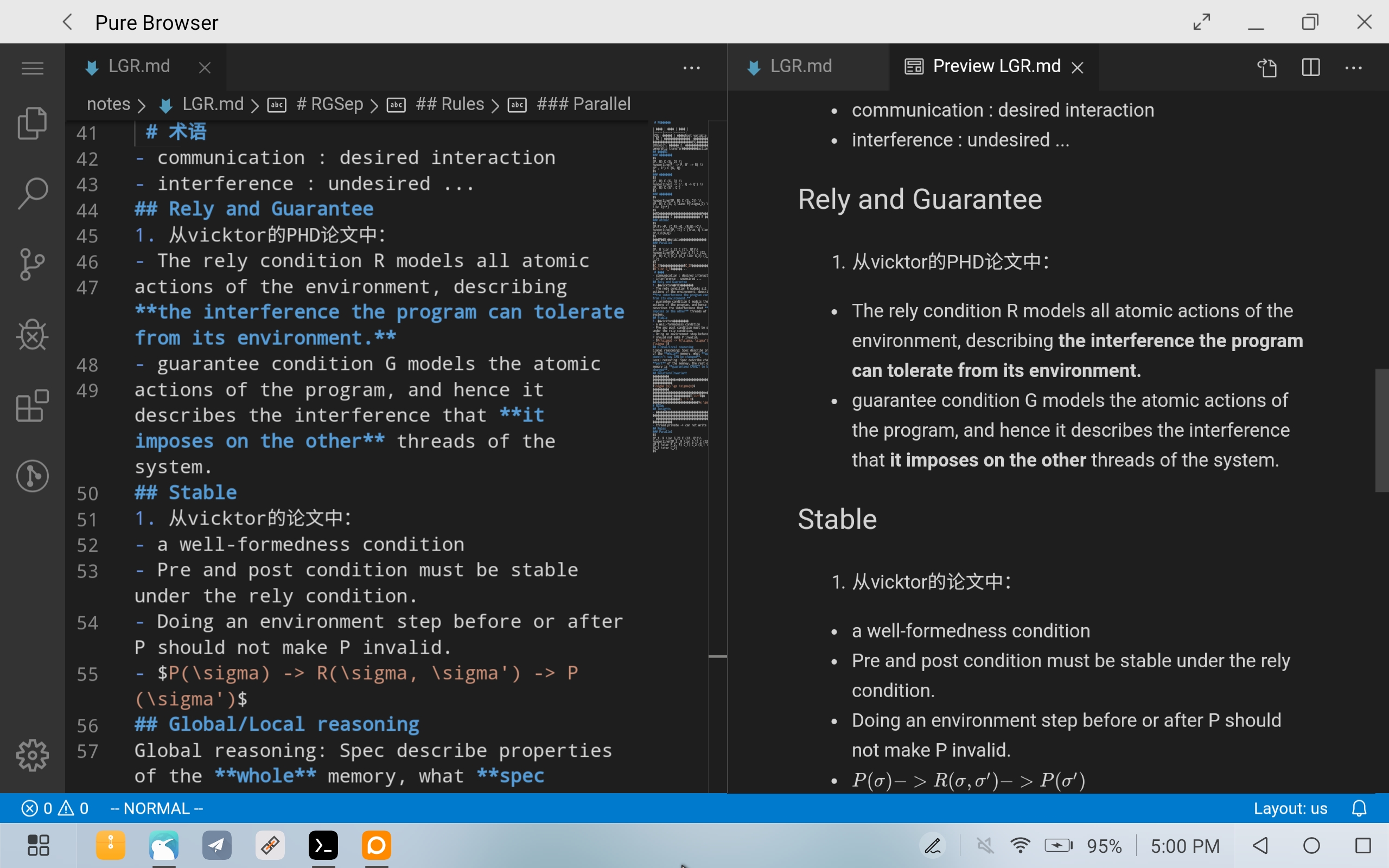
hongwen000
on 15 Jan 2020
Althogh there are some bugs, It still works good on my android tablet with ubuntu 18.04 installed in termux.
how did you launch it ? just ./code-server ? for me it don't work. https://imgur.com/a/O60QDS6
mirsella
on 15 Jan 2020
Althogh there are some bugs, It still works good on my android tablet with ubuntu 18.04 installed in termux.
how did you launch it ? just ./code-server ? for me it don't work. https://imgur.com/a/O60QDS6
I could not open it with native android runtime neither. You need to chroot to a ubuntu 18.04 environment. You can install _AnLinux_ app from google play for installation script.
hongwen000
on 15 Jan 2020
The Termux instructions are here: https://wiki.termux.com/wiki/Ubuntu
Once that is setup use code-server like usual. I put it in the /bin directory to use it.
AdaRoseCannon
on 15 Jan 2020
ah yes I forgot about chrooting in termux, thanks. theorically we can the same things on raspbian ?
mirsella
on 15 Jan 2020
@mirsella yep, though I suggest just running it in LXC and configure it that way.
sr229
on 15 Jan 2020
thanks @sr229 and @AdaRoseCannon thanks, everything is working in termux. will look how to setup lxc 🙃
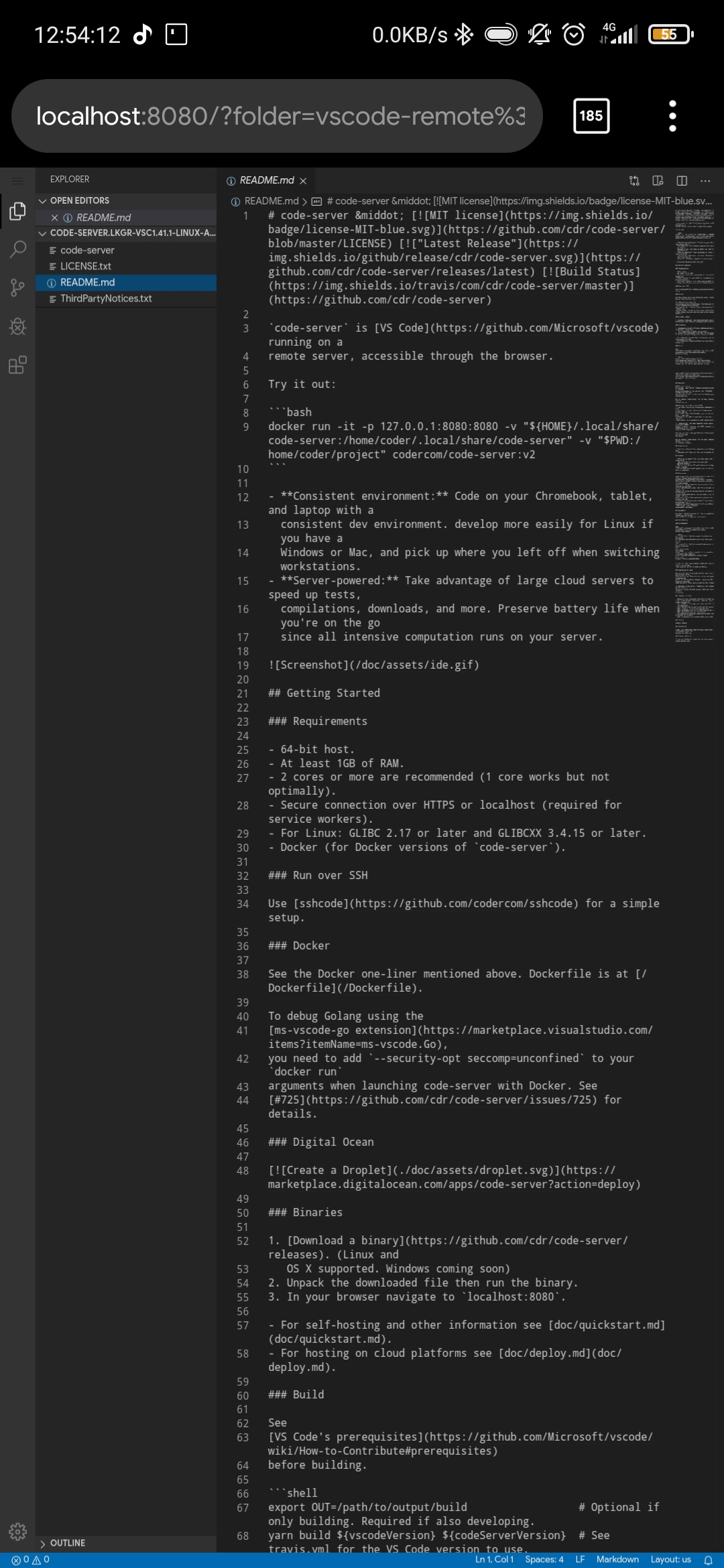
mirsella
on 15 Jan 2020
@mirsella skip the LXC part, I don't think you'll need it since you have Termux
sr229
on 15 Jan 2020
@mirsella skip the LXC part, I don't think you'll need it since you have Termux
lxc was for my pi4, but i think I gonna leave buster to a native aarch64 distro anyway (manjaro) thanks
mirsella
on 15 Jan 2020
Have modified my old aarch64 build to run on arm32, terminal starts and stuff... need to figure out how one packs it into a self contained file like @sr229 's build then try it on the Pi Zero. If it works there I can redistribute it to those wanting to try arm 32-bit.
deftdawg
on 15 Jan 2020
Here is my modified aarch64 build that should work on arm32 (ubuntu+glibc; probably not on alpine):
curl -L -O http://69.195.146.38/code-server/cs-arm32.tar.bz2
tar -jxf cs-arm32.tar.bz2
cd cs-arm32
./code-server.sh # need to have node installed
It's like 600MB unpacked, alas I couldn't get nbin down to pack it into a self-contained binary...
 yarn binary "${BUILD_VER}" "deftdawg-alpine-arm64"                                                                                                                │····················
yarn run v1.21.1                                                                                                                                                                             │····················
$ yarn runner binary 1.41.0 deftdawg-alpine-arm64                                                                                                                                            │····················
$ cd ./scripts && node --max-old-space-size=32384 -r ts-node/register ./build.ts binary 1.41.0 deftdawg-alpine-arm64                                                                         │····················
[binary] Not running inside VS Code                                                                                                                                                          │····················
[binary] rootPath is "/home/deftdawg/cs-aa64"                                                                                                                                                │····················
[binary] outPath is "/home/deftdawg/cs-aa64"                                                                                                                                                 │····················
[binary] arch is "arm"                                                                                                                                                                       │····················
[binary] target is "linux"                                                                                                                                                                   │····················
[binary] vscodeVersion is "1.41.0"                                                                                                                                                           │····················
[binary] codeServerVersion is "deftdawg-alpine-arm64"                                                                                                                                        │····················
✔ Wrote 0 files!                                                                                                                                                                             │····················
info  Fetching {"url":"https://nbin.cdr.sh/1.2.3/node-10.15.1-linux-arm"}                                                                                                                    │····················
Forbidden
@deftdawg It's work on my RPi 3B! Awesome!
Have some problems with lost connection, but I can open it in my browser.
UPD: Works with node 12
UPD2: Only term doesn't work.
 Toxblh
on 15 Jan 2020
Toxblh
on 15 Jan 2020
@deftdawg It's work on my RPi 3B! Awesome!
Have some problems with lost connection, but I can open it in my browser.
UPD: Works with node 12
UPD2: Only term doesn't work.
@Toxblh Is there a way to have this in a docker container up and running for RPI 3b+ in a arm32 image ?
v0idp
on 16 Jan 2020
An update, the arm32 build was patched on Ubuntu 19.10 which comes with libcstdc++6 v9.2.1 (GLIBCXX_3.4.26) where as raspbian buster comes libcstdc++6 v8.3.0... Last symbol on Buster is GLIBCXX_3.4.25. (see below)
I discovered this on my Pi Zero W (errors with spdlog.node, no terminal, etc). Will have to do a new aarch64 build and then fix it in a docker image.
The basic method is to copy over the build and then go down to out/vs/server/node_modules and then run npm rebuild. Probably want a machine with more ram and cpu power than a RPi to do that, otherwise it might take a while or error out of heap.
# ldd /home/pi/cs-arm32/node_modules/spdlog/build/Release/spdlog.node
/home/pi/cs-arm32/node_modules/spdlog/build/Release/spdlog.node: /usr/lib/arm-linux-gnueabihf/libstdc++.so.6: version `GLIBCXX_3.4.26' not found (required by /home/pi/cs-arm32/node_modules/spdlog/build/Release/spdlog.node)
        /usr/lib/arm-linux-gnueabihf/libarmmem-${PLATFORM}.so => /usr/lib/arm-linux-gnueabihf/libarmmem-v6l.so (0xb6eef000)
        libstdc++.so.6 => /usr/lib/arm-linux-gnueabihf/libstdc++.so.6 (0xb6da8000)
        libgcc_s.so.1 => /lib/arm-linux-gnueabihf/libgcc_s.so.1 (0xb6d7b000)
        libpthread.so.0 => /lib/arm-linux-gnueabihf/libpthread.so.0 (0xb6d51000)
        libc.so.6 => /lib/arm-linux-gnueabihf/libc.so.6 (0xb6c03000)
        /lib/ld-linux-armhf.so.3 (0xb6f37000)
        libm.so.6 => /lib/arm-linux-gnueabihf/libm.so.6 (0xb6b81000)
# strings /usr/lib/arm-linux-gnueabihf/libstdc++.so.6 | grep GLIBCXX
GLIBCXX_3.4
GLIBCXX_3.4.1
GLIBCXX_3.4.2
GLIBCXX_3.4.3
GLIBCXX_3.4.4
GLIBCXX_3.4.5
GLIBCXX_3.4.6
GLIBCXX_3.4.7
GLIBCXX_3.4.8
GLIBCXX_3.4.9
GLIBCXX_3.4.10
GLIBCXX_3.4.11
GLIBCXX_3.4.12
GLIBCXX_3.4.13
GLIBCXX_3.4.14
GLIBCXX_3.4.15
GLIBCXX_3.4.16
GLIBCXX_3.4.17
GLIBCXX_3.4.18
GLIBCXX_3.4.19
GLIBCXX_3.4.20
GLIBCXX_3.4.21
GLIBCXX_3.4.22
GLIBCXX_3.4.23
GLIBCXX_3.4.24
GLIBCXX_3.4.25
GLIBCXX_DEBUG_MESSAGE_LENGTH
@deftdawg got some problem with your build, it run but can't open any folders or file. every 10 seconds i got a "Cannot reconnect. Please reload the window." thanks your for your work anyway.
i gonna switch my servers to native aarch64 distro, don't like raspbian anyway.
mirsella
on 16 Jan 2020
Another build for folks to try, this was build against buster on arm... it dies with an illegal instruction on my Pi Zero W though. The Pi Zero isn't a great test machine as it's armv6 and has only 512mb ram.
@mirsella, @Toxblh or someone if you can give this a run and let me know if it starts...
deftdawg
on 22 Jan 2020
Another build for folks to try, this was build against buster on arm... it dies with an illegal instruction on my Pi Zero W though. The Pi Zero isn't a great test machine as it's armv6 and has only 512mb ram.
@mirsella, @Toxblh or someone if you can give this a run and let me know if it starts...
thanks, really appreciate your work, but i'm not using buster anymore haha
if nobody can test it, i can flash buster on another unused sdcard and test it on a clean install
mirsella
on 22 Jan 2020
I've created a new bug that describes the issue I'm hitting with armv6 build. Essentially it loads and looks like it's going to work but then node mysteriously exits with status 0.
deftdawg
on 23 Jan 2020
@deftdawg relative that https://github.com/cdr/code-server/issues/35#issuecomment-577290934
[Error: ENOENT: no such file or directory, open '/home/deftdawg/code-server/build/code-serverdeftdawg-arm-debian-10-vsc1.41.1-linux-arm-built/out/vs/server/src/node/cli.js'] { small problems 😅
Toxblh
on 24 Jan 2020
@deftdawg Maybe this can work on an RPi 4?
I have tried the first version by you, but it failed somewhere.
Also I had to modify the source to change the port. Can I somehow change the port? Because 8080 is used for me.
Also the newer build you posted, I can't guess what type of file is this :(
 radokristof
on 24 Jan 2020
radokristof
on 24 Jan 2020
Arm v6 now works but must be run with the unofficial build of 12.14.1
I'm still working on a problem with build.ts using too much memory for my little Pi Zero which prevents me from building a self-contained binary.
deftdawg
on 24 Jan 2020
Oh, I understand... but that means that some day even a docker container can be made which will work with armv6?
RAM is not really an issue for me, because I have a Pi 4 4GB version...
radokristof
on 24 Jan 2020
@deftdawg I can try to build it on my RPi 3B, but I’m not fully understand how to do that
Toxblh
on 24 Jan 2020
I posted how I setup 12.14.1 on arm6 here
Not sure if building on a Pi3 will work, I have one at home I may fire it up though I think making build.ts not buffer all 220MB of binary data in memory before writing it is the best way to fix the last issue.
deftdawg
on 24 Jan 2020
Also I had to modify the source to change the port. Can I somehow change the port? Because 8080 is used for me.
@radokristof code-server --port 1234
mirsella
on 25 Jan 2020
@mirsella I think that can't be used on this tweaked version of code-server provided by @deftdawg
Basically the runnable file won't pass the parameters...
radokristof
on 25 Jan 2020
Open the shell script and append $* to the node line near the bottom and it will pass the parameters
deftdawg
on 25 Jan 2020
New build; this was tested on the Raspberry Pi Zero (armv6), and Pi2 (armv7)... it requires nodejs-12.14.1-arm6 (script installs it in home dir) and raspbian or debian 9 or higher. Debug logging is off and $* has been added to the start script.
I could not build the standalone binary with the Pi2, it dies at the same spot after attempting to allocate more than the 1GB of ram on the Pi2.
deftdawg
on 25 Jan 2020
@deftdawg Your build is work without some bugs on RPi3. Awesome.
Toxblh
on 13 Feb 2020
@deftdawg That's awesome. FYI for anyone following the open issue tracking this is at https://github.com/cdr/code-server/issues/1337
 nhooyr
on 13 Feb 2020
nhooyr
on 13 Feb 2020
If you would like to try I wrap it to docker
docker run -p 8888:8080 -v /home/pi:/home/pi toxblh/code-server-rpi
Not ideal yet, but basically work without terminal
Just need to fix Error loading shared library ld-linux-armhf.so.3 and will work
Toxblh
on 13 Feb 2020
for people wanting to running on the Pi 3 and above you can get a 64bit userspace in buster via chroot
sudo apt install -y debootstrap schroot
put this config in /etc/schroot/chroot.d/pi64
[pi64]
users=pi
personality=linux
description=V3D arm64 for buster
type=directory
directory=/srv/chroot/pi64
profile=desktop
root-groups=root
preserve-environment=true
sudo debootstrap --arch arm64 buster /srv/chroot/pi64
then run sudo schroot -c pi64 and now your in a 64bit userspace. you will need to reinstall apps again as this user E.G wget, curl, node but after that you can run the latest release (2.1698) of coder
 TechLevelZero
on 16 Feb 2020
TechLevelZero
on 16 Feb 2020
I just need 32bit arm docker image. will 32bit images not be supported ?
v0idp
on 17 Feb 2020
the toxblh/code-server-rpi docker container seems to be working fine except I am unable to set the password or use https. I'm a noob at docker though so maybe I just don't know what I'm doing.
 brandosha
on 18 Feb 2020
brandosha
on 18 Feb 2020
@brandosha I disable it just for the show its work)) But yes it's work, I can to recreate it with ARG params
Toxblh
on 18 Feb 2020
@brandosha I disable it just for the show its work)) But yes it's work, I can to recreate it with ARG params
what does your docker run command look like ?
v0idp
on 19 Feb 2020
@deftdawg How can I install that new build on my RPi? There is no script, just the packages extensions, node_modules, out and the files package.json and product.json. npm run start doesn‘t work either.
 realmayus
on 24 Feb 2020
realmayus
on 24 Feb 2020
@deftdawg How can I install that new build on my RPi? There is no script, just the packages extensions, node_modules, out and the files package.json and product.json. npm run start doesn‘t work either.
Back out from that directory. There's a script called "cs-on-pi0w.sh" outside of it that you have to run.
So far this build is working fine for me on Pi 4.
 awahlig
on 1 Mar 2020
awahlig
on 1 Mar 2020
@deftdawg Tried to find your build via http://69.195.146.38/code-server/cs-arm32.tar.bz2 and got a 404.
I tried looking through the comments and couldn't find any other builds. Am I missing anything? I have a Raspberry Pi 4B
 bpmct
on 13 Mar 2020
bpmct
on 13 Mar 2020
@bpmct see "new build" link in this post https://github.com/cdr/code-server/issues/35#issuecomment-578432770
deftdawg
on 13 Mar 2020
Hey guys update at https://github.com/cdr/code-server/issues/1337#issuecomment-622457413
yarn global add @coder/code-server
Related issues
 justmao945
·
3Comments
justmao945
·
3Comments
 balazssoltesz
·
3Comments
balazssoltesz
·
3Comments
 sa7mon
·
3Comments
sa7mon
·
3Comments
 broady
·
3Comments
broady
·
3Comments
 chrischabot
·
3Comments
chrischabot
·
3Comments
Most helpful comment
@deftdawg yes we do