Cocoapods: Xcode 10 beta "Multiple commands produce /.../Localization.bundle" error
- [x] I've read and understood the CONTRIBUTING guidelines and have done my best effort to follow.
Report
I have a project that uses multiple private pods that are each localized using a resource_bundle named "Localization". When using Xcode 10 beta to build and execute the project, everything works as expected. Archiving results in an error.
What did you do?
"Archive" the project using Xcode 10 beta.
What did you expect to happen?
Produce a valid archive with no errors.
What happened instead?
Xcode produces the following output:
error: Multiple commands produce '/Users/.../Library/Developer/Xcode/DerivedData/.../Build/Intermediates.noindex/ArchiveIntermediates/.../IntermediateBuildFilesPath/UninstalledProducts/iphoneos/Localization.bundle': ...
CocoaPods Environment
Stack
   CocoaPods : 1.5.3
        Ruby : ruby 2.3.3p222 (2016-11-21 revision 56859) [universal.x86_64-darwin17]
    RubyGems : 2.5.2
        Host : Mac OS X 10.13.5 (17F77)
       Xcode : 9.4.1 (9F2000)
         Git : git version 2.15.2 (Apple Git-101.1)
Ruby lib dir : /System/Library/Frameworks/Ruby.framework/Versions/2.3/usr/lib
Repositories : master - https://github.com/CocoaPods/Specs.git @ 1555e95aad45615a9b6f3f3f05b091b3631e4fca
               nextraq - https://github.com/NexTraq/NXTPods.git @ 581b4cd022af3aba9f073689aca0d51755e81608
Installation Source
Executable Path: /usr/local/bin/pod
Plugins
claide-plugins         : 0.9.2
cocoapods-deintegrate  : 1.0.2
cocoapods-dependencies : 1.0.0.beta.1
cocoapods-plugins      : 1.0.0
cocoapods-search       : 1.0.0
cocoapods-stats        : 1.0.0
cocoapods-trunk        : 1.3.0
cocoapods-try          : 1.1.0
cocoapods_debug        : 0.1.0
Podfile
# Specs Sources
source 'https://github.com/NexTraq/NXTPods.git'
source 'https://github.com/CocoaPods/Specs.git'

# Project Config
platform :ios, '10.0'   # Also change target version below in post_install

# Settings
use_frameworks!

# Shared Pods
def shared_pods
  # workaround for Xcode 10 beta 3 to use 0.25.1 until 0.26.1 is released
  # https://stackoverflow.com/a/51174106/1033581
  pod 'SwiftLint', '~> 0.25.1'

  pod 'GooglePlaces'

  pod 'InternalPod1'
  pod 'InternalPod2'
  pod 'InternalPod3'

  pod 'AWSCore'
  pod 'AWSS3'
  pod 'KeychainAccess'

  pod 'Charts'
  pod 'FSCalendar'
end

# Targets
target 'Test-App' do
  shared_pods
end

target 'App' do
  shared_pods
end

target 'Staging-App' do
  shared_pods
end

target 'QA-App' do
  shared_pods
end

target 'Dev-View' do
  shared_pods
end

target 'AppTests' do
end

target 'AppUITests' do
  shared_pods
end
Project that demonstrates the issue
 k4ety
k4ety
All 12 comments
Please upload a sample app. It is downright impossible to diagnose this without it.
 dnkoutso
on 23 Jul 2018
dnkoutso
on 23 Jul 2018
Unfortunately these are in a private repo and not sharable. I am hoping that by me explaining what is happening, someone will see the problem and be able to suggest a fix.
The podspec for each of the internal pods contains the following:
s.resource_bundle = {'Localization' => ['
Each of the frameworks produces a "Localization.bundle" that contains its relevant localized strings and assets:
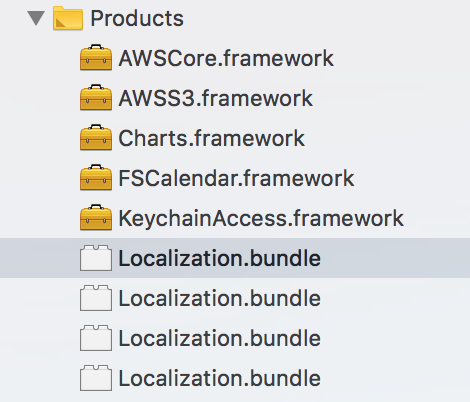
When Building, each "Localization.bundle" is written to a separate directory, with the name of its corresponding framework. When Archiving, it seems to be trying to write all of them to the root directory and causing a conflict.
This is more detail on the error:
error: Multiple commands produce '/Users/…/Library/Developer/Xcode/DerivedData/…/Build/Intermediates.noindex/ArchiveIntermediates/App-Prod/IntermediateBuildFilesPath/UninstalledProducts/iphoneos/Localization.bundle':
1) Target ‘Framework1-Localization' has create directory command with output '/Users/…/Library/Developer/Xcode/DerivedData/…/Build/Intermediates.noindex/ArchiveIntermediates/App-Prod/IntermediateBuildFilesPath/UninstalledProducts/iphoneos/Localization.bundle'
2) Target 'Framework2-Localization' has create directory command with output '/Users/…/Library/Developer/Xcode/DerivedData/…/Build/Intermediates.noindex/ArchiveIntermediates/App-Prod/IntermediateBuildFilesPath/UninstalledProducts/iphoneos/Localization.bundle'
3) Target 'Framework3-Localization' has create directory command with output '/Users/…/Library/Developer/Xcode/DerivedData/…/Build/Intermediates.noindex/ArchiveIntermediates/App-Prod/IntermediateBuildFilesPath/UninstalledProducts/iphoneos/Localization.bundle'
4) Target 'Framework4-Localization' has create directory command with output '/Users/…/Library/Developer/Xcode/DerivedData/…/Build/Intermediates.noindex/ArchiveIntermediates/App-Prod/IntermediateBuildFilesPath/UninstalledProducts/iphoneos/Localization.bundle'
If you chance the name of these bundles to something uniq does it fix the issue? It might be because Xcode 10 is more strict.
dnkoutso
on 23 Jul 2018
The build/run process works fine, so I don't think this is an Xcode 10 issue.
Since the strings and assets are in a separate bundle, that bundle name must be referenced in the code. I want to standardize so that these resources are always in a bundle named "Localization". I have extensions with convenience initializers on UIStoryboard and UINib that automatically look for a bundle named "Localization".
If I change the podspecs to use unique names, that would solve the Archive build conflict, but then the resulting bundles would also have the unique names instead of using the standard "Localization" name and all of the code would break.
I don't know the internals of CocoaPods - does it produce different commands for "Build" vs. "Archive"? When Archiving, it seems to be trying to write to the root directory rather than writing each bundle to its own directory.
k4ety
on 23 Jul 2018
CocoaPods does not interfere with Xcode build or archiving. It only generates the project and then lets Xcode take over on compilation.
Another way to look at this is to have a non-CocoaPods project and have two Localization.bundle references, does Xcode 10 produce the same warning?
dnkoutso
on 23 Jul 2018
I will do some more research and update accordingly. Thanks for the input.
k4ety
on 23 Jul 2018
No problem!
dnkoutso
on 23 Jul 2018
video _ my solution to the question https://youtu.be/mMlcUgseZRs
 DanielDeSua
on 26 Sep 2018
DanielDeSua
on 26 Sep 2018
go to: File -> workspace/project settings and change build system to (Legacy Build System)
it worked for me
 hoseins77
on 7 Oct 2018
hoseins77
on 7 Oct 2018
go to: File -> workspace/project settings and change build system to (Legacy Build System)
it worked for me
go to: File -> workspace/project settings and change build system to (Legacy Build System)
it worked for me
It worked for me too, Can you someone explain how it worked? For my knowledge it looks like we complied it from Old swift version it its true then how can i run it on New Swift version.
thanks,
 Maheepk
on 10 Oct 2018
Maheepk
on 10 Oct 2018
The related issue is https://stackoverflow.com/questions/52417893/xcode-10-archive-build-failed
 sergeylaptev
on 19 Jan 2019
sergeylaptev
on 19 Jan 2019
One of our customers ran into this again. Considering that the Legacy Build System will be removed in Xcode 12*, this might become more of an issue in the future.
(* I heard rumors, this isn't confirmed yet, but I'm confident this will disappear in late 2020)
 steipete
on 22 Apr 2020
steipete
on 22 Apr 2020
Related issues
 hmistry
·
3Comments
hmistry
·
3Comments
 evermeer
·
3Comments
evermeer
·
3Comments
 k06a
·
3Comments
k06a
·
3Comments
 marzapower
·
3Comments
marzapower
·
3Comments
 pronebird
·
3Comments
pronebird
·
3Comments
Most helpful comment
go to: File -> workspace/project settings and change build system to (Legacy Build System)
it worked for me