Cockpit: software: Change scheduled updates UI
Software Updates page currently has scheduled updates as instant-apply summary. Usability study found this to be confusing.
Suggestion: Redesign instant apply to be a summary with an edit button. Editing the updates should happen in a modal with a save button.
 garrett
All 14 comments
Perhaps we might want to consider inline editing instead of a dialog:
https://www.patternfly.org/v4/components/inline-edit/design-guidelines/
garrett
on 12 Oct 2020
BTW: When I say in-line, I mean editing everything related in one go, like the "full page" version https://www.patternfly.org/v4/components/inline-edit/design-guidelines/#full-page-edit (but for everything in related in the section, not for the entire page) — the toggle every form version is tedious and doesn't make sense in most places.
garrett
on 13 Oct 2020
The start of a design to handle this issue (and more!) is at https://github.com/cockpit-project/cockpit/issues/14749.
I haven't decided yet if the editing will be in-line or in a modal. For that design, it would be more consistent with the rest of Cockpit if we adjusted it in a modal, I think? I can be swayed either way on this topic. :wink:
garrett
on 15 Oct 2020
it would be more consistent with the rest of Cockpit if we adjusted it in a modal
I agree with this. We have modals for editing stuff and I like it more like that - it is obvious when you are in the editing mode (modal opened), when you cancel it (cancel the dialog) and when you save it (submitting the dialog). Never was a huge fan of inline edits as there are some buttons appearing and disappearing...
 marusak
on 16 Oct 2020
marusak
on 16 Oct 2020
I like the _edit_ button that opens a dialog.
 andreasn
on 19 Oct 2020
andreasn
on 19 Oct 2020
Agreed. For better or worse, inline editing usually feels a bit cludgy to me too. A lot of PF projects are apparently using it, and we're using dialogs more than other projects, but for the reasons outlined above, a dialog makes sense.
Additionally, inline editing _always_ has more UI than just displaying strings, so it can (often enough) cause reflows and change layouts. Dialogs don't have this problem, really.
garrett
on 20 Oct 2020
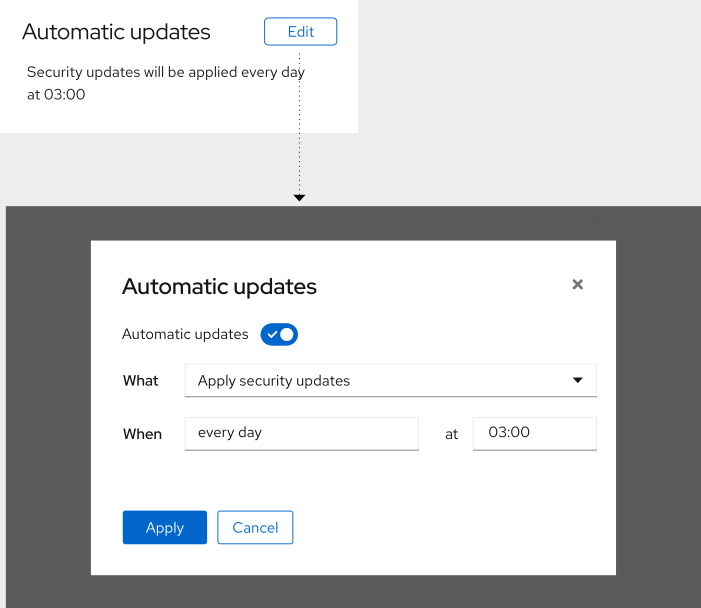
andreasn
on 21 Oct 2020
- Overall, I like this; it's basically what I had in my head too (but didn't get around to mocking up).
- There are a lot of "Automatic updates" strings. Not sure what we can do to reduce that though.
- When and at should also be dropdowns.
- We might want to reconsider the action button's text.
- "Apply" _could possibly_ be construed to mean "apply updates"
- PatternFly suggests "Save" For inline editing (different from modals, of course): https://www.patternfly.org/v4/components/inline-edit/design-guidelines/#how-to-use-0
- PF also suggests "Save changes" @ https://www.patternfly.org/v4/components/switch/design-guidelines/#when-to-use-switches-versus-checkboxes
- Perhaps we should have "Save changes" here? WDYT?
garrett
on 26 Oct 2020
There are a lot of "Automatic updates" strings. Not sure what we can do to reduce that though.
The first version that I sketched out had more of an explanation on the mechanics of it. That it would apply the updates and reboot, etc. That breaks the repetition at least. I'll give it a try and see how that looks.
PF also suggests "Save changes"
I agree that "Apply" could imply to apply the updates now. The other string is slightly more clear, so I'll change it to "Save changes".
andreasn
on 2 Nov 2020
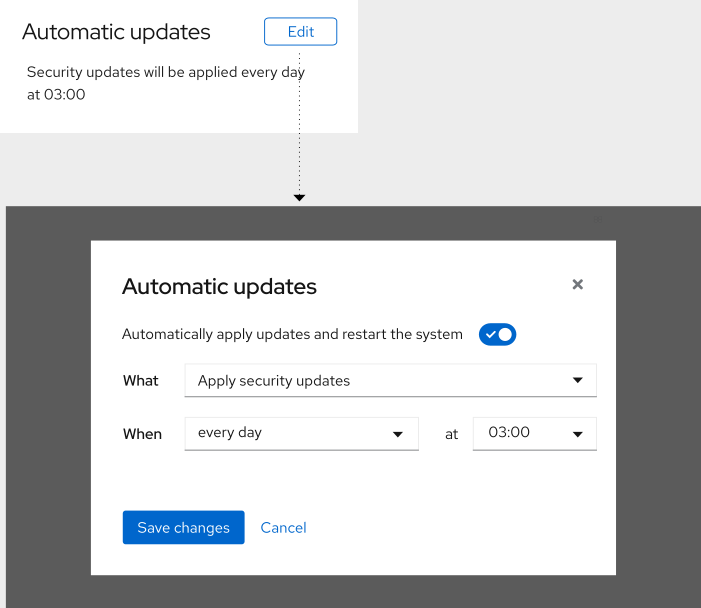
andreasn
on 2 Nov 2020
The first version that I sketched out had more of an explanation on the mechanics of it. That it would apply the updates and reboot, etc. That breaks the repetition at least. I'll give it a try and see how that looks.
I guess something to the effect of:
"Automatically apply updates on a schedule and reboot if necessary"
Of course, the later half of figuring out when to reboot would require @skobyda's tracer integration. This is something we should do (eventually).
I think right now we check if there are updates, apply them, and reboot (regardless of if it is 100% needed). If there aren't updates, skip and wait until the next scheduled window.
garrett
on 3 Nov 2020
And all it does is to call dnf-automatic, so all the logic lives there.
https://dnf.readthedocs.io/en/latest/automatic.html
I don't think that has any tracer integration (yet), but would need to happen at that layer in that case.
andreasn
on 3 Nov 2020
Fixed the string suggestion, as @garrett suggested above.
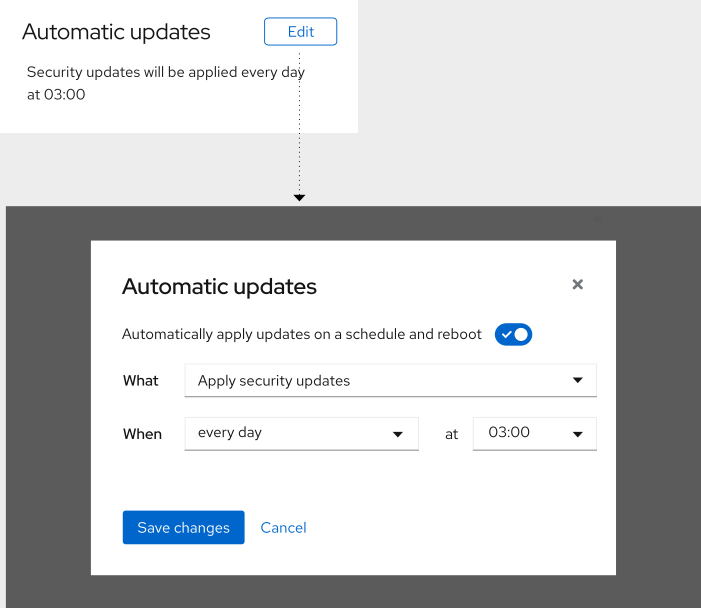
andreasn
on 3 Nov 2020
As there are only 3 items and some of the widgets don't apply when there are no updates... what if we use a group of radio buttons like this?
Default state (no updates scheduled)
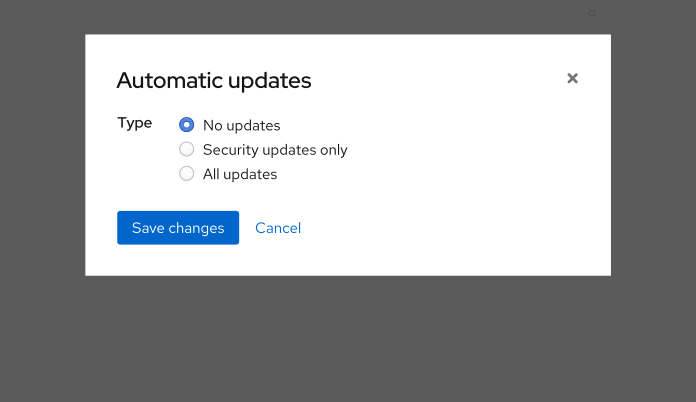
Security (and all)

...and the all updates would look like security, except with a different radio button selected.
garrett
on 3 Nov 2020
Related issues
 tmjpugh
·
8Comments
tmjpugh
·
8Comments
 MauriceNorden
·
3Comments
MauriceNorden
·
3Comments
 daniel-wtd
·
8Comments
daniel-wtd
·
8Comments
 kxxoling
·
5Comments
kxxoling
·
5Comments
 jacksnodgrass
·
6Comments
jacksnodgrass
·
6Comments