Cncjs: Command line and config option for controller == Marlin is not working
The command line: cnc --controller Marlin seems not to work.
As far as I can see that, the Marlin controller is missing here:
https://github.com/cncjs/cncjs/blob/c620aa499e681b3701d4c2f2040d5a5b88f857c7/src/app/services/cncengine/CNCEngine.js#L39
 tbnobody
All 10 comments
@Hoangthoi please create a new issue for new & unrelated issues....
Please also see the Raspberry Pi Install Guide in the Wiki, or download the Raspberry Pi Image (beta)
 AustinSaintAubin
on 20 Jul 2018
AustinSaintAubin
on 20 Jul 2018
@Hoangthoi Run node -v to show your node.js version.
 cheton
on 21 Jul 2018
cheton
on 21 Jul 2018
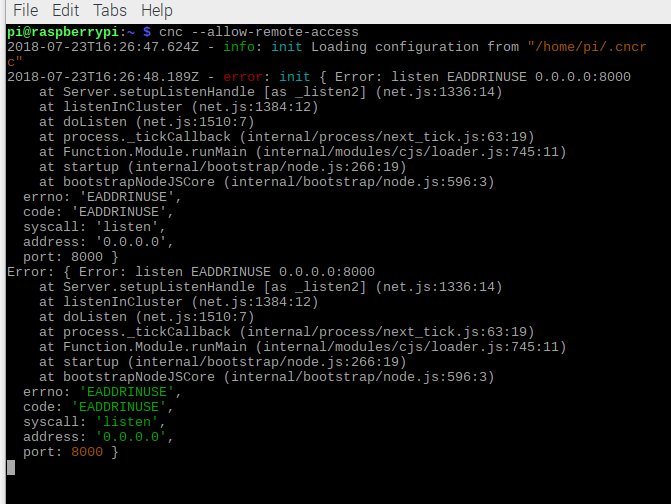
tôi muốn kết nối từ xa, nhưng khi tôi cài đặt thì nó bị lỗi. tôi rất tệ về khoảng cài đặt này.
 Hoangthoi
on 23 Jul 2018
Hoangthoi
on 23 Jul 2018
This error results when you try to start cncjs but it is already running. If cncjs is autostarted, perhaps by using pm2, then if you start it later from the command line, you will get this error.
 MitchBradley
on 23 Jul 2018
MitchBradley
on 23 Jul 2018
@Hoangthoi
If you didn't start CNCjs server with pm2, you can kill all running Node.js processes using killall -9 node.
cheton
on 23 Jul 2018
Thanks for the help me. now i have to reinstall cncjs correct?
Hoangthoi
on 23 Jul 2018
There should be no need to reinstall cncjs. If you wish to apply the "allow-remote-access" capability to the cncjs that is started automatically, you can add a line to the file ".cncrc" in the home directory. The line should be added after the initial line that contains "{", as follows:
{
    "allowRemoteAccess": true,
Then, when you reboot your raspberry pi, the autostarted cncjs process will allow remote access.
MitchBradley
on 23 Jul 2018
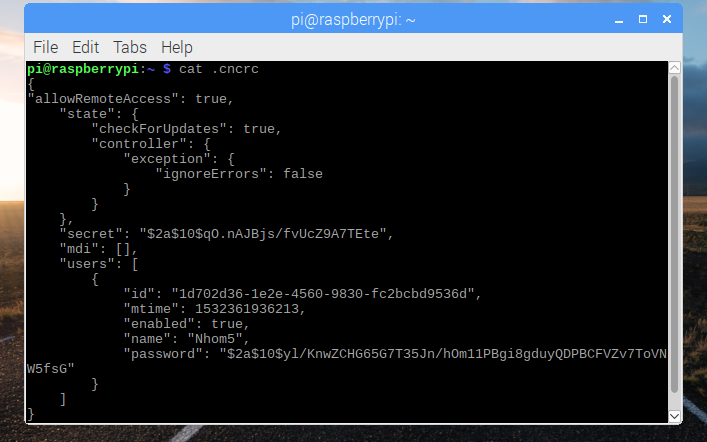
I tried, but it still can not access.
Hoangthoi
on 23 Jul 2018
@Hoangthoi The "allowRemoteAccess" option is only necessary when you want to connect to the CNCjs server from a public network. If you're using a private network, just connect to the IP address of your Raspberry Pi.
Private Network
- 10.0.0.0/8 IP addresses: 10.0.0.0 -- 10.255.255.255
- 172.16.0.0/12 IP addresses: 172.16.0.0 -- 172.31.255.255
- 192.168.0.0/16 IP addresses: 192.168.0.0 – 192.168.255.255
You can get the IP address from ifconfig, enter the following:
ifconfig
Fixed in 1.9.16
cheton
on 7 Mar 2019
Related issues
 daniel-ex
·
7Comments
daniel-ex
·
7Comments
 hublerdesignworks
·
5Comments
hublerdesignworks
·
5Comments
 madmod
·
6Comments
madmod
·
6Comments
 itman496
·
3Comments
itman496
·
3Comments
 slimline33
·
3Comments
slimline33
·
3Comments