Cncjs: Mjpg-streamer works only from the browser
Description
Hi,
Im trying to get the camera working. Im new to cncjs. If I type raspberrypi:8000 in the browser it works, but it doesnt work with the widget. The link in the widget is the same.
Cheers
Daniel
Versions
- CNCjs: 1.9.15
- Node.js: 6.x
- NPM: 5.x
How Do You Install CNCjs?
- [x] NPM
- [ ] Download the CNCjs Desktop Application
CNC Controller
- [x] Grbl
- [ ] Smoothieware
- [ ] TinyG/g2core
Hardware
- [x] Raspberry Pi
- [ ] Desktop or Laptop
- [ ] Mobile Device
Operating System
- [x] Not Applicable
- [ ] Windows
- [ ] Mac
- [ ] Linux
 daniel-ex
All 7 comments
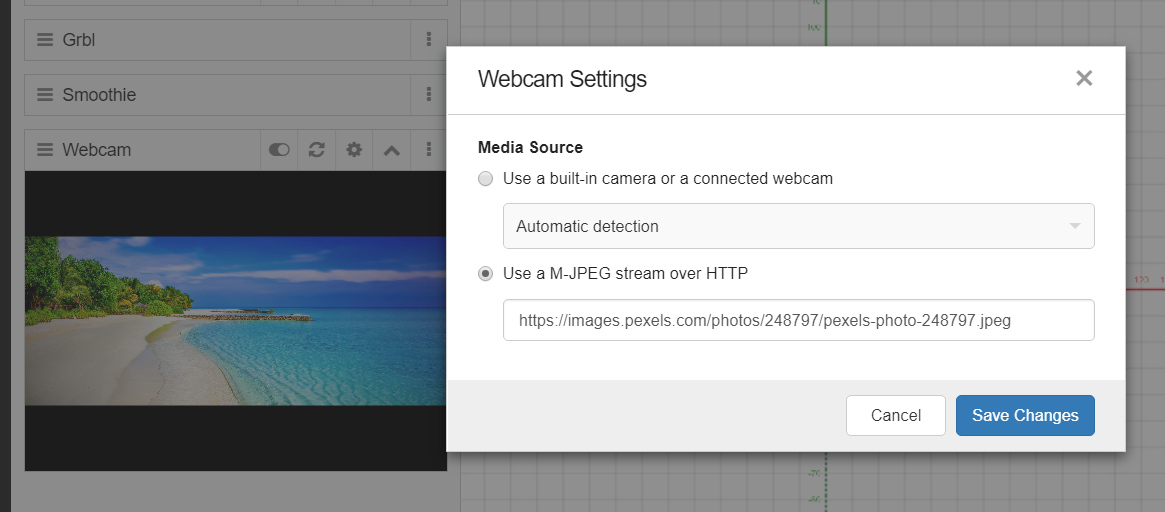
Did you specify the query parameter ?action=stream in the URL?
http://raspberrypi:8080/?action=stream
If it still doesn't work, what's the result if you paste an image url? Can you see the image on the UI?
For example: https://images.pexels.com/photos/248797/pexels-photo-248797.jpeg
 cheton
on 3 Oct 2018
cheton
on 3 Oct 2018
You can also check setup guides if you encountered problems when setting up MJPEG streamer on a Raspberry Pi.
Setup Guide: Raspberry Pi | MJPEG Streamer Install & Setup & FFMpeg Recording
https://github.com/cncjs/cncjs/wiki/Setup-Guide:-Raspberry-Pi-%7C-MJPEG-Streamer-Install-&-Setup-&-FFMpeg-Recording
Secure Webcam streaming with MJPG-Streamer on a Raspberry Pi
cheton
on 3 Oct 2018
Thank you for your help. Its really embarrassing, but I just saw that link in the widget and thought its a default address. But then I saw the picture here and realized its just an example. I remamber I tried to edit it before on the touch screen and couldnt -it was in grey... oh well, that touch screen isnt very responsive. Anyway, Ive typed the link and it works perfectly! Thank you again.
Im not sure if Im allowed to ask here... is it better to use usb or xbee? I had some noise issues but solved 95%. I wonder if xbee willwork better.
Thanx everyone!
daniel-ex
on 3 Oct 2018
@daniel-ex
I may not be the right person to answer your hardware question regarding noise reduction. Did you use the GPIO pins on a Raspberry Pi to connect to Arduino?
cheton
on 4 Oct 2018
Not yet, I had noise issues before when I used laptop+grbl. I'd love to use gpio pins, but Im not sure if my controller (Xpro) will allow me. There is a converter serial to usb on the board or Xbee/BT.
I just looked at the schematic and it should be simple to use a serial connection. Ill test it later this evening
daniel-ex
on 4 Oct 2018
Solving noise problems can be tricky. There is no way to say, without direct measurement of the system and its environment, whether USB would be better or worse than Xbee or GPIO or anything.
The last time I had a "noise" problem it turned out to be a capacitor that had gone bad. It was leaking current and creating a partial short circuit. Bad connections, inadequate grounding, bad cable routing, faulty components, presence of some kinds of equipment. all can cause noise problems.
Years ago the computer lab where I was a grad student received a new PDP-11 computer. It crashed seemingly-randomly every day. The factory repairman came every week and eventually replaced pretty much every component. Still it crashed. We finally noticed that the crashes tended to happen about the same time of day and started looking for things that happened then. The lab was in a building that housed some heavy engineering fabrication groups, including a glass-blowing facility. When the glass blowers went to lunch, they turned off their electric furnaces, which caused a power surge that affected the entire building.
That is the second most interesting noise problem I have ever experienced or diagnosed.
 MitchBradley
on 4 Oct 2018
MitchBradley
on 4 Oct 2018
Inadequate grounding is a very common problem.
 AustinSaintAubin
on 6 Oct 2018
AustinSaintAubin
on 6 Oct 2018
Related issues
 LukeBonathan
·
3Comments
LukeBonathan
·
3Comments
 f0m3
·
6Comments
f0m3
·
6Comments
 TobyGWilliams
·
8Comments
TobyGWilliams
·
8Comments
 JonathanGoldnauVogt
·
7Comments
JonathanGoldnauVogt
·
7Comments
 slimline33
·
3Comments
slimline33
·
3Comments