Description
To begin, my name is Isaac, and I am the Lead Engineer at Gorilla Machines INC. We are a company that designs and manufactures CNC Plasma cutting machines, and are in the middle stages of development of our own custom CNC control boards for use in our machines. The company consists of me, Isaac, and my business partner Chris who combined with sub contractors are working hard to grow our company as well as work with other organisations to progress the cnc community. We have been working to migrate from older electronics and control interfaces to CNCjs and a smoothie-based modular PCB with all sorts of features, designed completely around Modularity of all of it's components and the ability to control a large array of different machines. The reason we are doing this as a company is that we are not stopping at building CNC Plasma's, we look forward to building 3D Printers, Laser engravers, mills, and machines that do a mixture of all of those. We need one control interface that covers all of those axis, but we certainly don't want to keep any of this a closed project, we would love to share our boards with the DIY cnc community!
So here is our idea-
CNCjs is an amazing software already, and it's on it's way to becoming be a very encompassing CNC control software for all machine types. Paired with the correct control board it has the ability to offer someone building a machine a single package- A great cnc control software combined with a control board, both so modular that together they can be used to control any machine whether it's a DIY CNC mill, 3D Printer, Laser engraver, or CNC Plasma cutter. As someone who as purchased and tested nearly every cnc control system on the market I know that there is no board that fits perfectly any software, and there is no software that fits perfectly any board for any type of machine. The idea I had in mind was developing my CNC control board around CNCjs' control interface, making the two the optimal choice for anyone developing their own machines. With the use of auto recognition of the peripherals connected to the control board and the relaying of that information to cncjs it would be very possible to load or enable a preset array of widgets depending on how you laid out your control board. This opens the door for nearly any project to come to life without complicated coding for the user or even changing machine settings and configuring a GUI, it would be just a matter of connecting your machine to the board. The board determines what type of machine it is depending on how it was connected, relays that information to cncjs, cncjs recognises the board type and loads the gui to match.
So what do you think? Any ideas? There is a good amount of work left to be done before this would ever be a reality, but I think that this could be really the future of DIY CNC. Also this could definitely boost both the popularity of CNCjs as well as our control boards, while at the same time benefiting the community. Also if we were to work together to make this a reality we could certainly arrange a method of splitting the profits of the control boards to help with paying those who develop the great software that is CNCjs. Thanks for reading and let's throw out some ideas!
Versions
- CNCjs: 1.9.x
- Node.js: 6.x
- NPM: 5.x
How Do You Install CNCjs?
- [x] NPM
- [x] Download the CNCjs Desktop Application
This depends on whether I am installing the software on my machine for development, or the computers that ship with our machines.
CNC Controller
- [ ] Grbl
- [x] Smoothieware
- [ ] TinyG/g2core
Hardware
- [ ] Raspberry Pi
- [X] Desktop or Laptop
- [ ] Mobile Device
Operating System
- [x] Not Applicable
- [ ] Windows
- [ ] Mac
- [ ] Linux
 GorillaMachines
All 8 comments
@GorillaMachines
Thank you for your valuable suggestions. As far as I know, the laserweb project has implemented some machine profiles to preset several hardware configurations, this might be similiar to your idea: https://github.com/LaserWeb/lw.machines/tree/master/machines
I will plan to add machine profiles support in the v2 backlog. It will allow user to configure machine settings, preset Web UI configuration, and offers a solution for white branding purpose.
Before getting started, I would like to collect your feedbacks, for example, which type of settings you would like to configure within the profile besides the preset array of widgets?
Free discussions on this topic.
 cheton
on 31 Oct 2017
cheton
on 31 Oct 2017
The basics of my control boards are as follows- There is one central Control Board that houses the ARM based microcontroller running Smoothieware, this board is fitted with ribbon cable connectors that connect the Control Board to the Machine Board that the user has picked for their project. I will be developing an array of unique machine boards that are designed to have the proper hardware, such as number of stepper drivers, inputs and outputs, mosfets, relays, and more, that fits that type of machine. There will be a board for 3D Printers, CNC Mills, CNC Plasma Cutters, CNC Laser Engravers, and another board which has a ridiculous amount of io, around 10 stepper drivers, and a large array of other components which I will call the "Custom Board". With these boards paired with the central "Control Board" you could feasibly make any kind of machine, and that is exactly the goal.
I battled back and forth whether or not having automatic board type recognition in CNCjs would be helpful, and came to the conclusion that yes it would be nice, but I believe that a simple drop down menu in cncjs' settings page that allowed you to select the type of machine you were connected to would be good enough. Depending on your selection a unique array of widgets would be displayed matching the type of machine attached.
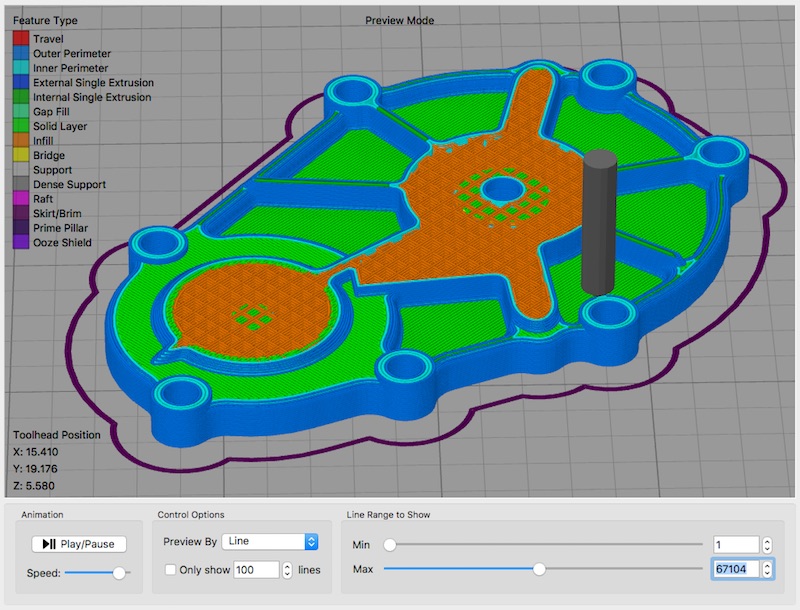
I also wanted to see if you ever plan on making different options for the Visualizer widget. What i had in mind was this- In laser engraving, plasma and cnc milling your visualizer widget is perfect for viewing gcode, but for running something like a 3D printer off of your software the gcode visualizer would be odd. It would display it, but the toolpaths would look as they do now, and not solid as they would in other 3D Printer softwares. I believe all you would have to do would be to make the line thickness of the visualizer widget the same as the extrusion width of the printer's nozzle to make the displayed gcode look like a 3d model. Please let me know how difficult this would be, as I'm not familiar enough with your visualizer to know. This would be extremely helpful in conjunction with my boards, because this would allow literally any machine someone builds based off of my boards to function in your software. Also opening the door to 3D Printing brings a huge crowd of people who would be interested in CNCjs.
Here is a screenshot of Simplify 3D, I believe that their Gcode visualizer is the best out there for 3D Printing. They also have assigned colors to the feedrate of the command, this allows even greater detail for visualisation. If this were to be implemented it could be much simpler than this, really just increasing the visualizer line thickness may do the trick. Thanks so much for your responses and I hope to hear from you soon!
GorillaMachines
on 31 Oct 2017
I also wanted to ask how the visualizer widget loads the grid? Is this a .png or something similar that is loaded? Or a 3D Model? If so would it be possible to load custom ones that matched the machine. For example, If someone built a CNC plasma cutter with our boards, could we make it where it would load a photo rendering of the bed of the plasma cutter? This would make material placement and gcode loading really intuitive.
Please correct me if this isn't possible, just a neat idea.
GorillaMachines
on 31 Oct 2017
I also wanted to ask how the visualizer widget loads the grid? Is this a .png or something similar that is loaded? Or a 3D Model? If so would it be possible to load custom ones that matched the machine. For example, If someone built a CNC plasma cutter with our boards, could we make it where it would load a photo rendering of the bed of the plasma cutter? This would make material placement and gcode loading really intuitive.
The grid system can be dynamically rendered, although the default values are currently hard-coded in the source code:
https://github.com/cncjs/cncjs/blob/master/src/web/widgets/Visualizer/Visualizer.jsx#L32-L50
const IMPERIAL_GRID_COUNT = 32; // 32 in
const IMPERIAL_GRID_SPACING = 25.4; // 1 in
const IMPERIAL_AXIS_LENGTH = IMPERIAL_GRID_SPACING * 12; // 12 in
const METRIC_GRID_COUNT = 60; // 60 cm
const METRIC_GRID_SPACING = 10; // 10 mm
const METRIC_AXIS_LENGTH = METRIC_GRID_SPACING * 30; // 300 mm
const CAMERA_VIEWPORT_WIDTH = 300; // 300 mm
const CAMERA_VIEWPORT_HEIGHT = 300; // 300 mm
const PERSPECTIVE_FOV = 70;
const PERSPECTIVE_NEAR = 0.001;
const PERSPECTIVE_FAR = 2000;
const ORTHOGRAPHIC_FOV = 35;
const ORTHOGRAPHIC_NEAR = 0.001;
const ORTHOGRAPHIC_FAR = 2000;
const CAMERA_POSITION_X = 0;
const CAMERA_POSITION_Y = 0;
const CAMERA_POSITION_Z = 200; // Move the camera out a bit from the origin (0, 0, 0)
const TRACKBALL_CONTROLS_MIN_DISTANCE = 1;
const TRACKBALL_CONTROLS_MAX_DISTANCE = 2000;
It's also doable to set up image background in the 3D visualizer. With the v2 release, I can make them configurable through the machine profile.
cheton
on 1 Nov 2017
That would be fantastic! What is your estimated ETA on the version 2 release? I have most likely around a month of work left before my boards design is solidified, but just curious. Thanks for the quick responses.
GorillaMachines
on 1 Nov 2017
Hi @whimsycwd
I would like to add machine profile support in v2 (edge branch) that allows user to customize functionalities through a machine profile. Do you have a checklist for what features should be hidden or customized for Marlin controller?
cheton
on 6 Nov 2017
@Cheton i will put together a list of functionalities and features that should be displayed or hidden for the smootheware controller for each of the machines that the multiboard will support. I will share the document on my multiboard GitHub page and share a link here.
GorillaMachines
on 6 Nov 2017
Hi @cheton
First of all, I have very limited experience with Grbl & other Firmware. And know a limit subset of Marlin. A few months ago I am working on microservice & Docker etc. barely know firmware, electronic and hardware. This is my background. ^ ^. But I do hope I can help here.
What I know are:
- Marlin & Grbl's has similar instruction set. But different.
?that Grbl used to report current position in real-time is not available in Marlin.- Marlin doesn't have active state (Idle, Run, Hold, Alarm) which I can find proper mapping to those button in CNCjs.
- The shuttle widget, I can't find the mapping gcode. (Not sure, we just did't use it)
- Marlin was mainly used for 3D Printer. Other firmware is designed for CNC.
- They are similar in many ways, they all control 3-axis movement.
- But there are different design decisions made for different purposes, Like the
$report current position in real-time. This feature might be more important for CNC machine than 3D Printer.I am not expert on hardware, But I guess marlin didn't support this for a good reason. Maybe it doesn't need the MCU that powerful?(Just guessing).
- About Visualizer
- Threejs is versatile, It can easily load the image.
- One trick you need to notice is that drawing line with width is not that intuitive
- STL & obj loader for Threejs is hassle-free. They are ready to use inside Threejs.
- Mesh replacement for THREE.Line
- Drawing Lines is Hard
- Especially, if you want to make the render looks good. Looks like a 3D object, those lines not only need width, also need to cast the shadow. add light and Material etc.
- Might have to use geometry extrude
- It can have a serious performance issue with a complex model.
- I have read Cura source code about how they render different color for different part(inner-wall, outer-wall, support etc.) It's done in this way, The slicer(curaEngine) will create GCode that has comment telling indicate next coming gcode's meaning.
- auto-detect peripherals is a cool idea. @GorillaMachines
- Our company design a 3-in-1 3D Printer. Three swappable toolhead And we do customization base on CNCjs(Thanks to Cheton who has done amazing work !).
- We have done this in a ugly way. Firmware use temperature(resistor) to determine which toolhead is using. Then host software use this info to adjust widget.
- Not well-design at all. Deadline drives us crazy, haha. Need better and clean interface here. Maybe adding one new GCode? (Maybe exist already?)
Bests,
David
 whimsycwd
on 6 Nov 2017
whimsycwd
on 6 Nov 2017
Related issues
 hublerdesignworks
·
5Comments
hublerdesignworks
·
5Comments
 brychanrobot
·
7Comments
brychanrobot
·
7Comments
 AZRadiohead
·
5Comments
AZRadiohead
·
5Comments
 tbnobody
·
10Comments
tbnobody
·
10Comments
 Timberwolfe
·
10Comments
Timberwolfe
·
10Comments
Most helpful comment
The basics of my control boards are as follows- There is one central Control Board that houses the ARM based microcontroller running Smoothieware, this board is fitted with ribbon cable connectors that connect the Control Board to the Machine Board that the user has picked for their project. I will be developing an array of unique machine boards that are designed to have the proper hardware, such as number of stepper drivers, inputs and outputs, mosfets, relays, and more, that fits that type of machine. There will be a board for 3D Printers, CNC Mills, CNC Plasma Cutters, CNC Laser Engravers, and another board which has a ridiculous amount of io, around 10 stepper drivers, and a large array of other components which I will call the "Custom Board". With these boards paired with the central "Control Board" you could feasibly make any kind of machine, and that is exactly the goal.
I battled back and forth whether or not having automatic board type recognition in CNCjs would be helpful, and came to the conclusion that yes it would be nice, but I believe that a simple drop down menu in cncjs' settings page that allowed you to select the type of machine you were connected to would be good enough. Depending on your selection a unique array of widgets would be displayed matching the type of machine attached.
I also wanted to see if you ever plan on making different options for the Visualizer widget. What i had in mind was this- In laser engraving, plasma and cnc milling your visualizer widget is perfect for viewing gcode, but for running something like a 3D printer off of your software the gcode visualizer would be odd. It would display it, but the toolpaths would look as they do now, and not solid as they would in other 3D Printer softwares. I believe all you would have to do would be to make the line thickness of the visualizer widget the same as the extrusion width of the printer's nozzle to make the displayed gcode look like a 3d model. Please let me know how difficult this would be, as I'm not familiar enough with your visualizer to know. This would be extremely helpful in conjunction with my boards, because this would allow literally any machine someone builds based off of my boards to function in your software. Also opening the door to 3D Printing brings a huge crowd of people who would be interested in CNCjs.
Here is a screenshot of Simplify 3D, I believe that their Gcode visualizer is the best out there for 3D Printing. They also have assigned colors to the feedrate of the command, this allows even greater detail for visualisation. If this were to be implemented it could be much simpler than this, really just increasing the visualizer line thickness may do the trick. Thanks so much for your responses and I hope to hear from you soon!