Cms: Date fieldtype doesn't use the right format
Bug Description
This issue is for the second part of #1310
The date fieldtype uses a hardcoded format on the publish form (not the listings).
How to Reproduce
- Have a date field
- Set a custom format in
config/statamic/cp.phpdate_format(as that feels like the natural place to do it) - See the date field in the hardcoded format
Extra Detail
Since the Vue part of the date fieldtype needs a moment.js compatible date format (different from the PHP format the date_format config uses), we'll probably need _another_ config value, like date_format_js or something.
Unless there's some cool way to convert from PHP date to moment.js.
...As I'm writing this, I decided to Google if such a thing already exists. It might.
Environment
Statamic version: 3.0.44
 jasonvarga
All 4 comments
It's worth mentioning that the Date fieldtype actually formats the date automatically based on your locale. For example, if your locale is fi for Finland, you'll see today's date as 11.03.2021, sv for Swedish gets you 2021-03-11, and so on. I know this isn't rolled all the way across the CMS for any date you'd encounter (and I'm not convinced it should) so it's not something you'd be able to "set and forget", but if anyone is reading this and needs a solution, this could very much be one.
 jackmcdade
on 11 Mar 2021
jackmcdade
on 11 Mar 2021
Is this the locale set in /config/app.php? And what would be appropriate for the UK?
Both en_UK en_GB break the date field. I cannot find this in the docs (Statamic or Laravel).
Below is from a project where the date field displays 08/02/2012 (when it's not open showing the datepicker). In the UK, 08/02/2012 is read as 08 Feb 2012 but the CMS has this as 02 Aug 2012.
.

 wesort
on 11 Mar 2021
wesort
on 11 Mar 2021
Yeah, the date picker completely ignores both the app.locale and the statamic.cp.date_format config values when formatting the picked date.
It still "works". I mean you get the date "2nd August 2012" when ju select "2nd August 2012" in the mini calendar. But it's very annoying and confusing for us non-Americans to keep remembering to interpret "08/02/2012" in the date picker as 2 aug - and not 8 feb. Especially when the rest of the front end, like the entry listing uses the configured date format.
I vote for a statamic.cp.date_format_js config value (in Moment.js format) to be able to change the default US format used by the date picker.
 jonatanalvarsson
on 12 Mar 2021
jonatanalvarsson
on 12 Mar 2021
I've been trying to figure this out as well (also in UK).
Setting app.locale to en-GB fixes the date format in the CP:
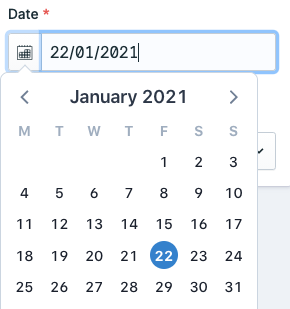
However it breaks other stuff. It looks like the CP does not like locales with a country part, as a lot of the text becomes placeholders:

I thought the CP might use the app.fallback_locale in this situation, but it doesn't.
I'm currently solving this by leaving app.locale as en, and then adding this to my cp.js:
Statamic.booting(() => {
    Statamic.$config.set('locale', 'en-GB');
});
That works, and the text is still right, but it's not ideal. I'd really prefer to set my application's locale the the full en-GB value, and it feels hacky overriding this just on the JS side.
I think it makes sense to use the locale for the date display format, and if the translation logic could use the fallback locale as well (or just the language part of app.locale) it would all work fine.
 jacksleight
on 18 Mar 2021
jacksleight
on 18 Mar 2021
Related issues
 AndreasSchantl
·
3Comments
AndreasSchantl
·
3Comments
 sandervanh
·
4Comments
sandervanh
·
4Comments
 sauerbraten
·
3Comments
sauerbraten
·
3Comments
 riasvdv
·
4Comments
riasvdv
·
4Comments
 skoontastic
·
4Comments
skoontastic
·
4Comments
Most helpful comment
Is this the
localeset in/config/app.php? And what would be appropriate for the UK?Both
en_UKen_GBbreak the date field. I cannot find this in the docs (Statamic or Laravel).Below is from a project where the date field displays
08/02/2012(when it's not open showing the datepicker). In the UK,08/02/2012is read as08 Feb 2012but the CMS has this as02 Aug 2012..