Cms: Ranged date field ranged saves dates minus one
Bug Description
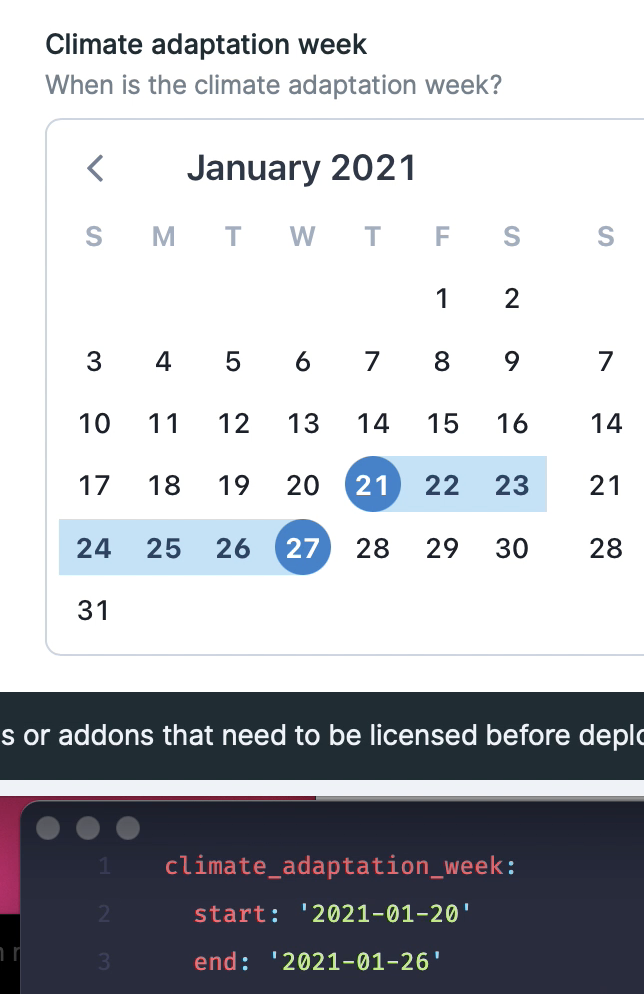
The date field (ranged in this case) always saves the dates a day before.
How to Reproduce
field:
          mode: range
          time_enabled: false
          time_required: false
          earliest_date: '2020-01-01'
          full_width: true
          inline: true
          columns: 1
          rows: 1
          type: date
          listable: hidden
          instructions: 'When is the climate adaptation week?'
          display: 'Climate adaptation week'
Extra Detail
Environment
Statamic 3.0.2 Pro
Laravel 7.26.1
PHP 7.4.6
No addons installed
Install method (choose one):
- Starter Kit Peak
 robdekort
All 25 comments
Update: tested with the non ranged datepicker. That one works fine. It's the ranged picker that's unusable atm.
robdekort
on 10 Sep 2020
+1 confirmed
 mnlmaier
on 14 Sep 2020
mnlmaier
on 14 Sep 2020
Here's a little demo package. Go to the globals -> configuration, save a ranged date and refresh the page.
robdekort
on 15 Sep 2020
Odd. Seems fine to me, even in the site you zipped up. Tried multiple browsers.
 jasonvarga
on 30 Sep 2020
jasonvarga
on 30 Sep 2020
Really odd. Maybe it’s fixed in the latest releases. Will check later tonight and report back Sir.
robdekort
on 30 Sep 2020
Still here. Just like in #2565 I can give you access to the same repo with this issue.
robdekort
on 30 Sep 2020
Just added you to https://github.com/studio1902/klimaatadaptatiegroningen. Let me know if that doesn't work for you. The ranged picker with this issue is on Globals > Configuration.
I'm now thinking: since you couldn't replicate this in my previous zip you probably also can't on this repo. Could this be a local/timezone thing?
Last but not least. A little gif to prove I'm not talking nonsense here:

robdekort
on 30 Sep 2020
the off by one is definitely a timezone issue. Solved this in a (non-Statamic) project. Likely the front end is not setting to the server's timezone.
I can find the check in my project that fixed this if needed
 edalzell
on 1 Oct 2020
edalzell
on 1 Oct 2020
Is the value getting saved to the md file wrong too?
jasonvarga
on 1 Oct 2020
Yes
robdekort
on 1 Oct 2020
same for me. looks fine after saving, but when you reload, you see the date - 1

 goellner
on 18 Nov 2020
goellner
on 18 Nov 2020
I have the same problem, any ideas on how to give you more info in order to solve this?
 afonic
on 5 Dec 2020
afonic
on 5 Dec 2020
If this doesn’t work for you, what time zone are you in and what tz is your site set to?
edalzell
on 5 Dec 2020
I'm in Europe/Athens, so it date.timezone in PHP. My site is set to UTC.
Why would the timezone affect this?
afonic
on 5 Dec 2020
@afonic @goellner @robdekort what time(s) of day have you tried this? I cannot reproduce it either. I'll try early in the morning to see if that matters for me.
edalzell
on 22 Dec 2020
I don't know what times I tried this four months ago 😂 but I know it never worked for me. Have you tried switching time zones? Anything I can test here. Or at a certain time?
robdekort
on 22 Dec 2020
@edalzell any time or date does not make a difference.
It seems the problem is in the Javascript side.
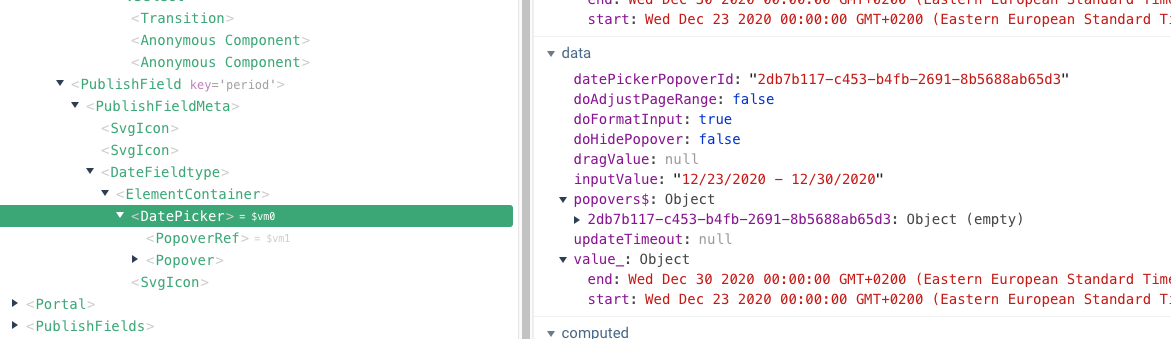
The datepicker sets the values correctly:
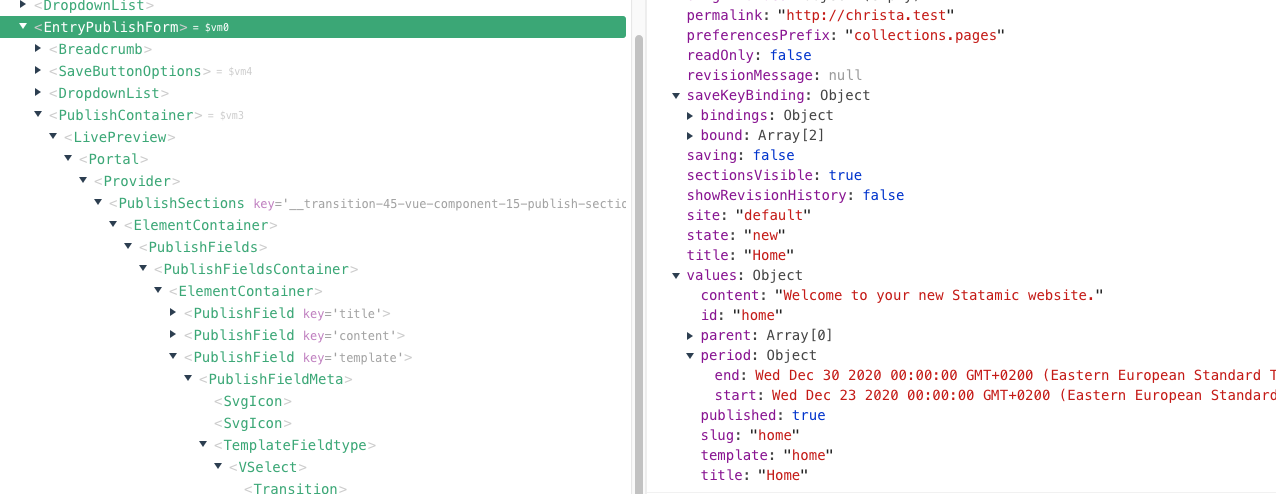
Even EntryPublishFrom seems the have the current value:
But when I save, the PATCH payload is wrong:
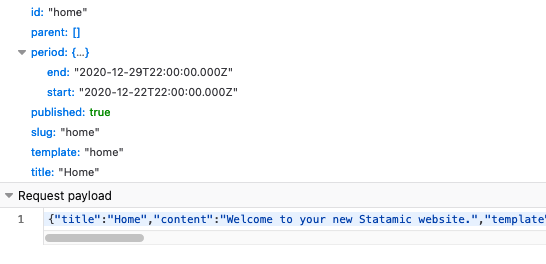
It seems to move the correct date and time 00:00 back to the day before at 22:00.
This could be consistent with my local timezone of GMT+3 messing it up somehow, but I have no idea why.
I will investigate further, however I have no idea how Statamic works in the Vue side, so you might be help work this out sooner. Thanks!
afonic
on 22 Dec 2020
May be relevant: https://github.com/axios/axios/issues/2284
afonic
on 22 Dec 2020
Nice find, there’s the bug. It’s set to midnight your time which is the day before in UTC.
edalzell
on 22 Dec 2020
@afonic found the answer here. Can this be looked into?
robdekort
on 15 Jan 2021
Solution will be something like this: https://github.com/nathanreyes/v-calendar/issues/286#issuecomment-649892512
edalzell
on 17 Jan 2021
I couldn't quite get this code working but something like this will be the solution in DateFieldtype's handleUpdate:
            let date = null;
            if (this.config.mode === "single") {
                date = Vue.moment(this.dateTime).format(this.format);
            } else {
                let tempDate = Object.assign({}, this.date);
                date = {
                    start: Vue.moment(tempDate.start).tz('UTC', true).toDate(),
                    end: Vue.moment(tempDate.end).tz('UTC', true).toDate()
                };
            }
FYI, this caused an infinite loop for some reason. Note you'll also need to install Moment Timezone to get it to work.
Code diff here: https://github.com/edalzell/cms/pull/530
Note: to test this, you need to set your machine to UTC+1, as this bug doesn't exist on < UTC.
edalzell
on 17 Jan 2021
Unrelated to this minus-one issue, but related to ranged dates...
Were any of you actually using the ranged date in your templates? What did your templates look like?
jasonvarga
on 9 Feb 2021
Yep, like this:
{{ configuration:climate_adaptation_week }}
    {{ start format_localized="%a %e %B" }} - {{ end format_localized="%a %e %B" }} {{ start format_localized="%Y" }}
{{ /configuration:climate_adaptation_week }}
I use it heavily in two projects but access it mainly through the Content API.
afonic
on 10 Feb 2021
Related issues
 aerni
·
3Comments
aerni
·
3Comments
 austenc
·
3Comments
austenc
·
3Comments
 wm-simon
·
3Comments
wm-simon
·
3Comments
 riasvdv
·
4Comments
riasvdv
·
4Comments
 jelleroorda
·
3Comments
jelleroorda
·
3Comments